1. Киришүү
This manual provides instructions for the assembly, operation, and maintenance of your FLEXISPOT 36-inch Standing Desk Converter, Model MT137. This height-adjustable workstation is designed to facilitate seamless transitions between sitting and standing positions, promoting a more dynamic and ergonomic work environment. It accommodates dual monitors and laptops, featuring a wide keyboard tray for enhanced comfort and productivity.
2. Коопсуздук маалыматы
Маанилүү коопсуздук көрсөтмөлөрү:
- Always secure the desk converter to your existing desk to prevent tipping.
- Read and follow all assembly instructions carefully to ensure safe and proper use.
- Do not place your hands near the strut during adjustments. The angle of the strut joints will change during the adjustment of the desktop height and may cause injury.
- Ensure the desk converter is placed on a stable, level surface.
- Do not overload the desk converter. Refer to the specifications section for maximum weight capacities.
- Keep children and pets away from the desk converter during operation.
3. Орнотуу
The FLEXISPOT Standing Desk Converter is designed for quick and straightforward assembly. Most of the unit comes pre-assembled.
3.1 Пакеттин мазмуну
Монтаждоону баштоодон мурун бардык компоненттердин бар экендигин текшериңиз:
- Main Desk Converter Unit
- Баскычтоп лоток
- Mounting Hardware for Keyboard Tray
- Instruction Manual
3.2 Чогултуу кадамдары
- Агрегатты таңгактан чыгаруу: Carefully remove all components from the packaging. Place the main desk converter unit on your existing desk in the desired position.
- Баскычтоп салгычын тиркөө: Align the keyboard tray with the designated attachment points on the main unit. Secure the tray using the provided mounting hardware (screws, brackets). Ensure it is firmly attached.
- Кабелдик башкаруу: Utilize the integrated cable management clips (if included) to organize any power or display cables, preventing clutter and ensuring smooth operation during height adjustments.
- Place Devices: Position your monitor(s) or laptop on the upper desktop surface. Place your keyboard and mouse on the attached keyboard tray.

Figure 1: Fully assembled FLEXISPOT Standing Desk Converter with dual monitors and a laptop.

Figure 2: Illustration of attaching the keyboard tray to the main unit.
3.3 Жыйноо видеосу
Видео 1: Бүттүview of the FLEXISPOT 36 inch Standing Desk Converter, demonstrating its features and assembly process.
4. Иштөө нускамалары
The FLEXISPOT Standing Desk Converter features a gas spring system for smooth and effortless height adjustments.
4.1 Бийиктикти тууралоо
- Көтөрүү: Locate the adjustment lever, typically on the side of the upper desktop. Squeeze the lever and gently lift the desktop to your desired standing height. Release the lever to lock the desk in place.
- Төмөндөтүү үчүн: Squeeze the adjustment lever and apply gentle downward pressure on the desktop. Guide the desktop down to your preferred sitting height. Release the lever to lock the desk in place.
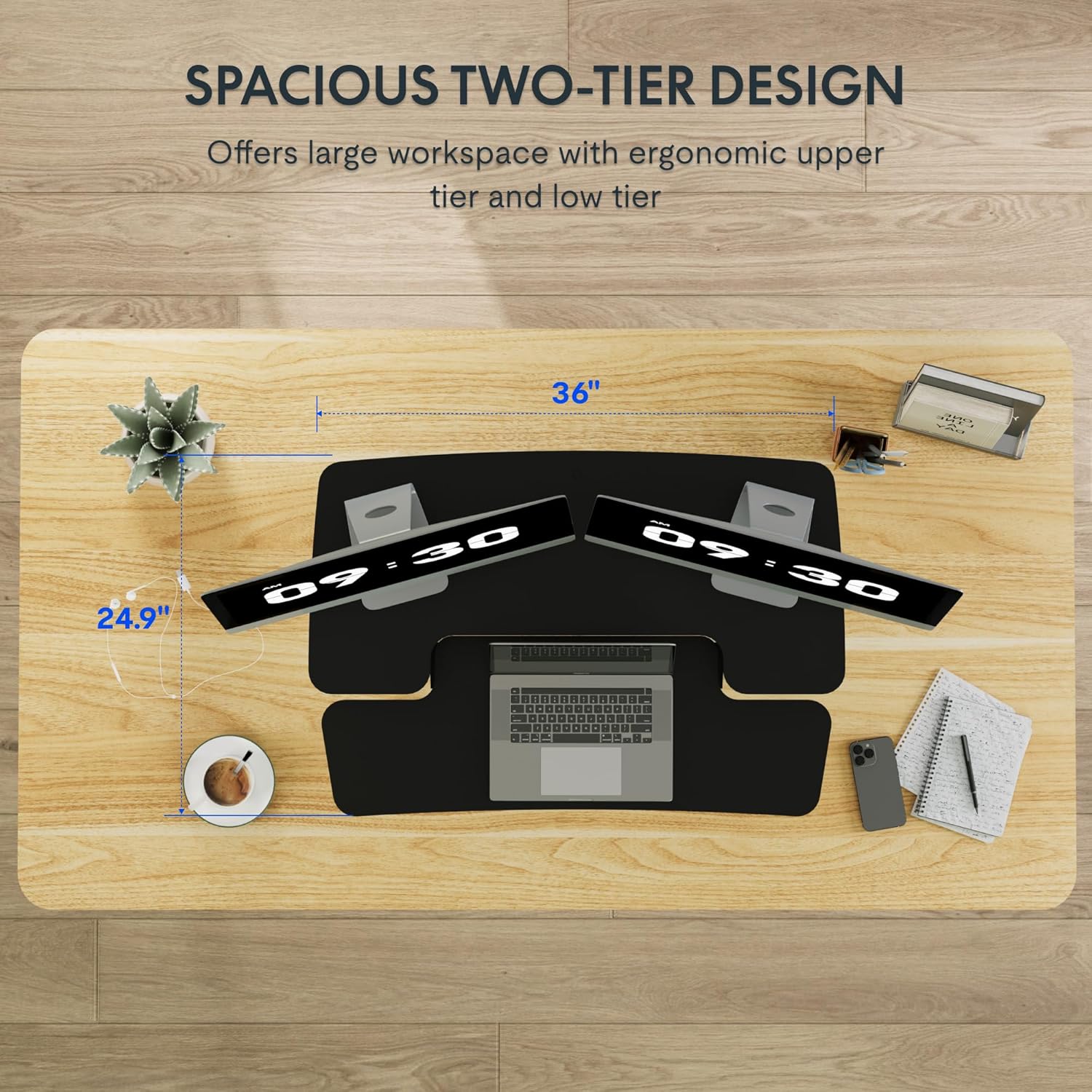
Figure 3: Close-up of the height adjustment lever and gas spring mechanism.

Figure 4: Visual representation of the desk converter's adjustable height range (4.7 to 16.6 inches).
4.2 Dual-Tier Design
The converter features a two-tier design:
- Жогорку иш тактасы: Designed to hold monitors or a laptop, keeping your screen at an ergonomic eye level.
- Lower Keyboard Tray: Provides space for your keyboard and mouse, allowing your wrists to remain in a neutral position. The U-shaped design of the upper deck also allows for a laptop to be placed directly on the keyboard tray if preferred.

Figure 5: The dual-tier design providing ample space for monitors, laptop, keyboard, and mouse.
5. Техникалык тейлөө
To ensure the longevity and optimal performance of your FLEXISPOT Standing Desk Converter, follow these maintenance guidelines:
- Тазалоо: Беттерди жумшак менен сүртүңүз, гamp кездеме. Финишке зыян келтирүүчү абразивдүү тазалагычтардан же эриткичтерден качыңыз.
- Текшерүү: Бардык бурамаларды жана туташтыргычтарды бекем бекитилгенин мезгил-мезгили менен текшерип туруңуз. Зарыл болсо, кайра бекитиңиз.
- Кыймыл: Ensure the gas spring mechanism operates smoothly. If you notice any stiffness or unusual sounds, contact customer support. Do not attempt to lubricate or repair the gas spring yourself.
- Салмагын бөлүштүрүү: Always distribute weight evenly across the desktop and keyboard tray to prevent strain on the mechanism.
6. Кыйынчылыктарды
If you encounter any issues with your desk converter, refer to the following common problems and solutions:
| Көйгөй | Мүмкүн себеп | Чечим |
|---|---|---|
| Desk does not adjust smoothly. | Uneven weight distribution or mechanism obstruction. | Redistribute items evenly. Check for any obstructions around the X-frame. |
| Стол титиреп жаткандай сезилет. | Бош байланыштар же тегиз эмес бет. | Ensure all screws are tightened. Place the converter on a flat, stable desk. |
| Keyboard tray is not secure. | Improper attachment during assembly. | Re-check the keyboard tray mounting hardware and ensure it is correctly installed and tightened. |
If the problem persists, please contact FLEXISPOT customer support for further assistance.
7. Техникалык шарттар

Figure 6: Detailed dimensions and weight capacities of the FLEXISPOT Standing Desk Converter.
| Өзгөчөлүк | Деталь |
|---|---|
| Бренд | FLEXISPOT |
| Модель номери | MT137 (MB) |
| Продукциянын өлчөмдөрү (D x W x Y) | 24"D x 35"W x 19.7"H |
| Түс | Кара |
| Стиль | Заманбап |
| Негизги материал | Металл |
| Жогорку Материал түрү | Жыгач |
| Элемент Салмагы | 25.5 фунт |
| Минималдуу бийиктик | 4.7 дюйм |
| Максималдуу бийиктик | 19.6 дюйм |
| Upper Desktop Load Capacity | 33 фунтка чейин |
| Баскычтоп лоток жүктөө сыйымдуулугу | 6.6 фунтка чейин |
| Өзгөчөлүктөр | Adjustable Height, Ergonomic, Keyboard Tray Included |
8. Кепилдик жана колдоо
8.1 Кепилдик маалыматы
This FLEXISPOT product comes with a Full Warranty. For specific details regarding the warranty period and coverage, please refer to the warranty card included with your product or visit the official FLEXISPOT webсайт.
8.2 Кардарларды колдоо
For technical assistance, troubleshooting, or inquiries regarding your product, please contact FLEXISPOT customer support. Contact information can be found on the official FLEXISPOT webсайтында же продуктунун таңгагында.
Онлайн ресурстар:
- расмий сапар FLEXISPOT дүкөнү продукт маалымат жана колдоо үчүн.


