1. Киришүү
This manual provides comprehensive instructions for the installation, operation, and maintenance of your Volteck CTV-30W WiFi Robotic Camera. This 3 MP camera offers advanced surveillance features, including motion detection, two-way audio, and remote control via a mobile application. Please read this manual carefully before using the product to ensure proper functionality and safety.
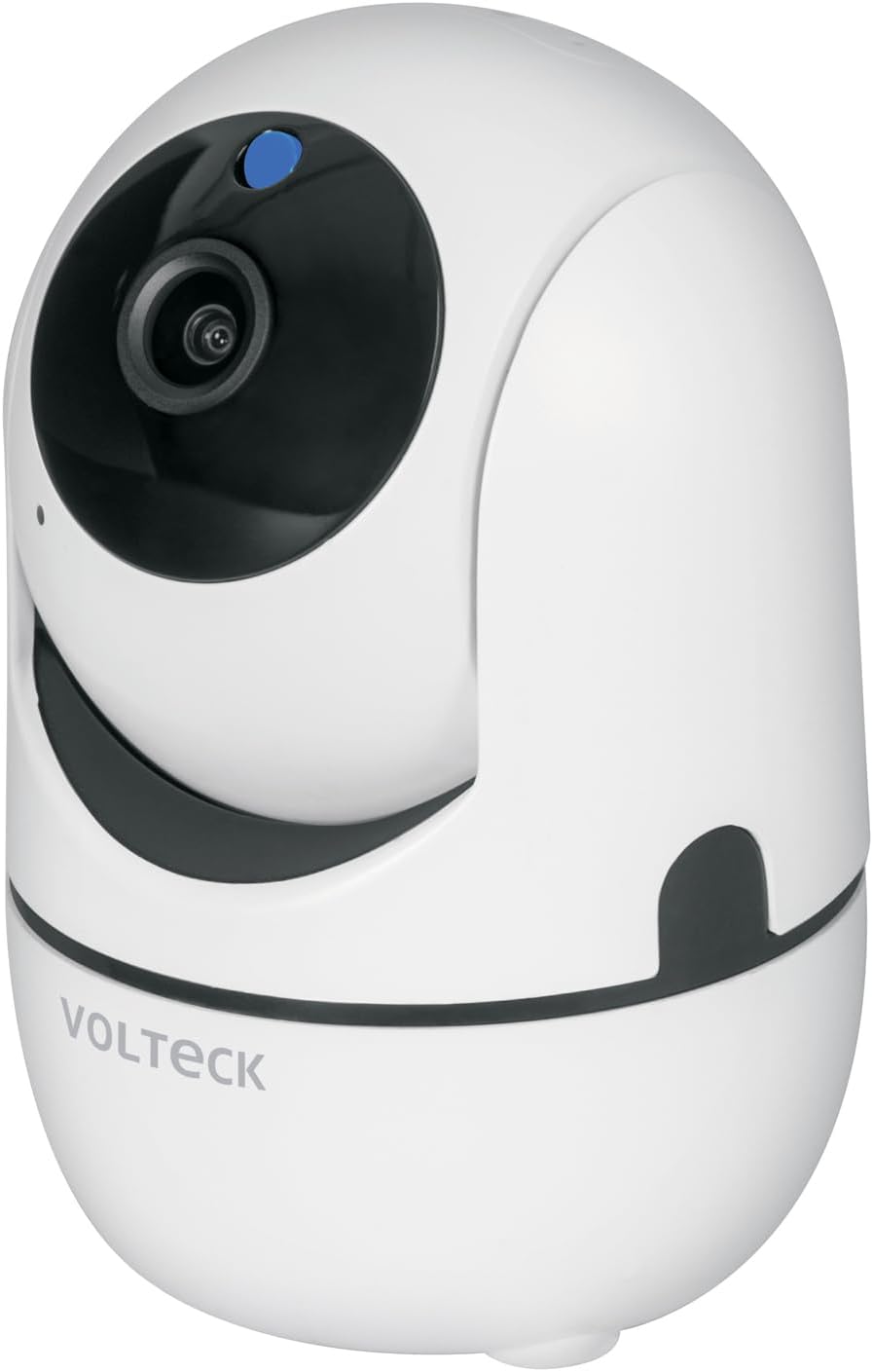
Image 1.1: Volteck CTV-30W WiFi Robotic Camera. This image shows the camera's sleek white design with its lens and a blue indicator light.
2. Пакеттин мазмуну
Төмөнкү нерселердин баары пакетиңизге камтылганын текшериңиз:
- Volteck CTV-30W WiFi Robotic Camera
- 1 USB заряддагыч
- 1 USB кабели
- 1 Дубалга орнотуу плитасы
- 2 Дубал анкерлери
- 2 Бурама
- Колдонуучунун Колдонмосу (бул документ)

Image 2.1: Included accessories. This image displays the USB charger and USB cable that come with the camera.
3. Продукт бүтүп калдыview
Familiarize yourself with the main components and features of your Volteck CTV-30W camera.

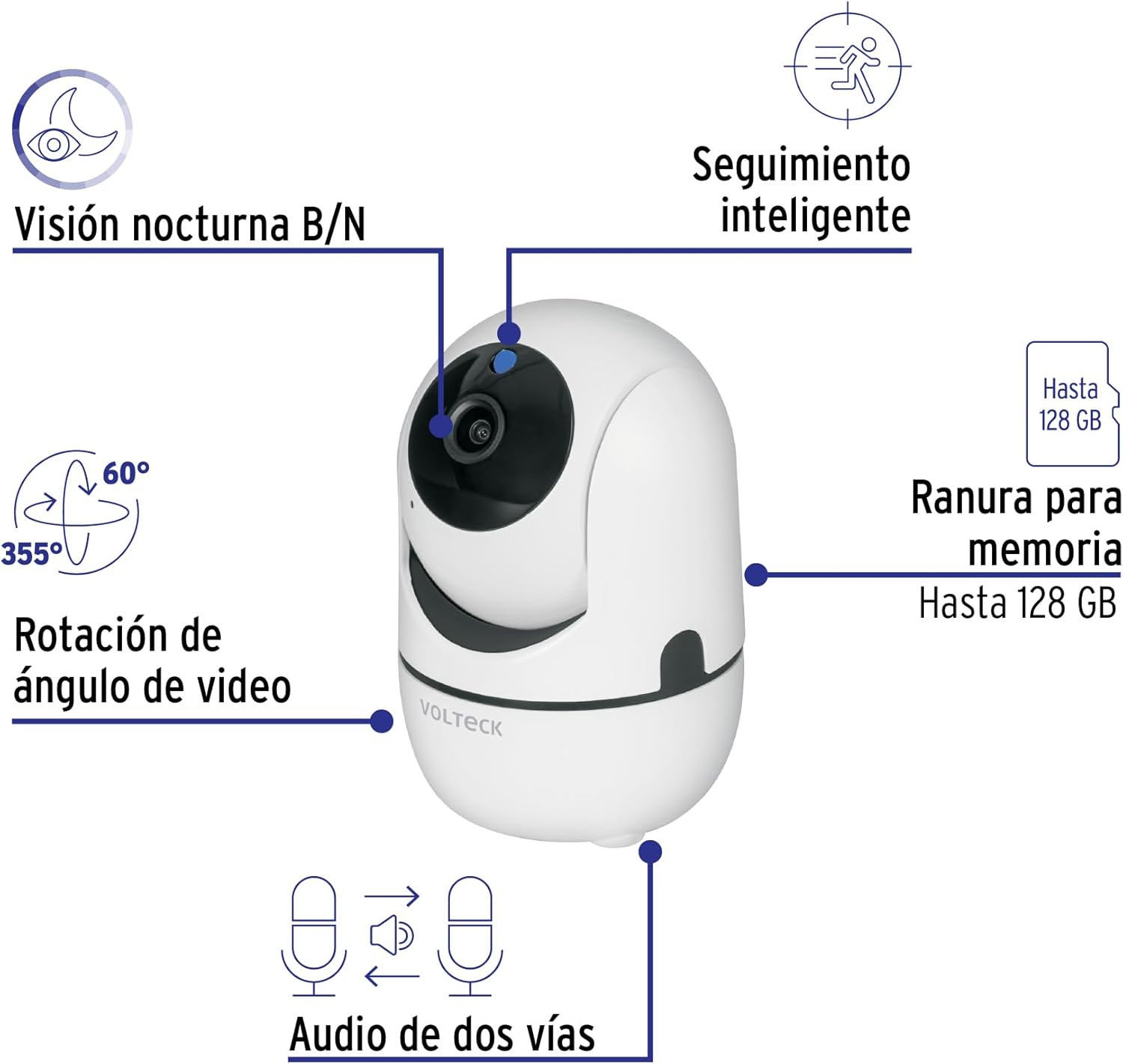
Image 3.1: Key Camera Features. This diagram highlights the camera's capabilities: Black/White Night Vision, Smart Tracking, 355° Pan and 60° Tilt video angle rotation, a memory card slot supporting up to 128 GB, and Two-Way Audio.
- Камера линзасы: Video foo тартатtage.
- Индикатор жарыгы: Shows camera status (e.g., power, connection).
- Микрофон: Аудио киргизүү жана эки тараптуу байланыш үчүн.
- Баяндамачы: Аудио чыгаруу жана эки тараптуу байланыш үчүн.
- MicroSD картасынын уячасы: Insert a microSD card (up to 128 GB, not included) for local video storage.
- Электр порту: USB кубат кабелин туташтырыңыз.
- Калыбына келтирүү баскычы: Used to reset the camera to factory settings (usually a small pinhole button).
Сүрөт 3.2: Алдыңкы View. This image provides a clear view of the camera's front, including the lens and indicator light.

Сүрөт 3.3: Артка View. This image shows the rear of the camera, typically where the power port and reset button are located.
4. Орнотуу
4.1 Физикалык орнотуу
- Жайгашкан жерди тандаңыз: Select a suitable indoor or outdoor location for your camera. Ensure it has a stable surface or wall for mounting and is within range of your Wi-Fi network.
- Кубат туташуу: Connect the provided USB cable to the camera's power port and the USB charger. Plug the charger into a standard electrical outlet. The camera will power on, and the indicator light will activate.
- Кошумча дубалга орнотуу: If mounting on a wall, use the included wall mounting plate, anchors, and screws. Mark the drilling points, drill holes, insert anchors, and secure the plate. Then, attach the camera to the mounting plate.
4.2 Колдонмону орнотуу жана жупташтыруу
The Volteck CTV-30W camera uses the Tuya Smart app for remote control and monitoring.
- Колдонмону жүктөп алыңыз: Download the "Tuya Smart" app from the Apple App Store (for iOS devices) or Google Play Store (for Android devices).
- Катталуу/Кирүү: Колдонмону ачып, жаңы аккаунтка катталыңыз же сизде мурунтан эле бар болсо кириңиз.
- Түзмөк кошуу: Жаңы түзмөк кошуу үчүн колдонмодогу нускамаларды аткарыңыз. "Коопсуздук жана видео көзөмөл" жана андан кийин "Акылдуу камера (Wi-Fi)" тандаңыз.
- Wi-Fi'га туташуу: Ensure your mobile device is connected to a 2.4 GHz Wi-Fi network. The app will guide you through connecting the camera to your Wi-Fi network, often by displaying a QR code for the camera to scan.
- Жупташтыруу аяктады: Once successfully paired, the camera's indicator light will change, and you will see the camera feed in the app.
Image 4.1: App Control Interface. This image illustrates the process of downloading, linking, and viewing the camera feed through the Tuya Smart application, available on both the App Store and Google Play.
5. Операция
5.1 Live View жана панорамалоо/кыйшайтуу башкаруусу
Once connected, open the Tuya Smart app to access the live video feed. You can control the camera's pan (horizontal) and tilt (vertical) movements directly from the app interface to adjust the viewing angle. The camera supports 355° pan and 60° tilt rotation.
5.2 Кыймылды аныктоо жана эскертмелер
The camera features intelligent motion detection. When movement is detected, the camera can automatically record video and send instant notifications to your linked mobile device. You can customize motion detection sensitivity and notification settings within the app.
5.3 Эки тараптуу аудио
Utilize the built-in microphone and speaker for two-way communication. This allows you to listen to the camera's surroundings and speak through the camera from your mobile device.
5.4 Түнкү көрүнүш
The Volteck CTV-30W is equipped with black and white night vision, enabling clear video monitoring even in low-light or complete darkness conditions.
5.5 Видеону жазуу жана сактоо
Insert a microSD card (up to 128 GB, not included) into the camera's slot for local storage of recorded video footagд. Сиз кайра аласызview recordings directly through the Tuya Smart app. Cloud storage options may also be available through the app (subscription may be required).
6. Техникалык тейлөө
- Тазалоо: Камера линзасын жана корпусун жумшак, кургак чүпүрөк менен акырын сүртүңүз. Катуу химиялык заттарды же абразивдүү тазалоочу каражаттарды колдонбоңуз.
- Электр камсыздоо: Ensure the camera is always connected to the specified power supply (5V DC, 1.5A).
- Программалык камсыздоонун жаңыртуулары: Regularly check the Tuya Smart app for any available firmware updates for your camera to ensure optimal performance and security.
- Экологиялык шарттар: While suitable for indoor and outdoor use, avoid exposing the camera to extreme temperatures, direct water immersion, or excessive humidity.
7. Кыйынчылыктарды
| Көйгөй | Мүмкүн себеп | Чечим |
|---|---|---|
| Камера күйбөй жатат. | Power cable disconnected; faulty adapter/cable; power outlet issue. | Check power connections. Try a different USB cable or adapter. Test the power outlet with another device. |
| Wi-Fi'га туташпай жатат. | Incorrect Wi-Fi password; camera too far from router; 5 GHz Wi-Fi network selected; router issues. | Ensure correct 2.4 GHz Wi-Fi password. Move camera closer to router. Restart router. Reset camera and try pairing again. |
| No video feed in app. | Camera offline; poor Wi-Fi signal; app glitch. | Check camera's indicator light. Verify Wi-Fi connection. Restart the app. Restart the camera. |
| Кыймылды аныктоо иштебей жатат. | Detection settings disabled; sensitivity too low; network issues. | Check motion detection settings in the app. Increase sensitivity. Ensure stable internet connection. |
| Эки тараптуу аудио иштебей жатат. | Microphone/speaker blocked; app permissions; volume settings. | Микрофонго же динамикке эч нерсе тоскоол болбой турганын текшериңиз. Микрофонго кирүү үчүн колдонмонун уруксаттарын текшериңиз. Колдонмодо жана телефонуңузда үн жөндөөлөрүн тууралаңыз. |
If you encounter issues not listed here, please refer to the support section of the Tuya Smart app or contact Volteck customer support.
8. Техникалык шарттар
| Өзгөчөлүк | Деталь |
|---|---|
| Бренд | Volteck |
| Модель аты | CTV-30W |
| Product Model Number (Internal) | 49556 |
| Резолюция | 3 депутат |
| Камера томtage | 5 В DC |
| Camera Current | 1.5 А |
| Адаптер Voltage | 100 V AC - 240 V AC |
| Adapter Current | 200 mA - 120 mA |
| Adapter Frequency | 50 Hz / 60 Hz |
| Connectivity Protocol | Wi-Fi (2.4 GHz) |
| Өзгөчөлүктөр | Night Vision, Motion Detection, Two-Way Audio, Pan/Tilt Rotation, Smart Tracking |
| Pan/Tilt Rotation | 355° Пан, 60° Тилт |
| Сактагыч | 128 ГБ чейин MicroSD картасы (киргизилген эмес) |
| Ички/тышкы колдонуу | Ички, сырткы |
| Монтаж түрү | Table Mount, Wall Mount (accessories included) |
| Түс | Ак |
| Product Dimensions (H x D) | 11 x 7 см (болжолдуу) |
| Элементтин өлчөмдөрү (L x W x Y) | 9.98 x 10.64 x 18.31 см |
| Элемент Салмагы | 280 г |
| Келип чыккан өлкө | Мексика |

Image 8.1: Camera Dimensions. This image shows the approximate height (11 cm) and diameter (7 cm) of the camera.
9. Кепилдик жана колдоо
9.1 Кепилдик маалыматы
The Volteck CTV-30W WiFi Robotic Camera comes with a 1 жылдык кепилдик сатып алынган күндөн тартып. Бул кепилдик өндүрүштүк кемчиликтерди жана нормалдуу колдонуудагы бузулууларды камтыйт. Кепилдик дооматтары үчүн сатып алганыңыздын далилин сактап коюңуз.

Image 9.1: Product Packaging. The packaging box confirms the 1-year warranty and highlights key features like 3MP resolution, Pan/Tilt, motion tracking, two-way audio, and B/W night vision.
9.2 Кардарларды колдоо
For technical assistance, troubleshooting, or warranty inquiries, please contact Volteck customer support. Refer to the Volteck website or the Tuya Smart app for the most up-to-date contact information.
Volteck Official Webсайт: www.volteck.com (Эскертүү: Бул толтургуч URL, Сураныч, туура өнүм документациясын караңыз webсайт.)


