Introduction
This manual provides comprehensive instructions for the setup, operation, maintenance, and troubleshooting of your Bloody AT98 Alpha Optical Switch Performance Keyboard. Please read this manual thoroughly before using the product to ensure proper function and longevity.
Жайгашуу
Пакеттин мазмуну
- Bloody AT98 Alpha Optical Switch Performance Keyboard
- USB-C Cable
- Баскыч капкагын тарткыч
- Чаң капкагы
- Кошумча баскычтоптор (ыңгайлаштыруу үчүн)
Баскычтопту туташтыруу
- Locate the USB-C port on the back of the keyboard. The port is recessed for cable management.
- Берилген USB-C кабелин клавиатуранын USB-C портуна туташтырыңыз.
- Route the cable through the integrated cable management channels on the underside of the keyboard (left, right, or center) as desired.
- Connect the other end of the USB-C cable (USB-A) to an available USB port on your computer.
- Клавиатура сиздин операциялык системаңыз тарабынан автоматтык түрдө таанылат.

Image: The Bloody AT98 keyboard with its USB-C cable connected, showcasing the cable management options on the underside.
Баскычтоптун бийиктигин тууралоо
The keyboard features dual-height adjustable feet on the underside. Flip out the feet to achieve your preferred typing angle and ergonomic comfort.

Сүрөт: асты view of the Bloody AT98 keyboard, illustrating the dual-height adjustable feet for ergonomic positioning.
Операция
Alpha Optical Switches
The Bloody AT98 keyboard is equipped with Alpha Optical Switches, which offer a fast response and high durability (up to 100 million keystrokes). These linear switches have a total travel distance of 3.8 mm ± 0.2 mm and an initial force of 48 ± 3 cN.

Image: Detailed diagram illustrating the specifications of the Alpha Optical Switch, including switch type, durability, initial force, total travel distance, and actuation point customization range.
Customizable Actuation Points
The keyboard allows for customization of actuation points, ranging from 0.8mm to 3.0mm. This feature enables users to fine-tune key responsiveness to their preference. There are 4 customizable variable speed profileлар жеткиликтүү.
To adjust actuation points, use the dedicated function keys (often marked 'LT' or similar, refer to keyboard layout) in combination with other keys as specified in the software or quick guide.

Image: Visual representation of the customizable actuation points and the eXact Reset System, detailing downward key travel, Z-Force Rapid Trigger, and X-Force Rapid Trigger.
eXact Reset System
The eXact Reset System provides enhanced key reset functionality:
- Hyper Z-Force Mode: Ultra-fast reset at 0.3mm for peak precision.
- Extreme X-Force Mode: Enhanced reset at 0.8mm for superior control.
- Classic Mode: Cancels out the eXact Reset and reverts to the default key reset point for a traditional response.
RGB жарыктандыруу
The keyboard features 7 preset RGB backlit effects. These can be adjusted using function key combinations. Refer to the keyboard's quick start guide or software for specific key combinations to change lighting patterns and brightness.
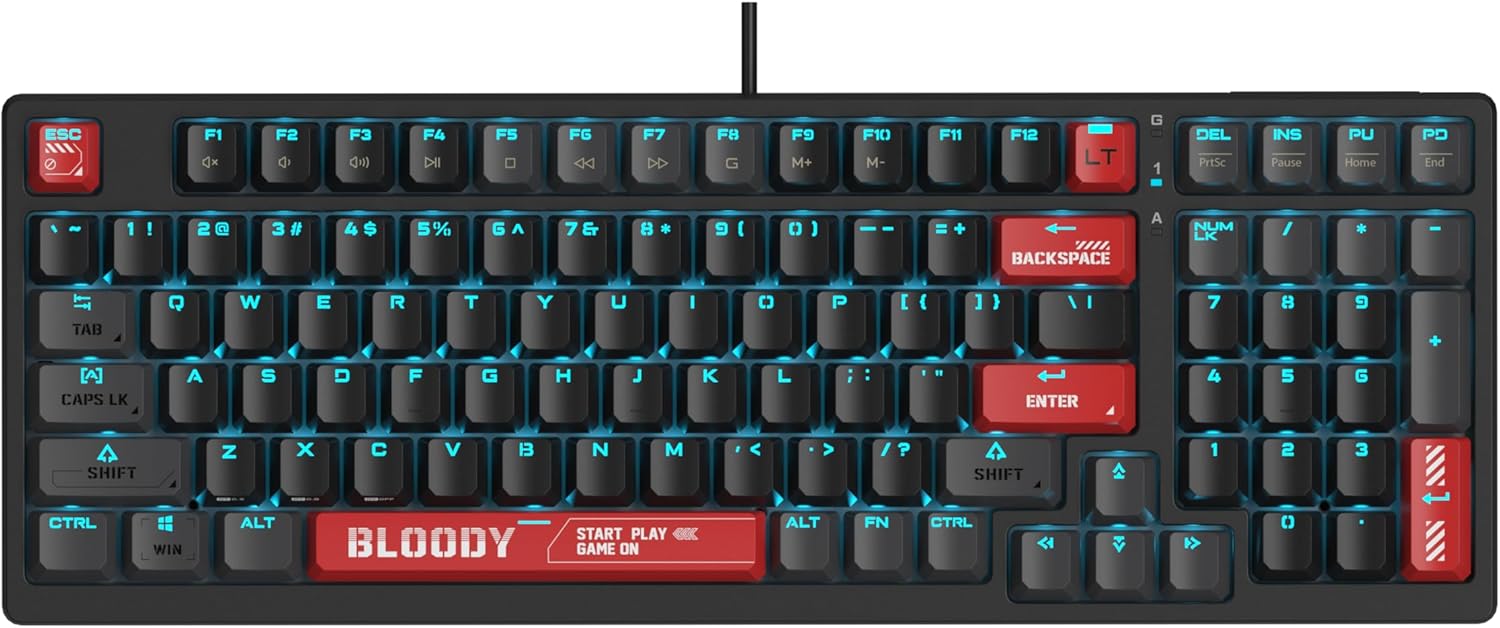
Image: The Bloody AT98 keyboard illuminated with its RGB backlighting, showcasing the key layout and design.
Мультимедиа функциялары
Secondary multimedia functions are integrated into the F-key row. These functions are typically activated by pressing the FN key in combination with the corresponding F-key (e.g., FN + F1 for volume down, FN + F2 for volume up, FN + F3 for mute). Specific key assignments may vary; consult the keyboard's quick start guide for details.
Техникалык тейлөө
Баскычтопту тазалоо
- Тазалоодон мурун клавиатураны компьютерден ажыратыңыз.
- Бир аз жумшак, түксүз кездемени колдонуңуз dampклавиатураны жана бетти сүртүү үчүн суу же жумшак тазалоо эритмеси менен жабыңыз.
- Ачкычтардын ортосундагы чаң жана таштанды үчүн кысылган абаны колдонуңуз.
- Суюктуктарды клавиатурага түздөн-түз чачуудан алыс болуңуз.
- Катуу химиялык заттарды же абразивдүү материалдарды колдонбоңуз.
Баскычтын капкагын алмаштыруу
The Bloody AT98 comes with additional keycaps and a keycap puller for customization. To replace keycaps:
- Баскыч капкагын тарткычты алып салгыңыз келген баскычка акырын бекитиңиз.
- Pull upwards with steady, even pressure until the keycap detaches from the switch.
- Жаңы баскычтоптун капкагын которгучтун сабы менен тегиздеп, ордуна чыкылдаган үн чыкканча бекем басыңыз.
The PBT keycaps are designed for durability and a quick bounce-back feel.

Сүрөт: Жакын план view of the Bloody AT98 keyboard highlighting the PBT keycaps, emphasizing their material and design.
Dust Cover Usage
Utilize the provided dust cover when the keyboard is not in use to protect it from dust and debris, which can affect performance and longevity.
Проблемаларды чечүү
Баскычтоп жооп бербейт
- USB-C кабели клавиатурага жана компьютерге бекем туташып турганын текшериңиз.
- Баскычтопту компьютериңиздин башка USB портуна туташтырууга аракет кылыңыз.
- Компьютерге тиешелүү маселени болтурбоо үчүн баскычтопту башка компьютерде сынап көрүңүз.
- Компьютериңизди өчүрүп күйгүзүңүз.
Backlighting Not Working or Incorrect
- Check if the backlighting is turned off. Use the designated FN key combinations to cycle through lighting effects and adjust brightness.
- Ensure any keyboard software is up to date and correctly configured.
Ачкычтар катталбайт же эки жолу терилбейт
- Калдыктарды кетирүү үчүн бузулган ачкычты(ларды) кысылган аба менен тазалаңыз.
- Verify that the keycap is properly seated on the switch.
- If using custom actuation points, try resetting them to default settings.
Программалык камсыздоо маселелери
- Download the latest software and drivers from the official Bloody webсайт.
- Иштөө тутумуңуз жаңыртылганын текшериңиз.
Техникалык шарттар
| Модель аты | AT98-BloodyRed |
| Бренд | Кандуу |
| Keyboard Description | Alpha Optical Switch |
| Которуу түрү | Linear Optical Switch |
| Ачкыч саны | 98 Ачкычтар |
| Actuation Point Customization | 0.8mm - 3.0mm (23 options) |
| Баштапкы күч | 48 ± 3 cN |
| Жалпы саякат аралыгы | 3.8 мм ± 0.2 мм |
| Туруктуу | 100 миллион баскычка чейин |
| Байланыш технологиясы | USB-C |
| Шайкеш түзмөктөр | PC |
| Продукциянын өлчөмдөрү | 5.43 x 15.16 x 1.61 дюйм (13.79 x 38.51 x 4.09 см) |
| Элемент Салмагы | 1.65 фунт (0.75 кг) |
| Өзгөчө өзгөчөлүк | eXact Reset System, RGB Backlit, PBT Keycaps, Dual-Height Feet |
Кепилдик жана колдоо
Кепилдик маалымат
For detailed warranty information, please refer to the warranty card included with your product or visit the official Bloody webсайт. Кепилдик дооматтар үчүн сатып алганыңыздын далилин сактаңыз.
Кардарларды колдоо
If you encounter any issues not covered in this manual or require further assistance, please contact Bloody customer support through their official webсайт же продукт таңгагында көрсөтүлгөн байланыш маалыматы.
Official Bloody Webсайт: www.bloody.com


