1. Киришүү
The IFYOO G53 Wireless Vertical Ergonomic Mouse is designed to provide superior comfort and enhance productivity. Its unique vertical design promotes a natural handshake position, reducing wrist strain and discomfort often associated with traditional mice. This tri-mode mouse offers versatile connectivity options and customizable features to adapt to various computing environments.

Figure 1.1: IFYOO G53 Wireless Vertical Ergonomic Mouse.
2. Негизги өзгөчөлүктөрү
- Superior Ergonomic Design: Keeps your hand in a natural handshake position to reduce wrist stress and pain, helping to prevent Carpal Tunnel Syndrome.
- Tri-Mode туташуу: Supports 2.4GHz wireless, Bluetooth 5.1, and wired USB-C connections, allowing seamless switching between multiple devices.
- Жөнгө салынуучу DPI: Max 8400 DPI for smooth and accurate tracking, with multiple DPI settings (500, 1600, 2400, 3200, 4000, 4800, 8400) for precise control.
- Динамикалык RGB жарыктандыруу: Features 9 RGB lighting modes for customizable visual effects, which can also be turned off. DPI changes are indicated by logo color.
- 5 Programmable Side Buttons: Boost productivity with shortcuts for forward/backward webpage navigation, changing lighting effects, opening file explorer, or returning to desktop. (Note: Some side button shortcuts may not work with Mac OS, iPad OS, and other operating systems, except for light switch, and are primarily supported on Windows 10/11).
- Кайра заряддалуучу батарея: Built-in 600mAh rechargeable battery with intelligent power saving. Charges via USB-C.

Figure 2.1: Ergonomic design promotes a natural hand position, reducing wrist strain.
3. Пакеттин мазмуну
Пакетте бардык буюмдар бар экенин текшериңиз:
- 1x IFYOO G53 зымсыз вертикалдуу эргономикалык чычкан
- 1x Колдонуучунун колдонмосу (бул документ)
- 1x Type-C USB заряддоо кабели
- 1x 2.4 ГГц USB кабыл алгыч (чычкандын түбүндө сакталат)
4. Орнотуу
4.1 Чычканды заряддоо
Before first use, it is recommended to fully charge the mouse. Connect the provided USB-C cable to the charging port on the front of the mouse and the other end to a USB power source (e.g., computer USB port, USB wall adapter). The RGB lighting may indicate charging status.
4.2 Түзмөгүңүзгө туташуу
The G53 mouse offers three connection modes:
- 2.4 ГГц зымсыз режими:
- Locate the 2.4 GHz USB receiver stored in the magnetic compartment at the bottom of the mouse.
- USB ресиверди компьютериңиздеги жеткиликтүү USB портуна сайыңыз.
- Slide the mode switch at the bottom of the mouse to the "2.4G" position. The mouse should connect automatically.
- Bluetooth (BT) режими:
- Slide the mode switch at the bottom of the mouse to the "BT" position.
- On your device (Windows, Mac, iPad OS, Android), go to Bluetooth settings and search for new devices.
- Жупташтыруу үчүн жеткиликтүү түзмөктөрдүн тизмесинен "IFYOO G53" тандаңыз.
- Зымдуу режим:
- Connect the provided USB-C cable to the mouse's charging port and the USB-A end to your computer's USB port.
- Slide the mode switch at the bottom of the mouse to the "Wired" position. The mouse will function as a wired device and charge simultaneously.

Figure 4.1: Seamless multi-device connectivity with 2.4G, Wired, and Bluetooth modes.
4.3 Driver Software (Windows Only)
To modify mouse configurations and customize buttons (excluding light switch), driver software is available for Windows OS only. Visit www.ifyoo.net to download the latest driver. This software allows for personalized profiles, macro settings, and advanced RGB control.

Figure 4.2: Professional driver software interface for Windows customization.
5. Иштөө нускамалары
5.1 Баскыч функциялары
The IFYOO G53 mouse features 10 buttons for enhanced control:

Figure 5.1: Mouse layout and button overview.
- Сол баскыч (1): Стандарттык сол чыкылдатуу функциясы.
- Айлантуу дөңгөлөгү (2): Scroll up/down, middle-click.
- Оң баскыч (3): Стандарттык оң баскычты чыкылдатуу функциясы.
- DPI баскычы (4): DPI жөндөөлөрү аркылуу айланышат.
- Forward Button (5): Алга карай жылдырат web браузерлер/тиркемелер.
- Backward Button (6): Артка карай багыт алат web браузерлер/тиркемелер.
- Light Effect Button (7): RGB жарыктандыруу режимдерин өзгөртөт.
- File Resource Manager (8): ачат File Explorer (Windows only).
- BOSS Button (9): Returns to desktop (Windows only).
- Mode Indicator (10): Displays current connection mode.
- 2.4G Receiver (11): USB dongle for 2.4GHz wireless connection.
- Режим баскычы (12): Switch between 2.4G, Wired, and BT modes.
Note: Due to system compatibility, functions of buttons 5, 6, 8, and 9 can only be used on Windows OS.
5.2 DPI сезгичтигин тууралоо
басыңыз DPI баскычы (4) to cycle through the available DPI settings. Each change in DPI will typically be indicated by a change in the logo's LED color, allowing you to visually confirm your current sensitivity level.
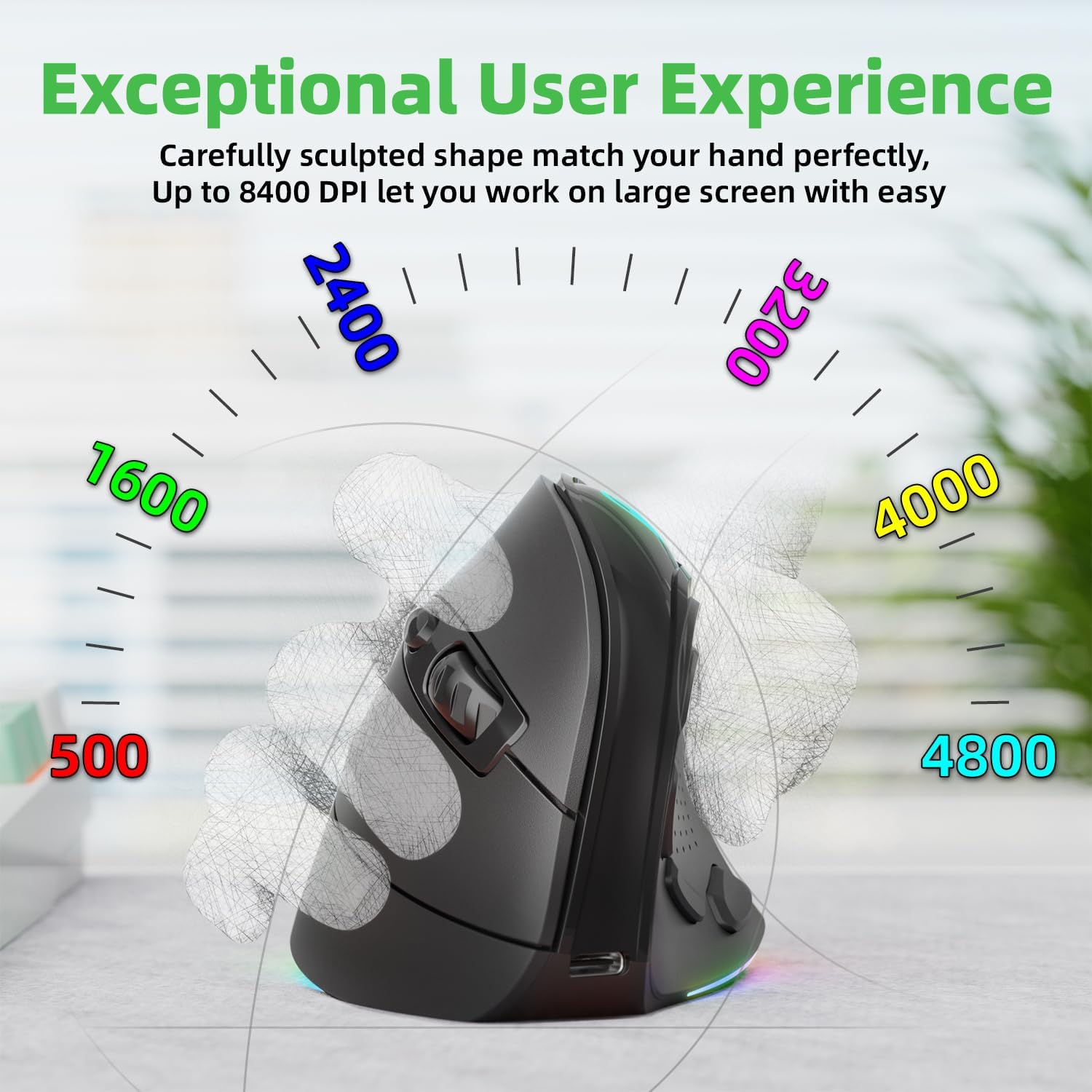
Figure 5.2: Adjustable DPI up to 8400, with logo color indicating current DPI.
5.3 Controlling RGB Lighting
басыңыз Light Effect Button (7) to cycle through the 9 dynamic RGB lighting modes. Continue pressing to find your preferred effect or to turn the lighting off.
6. Техникалык тейлөө
- Тазалоо: Чычканды тазалоо үчүн жумшак, кургак чүпүрөктү колдонуңуз. өжөр кир үчүн, бир аз гampчүпүрөктү суу же жумшак тазалоо эритмеси менен жууп салыңыз. Катуу химиялык заттардан же абразивдүү материалдардан алыс болуңуз.
- Сактагыч: When not in use for extended periods, store the mouse in a cool, dry place. Ensure the 2.4 GHz receiver is stored securely in its compartment at the bottom of the mouse.
- Батареяга кам көрүү: Батареянын иштөө мөөнөтүн узартуу үчүн чычканды бат-баттан толук кубаттап турбаңыз. Батарея индикатору аз болгондо аны заряддаңыз.
7. Кыйынчылыктарды
- Чычкан жооп бербей жатат:
- Чычкандын заряддалганын текшериңиз.
- Check the connection mode switch (2.4G, Wired, BT) is in the correct position.
- For 2.4GHz, ensure the USB receiver is securely plugged in. Try a different USB port.
- Bluetooth үчүн, түзмөгүңүздө Bluetooth иштетилгенин жана чычкан жупташтырылганын текшериңиз. Кайра жупташтырып көрүңүз.
- In wired mode, ensure the USB-C cable is properly connected.
- Курсордун кыймылы туруксуз же жай:
- DPI баскычын колдонуп DPI жөндөөсүн тууралаңыз.
- Чычкан сенсорунун таза жана таштандылардан таза экенин текшериңиз.
- Чычканды таза, чагылдырылбаган бетке же чычкан аянтчасына колдонуңуз.
- Side buttons not working (Mac OS/iPad OS):
- As noted, some side button functions (Forward, Backward, File Resource Manager, BOSS Button) are system-specific and primarily supported on Windows OS. The Light Effect Button should function across all compatible OS.
8. Техникалык шарттар
| Бренд | ЭФСЕН |
| Модель номери | IFYOO-G53-Black3 |
| Байланыш технологиясы | 2.4GHz Wireless, Bluetooth 5.1, Wired (USB-C) |
| Кыймылды аныктоо технологиясы | Оптикалык |
| баскычтардын саны | 10 |
| DPI орнотуулары | Up to 8400 (Adjustable) |
| Батарея | 600 мАч литий полимери (кайра заряддалуучу) |
| Заряддоо порту | USB-C |
| Шайкештик | Windows 11/10/7/8, Mac OS, iPad OS, Android |
| Элемент Салмагы | 8.4 унция |
| Пакеттин өлчөмдөрү | 5.87 x 4.49 x 3.31 дюйм |
| Келип чыккан өлкө | Кытай |
9. Кепилдик жана колдоо
9.1 Бир жылдык кепилдик
IFYOO offers a 90-day free replacement and one-year warranty service from the date of purchase. If there are any problems with the product, please do not hesitate to contact us.
9.2 Кардарларды колдоо
- Официалдуу Webсайт: www.ifyoo.net
- Кардарларды тейлөө электрондук почтасы: cs@ifyoo.net (9:00 - 18:00 Monday to Friday)
- Manuals, Drivers, Firmware Updates: support.ifyoo.net
- Видео үйрөткүчтөр: www.youtube.com/IFYOO


