1. Киришүү
This manual provides comprehensive instructions for the installation, operation, and maintenance of your MOES 30W Power Delivery USB C Wall Electrical Outlet. This ETL Listed outlet features a 15 Amp capacity, an ultra-speed Type C receptacle, and is designed for efficient charging of various compatible devices.

Image 1: MOES 30W Power Delivery USB C Wall Electrical Outlet with its packaging.
2. Коопсуздук маалыматы
WARNING: Risk of electric shock. Improper installation can result in serious injury or death. Always turn off power at the circuit breaker before installation.
- ETL тизмеленген: This product is ETL Listed, ensuring it meets recognized safety standards.
- TampЭр-резистенттүү дизайн: Built-in shutters prevent foreign objects from being inserted into the receptacles, enhancing safety, especially in households with children.
- Ашыкча ток коргоо: Designed to safeguard connected electronics from receiving excessive power.
- Тtage: Operates at 120 Volts. Ensure your electrical system is compatible.
- Орнотуу процессинин кандайдыр бир бөлүгүнө ишенбесеңиз, квалификациялуу электрик менен кеңешиңиз.

Сүрөт 2: Бүттүview of the MOES outlet's safety features, including tamper-resistant design and various protections.
3. Пакеттин мазмуну
Пакетте бардык буюмдар бар экенин текшериңиз:
- 1 x MOES 30W Power Delivery USB C Wall Electrical Outlet
- 1 x Дубал плитасы
- 4 х бурамалар
- 1 x User Manual
4. Техникалык шарттар
| Өзгөчөлүк | Деталь |
|---|---|
| Бренд | MES |
| Модел | Type 1C/1A 30WPD 15A Outlet |
| Тtage | 120 вольт |
| Ampөчүрүү | 15 Amp |
| USB чыгышы (жалпы) | 30W макс |
| USB Type-C | PD3.0 (Power Delivery) |
| USB Type-A | QC2.0 (тез кубаттоо) |
| Материал | Пластик |
| Түс | Ак |
| Шайкеш түзмөктөр | Smartphone, Tablet, Laptop (USB-C PD compatible) |
| Сертификаттар | ETL тизмеленген |

Image 3: Dimensions of the MOES USB C Wall Electrical Outlet for installation planning.
5. Орнотуу жана орнотуу
- Кубатты өчүрүү: Locate your circuit breaker panel and turn off the power to the outlet you intend to replace. Use a voltage tester to confirm the power is off before proceeding.
- Эски розетканы алып салуу: Электрдик кутудан учурдагы дубал плитасын жана розеткасын бурап, кылдаттык менен чыгарып алыңыз. Эски розеткадан зымдарды ажыратыңыз.
- Зымдарды даярдоо: If necessary, strip approximately 1/2 inch (12-15mm) of insulation from the ends of the electrical wires (Hot, Neutral, Ground).
- Зымдарды туташтыруу:
- туташтыруу Ысык зым (usually black or red) to the brass screw terminal.
- туташтыруу Нейтралдуу зым (usually white) to the silver screw terminal.
- туташтыруу Жер зымы (usually green or bare copper) to the green screw terminal.
- Mount New Outlet: Carefully push the wired outlet back into the electrical box. Secure it with the provided screws.
- Дубал плитасын орнотуу: Attach the screwless wall plate by first screwing the clear inner part to the outlet, then snapping the decorative outer plate into place.
- Күчтү калыбына келтирүү: Return to your circuit breaker panel and turn the power back on. Use a voltage tester to confirm power is restored to the new outlet.
Орнотуу боюнча видео көрсөтмө:
Video 1: Step-by-step guide on how to install the MOES wall outlet.
6. Иштөө нускамалары
The MOES 30W Power Delivery USB C Wall Electrical Outlet provides both traditional AC power and advanced USB charging capabilities.
- AC алгычтар: Use the two standard 15 Amp AC outlets for powering appliances and devices requiring 120V.
- USB Type-C Port (PD3.0): Plug in your USB-C compatible devices, such as iPhones (15 Series), MacBooks, iPads, and Samsung Galaxy phones, for rapid charging up to 30W via Power Delivery 3.0.
- USB Type-A Port (QC2.0): Connect devices that use a standard USB-A cable for charging, supporting Quick Charge 2.0 for faster charging where compatible.
- Smart Chip технологиясы: The integrated smart chip automatically detects the connected device and delivers the optimal power level for fast and efficient charging.
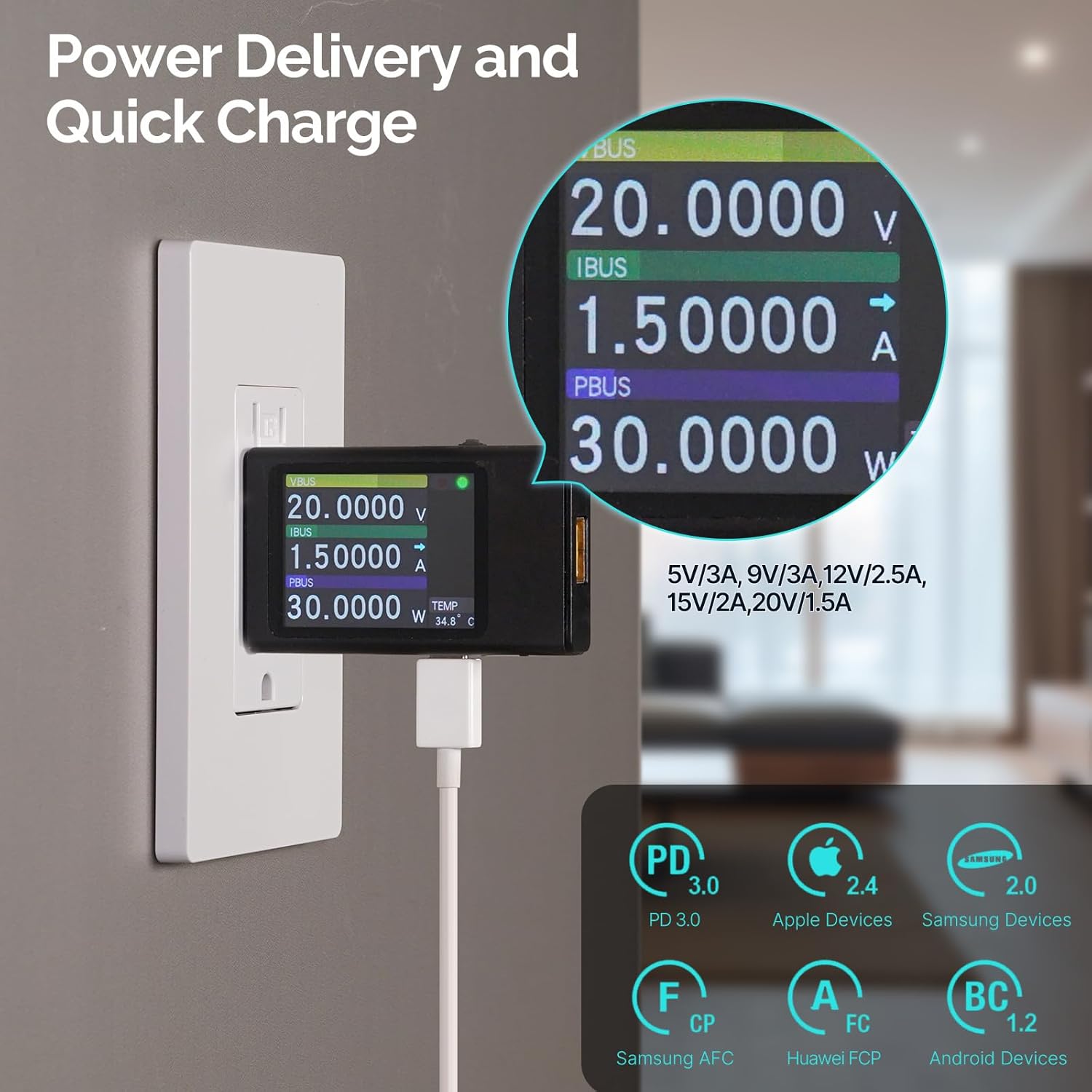
Image 4: Power Delivery and Quick Charge capabilities of the MOES outlet.

Image 5: Universal compatibility of the MOES outlet with various devices.
Продукт бүттүview Видео:
Видео 2: Бүттүview of the MOES 30W PD USB Wall Outlet features and usage.
7. Техникалык тейлөө
- Тазалоо: Disconnect power before cleaning. Use a soft, dry cloth to wipe the surface of the outlet and wall plate. Avoid using liquid cleaners or abrasive materials.
- Үзгүлтүксүз текшерүүлөр: Periodically inspect the outlet for any signs of damage, loose connections, or discoloration. If any issues are found, turn off power and consult a qualified electrician.
8. Кыйынчылыктарды
| Көйгөй | Мүмкүн себеп | Чечим |
|---|---|---|
| No power from AC receptacles or USB ports. | Circuit breaker tripped; loose wiring connection. | Check and reset the circuit breaker. If issue persists, turn off power and check wiring connections. Consult an electrician if needed. |
| USB devices charging slowly. | Device not compatible with fast charging; faulty cable; multiple devices drawing power simultaneously. | Ensure your device supports PD3.0 (USB-C) or QC2.0 (USB-A). Try a different, high-quality charging cable. Disconnect other devices to test single-port performance. |
| Outlet жылуу сезет. | Normal operation under heavy load; excessive load. | Slight warmth is normal. If it feels excessively hot, disconnect devices and reduce the load. Ensure proper ventilation. |
9. Кепилдик жана колдоо
For warranty information or technical support, please refer to the contact details provided in your product packaging or visit the official MOES webсайт. Кепилдик дооматтары үчүн сатып алуу дүмүрчөгүңүздү сактаңыз.


