1. Киришүү
Сатып алганыңыз үчүн рахматasing the TecTake Kade Retro Mushroom Table Lamp. Бул колдонмо жаңы лampКолдонуудан мурун бул көрсөтмөлөрдү кунт коюп окуп чыгып, келечекте колдонуу үчүн сактап коюңуз.
2. Коопсуздук нускамалары
- l камсыз кылууamp чөгүп кетпеши үчүн туруктуу, жалпак бетке коюлат.
- л-ды ачыкка чыгарбаamp сууга же ашыкча нымдуулукка тийгизбеңиз. Бул продукт имараттын ичинде гана колдонуу үчүн.
- l сактаңызamp жылуулук булактарынан, түздөн-түз күндүн нурларынан жана күйүүчү материалдардан алыс.
- l-ди ажыратууга же өзгөртүүгө аракет кылбаңызamp. Бул кепилдикти жокко чыгарып, коопсуздук коркунучун жаратышы мүмкүн.
- Заряддоо үчүн берилген кубаттоо кабелин же тастыкталган USB-C кабелин гана колдонуңуз.
- l иштетпеңизamp if the cable or any part of the lamp бузулган.
- The integrated battery is not user-replaceable.
- Dispose of the product responsibly according to local regulations at the end of its lifespan.
3. Пакеттин мазмуну
Пакетте бардык буюмдар бар экенин текшериңиз:
- 1 x TecTake Kade Retro Mushroom Table Lamp
- 1 х USB-C кубаттоо кабели
- 1 х Колдонуучунун колдонмосу (бул документ)
4. Продукт бүтүп калдыview
The TecTake Kade Retro Mushroom Table Lamp features a classic 70s-inspired design with modern functionality. It offers indirect, glare-free illumination with three adjustable brightness levels, controlled by a touch switch on the lampкөлөкө. лamp is cordless and rechargeable, providing flexibility for placement.
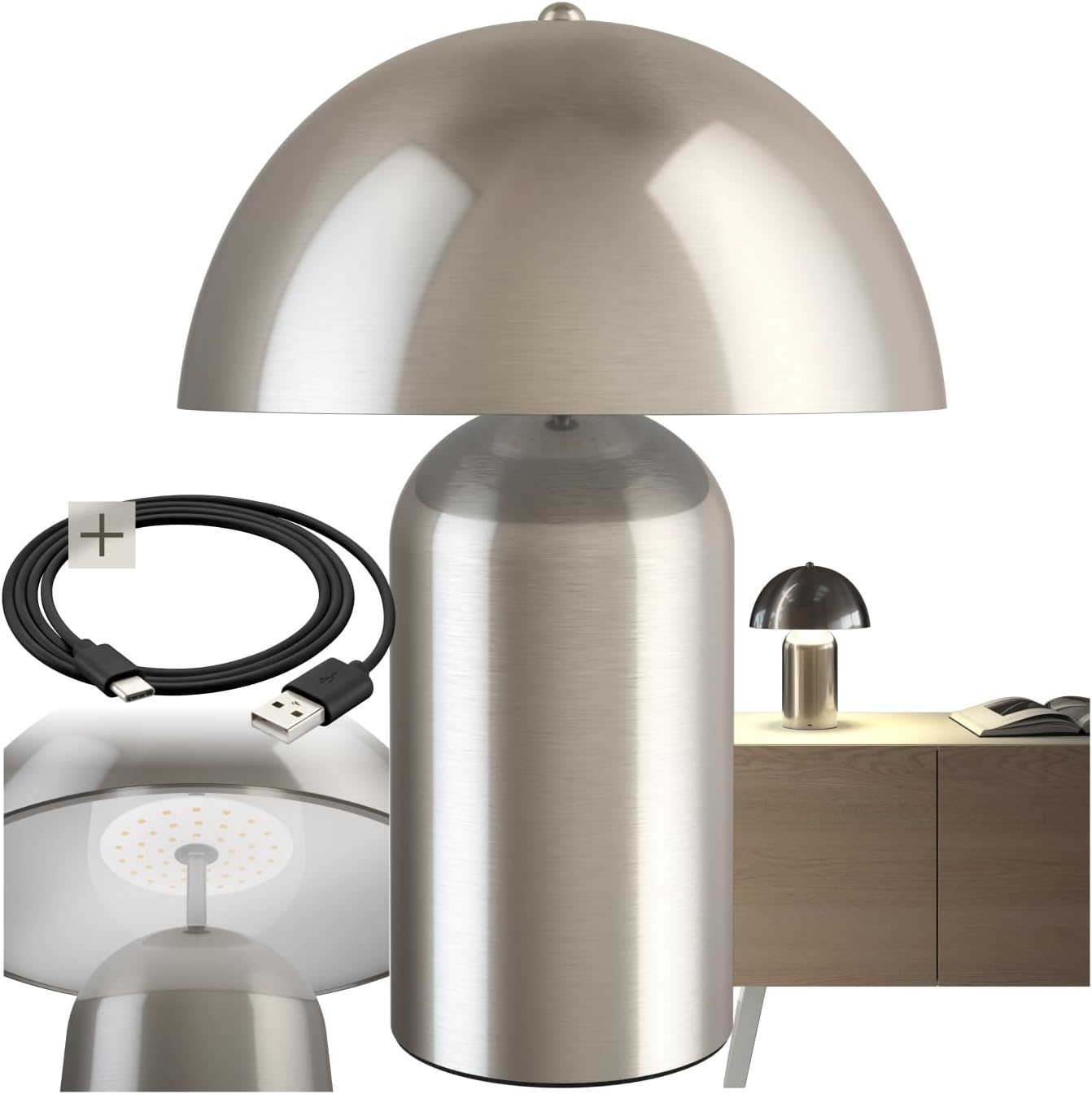
Image 1: The TecTake Kade Retro Mushroom Table Lamp, showcasing its full design and included USB-C charging cable.
5. Орнотуу
- Пакеттен чыгаруу: Бардык компоненттерди таңгактан кылдаттык менен алып салыңыз. Келечекте сактоо же ташуу үчүн таңгактарды сактаңыз.
- Баштапкы төлөм: Биринчи колдонуудан мурун lamp. Connect the USB-C end of the charging cable to the lamp's charging port (located on the base) and the USB-A end to a suitable USB power adapter (not included) or a computer USB port. The charging indicator (if present, usually a small LED) will show charging status. A full charge typically takes 4-6 hours.
Сүрөт 2: Жакын пландан view лamp's base, showing the USB-C charging port and the included charging cable.
6. Иштөө нускамалары
лamp features a touch-sensitive switch located on the top of the lampshade for easy control.
- Күйгүзүү/өчүрүү: Lightly touch the top of the lampкөлөкө лamp on. Touch it again to cycle through brightness levels and eventually turn it off.
- Жарыктыкты жөндөө: лamp has three brightness levels. Each subsequent touch of the lampshade will cycle to the next brightness level (Low > Medium > High > Off).
- Заряддоо: When the battery is low, the light output may diminish. Connect the lamp to a power source using the USB-C cable as described in the Setup section. The lamp can be used while charging. A full charge provides approximately 8-10 hours of operation, depending on the brightness level used.

Сүрөт 3: Астыңкы бети view лampshade, highlighting the integrated LED light source and the area for touch control.
7. Техникалык тейлөө
- Тазалоо: lamp тазалоодон мурун каалаган кубат булагынан тазалаңыз.amp жумшак, кургак же бир аз нымдууamp кездеме. Абразивдүү тазалагычтарды, эриткичтерди же катуу химиялык заттарды колдонбоңуз.
- Сактагыч: Эгерде лamp for an extended period, ensure it is fully charged and store it in a cool, dry place. Recharge the lamp every 3-6 months to maintain battery health.
8. Кыйынчылыктарды
- Lamp күйгүзбөйт:
- Батареянын заряддалганын текшериңиз. l туташтырыңызamp to a power source and try again.
- Verify that the touch switch area is clean and unobstructed.
- Lamp does not charge:
- Check if the USB-C cable is securely connected to both the lamp жана кубат адаптери.
- Try using a different USB-C cable or power adapter to rule out cable/adapter issues.
- Электр розеткасынын иштешин текшериңиз.
- Brightness levels are not changing:
- Ensure you are touching the correct area on the lampкөлөкө.
- If the battery is very low, the lamp may not be able to sustain higher brightness levels. Charge the lamp.
If you encounter issues not covered here, please contact TecTake customer support.
9. Техникалык шарттар

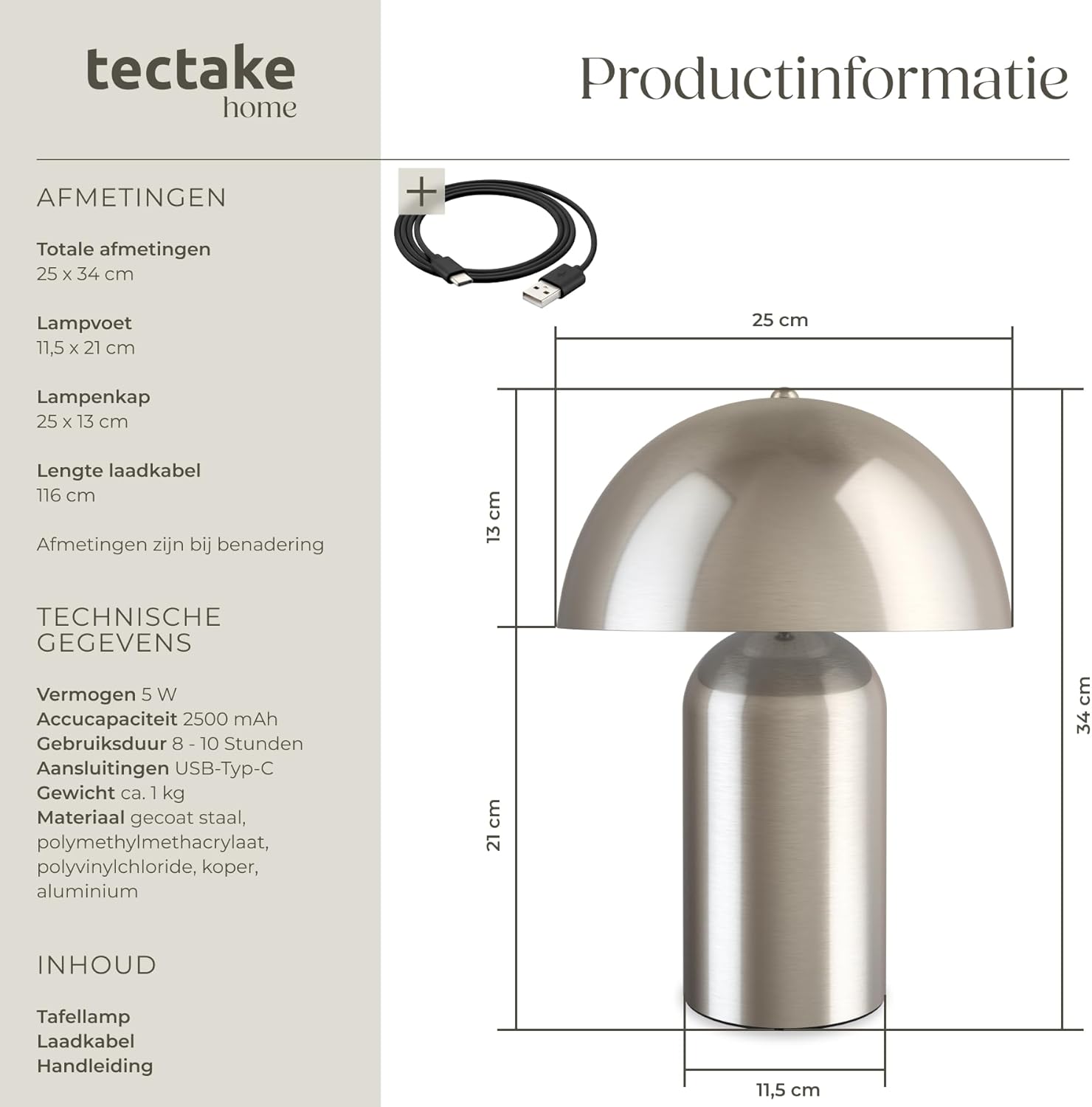
Image 4: Technical diagram illustrating the dimensions of the lamp, including total height, base diameter, and lampshade dimensions.
| Өзгөчөлүк | Спецификация |
|---|---|
| Модель номери | 405246 |
| Бренд | TecTake |
| Total Dimensions (Diameter x Height) | Болжол менен 25 x 34 см (9.8 x 13.4 дюйм) |
| Lamp Base (Diameter x Height) | Болжол менен 11.5 x 21 см (4.5 x 8.3 дюйм) |
| Lampshade (Diameter x Height) | Болжол менен 25 x 13 см (9.8 x 5.1 дюйм) |
| Заряддоо кабелинин узундугу | Болжол менен 116 см (45.7 дюйм) |
| Күч | 5 Вт |
| Түс температурасы | 3000 К |
| Батарея сыйымдуулугу | 2500 мАч |
| Заряддоо убактысы | Болжол менен 4-6 саат |
| Иштөө убактысы | Approx. 8-10 hours (depending on brightness) |
| Туташуу түрү | USB-C |
| Салмагы | Болжол менен 1.2 кг (2.6 фунт) |
| Материал | Coated steel, polymethyl methacrylate, polyvinyl chloride, copper, aluminum |
10. Кепилдик жана колдоо
TecTake products are designed for quality and reliability. For information regarding warranty terms and conditions, please refer to the warranty card included with your purchase or visit the official TecTake website. For technical support, spare parts, or service inquiries, please contact TecTake customer service directly.
Contact information can typically be found on the product packaging or the TecTake official webсайт.


