1. Киришүү
Thank you for choosing the LIGE FV6 Smartwatch. This manual provides essential information for setting up, operating, and maintaining your device. Please read it carefully to ensure optimal performance and longevity of your smartwatch.

Image 1.1: The LIGE FV6 Smartwatch showcasing its main display and features.
2. Пакеттин мазмуну
Upon opening your LIGE FV6 Smartwatch package, please verify that all the following items are included:
- LIGE FV6 Smartwatch (1 unit)
- Колдонмо (1 бирдик)
- Watch Box (1 unit)
- Watch Straps (3 types, 1 set)
- Кубаттоочу кабель (1 даана)
3. Орнотуу колдонмосу
3.1 Акылдуу саатты кубаттоо
Before initial use, fully charge your smartwatch. Connect the provided charging cable to the charging port on the back of the watch and to a USB power source. A full charge typically takes approximately 2 hours.

Image 3.1: The 730mAh battery capacity of the LIGE FV6 Smartwatch, indicating long usage times.
3.2 Колдонмону орнотуу жана жупташтыруу
- жүктөп алыңыз FitcloudPro app from your smartphone's app store (available for iPhone and Android devices).
- Смартфонуңузда Bluetooth иштетилгенин текшериңиз.
- Open the FitcloudPro app and follow the on-screen instructions to create an account or log in.
- In the app, navigate to the device pairing section and select your LIGE FV6 Smartwatch from the list of available devices.
- Смартфонуңузда да, акылдуу саатыңызда да жупташтыруу өтүнүчүн ырастаңыз.
3.3 Баштапкы орнотуулар
After successful pairing, you can configure basic settings such as language, time format, and personal profile information through the FitcloudPro app.
4. Иштөө нускамалары
4.1 Негизги навигация
The LIGE FV6 Smartwatch features a 1.85-inch IPS touchscreen display and physical buttons for navigation. Swipe across the screen to access different functions and menus. Press the side buttons to return to the home screen or access specific features.

Image 4.1: The smartwatch display with large, clear icons for easy navigation, suitable for all users.
4.2 Дисплейди ыңгайлаштыруу
The smartwatch offers over 150 watch faces, with more available through the FitcloudPro app. You can also create custom watch faces using your own photos. Adjust screen brightness via the watch settings or the app for optimal visibility in various lighting conditions.

Image 4.2: A selection of customizable watch faces and the app interface for personalizing your display.
4.3 Bluetooth чалуу функциясы
With Bluetooth 5.3 connectivity, you can make and receive calls directly from your smartwatch. Ensure your watch is connected to your phone via Bluetooth. Access the dial pad, call history, and contacts from the watch interface.
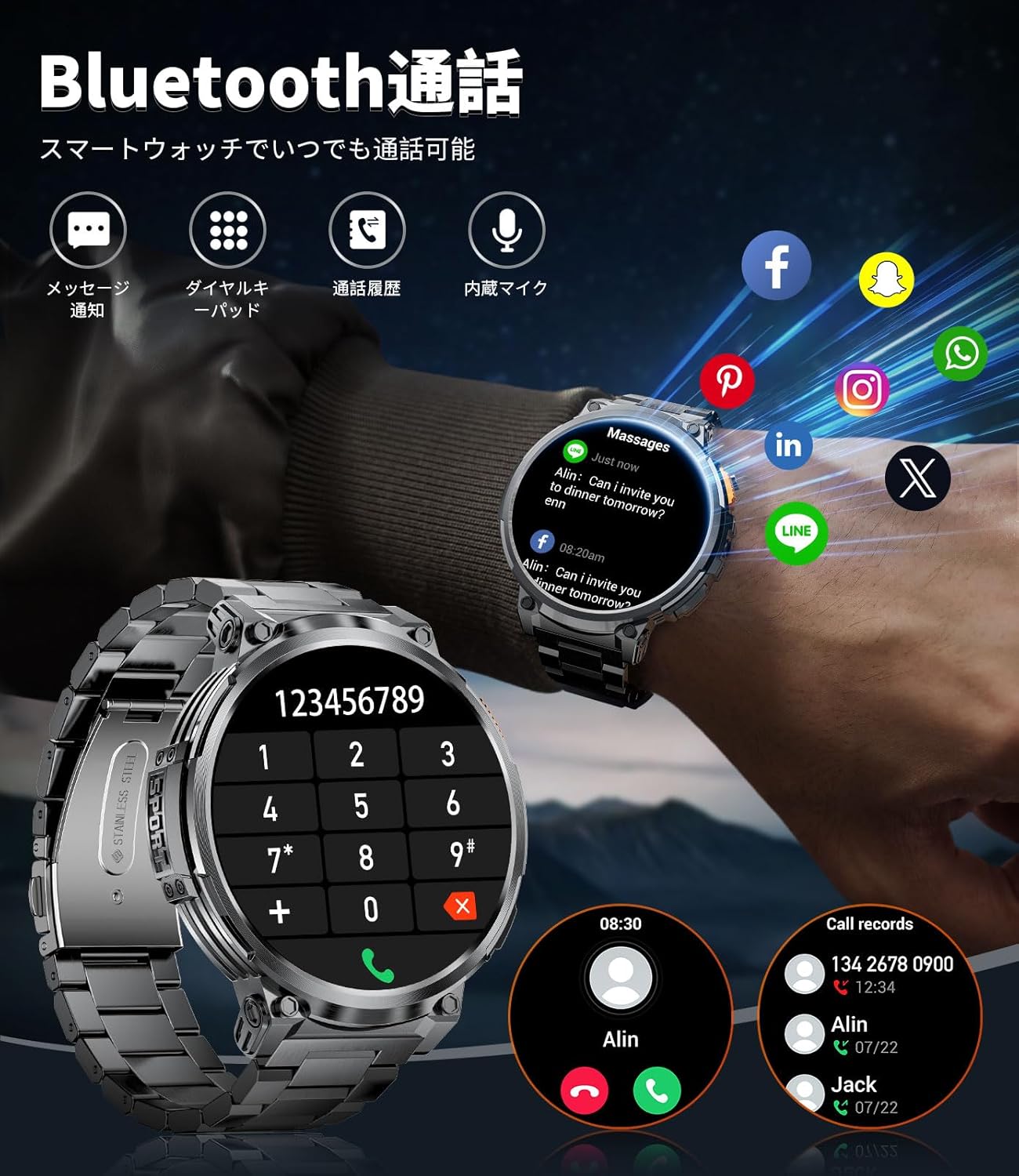
Image 4.3: The smartwatch displaying its Bluetooth call interface, including a dial pad and call logs.
4.4 Билдируулер
Receive notifications for calls, messages (SMS, LINE), and other apps directly on your smartwatch. Configure which app notifications you wish to receive through the FitcloudPro app settings.

Image 4.4: The smartwatch displaying incoming message notifications and the voice assistant interface.
4.5 Спорт режимдери жана активдүүлүккө көз салуу
The smartwatch includes over 20 built-in sports modes, with more than 100 additional modes available via the FitcloudPro app. It tracks various metrics such as calories burned, distance traveled, and steps taken in real-time.

Image 4.5: The smartwatch tracking key fitness metrics during different sports activities.
4.6 LED Flashlight Function
The smartwatch is equipped with a side-mounted LED flashlight. This feature can provide illumination for over 2 hours, useful for outdoor activities at night or during emergencies. To activate, refer to the watch's quick settings or specific button functions.

Image 4.6: The smartwatch's LED flashlight in use, demonstrating its utility in various dark environments.
4.7 Башка функциялар
The LIGE FV6 Smartwatch offers a range of additional features:
- Аба ырайы: View учурдагы аба ырайы жана божомолдор.
- Үн жардамчысы: Control your watch or phone with voice commands.
- Ойготкуч: Бир нече ойготкучтарды коюу.
- Секундомер жана таймер: Убакытты так өлчөө үчүн.
- Музыкалык башкаруу: Play, pause, skip tracks on your connected smartphone.
- Камераны башкаруу: Смартфонуңуздун камерасын алыстан иштетиңиз.
- Отуруучу эстеткич: Кыймылсыздык мезгилинен кийин көчүп кетүү тууралуу эскертет.
- Гидрация жөнүндө эскертүү: Prompts you to drink water.
- Телефонду табуу: Жоголгон смартфонуңузду табууга жардам берет.
- Түнкү режим: Adjusts display for comfortable viewаз жарыкта.
- Сырсөз орнотуу: Enhance device security.

Image 4.7: The smartwatch's multi-functional interface, showing various features accessible to the user.
5. Техникалык тейлөө
5.1 Аппаратты тазалоо
Regularly clean your smartwatch with a soft, dry cloth. For stubborn dirt, slightly dampen the cloth with water. Avoid using harsh chemicals or abrasive materials, as these can damage the device's finish or screen.
5.2 Сууга туруктуулук
The LIGE FV6 Smartwatch is rated IP68 for water and dust resistance. This means it can withstand immersion in water up to 1.5 meters for up to 30 minutes. It is suitable for daily use, such as hand washing or light rain. However, it is not recommended for hot showers, saunas, or deep-water diving. Avoid exposing the watch to high-pressure water or chemical liquids.

Image 5.1: The smartwatch highlighting its military-grade durability and IP68 water resistance, suitable for various environments.
5.3 Батареяга кам көрүү
To prolong battery life, avoid extreme temperatures. Do not leave the watch fully discharged for extended periods. Charge the device using only the provided charging cable.
5.4 Боону алмаштыруу
The LIGE FV6 Smartwatch comes with three interchangeable straps, allowing you to customize its appearance for different occasions. To replace a strap, locate the quick-release pins on the underside of the strap and gently slide them to detach. Align the new strap and secure the pins into the watch lugs.
6. Кыйынчылыктарды
If you encounter any issues with your LIGE FV6 Smartwatch, please refer to the following common solutions:
- Түзмөк күйбөй жатат: Саат толук заряддалганын текшериңиз. Аны заряддагычка кеминде 30 мүнөт туташтырыңыз.
- Смартфон менен жупташуу мүмкүн эмес:
- Bluetooth эки түзмөктө тең иштетилгенин текшериңиз.
- Саат смартфонуңуздун диапазонунда экенин текшериңиз.
- Акылдуу саатты да, смартфонуңузду да өчүрүп күйгүзүңүз.
- Телефонуңуздагы Bluetooth кэшин тазалаңыз (эгер бар болсо).
- Билдирмелер алынган жок:
- Check app notification settings in the FitcloudPro app.
- Колдонмо телефонуңузда фондо иштеп жатканын текшериңиз.
- Verify that your phone's notification permissions are granted to the FitcloudPro app.
- Аракеттерге так эмес көз салуу: Ensure the watch is worn snugly on your wrist. Calibrate settings in the FitcloudPro app if available.
- Батарейканын кыска мөөнөтү:
- Экран жарыктыгын азайтыңыз.
- Disable unnecessary features or frequent heart rate monitoring.
- Колдонуудан мурун сааттын толук заряддалганын текшериңиз.
For further assistance, please consult the FitcloudPro app's help section or contact customer support.
7. Техникалык шарттар

Image 7.1: A comprehensive overview of the LIGE FV6 Smartwatch's key features and specifications.
| Өзгөчөлүк | Спецификация |
|---|---|
| Бренд | LIGE |
| Модель номери | K66 |
| Дисплей өлчөмү | 1.85 дюйм |
| Дисплей түрү | IPS HD экраны |
| Батарея сыйымдуулугу | 730 мАч литий полимери |
| Заряддоо убактысы | Болжол менен 2 саат |
| Колдонуу убактысы | 15+ күн (адатта колдонуу) |
| Күтүү убактысы | 45+ күн |
| Байланыш | Bluetooth 5.3 |
| Суу каршылык | IP68 |
| Шайкештик | iPhone, Android смартфондору |
| Memory Storage | 256 MB |
| Өлчөмдөр | 20.5 x 9.7 x 2.5 см |
| Салмагы | 300 г |
| Өзгөчөлүктөр | Military-grade durability, LED Flashlight, Bluetooth Call, Voice Assistant, 100+ Sports Modes, Customizable Watch Faces |
8. Кепилдик жана колдоо
8.1 Кепилдик маалыматы
Your LIGE FV6 Smartwatch is covered by a standard manufacturer's warranty against defects in materials and workmanship. The specific terms and duration of the warranty may vary by region and retailer. Please retain your proof of purchase for warranty claims.
8.2 Кардарларды колдоо
For technical support, warranty inquiries, or any other questions regarding your LIGE FV6 Smartwatch, please refer to the contact information provided by your retailer or visit the official LIGE webколдоо булактары үчүн сайт.


