1. Продукт бүтүп калдыview
The MOBAPAD N1 HD is a versatile wireless controller designed for an enhanced gaming experience across multiple platforms. It features advanced technologies such as Hall Effect Joysticks for precise control, ALPS Dual-Axis Motors for immersive HD vibration, and six-axis motion control. This controller is compatible with Nintendo Switch, PC, iOS, and Android devices, offering seamless connectivity and responsive performance.

Сүрөт: алдыңкы view of the MOBAPAD N1 HD Wireless Controller, showcasing анын эргономикалык дизайны жана баскычтардын жайгашуусу.
2. Негизги өзгөчөлүктөрү
- Көп платформа шайкештиги: Fully compatible with Nintendo Switch, PC, iOS, and Android devices, ensuring broad usability.
- Холл эффектисинин джойстиктери: Provides smooth, precise, and durable control with minimal wear, ideal for accurate gaming.
- ALPS Dual-Axis Motors with HD Vibration: Delivers realistic and immersive haptic feedback for enhanced gameplay.
- Алты огулуу кыймылды башкаруу: Built-in gyroscope enables enhanced motion control for compatible games.
- NFC for Amiibo Scanning: Supports NFC technology for scanning Amiibo figures on Nintendo Switch.

Image: The controller illustrating its immersive motion control capabilities with swirling lines around it.

Image: The controller positioned in front of a collection of Amiibo figures, highlighting its NFC scanning function.

Image: The controller shown alongside icons for Switch, Android/iOS, and PC, demonstrating its multi-device compatibility.
3. Орнотуу жана туташуу
Follow these steps to connect your MOBAPAD N1 HD controller to your desired device.
3.1. Nintendo Switch'ке туташуу
- HOME Менюсунан тандаңыз Контроллер, анда Катуу/Тартипти өзгөртүү.
- While the screen is displaying "Press L + R on the controller", press and hold the Башкы бет баскычы on the MOBAPAD N1 HD controller for 3-5 seconds until the player LEDs begin to flash.
- Once connected, the player LED(s) corresponding to the controller number will remain lit.
3.2. Компьютерге туташуу (Windows)
- Connect the controller to your PC using a USB-C cable. The controller will be recognized as a wired controller.
- For wireless connection, ensure your PC has Bluetooth enabled. Go to Bluetooth & other devices settings.
- "Bluetooth же башка түзмөк кошуу" дегенди тандап, андан кийин "Bluetooth" дегенди тандаңыз.
- басып, кармап туруңуз Башкы бет баскычы on the controller until the LEDs flash rapidly, indicating pairing mode.
- Select "MOBAPAD N1 HD" from the list of available devices.
3.3. Connecting to iOS/Android Devices
- iOS же Android түзмөгүңүздө Bluetooth'ду иштетиңиз.
- Go to Bluetooth settings and search for new devices.
- басып, кармап туруңуз Башкы бет баскычы on the controller until the LEDs flash rapidly.
- Select "MOBAPAD N1 HD" from the list of available devices to pair.
4. Контроллерди иштетүү
Familiarize yourself with the controller's layout and functions for optimal gameplay.
4.1. Button Layout
- Сол аналогдук таякча: For movement and camera control. Features Hall Effect technology.
- Оң аналогдук таякча: For camera control and aiming. Features Hall Effect technology.
- D-Pad: Directional input for menu navigation and specific game actions.
- A/B/X/Y баскычтары: Стандарттык аракет баскычтары.
- Сол/Оң баскычтар: Ийин баскычтары.
- ZL/ZR баскычтары: Триггер баскычтары.
- Минус (-) баскычы: Typically for opening in-game menus or specific functions.
- Plus (+) баскычы: Typically for opening in-game menus or specific functions.
- Үй баскычы: Returns to the system's home screen. Also used for pairing and NFC scanning.
- Тартуу баскычы: Takes screenshots or video clips (Nintendo Switch).
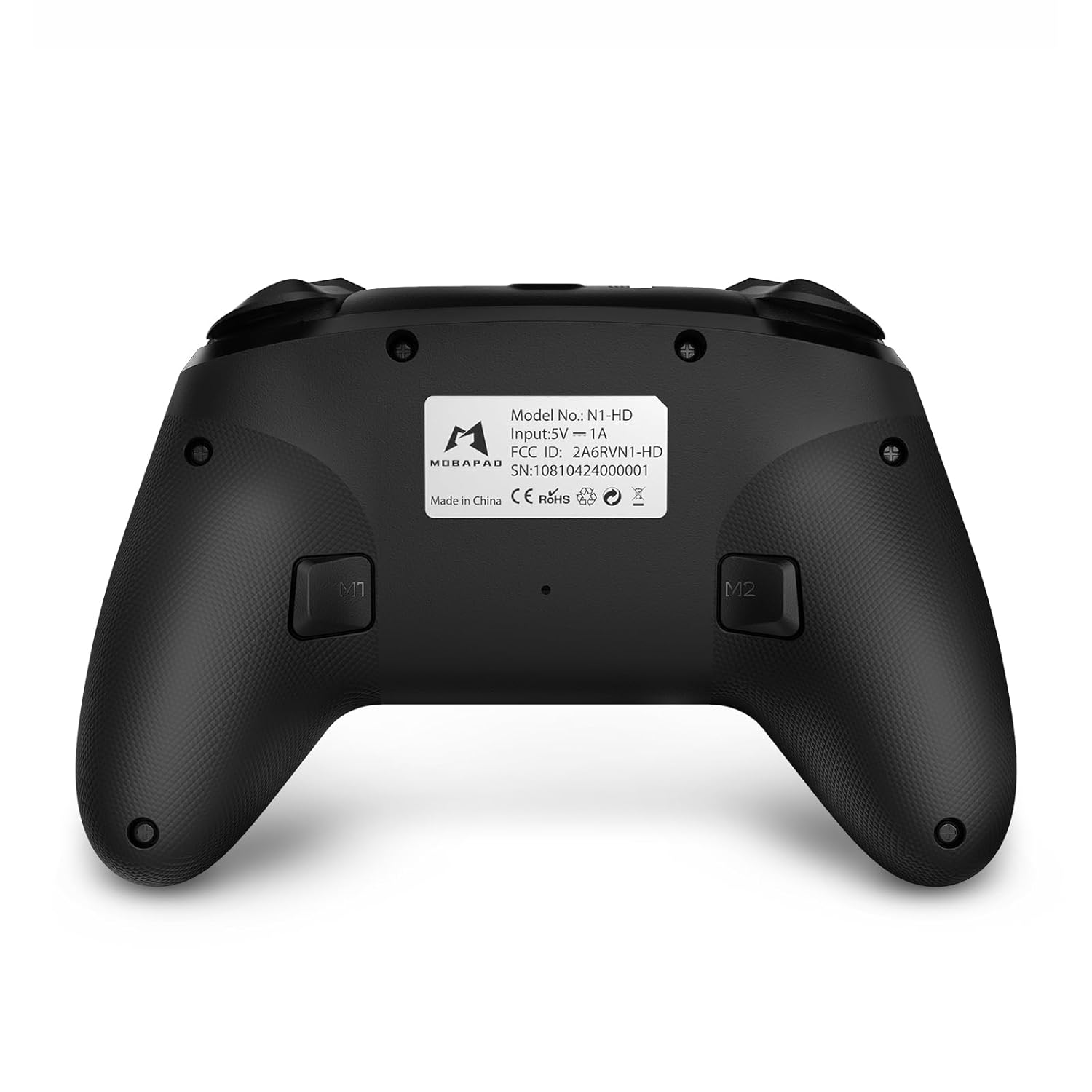
- M1/M2 баскычтары: Programmable back buttons for custom macros or remapping.
Сүрөт: деталдуу алдыңкы view of the MOBAPAD N1 HD controller, showing all buttons and joysticks.

Сүрөт: Артка view of the MOBAPAD N1 HD controller, highlighting the M1 and M2 programmable buttons and product label.
4.2. NFC Functionality (Amiibo Scanning)
To use the NFC function for Amiibo scanning on Nintendo Switch:
- Ensure your controller is connected to the Nintendo Switch.
- In a compatible game, when prompted to scan an Amiibo, place the Amiibo figure directly over the Башкы бет баскычы area on the controller.
- Hold the Amiibo in place until the game registers the scan.
5. Техникалык тейлөө жана кам көрүү
Туура техникалык тейлөө контроллериңиздин узак мөөнөттүү иштешин жана оптималдуу иштешин камсыз кылат.
- Тазалоо: Башкаргычты жумшак, кургак чүпүрөк менен сүртүңүз. Өтө кир болсо, бир аз сүртүңүзampчүпүрөктү суу менен. Катуу химиялык заттардан же абразивдүү материалдардан алыс болуңуз.
- Сактагыч: Контроллерди түз күн нурунан жана экстремалдык температурадан алыс салкын, кургак жерде сактаңыз.
- Батареяга кам көрүү: The controller contains a Lithium Ion battery. Avoid fully discharging the battery frequently. If storing for extended periods, charge the battery to about 50% to prolong its lifespan. Do not expose the battery to fire or extreme heat.
- Колдонуу: Башкаргычты түшүрүп алуудан же ага катуу сокку уруудан алыс болуңуз, анткени бул ички компоненттерге зыян келтириши мүмкүн.
6. Кыйынчылыктарды
If you encounter issues with your MOBAPAD N1 HD controller, refer to the following common solutions.
| Көйгөй | Мүмкүн себеп | Чечим |
|---|---|---|
| Контроллер туташпай жатат. | Low battery, out of range, incorrect pairing mode, interference. | Charge the controller fully. Ensure it is within range of the device. Re-enter pairing mode (hold Home button). Move closer to the device or away from other wireless devices. |
| Баскычтар же джойстиктер жооп бербейт. | Software glitch, physical obstruction, damage. | Restart the controller and the connected device. Check for any debris around the buttons/joysticks. If issues persist, contact customer support. |
| Vibration is weak or absent. | Vibration setting off, game does not support vibration, motor issue. | Check in-game settings and system settings to ensure vibration is enabled. Verify if the game supports vibration feedback. |
| NFC scanning fails. | Incorrect placement, game not prompting scan, controller not connected. | Ensure the Amiibo is placed directly over the Home button area. Confirm the game is prompting for an Amiibo scan. Verify controller is properly connected to the Switch. |
7. Техникалык шарттар
| Өзгөчөлүк | Деталь |
|---|---|
| Модель номери | Mobapad N1 HD Black |
| Өлчөмдөрү (L x W x Y) | 5.91 x 2.36 x 3.94 дюйм |
| Салмагы | 7.05 унция |
| Батарея түрү | 1 литий-иондук батарейка (кошулган) |
| Байланыш | Wireless (Bluetooth), USB-C (wired) |
| Шайкештик | Nintendo Switch, PC, iOS, Android |
| Өзгөчөлүктөр | Hall Effect Joysticks, ALPS Dual-Axis Motors, HD Vibration, Six-Axis Gyroscope, NFC |
8. Кепилдик жана колдоо
For warranty information or technical support, please contact MOBAPAD customer service. Refer to the official MOBAPAD webКепилдиктин белгилүү бир шарттары жана байланыш маалыматтары үчүн сайтка же сатып алуу документтерине кайрылыңыз.
You can visit the official MOBAPAD store on Amazon for more information: MOBAPAD Store


