Introduction
The August MR285 is a versatile 2-in-1 Bluetooth audio adapter, functioning as both a transmitter and a receiver. It allows you to wirelessly stream audio from various sources to Bluetooth-enabled devices or add Bluetooth receiving capabilities to wired audio systems. With its multiple connectivity options and portable design, the MR285 offers a comprehensive solution for your audio needs.
Пакеттин мазмуну
- August MR285 Bluetooth Audio Transmitter and Receiver
- 3.5 мм аудио кабель
- RCA аудио кабели
- USB-C заряддоо кабели
- User Manual

Image: Contents of the August MR285 retail box, showing the device, various cables, and the user manual.
Продукт бүттүview
Түзмөктүн жайгашуусу

Сүрөт: алдыңкы view of the August MR285 showing the display, central button, and control buttons on the side.

Сүрөт: Арткы view of the August MR285 highlighting the USB Port, AUX-In/Out, RCA-In/Out, Coaxial-In, Optical-In, USB-C Charging Port, and Charging Indicator.

Image: Close-up of the control buttons on the side of the MR285, indicating Signal Source Switch, Volume +/- Control, LED Light, and Microphone.
Негизги өзгөчөлүктөрү
- Dual Transmitter and Receiver (2-in-1): Functions as both a Bluetooth audio transmitter (TX) and receiver (RX).
- NFC Bluetooth 5.3: Provides fast, low-latency connections with NFC tap-to-pair functionality and multipoint connection for up to two devices.
- Multiple Audio Inputs/Outputs: Supports USB, 3.5mm AUX, Optical, Coaxial, and RCA connections for wide compatibility.
- Wired Bypass Mode: Allows conversion between coaxial/optical and AUX/RCA without Bluetooth, ensuring lossless wired audio.
- Кайра заряддалуучу батарея: Built-in 1000mAh battery provides 10-12 hours of wireless audio on a single charge.
- Камтылган микрофон: Enables hands-free calls when used in receiver mode.
- LED Screen with RGB Display: Displays current mode and connection status, with RGB effects for low battery warnings.

Image: Diagram illustrating the MR285's dual functionality as a Bluetooth Receiver (RX Mode) and Transmitter (TX Mode).

Сүрөт: Мисamples of the MR285's LED screen displays for different modes and statuses, including "BLUE" (Bluetooth), "LINE", and "OFF".
Image: The MR285 connected to a USB-C charging cable, highlighting its built-in 1000mAh rechargeable battery.

Image: Diagram showing the compact dimensions of the MR285: 10cm length, 7.5cm width, and 2.2cm height.
Жайгашуу
Аппаратты заряддоо
Connect the supplied USB-C charging cable to the MR285's USB-C port and a USB power source (e.g., computer USB port, USB wall adapter). The charging indicator will illuminate during charging and turn off when fully charged. A full charge takes approximately 2 hours.
Күйгүзүү/өчүрүү
To power on, press and hold the central button until the screen illuminates. To power off, press and hold the central button until the screen turns off.
Иштөө режимдери
The August MR285 operates in two main modes: Transmitter (TX) and Receiver (RX). Use the TX/RX switch on the side of the device to select the desired mode.
Receiver (RX) режими
In RX mode, the MR285 receives Bluetooth audio from your smartphone, tablet, or computer and outputs it to a wired audio system (e.g., speakers, headphones, car stereo) via AUX, RCA, Optical, or Coaxial connections.
- Switch the MR285 to RX mode. The screen will display "BLUE" and the Bluetooth indicator will flash.
- Enable Bluetooth on your source device (smartphone, tablet).
- Издөө "August MR285" in your device's Bluetooth settings and select it to pair.
- Once paired, the Bluetooth indicator on the MR285 will become solid.
- Connect the MR285 to your wired audio system using the appropriate cable (3.5mm AUX, RCA, Optical, or Coaxial).
Көп чекиттүү туташуу (RX режими)
The MR285 can connect to two Bluetooth source devices simultaneously in RX mode. After pairing the first device, put the MR285 back into pairing mode (press and hold the central button for 3 seconds) and pair the second device. Audio will play from the currently active source.
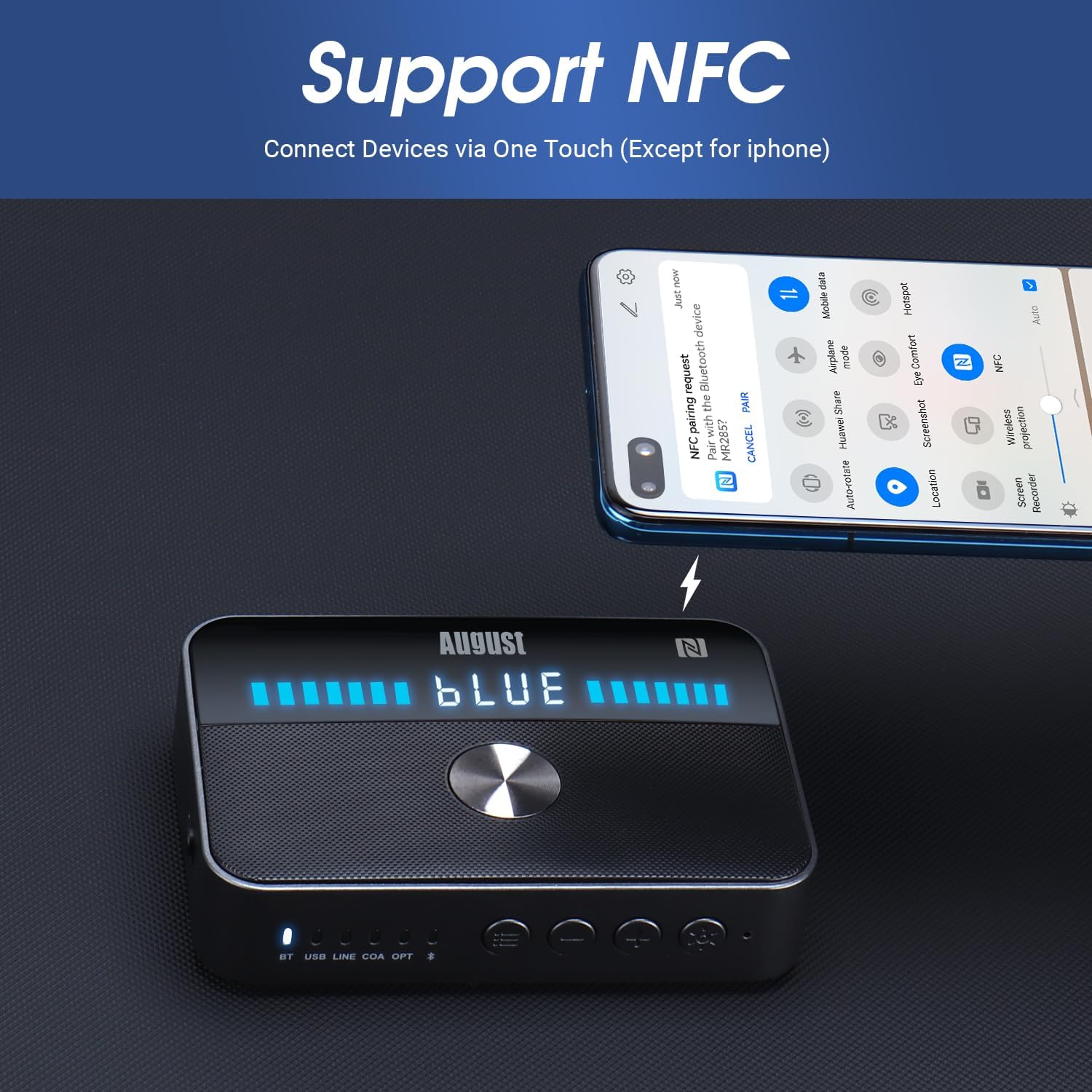
Image: Diagram showing the MR285 in RX mode, receiving audio from two smartphones/laptops and outputting to wired speakers or a Hi-Fi system.
Өткөргүч (TX) режими
In TX mode, the MR285 transmits audio from non-Bluetooth devices (e.g., TV, PC, CD player) to Bluetooth-enabled headphones or speakers.
- Switch the MR285 to TX mode. The screen will display "BLUE" and the Bluetooth indicator will flash.
- Bluetooth гарнитураңызды же динамигиңизди жупташтыруу режимине коюңуз.
- The MR285 will automatically search for and connect to nearby Bluetooth devices. Once connected, the Bluetooth indicator will become solid.
- Connect the MR285 to your audio source (TV, PC) using the appropriate cable (3.5mm AUX, RCA, Optical, or Coaxial).
Dual Audio Connection (TX Mode)
The MR285 can transmit audio to two Bluetooth headphones/speakers simultaneously in TX mode. After connecting the first device, put the MR285 back into pairing mode (press and hold the central button for 3 seconds) and pair the second device.

Image: Diagram showing the MR285 in TX mode, transmitting audio from a TV or other audio source to two pairs of Bluetooth headphones.
NFC Pairing (RX Mode Only)
For Android devices with NFC, you can quickly pair by tapping your device to the NFC area on the MR285.
- Ensure NFC is enabled on your Android device.
- Switch the MR285 to RX mode.
- Tap your Android device to the "N" logo on the top of the MR285.
- Түзмөгүңүздөгү жупташтыруу өтүнүчүн ырастаңыз.

Image: Image demonstrating NFC pairing by tapping an Android phone to the MR285.
USB Stick Play Mode
The MR285 can play audio fileтүздөн-түз USB флэш-дискинен.
- Аудио камтыган USB флэш-дискти салыңыз files into the USB port on the MR285.
- The device will automatically switch to USB Play Mode and begin playing.
- Use the volume buttons to control playback.

Image: The MR285 playing music from a USB stick, connected to a vintage-style radio via Bluetooth.
Wired Bypass Mode
The MR285 can act as a wired audio converter, allowing you to convert coaxial or optical audio signals to AUX or RCA without Bluetooth. This is useful for connecting devices with different audio output types.
- Connect your audio source (e.g., TV) to the MR285's Optical or Coaxial input.
- Connect the MR285's AUX or RCA output to your audio system (e.g., soundbar, speakers).
- Ensure the MR285 is powered on and in the correct input mode.

Image: Diagram illustrating the MR285 in Bypass Mode, converting audio from a TV (via optical/coaxial) to a soundbar (via AUX/RCA).
Техникалык тейлөө
- Аппаратты кургак кармаңыз. ным же суюктуктардын таасиринен алыс болуңуз.
- Аппаратты жумшак, кургак чүпүрөк менен тазалаңыз. Абразивдүү тазалагычтарды же эриткичтерди колдонбоңуз.
- Avoid exposing the device to extreme temperatures (hot or cold) or direct sunlight.
- Аппаратты өз алдынча бөлүүгө же оңдоого аракет кылбаңыз. Бардык оңдоо иштери үчүн квалификациялуу тейлөө кызматкерлерине кайрылыңыз.
Проблемаларды чечүү
- Түзмөк күйбөй жатат.
- Ensure the battery is charged. Connect to a power source using the USB-C cable and allow it to charge for a few minutes before attempting to power on again.
- Bluetooth түзмөгү менен жупташтыруу мүмкүн эмес.
- Ensure the MR285 is in the correct TX/RX mode and in pairing mode (Bluetooth indicator flashing). Move devices closer to each other. Clear previous pairings on both the MR285 and your Bluetooth device if necessary, then try pairing again.
- Аудио чыгышы жок.
- Check all cable connections to ensure they are secure. Ensure the correct input/output mode is selected on the MR285 and your audio system. Adjust volume levels on both the MR285 and the connected audio device.
- Үн сапаты начар же үзгүлтүктүү.
- Reduce the distance between the MR285 and the connected Bluetooth device. Avoid obstacles that may block the signal. Check for interference from other wireless devices (e.g., Wi-Fi routers, cordless phones).
Техникалык шарттар
| Өзгөчөлүк | Деталь |
|---|---|
| Модел | MR285B |
| Bluetooth версиясы | 5.3 |
| Иштөө режимдери | Transmitter (TX), Receiver (RX), Wired Bypass, USB Playback |
| Аудио киргизүү | 3.5mm AUX, RCA, Optical, Coaxial, USB |
| Аудио чыгуулар | 3.5mm AUX, RCA, Optical, Coaxial |
| Батарея сыйымдуулугу | 1000mAh |
| Оюн убактысы | 10-12 саат |
| Заряддоо убактысы | Болжол менен 2 саат |
| Өлчөмдөр | 10см x 7.5см x 2.2см (3.94 x 2.95 x 0.98 дюйм) |
| Салмагы | 106 грамм (3.74 унция) |
| Өзгөчөлүктөр | NFC, Multipoint Connection (TX/RX), LED Display, Built-in Microphone |
Кепилдик жана колдоо
This product comes with a standard manufacturer's warranty. For detailed warranty information, technical support, or to download the full user manual, please visit the August International webсайт.
Колдонуучунун толук нускасын жүктөп алыңыз
For further assistance, you may contact August support via email: service@augustint.com


