1. Киришүү
The Matek Mateksys AP_PERIPH CAN-L4-BM is an ultra-precise digital power monitor designed for applications requiring accurate current and voltage measurements via the CAN bus. It utilizes the TI INA239 IC and runs ArduPilot AP_Periph firmware, supporting the CAN/DroneCAN protocol. This device provides reliable power monitoring without the need for calibration.
2. Өзгөчөлүктөрү
- Ultra-precise digital power monitoring.
- Based on TI INA239 and ArduPilot AP_Periph firmware.
- Supports CAN/DroneCAN protocol.
- No calibration required for accurate current and bus voltage readouts.
- Low power loss due to 200µΩ typical conductive path resistance.
3. Техникалык шарттар
- MCU: STM32L431xC, 256KB Flash
- Power Monitor IC: INA239 (85-V, 16-Bit, High-Precision)
- Батарея Voltage Sense Input: 0~85V
- Current Sense Range: 0~204.8A
- Load Current on Sensing Resistor: 150A (Continuous), 204.8A (Burst)
- Тtage Тактыгы: 0.1%
- Учурдагы тактык: 2%
- Интерфейс: CAN (DroneCAN Protocol), UART2 (spare, DFU), ST debug (SWCLK & SWDIO)
- Электр камсыздоо: 4.5~5.5V @5V төшөнчү/төймө
- Энергияны керектөө: 10мА
- Иштөө температуралары: -40~85 °C
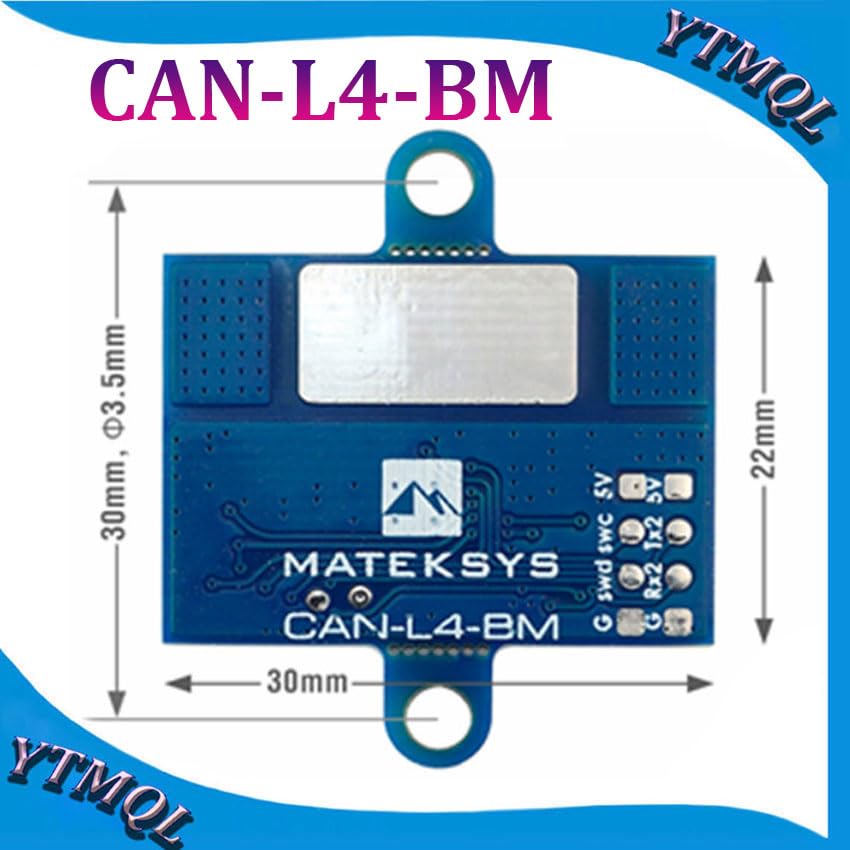
- Башкарманын өлчөмү: 30мм x 22мм x 3мм
- Салмагы: 4g
- Микропрограмма: ArduPilot AP_Periph (Update via DroneCAN GUI Tool)
4. Продукт бүтүп калдыview
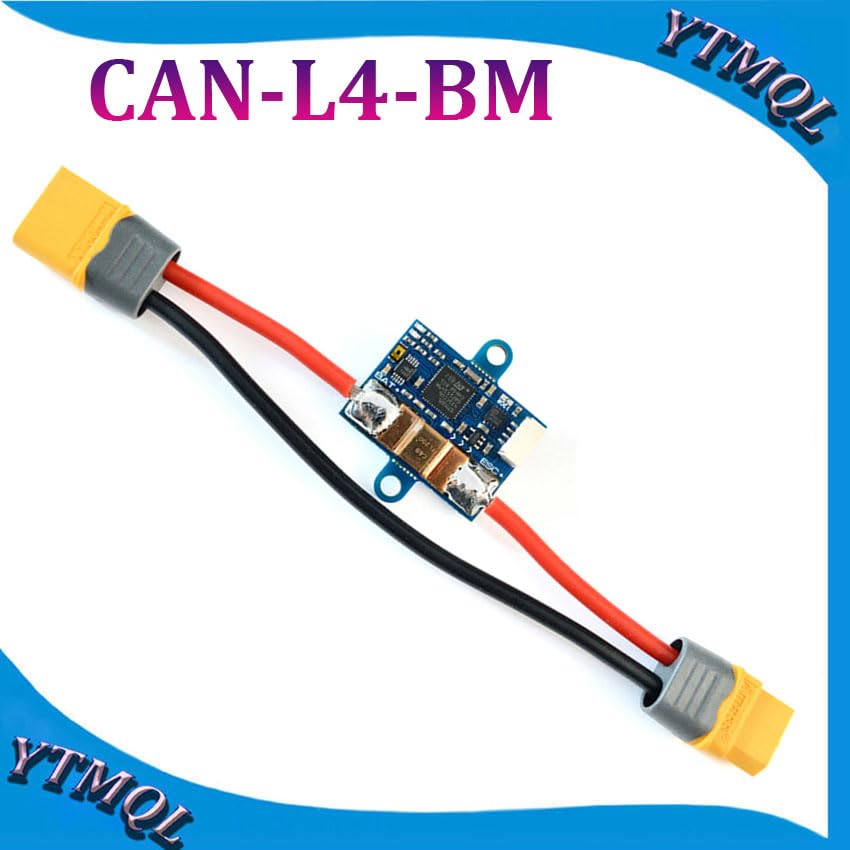
Компоненттин макети


5. Орнотуу жана орнотуу
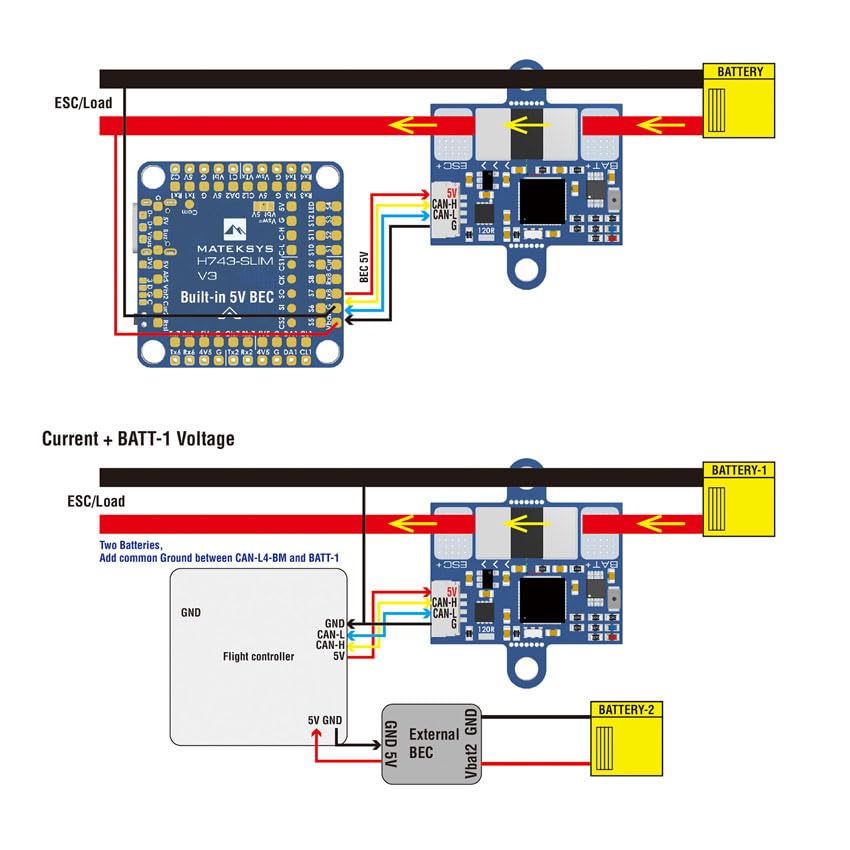
Wiring Instructions
Proper wiring is crucial for accurate readings and safe operation of the CAN-L4-BM.

Жалпы зымдар боюнча кеңештер
- Solder the positive wires as close as possible to both sides of the current sensing resistor on the board for optimal accuracy.
- Ensure a common ground connection between the flight controller and the ESC/Load to prevent ground loops and ensure stable operation.
- If CAN wires are excessively long, bridge the 120R jumper on the CAN-L4-BM board to maintain signal integrity.
- The large pad on the bottom side of the board is a dead pad and has no circuit network; it can be used for structural support if needed.
- The two mounting ears can be carefully cut off if not required for installation in space-constrained environments.
Микропрограмманын конфигурациясы
The CAN-L4-BM runs ArduPilot AP_Periph firmware. Configuration is performed via the DroneCAN protocol through your flight controller's settings.
- Connect the CAN-L4-BM to your flight controller's CAN bus port.
- Set the appropriate parameter in your flight controller's firmware to enable the CAN driver:
- For CAN bus1:
CAN_P1_DRIVER = 1 - For CAN bus2:
CAN_P2_DRIVER = 1
- For CAN bus1:
- Configure battery monitoring by setting:
BATTx_MONITOR = 8(DroneCAN-BatteryInfo), where 'x' corresponds to the battery monitor instance you are configuring. - Firmware updates for the CAN-L4-BM can be performed using the DroneCAN GUI Tool.
6. Операция
LED көрсөткүчтөрү
- Көк LED (Тез күйүп-өчүүчү): Indicates the board is in the process of booting up.
- Көк LED (жай күйүп-өчүп): Indicates the board is working correctly and communicating via CAN.
- Кызыл LED: Indicates that 3.3V power is present on the board.
Маалымат мониторинги
Once properly configured and powered, the flight controller will receive accurate current and bus voltage data from the CAN-L4-BM via the DroneCAN bus. This data can be logged and monitored through your flight controller's telemetry system or compatible ground station software.
7. Техникалык тейлөө жана мыкты тажрыйбалар
- Regularly inspect all soldered connections for integrity and signs of wear or corrosion.
- Keep the board free from dust, moisture, and debris to ensure optimal performance and longevity.
- Ensure proper ventilation if operating the device in enclosed spaces, although the CAN-L4-BM has a wide operating temperature range.
- Avoid exposing the board to extreme environmental conditions (e.g., excessive humidity, direct water contact) beyond its specified operating range.
8. Кыйынчылыктарды
Жалпы маселелер
- No data from monitor:
- Verify all CAN bus connections (CAN-H, CAN-L, GND, 5V) are secure and correct.
- Check the LED indicators for proper boot and operation (a slow blue blink indicates normal function).
- камсыз кылуу
CAN_P1_DRIVERorCAN_P2_DRIVERis set correctly in the flight controller parameters. - Муну ырастаңыз
BATTx_MONITOR = 8is set for the correct battery monitor instance. - Check for any short circuits or incorrect voltage supply to the CAN-L4-BM board.
- Туура эмес окуулар:
- Ensure positive wires are soldered as close as possible to the current sensing resistor on the board.
- Verify common ground connections between all components in the power system.
- Check for any physical damage to the board or its components that might affect sensor accuracy.
- Плата күйбөй жатат:
- Confirm that a stable 4.5~5.5V supply is provided to the 5V pad/pin.
- Check the Red 3.3V indicator LED; if it's off, there might be a power issue.
- Inspect all power supply wiring for breaks or incorrect connections.
9. Байланыш жана колдоо
For further assistance, technical support, or to access additional resources, please refer to the official Mateksys documentation available on their website or consult relevant community forums for ArduPilot and DroneCAN users.


