1. Киришүү
The FSP VITA GM 850W Power Supply is designed to provide stable and efficient power for your computer system. Featuring 80 PLUS Gold certification, a fully modular design, and advanced protection features, it is suitable for a wide range of applications, including gaming and professional workstations. This manual provides essential information for the proper installation, operation, and maintenance of your power supply unit.

Сүрөт 1.1: жогорудан ылдыйга view of the FSP VITA GM 850W Power Supply, showcasing its compact design and fan grill.
2. Коопсуздук маалыматы
Please read and understand all safety instructions before installing or operating the power supply. Failure to do so may result in personal injury or damage to your equipment.
- Электр жабдыгын ачпаңыз casing. Жогорку тtages are present inside, even when the unit is unplugged. There are no user-serviceable parts inside. Opening the casing кепилдикти жокко чыгарат.
- Электр менен жабдууну жакшы желдетилген жерге, жылуулук булактарынан, тике күн нурунан жана нымдан алыс орнотуңуз.
- Электр кубаты жерге туташтырылган электр розеткасына туташтырылганын текшериңиз.
- Use only the modular cables provided with this power supply. Using incompatible cables may cause damage to the PSU and connected components.
- Before installation or maintenance, always disconnect the AC power cord from the wall outlet.
- Электр булагынын үстүнө буюмдарды коюудан же анын желдетүү тешиктерин жаап коюудан алыс болуңуз.
3. Пакеттин мазмуну
Пакетиңизде бардык буюмдар бар экенин текшериңиз:
- FSP VITA GM 850W Power Supply Unit
- Modular Cable Set (including 12V-2x6 PCIe cable)
- AC Power Cord
- Монтаждоо бурамалар
- Колдонуучунун Колдонмосу (бул документ)
4. Продукт бүтүп калдыview
The FSP VITA GM 850W features a fully modular design, allowing for clean cable management and improved airflow within your PC case. Key components include the main power unit, a 120mm hydraulic bearing fan for cooling, and various modular connectors for system components.
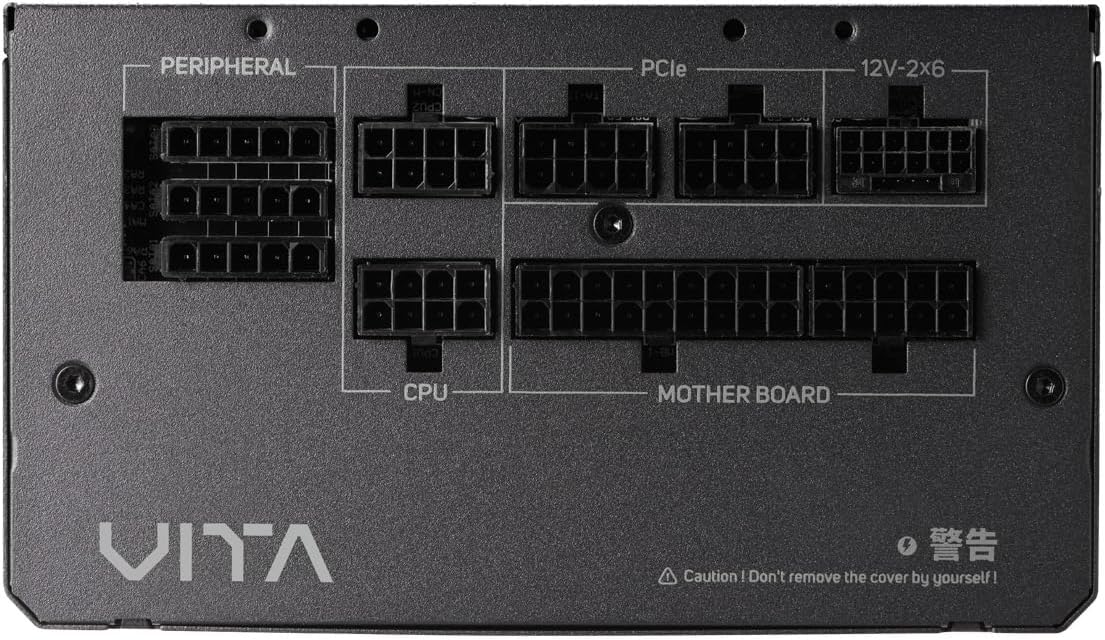
Сүрөт 4.1: Жакын пландан view of the modular connector panel on the FSP VITA GM 850W Power Supply, showing labeled ports for Motherboard, CPU, PCIe, Peripheral, and 12V-2x6.
4.1. Modular Connectors
The power supply features clearly labeled ports for connecting various components:
- Motherboard: Main 24-pin ATX connector.
- CPU: 8-pin (4+4 pin) EPS connectors for CPU power.
- PCIe: 8-pin (6+2 pin) connectors for graphics cards.
- 12V-2x6: Dedicated 12V-2x6 connector for high-power PCIe 5.1 graphics cards.
- Перифериялык: Connectors for SATA and Molex devices.
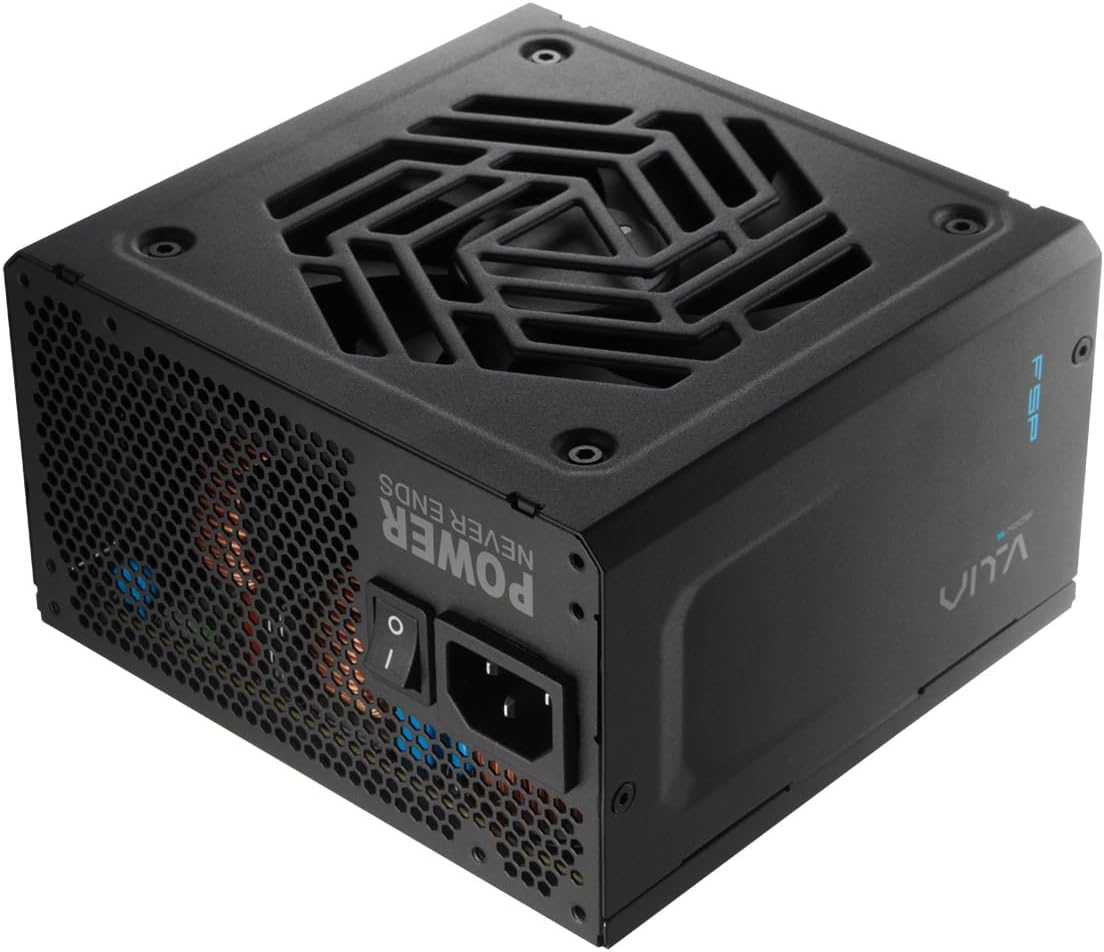
Сүрөт 4.2: Арткы view of the FSP VITA GM 850W Power Supply, showing the AC power inlet, power switch, and ventilation grille.
5. Орнотуу жана орнотуу
Follow these steps to properly install your FSP VITA GM 850W Power Supply into your computer system.
5.1. Физикалык орнотуу
- Компьютериңиздин өчүрүлгөнүн жана розеткадан суурулуп турганын текшериңиз.
- Электр менен жабдууну орнотуу аймагына кирүү үчүн компьютериңиздин корпусун ачыңыз.
- Carefully place the FSP VITA GM 850W Power Supply into the designated bay, ensuring the fan faces the correct direction for optimal airflow (typically facing downwards if there's a bottom vent, or inwards if mounted at the top).
- Берилген монтаждоо бурамалар менен корпуска кубат менен камсыздоону бекитиңиз.
5.2. Кабелдик байланыштар
Connect the necessary modular cables to your power supply and system components. Only connect the cables you need to minimize clutter and improve airflow.

Image 5.1: Diagram illustrating the various modular cables included with the FSP VITA GM 850W Power Supply, including Motherboard, CPU, PCIe 6+2 Pin, PCIe 12V-2x6, SATA, and SATA/Molex cables, along with their approximate lengths in millimeters.
- Connect the 24-pin ATX cable from the power supply to the motherboard.
- Connect the 8-pin (4+4 pin) EPS cable(s) from the power supply to the CPU power connector(s) on the motherboard.
- For graphics cards, connect the appropriate 8-pin (6+2 pin) PCIe cables or the 12V-2x6 cable (for compatible PCIe 5.1 GPUs) from the power supply to the graphics card(s).
- SATA кубат кабелдерин сактоо дисктериңизге (HDDs, SSDs) жана башка SATA менен иштеген түзмөктөргө туташтырыңыз.
- Connect Molex cables to any peripheral devices that require them.
- Ensure all cable connections are secure and properly seated.
- Компьютериңиздин корпусун жабыңыз.
- AC кубат шнурун кубат булагына, андан кийин жерге туташтырылган розеткага туташтырыңыз.
6. Иштөө нускамалары
Once installed, operating your FSP VITA GM 850W Power Supply is straightforward.
6.1. Күйгүзүү / Өчүрүү
- Кубат булагынын арткы жагындагы кубат которгучу 'ON' (I) абалында экенин текшериңиз.
- Системаны баштоо үчүн компьютериңиздин корпусундагы кубат баскычын басыңыз.
- To power off, shut down your operating system normally. For complete power disconnection, switch the power supply to the 'OFF' (O) position and unplug the AC cord.
6.2. Efficiency and Fan Operation
The VITA GM 850W is 80 PLUS Gold certified, meaning it operates with over 90% efficiency at typical loads. This reduces wasted energy, heat generation, and noise. The integrated 120mm HYB fan is designed for quiet and efficient cooling, adjusting its speed based on the power supply's temperature and load to maintain optimal performance and acoustics.

Image 6.1: Graph illustrating the fan speed (RPM) and acoustic noise (dBA) of the 120mm HYB fan in the FSP VITA GM 850W Power Supply across different load percentages, demonstrating quiet operation at lower loads.
7. Техникалык тейлөө
Туура тейлөө электр менен камсыздооңуздун узак мөөнөттүү жана оптималдуу иштешин камсыз кылат.
- Тазалоо: Periodically clean the exterior of the power supply and its fan grille to prevent dust buildup. Use a soft, dry cloth or compressed air. Ensure the power supply is unplugged before cleaning.
- Аба агымы: Электр менен камсыздоонун кирүүчү жана чыгуучу желдеткичтери бүтөлүп калбаганын текшериңиз. Натыйжалуу муздатуу үчүн жакшы аба агымы абдан маанилүү.
- Кабелдик башкаруу: Maintain tidy cable management within your PC case to promote better airflow and prevent cables from interfering with the power supply fan.
8. Кыйынчылыктарды
If you encounter issues with your FSP VITA GM 850W Power Supply, refer to the following common problems and solutions.
8.1. Жалпы маселелер
- Кубат жок:
- AC кубат шнурунун кубат булагына жана розеткага бекем туташкандыгын текшериңиз.
- Ensure the power switch on the PSU is in the 'ON' (I) position.
- Розетка иштеп жатканын башка түзмөктү сайып текшериңиз.
- Check all modular cable connections to the motherboard and components.
- Системанын туруксуздугу/Кокус өчүрүүлөр:
- This could indicate an overloaded system or a component issue. Ensure your system's power requirements do not exceed 850W.
- Check for proper ventilation and ensure the power supply fan is spinning. Overheating can trigger protection mechanisms.
- Бардык кабелдик туташуулар коопсуз экендигин текшериңиз.
- Катуу желдеткичтин үнү:
- Ensure the power supply's fan intake/exhaust is not obstructed.
- Clean any dust buildup on the fan blades or grille.
- High system load will naturally increase fan speed. If noise is excessive at low loads, contact support.
8.2. Коргоо өзгөчөлүктөрү
The FSP VITA GM 850W Power Supply includes several protection features to safeguard your system:
- OVP (Overvoltage Коргоо): Shuts down the PSU if output voltages exceed a safe level.
- OCP (ашыкча ток коргоо): Shuts down the PSU if current on a single rail exceeds a safe level.
- OPP (Overpower Protection): Shuts down the PSU if the total power draw exceeds its maximum wattage.
- UVP (Undervoltage Коргоо): Shuts down the PSU if output voltages drop below a safe level.
- SCP (Short Circuit Protection): Shuts down the PSU in case of a short circuit on any output rail.
- OTP (Overtemperature Protection): Shuts down the PSU if internal temperatures become too high.

Image 8.1: Diagram illustrating the comprehensive protection features of the FSP VITA GM 850W Power Supply, including OVP, OCP, OPP, NLO, OTP, SCP, UVP, and SIP.
If any of these protections are triggered, the power supply will shut down. Disconnect the AC power, check your system for faults, and then reconnect power to attempt a restart.
9. Техникалык шарттар
Detailed technical specifications for the FSP VITA GM 850W Power Supply:
| Өзгөчөлүк | Спецификация |
|---|---|
| Модель аты | VITA-850GM |
| Бренд | FSP |
| Чыгуу Wattage | 850 Ватт |
| 80 PLUS сертификаты | Алтын |
| Форма фактору | ATX |
| Өлчөмдөрү (L x W x Y) | 140 x 150 x 86 мм (5.5 x 5.9 x 3.4 дюйм) |
| Элемент Салмагы | 3.1 килограмм (6.82 фунт) |
| Муздатуу ыкмасы | Air (120mm HYB Fan) |
| Конденсаторлор | 105°C Japanese Bulk Capacitors |
| Туташтыргыч түрү | ATX, PCI Express (Full Modular) |
| Шайкеш түзмөктөр | Computer, Gaming Console |
| Коргоо өзгөчөлүктөрү | OVP, OCP, SCP, OPP, UVP, OTP, NLO, SIP |
10. Кепилдик
The FSP VITA GM 850W Power Supply comes with a 10 жылдык кепилдик from the date of purchase. This warranty covers defects in materials and workmanship under normal use. Please retain your proof of purchase for warranty claims. The warranty does not cover damage caused by improper installation, accident, abuse, misuse, natural disaster, insufficient or excessive electrical supply, abnormal mechanical or environmental conditions, or any unauthorized disassembly, repair, or modification.
11. Колдоо
For technical assistance, troubleshooting beyond this manual, or warranty inquiries, please visit the official FSP website or contact FSP customer support. You can often find FAQs, driver downloads, and contact information on the manufacturer's support pages.
Көбүрөөк маалымат алуу үчүн төмөнкүгө кириңиз: FSP Official Store on Amazon


