1. Киришүү
Welcome to the CUBOT GT1 Smartwatch user manual. This guide provides essential information for setting up, operating, maintaining, and troubleshooting your new smartwatch. The CUBOT GT1 is designed for outdoor enthusiasts, featuring a durable zinc alloy casing, high-precision dual-frequency GPS, a 1.43-inch HD AMOLED display, and comprehensive health monitoring capabilities.
2. Орнотуу
2.1 Пакеттин мазмуну
- CUBOT GT1 Smartwatch
- Заряддоо кабели
- Колдонуучунун Колдонмосу (бул документ)
2.2 Алгачкы заряддоо
Before first use, fully charge your CUBOT GT1 Smartwatch. Connect the provided charging cable to the charging port on the back of the watch and to a standard USB power adapter (not included). The watch will display a charging indicator. A full charge can take approximately 2-3 hours.
Note: The watch features a 480 mAh high-voltage polymer battery. A single charge can last up to 90 days in standby mode, 20-30 days with normal daily use, and up to 22 hours with continuous GPS activation.
2.3 Смартфонуңуз менен жупташуу
- Download the official CUBOT smartwatch application from your smartphone's app store (compatible with Android 9.0+ and iOS 9.0+).
- Смартфонуңузда Bluetooth иштетилгенин текшериңиз.
- Open the CUBOT app and follow the on-screen instructions to create an account or log in.
- Колдонмонун ичинен "Түзмөк кошуу" же "Жаңы түзмөктү жупташтыруу" дегенди тандаңыз.
- The app will search for your CUBOT GT1. Select it from the list of available devices.
- Смартфонуңузда да, акылдуу саатыңызда да жупташтыруу өтүнүчүн ырастаңыз.
Once paired, the watch will synchronize data and notifications with your smartphone.
3. Иштөө нускамалары
3.1 Негизги башкаруу каражаттары
The CUBOT GT1 features a 1.43-inch HD AMOLED touchscreen and two physical buttons:
- Сенсордук экран: Swipe to navigate menus, tap to select, swipe down for quick settings, swipe up for notifications.
- КҮЧ баскычы: Press to wake the screen, return to the main watch face, or access the main menu.
- БЫЙЫМ баскычы: Configurable for quick access to a specific function (e.g., sport mode). Long press for stopwatch.
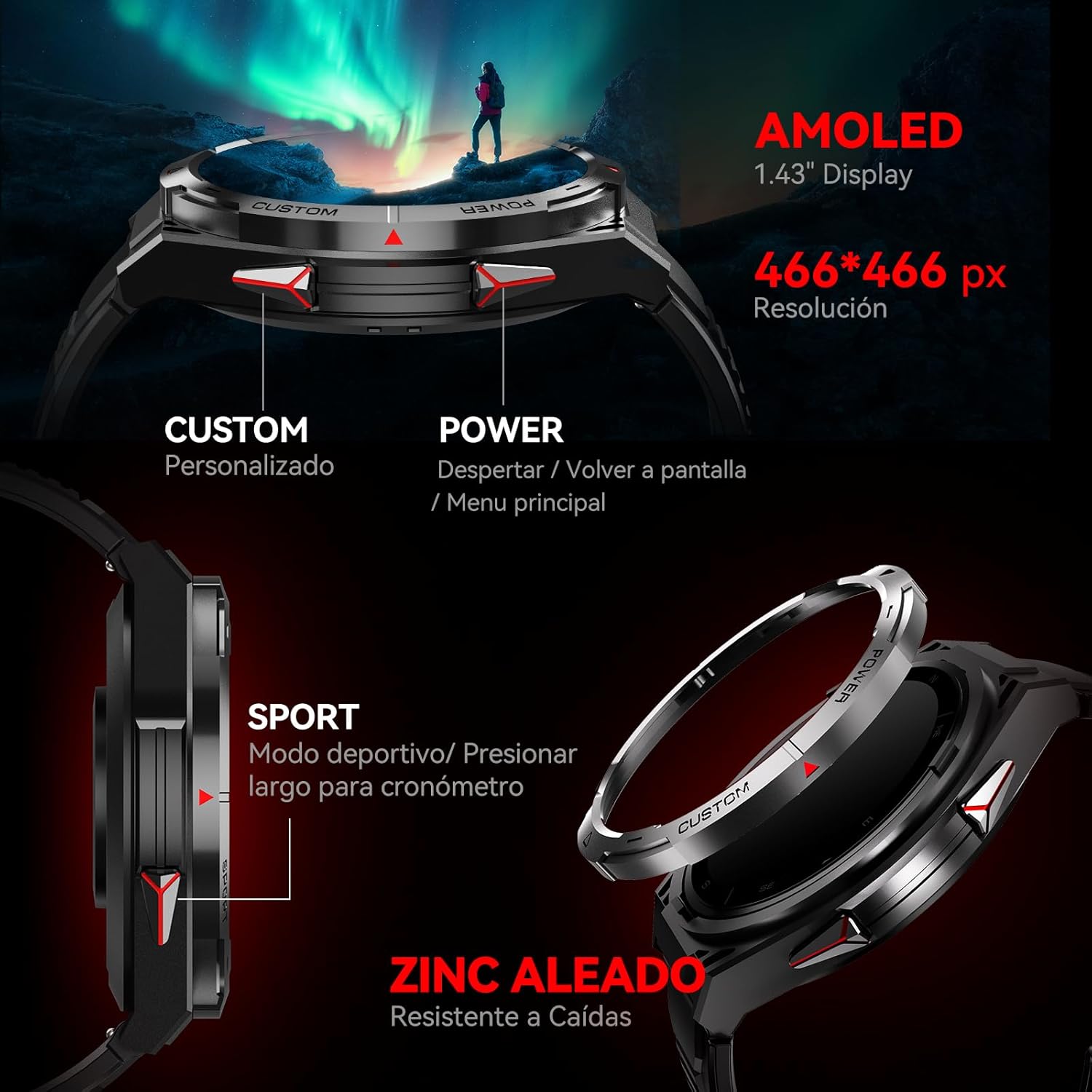
Сүрөт: каптал view of the CUBOT GT1 Smartwatch, highlighting the 'CUSTOM' and 'POWER' buttons and indicating the 1.43-inch AMOLED display with 466x466 pixel resolution.
3.2 GPS функциясы
The smartwatch integrates a dual-frequency L1+L5 GPS system for high-precision positioning. This system supports features such as:
- реалдуу убакытта көз салуу: Calibrates exercise routes and distances.
- Return-to-Start: Guides you back to your starting point via the same path or a straight line.
- Environmental Resilience: Provides reliable positioning in various environments.

Image: The CUBOT GT1 Smartwatch displaying a GPS tracking map on its screen, with satellites in the background, illustrating its dual-frequency GPS precision for navigation.
3.3 Спорт режимдери
The GT1 offers over 150 built-in sport modes. It utilizes the professional Savy sports algorithm and can automatically recognize 6 common sport modes. Each mode provides detailed exercise data to help users train scientifically.
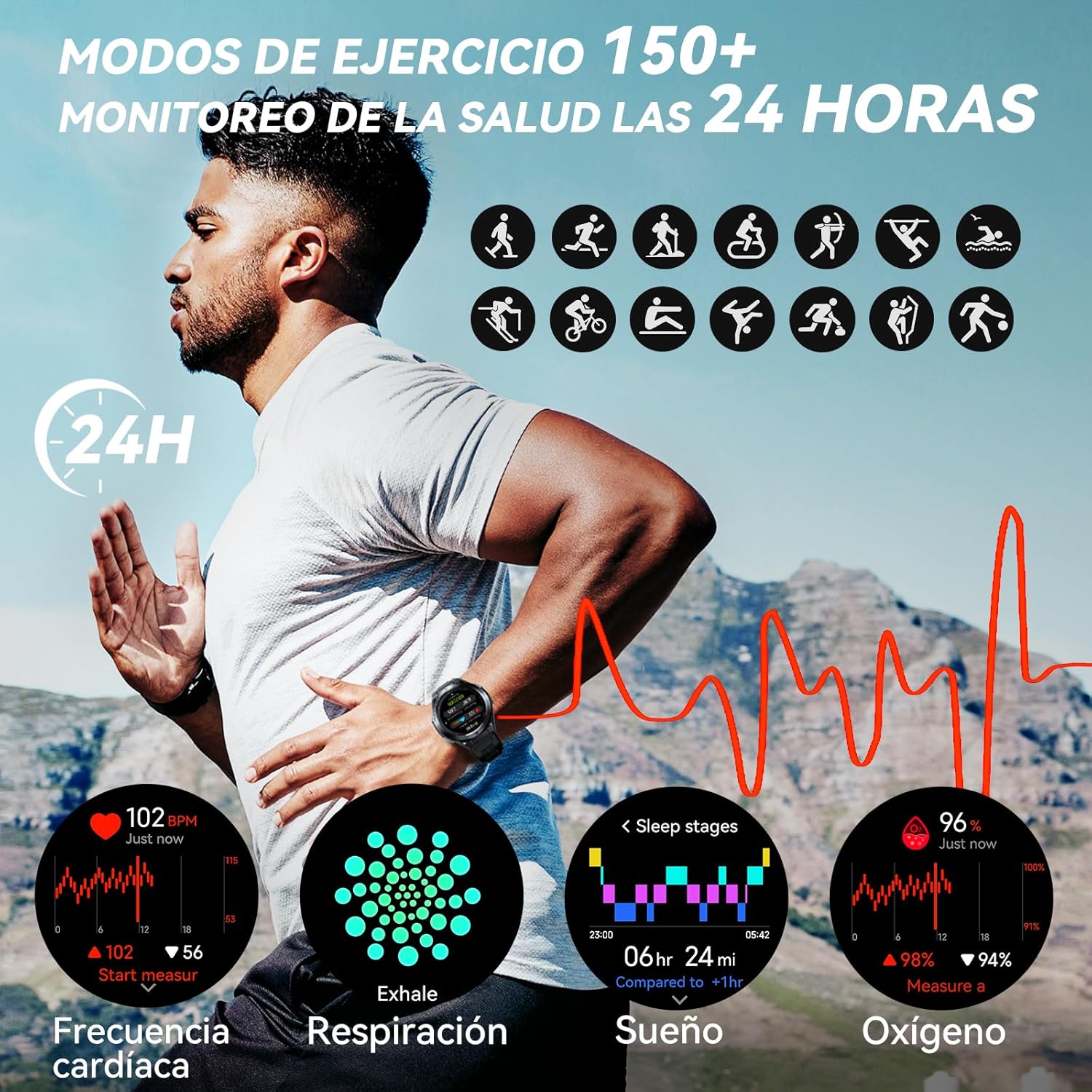
Image: A visual representation of various sport modes icons and health monitoring graphs for heart rate, respiration, sleep, and blood oxygen, indicating 24-hour tracking.
3.4 Ден соолуктун мониторинги
The smartwatch provides comprehensive 24-hour health monitoring through scientific algorithms, including:
- Жүрөктүн кагышын көзөмөлдөө
- Blood Oxygen Saturation (SpO2) tracking
- Sleep Data analysis
- Real-time Pressure detection
3.5 Эскертүүлөр жана чалуулар
Connect your smartwatch to your smartphone via the app to receive real-time notifications for incoming calls, text messages, and social media alerts (e.g., Facebook, Instagram, Twitter). You can answer or reject calls directly from the watch.

Image: The CUBOT GT1 Smartwatch displaying various communication features, including WhatsApp notifications, AI assistant interaction, Bluetooth call handling, and an SOS call screen.
3.6 Кошумча функциялар
The CUBOT GT1 offers several other convenient functions:
- Музыкалык башкаруу: Смартфонуңузда музыканы ойнотууну көзөмөлдөңүз.
- Камераны алыстан башкаруу: Смартфонуңуздун камерасын алыстан иштетиңиз.
- Аба ырайы: View учурдагы аба ырайы шарттары.
- Отурумдук эскертүү: Аракетсиз убакыттан кийин көчүп кетүүнү эскертет.
- SOS баскычы: For emergency situations (refer to app settings for configuration).
- Экологиялык сенсорлор: Includes atmospheric pressure, altitude, and compass.

Image: A collage of various smartwatch functions, including an 'All In One Smartwatch' screen showing app icons, music control, sedentary alert, camera control, and weather display.
4. Техникалык тейлөө
4.1 Сууга туруктуулук
The CUBOT GT1 is water-resistant up to 5 ATM (50 meters), making it suitable for swimming. However, it is crucial to follow these guidelines:
- After exposure to water, especially deep water or corrosive liquids like seawater, activate the drainage function on the watch. This function vibrates the watch to expel water from the speaker and microphone holes.
- Always drain and dry the device thoroughly after use in water.
- Store the watch in a dry place to prolong its lifespan.
- Саатты ысык сууга, бууга же жогорку басымдагы суу агымдарына дуушар кылбаңыз.

Image: The CUBOT GT1 Smartwatch submerged in water, illustrating its 5 ATM water resistance. Additional icons show IP69K dustproof rating and resistance to drops, along with atmospheric pressure, altitude, and compass features.
4.2 Тазалоо
Regularly clean your smartwatch and strap to prevent skin irritation and maintain functionality:
- Саатты жана боону жумшак, d менен сүртүңүзamp, түксүз кездеме.
- Катуу химиялык заттарды, абразивдүү тазалагычтарды же эриткичтерди колдонбоңуз.
- Заряддоодон мурун заряддоо контакттары таза жана кургак экенин текшериңиз.
4.3 Батареяга кам көрүү
- Батареянын иштөө мөөнөтүн начарлатышы мүмкүн болгон экстремалдык температурадан качыңыз.
- Саатты көп убакытка толук зарядсыз калтырбаңыз.
- If the watch will not be used for a long time, charge it to about 50% before storing.

Image: The back of the CUBOT GT1 Smartwatch showing the heart rate sensor and charging contacts, with text detailing battery life: 90 days standby, 25 days daily, 22 hours continuous GPS, and 10 days frequent use, powered by a 480mAh battery.
5. Кыйынчылыктарды
- Күйгүзүлбөй жаткан саат: Саат толук заряддалганын текшериңиз. Аны заряддоо кабелине жана кубат булагына туташтырыңыз.
- Смартфон менен жупташуу мүмкүн эмес:
- Телефонуңузда жана саатыңызда Bluetooth иштетилгенин текшериңиз.
- Make sure the CUBOT app is installed and running.
- Саатты да, смартфонуңузду да өчүрүп күйгүзүңүз.
- Саат башка түзмөк менен жупташтырылганын текшериңиз.
- Туура эмес ден соолук маалыматтары: Саат өтө тар же өтө бош эмес, билегиңизге бекем тагылганын текшериңиз. Сааттын артындагы сенсорду тазалаңыз.
- GPS сигналынын көйгөйлөрү: Ачык жерде экениңизди тактаңыз view of the sky. GPS performance can be affected by buildings, dense foliage, or adverse weather.
- Экран жооп бербейт: Try restarting the watch by long-pressing the power button. If unresponsive, allow the battery to fully drain and then recharge.
- Water damage after swimming: Although the watch is water-resistant, improper drainage or exposure to corrosive liquids can cause issues. Always activate the drainage function and dry thoroughly after water exposure. If issues persist, contact support.
6. Техникалык шарттар
| Өзгөчөлүк | Спецификация |
|---|---|
| Бренд | CUBOT |
| Модел | GT1 |
| Дисплей өлчөмү | 1.43 дюйм |
| Дисплей түрү | AMOLED |
| RAM | 256 MB |
| Батарея сыйымдуулугу | 480 миллионamp Саат |
| Батареянын орточо иштөө мөөнөтү | 7 days (normal use), up to 90 days (standby), 22 hours (continuous GPS) |
| Байланыш | Bluetooth |
| GPS | Integrated GPS (Dual-frequency L1+L5) |
| Суу каршылык | 5 банкомат (50 метр) |
| Өзгөчөлүктөр | SOS Button, GPS, Phone Calls, Notifications, Music Player, Touchscreen |
| Шайкеш түзмөктөр | Smartphone (Android 9.0+, iOS 9.0+) |
| Монтаждоочу аксессуарлар | Заряддоо кабели |
7. Кепилдик жана колдоо
7.1 Кепилдик маалыматы
For detailed warranty information, please refer to the warranty card included with your product packaging or the purchase documentation provided by your retailer. Keep your proof of purchase for any warranty claims.
7.2 Кардарларды колдоо
If you encounter any issues or have questions not covered in this manual, please visit the official CUBOT website or contact their customer support through the contact information provided on their webсайт же сатып алуу платформаңыз.


