1. Киришүү
This manual provides essential information for the safe and efficient operation of your VIZIO 50-inch 4K UHD LED Smart TV, model V4K50C-08. Please read this manual thoroughly before using your television and retain it for future reference.
The VIZIO V4K50C-08 Smart TV delivers vivid 4K picture quality with Dolby Vision HDR, enhancing detail, contrast, and color. It features WiFi 6 for faster streaming and gaming, and built-in VIZIO Home for instant access to applications, free channels, and on-demand titles.

Сүрөт 1.1: Алдыңкы view of the VIZIO 50-inch 4K UHD LED Smart TV.
2. Коопсуздук маалыматы
Always follow basic safety precautions when using this television to reduce the risk of fire, electric shock, and injury to persons. Keep this manual handy for reference.
- Бул аппаратты жамгырга же нымга калтырбаңыз.
- Эч кандай желдетүүчү тешиктерди жаап албаңыз. Өндүрүүчүнүн көрсөтмөлөрүнө ылайык орнотуу.
- Радиаторлор, жылуулук регистрлери, мештер же башка аппараттар (анын ичинде) сыяктуу жылуулук булактарынын жанына орнотпоңуз ampкөтөргүчтөр) жылуулукту пайда кылуучу.
- Электр шнурунун басылып кетүүсүнөн же кысып калуудан сактаңыз, өзгөчө сайгычтарда, розеткаларда жана алар аппараттан чыга турган жеринде.
- Өндүрүүчү тарабынан көрсөтүлгөн тиркемелерди/аксессуарларды гана колдонуңуз.
- Бардык тейлөөлөрдү квалификациялуу тейлөө кызматкерлерине тапшырыңыз.
3. Кутуда эмне бар
Your VIZIO 50-inch 4K UHD LED Smart TV package includes the following items:
- VIZIO 50-inch 4K UHD LED Smart TV
- Үн пульту
- 2 AAA батарейка (алыстан үчүн)
- Электр кабели
- Телевизор (2 даана)

Image 3.1: Included components and TV dimensions.
4. Орнотуу
4.1 Стендди бекитүү
- Зыян келтирбөө үчүн телевизорду бетин ылдый каратып жумшак, таза бетке этияттык менен коюңуз.
- Ар бир стенд бөлүгүн телевизордун түбүндөгү тиешелүү уячаларга тууралаңыз.
- Ар бир стенд бөлүгүн берилген бурамалар менен бекитиңиз. Алардын бекем кысылганын текшериңиз.
4.2 Перифериялык түзүлүштөрдү туташтыруу
Connect your external devices to the appropriate ports on the back or side of your VIZIO TV.
- HDMI: For high-definition video and audio devices (e.g., Blu-ray players, gaming consoles). Your TV features multiple HDMI ports, including HDMI 1 (eARC) for enhanced audio return channel functionality.
- USB: USB сактагыч түзмөктөрдү туташтыруу үчүн.
- Антенна: For connecting an over-the-air antenna.
- Audio Out Optical (S/PDIF): Саундбарга же аудио кабылдагычка туташуу үчүн.
- Ethernet: Зымдуу тармак туташуусу үчүн.
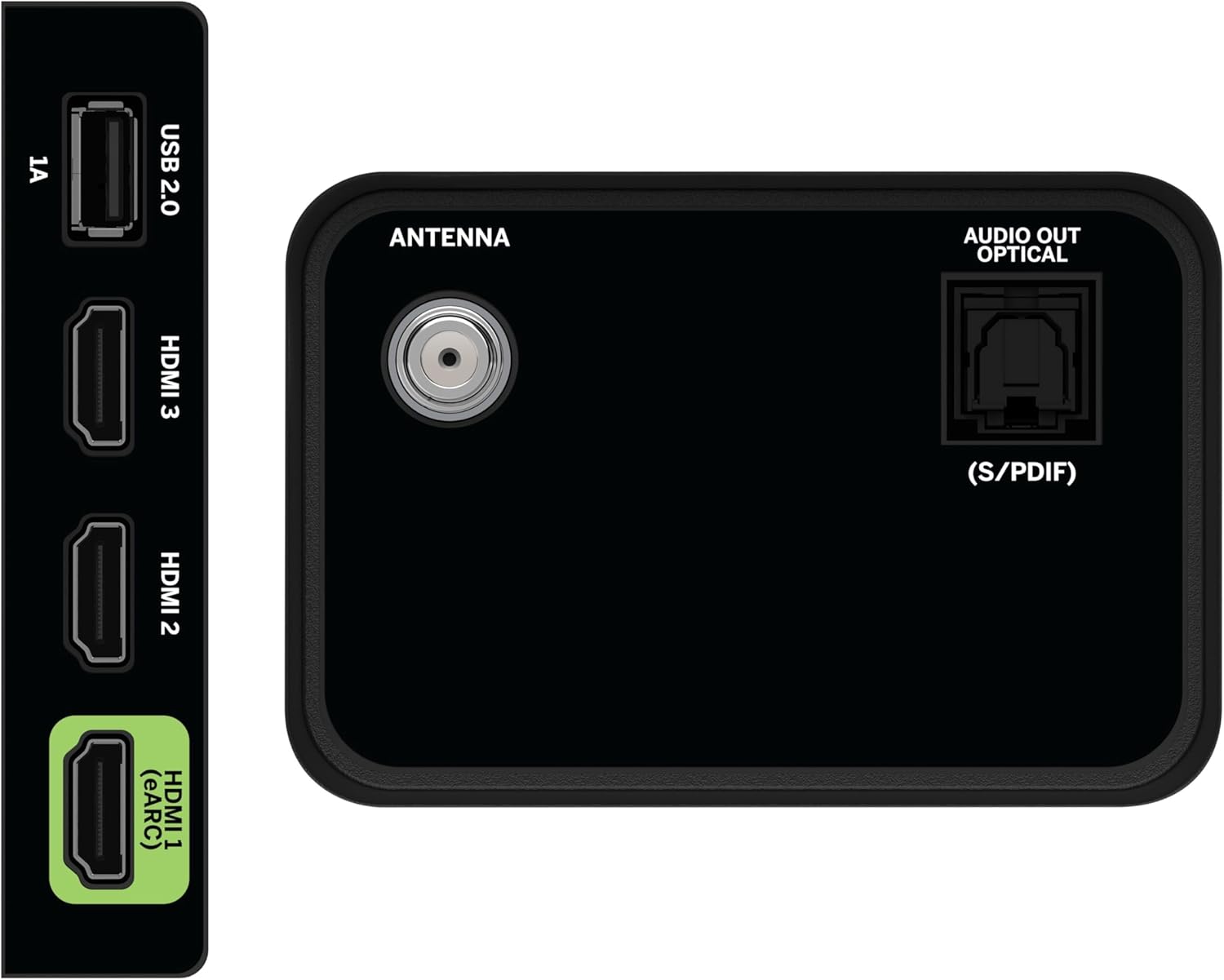
Image 4.1: Rear and side input/output ports.
4.3 Баштапкы күйгүзүү жана тармакка туташуу
- Plug the power cable into the TV and then into a power outlet.
- Алыстан башкаруу пультундагы же телевизордогу күйгүзүү/өчүрүү баскычын басыңыз.
- Follow the on-screen prompts to select your language, country, and connect to your Wi-Fi network (WiFi 6 supported for faster performance).
4.4 VIZIO Account Setup
A VIZIO Account is required for Smart TV functionality and product updates. Follow the on-screen instructions to create or log in to your VIZIO Account. This allows access to VIZIO Home, app subscriptions, and free channels.

Image 4.2: VIZIO Account setup via mobile device.
5. Сыналгыңызды иштетүү
5.1 Алыстан башкарууview
The included Voice Remote provides intuitive control over your TV. It features dedicated buttons for popular streaming apps and voice assistance integration.
- Киргизүү: Switch between connected devices.
- Күч: Телевизорду күйгүзүңүз/өчүңүз.
- Навигация аянтчасы: Use the directional buttons and OK button to navigate menus.
- Үй: Access the VIZIO Home screen.
- WatchFree+: Direct access to VIZIO's free streaming service.
- Үн баскычы: Үн буйруктарын иштетүү.
- Үн/Канал: Үндү тууралап, каналдарды өзгөртүңүз.
- Колдонмонун кыска жолдору: Quick access to pre-installed streaming applications.

Image 5.1: VIZIO Voice Remote and mobile app functionality.
5.2 Navigating VIZIO Home
The VIZIO Home screen is your central hub for all entertainment. It provides quick access to:
- Apps & Inputs: Browse and launch your favorite streaming apps (Netflix, Prime Video, Hulu, Disney+, etc.) and switch between connected inputs.
- Түз ТВ: Access hundreds of free channels and thousands of free On Demand titles with the built-in WatchFree+ app.
- Trending Now: Discover popular movies and shows.

Image 5.2: The VIZIO Home screen, your destination for easy streaming.
5.3 Сүрөт орнотуулары
Your VIZIO TV features Dolby Vision HDR, HDR10+, HDR10, and HLG for a true-to-life picture with a wider range of color and detail. Adjust picture modes (e.g., Calibrated, Vivid, Game) in the settings menu to optimize your viewтажрыйбасы.

Image 5.3: Breathtaking details for a crystal-clear 4K picture with Dolby Vision.
5.4 Аудио орнотуулары
Experience immersive sound with DTS Virtual:X setting. You can also connect Bluetooth headphones for private listening.

Image 5.4: Pair your wireless Bluetooth headphones for uninterrupted audio.
5.5 Smart өзгөчөлүктөрү
The VIZIO Smart TV supports Apple AirPlay and Google Cast Built-in, allowing you to stream content directly from your compatible devices. WiFi 6 ensures better streaming and gaming performance in a congested smart home environment.
5.6 Оюн функциялары
For gamers, the TV offers Dolby Vision HDR Gaming for enhanced in-game color. When a console or PC is detected, Auto Low Latency Mode is automatically enabled to reduce input lag.

Image 5.5: Venture into game realism with Dolby Vision HDR.
6. Техникалык тейлөө
6.1 Телевизоруңузду тазалоо
- Тазалоодон мурун дайыма сыналгыдан ажыратыңыз.
- Экранды жана шкафты акырын сүртүш үчүн жумшак, түксүз чүпүрөктү колдонуңуз.
- Do not use liquid or aerosol cleaners directly on the TV.
6.2 Программалык камсыздоо жаңыртуулары
Your VIZIO TV will automatically receive software updates when connected to the internet. Ensure your TV is connected to a network for optimal performance and access to the latest features.
7. Кыйынчылыктарды
If you encounter issues with your VIZIO TV, try the following common solutions:
- Кубат жок: Кубат кабелинин телевизорго да, розеткага да бекем туташтырылганын текшериңиз. Башка розетканы колдонуп көрүңүз.
- Сүрөт/үн жок: Check all cable connections (HDMI, audio). Ensure the correct input source is selected.
- Пульт иштебейт: Батареяларды алмаштырыңыз. Пульт менен телевизордун ортосунда эч кандай тоскоолдуктар жок экенин текшериңиз.
- Тармакка туташуу маселелери: Restart your router and modem. Reconnect the TV to the Wi-Fi network via the settings menu.
- Сүрөттүн сапаты начар: Check the source content resolution. Adjust picture settings in the TV menu.
For further assistance, refer to the VIZIO support webсайтка же кардарларды тейлөөгө кайрылыңыз.
8. Техникалык шарттар
| Өзгөчөлүк | Спецификация |
|---|---|
| Бренд | VIZIO |
| Модель номери | V4K50C-08 |
| Screen Size | 50 дюйм |
| Дисплей технологиясы | LED |
| Резолюция | 4K UHD |
| HDR колдоо | Dolby Vision HDR, HDR10+, HDR10, HLG |
| Жаңыртуу ылдамдыгы | HDMI VRR |
| Байланыш технологиясы | Bluetooth, HDMI, Wi-Fi (WiFi 6) |
| Өзгөчөлүктөр | Apple AirPlay, Bluetooth Headphone compatibility, Built-in apps with VIZIO Home, Closed Captioning, Google Chromecast, Sleep Timer, Voice Assistance Integration, Voice Remote |
| Продукциянын өлчөмдөрү | 9.68"D x 43.69"W x 27.57"H |
| Элемент Салмагы | 28.4 фунт |
| Аспект катышы | 16:9 |
9. Кепилдик жана колдоо
For warranty information and customer support, please visit the official VIZIO website or refer to the warranty card included with your product. VIZIO provides award-winning customer support to assist with any questions or issues you may have.


