1. Киришүү
This manual provides essential information for the safe and efficient operation of your FLASHFORGE AD5X 3D Printer. Please read it thoroughly before initial use and retain it for future reference.
The FLASHFORGE AD5X is a smart multi-color 3D printer designed for high-speed and precise printing. It features an Intelligent Filament System (IFS) for up to 4-color printing, fully automatic leveling, and a 300°C direct extruder, supporting various filament types including PLA-CF and PETG-CF.
2. Кутуда эмне бар
Carefully unpack all components and verify against the list below. If any items are missing or damaged, contact customer support.
- AD5X 3D Printer x1
- 10g HS PLA Filament x4
- Кубат кабели x1
- IFS connection cable x1
- 4-in-1 guide tube x1
- Экран x1
- Spool Holder x4
- Монтаж плитасы x1
- IFS (Intelligent Filament System) x1
- Бурама M3*6 x4
- Кабелдик клип x1
- Майлоо x1
- Бургасчы x1
- Allen Wrench Kits x1
- Diagonal Pliers x1
- X1

Figure 2.1: The FLASHFORGE AD5X 3D Printer with a multi-color print in progress.
3. Орнотуу
3.1 Кутудан чыгаруу жана баштапкы жайгаштыруу
Remove the printer from its packaging. Place the printer on a stable, level surface in a well-ventilated area, away from direct sunlight and heat sources. Ensure adequate space around the printer for operation and maintenance.
3.2 Кубат туташтыруу
Connect the provided power cable to the printer's power input and then to a suitable power outlet. Ensure the power switch is in the OFF position before connecting.
3.3 Intelligent Filament System (IFS) Setup
The AD5X features an Intelligent Filament System for multi-color printing and automatic filament management.
- Mount the spool holders onto the designated positions on the printer.
- Place filament spools onto the holders. The IFS supports up to 4 colors.
- Feed the filament into the IFS unit. The system supports auto filament loading/unloading and up to 4kg filament auto refill.
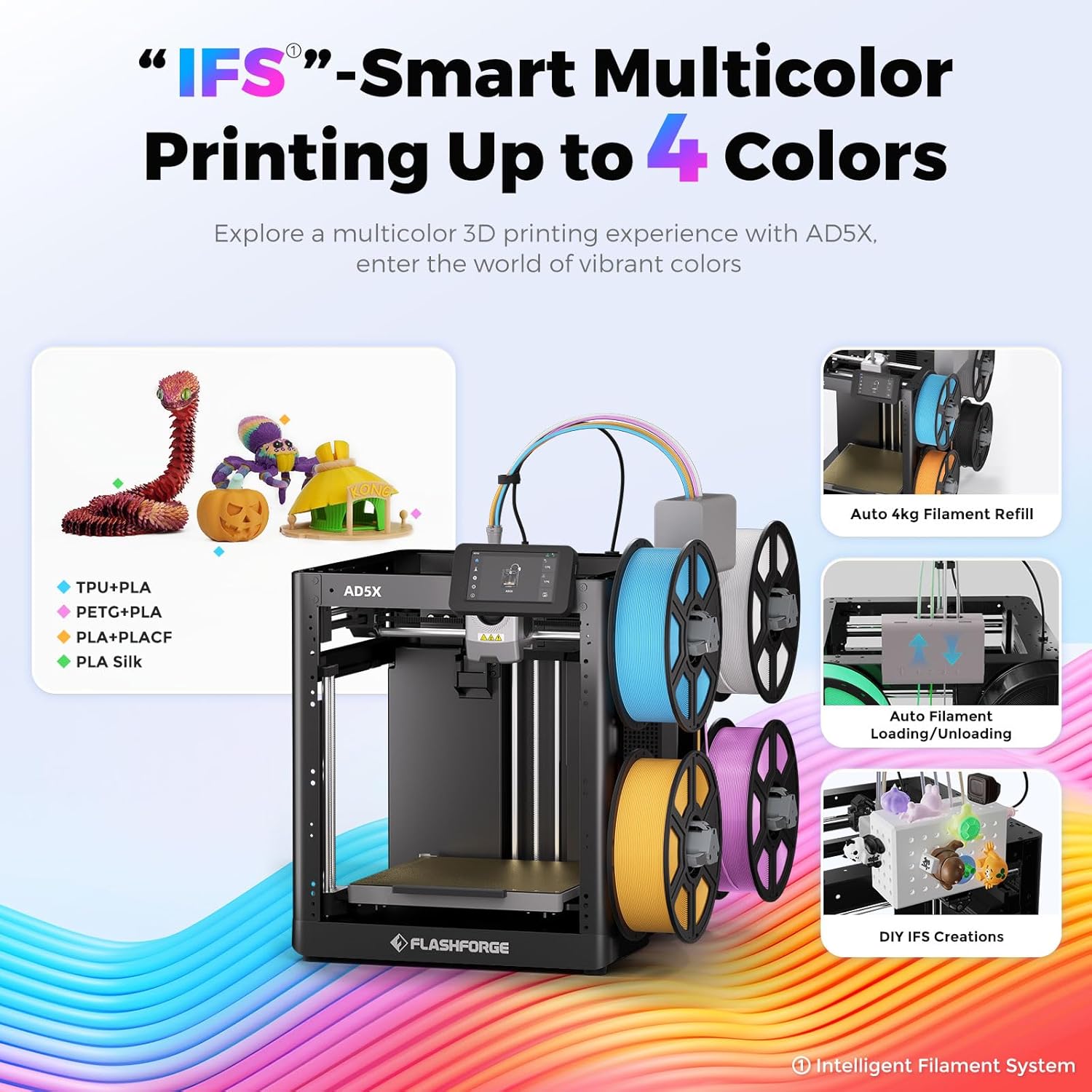
Figure 3.1: The Intelligent Filament System (IFS) for multi-color printing.
Video 3.1: Demonstration of the AD5X's various filament support and loading process.
3.4 Автоматтык түрдө төшөктү тегиздөө
The AD5X features one-click auto leveling to ensure a perfect first layer.
- Ensure the build plate is clear of any debris or foreign objects.
- On the 4.3-inch colorful touchscreen, navigate to the leveling function.
- Initiate the one-click auto leveling process. The printer will automatically calibrate the build plate.
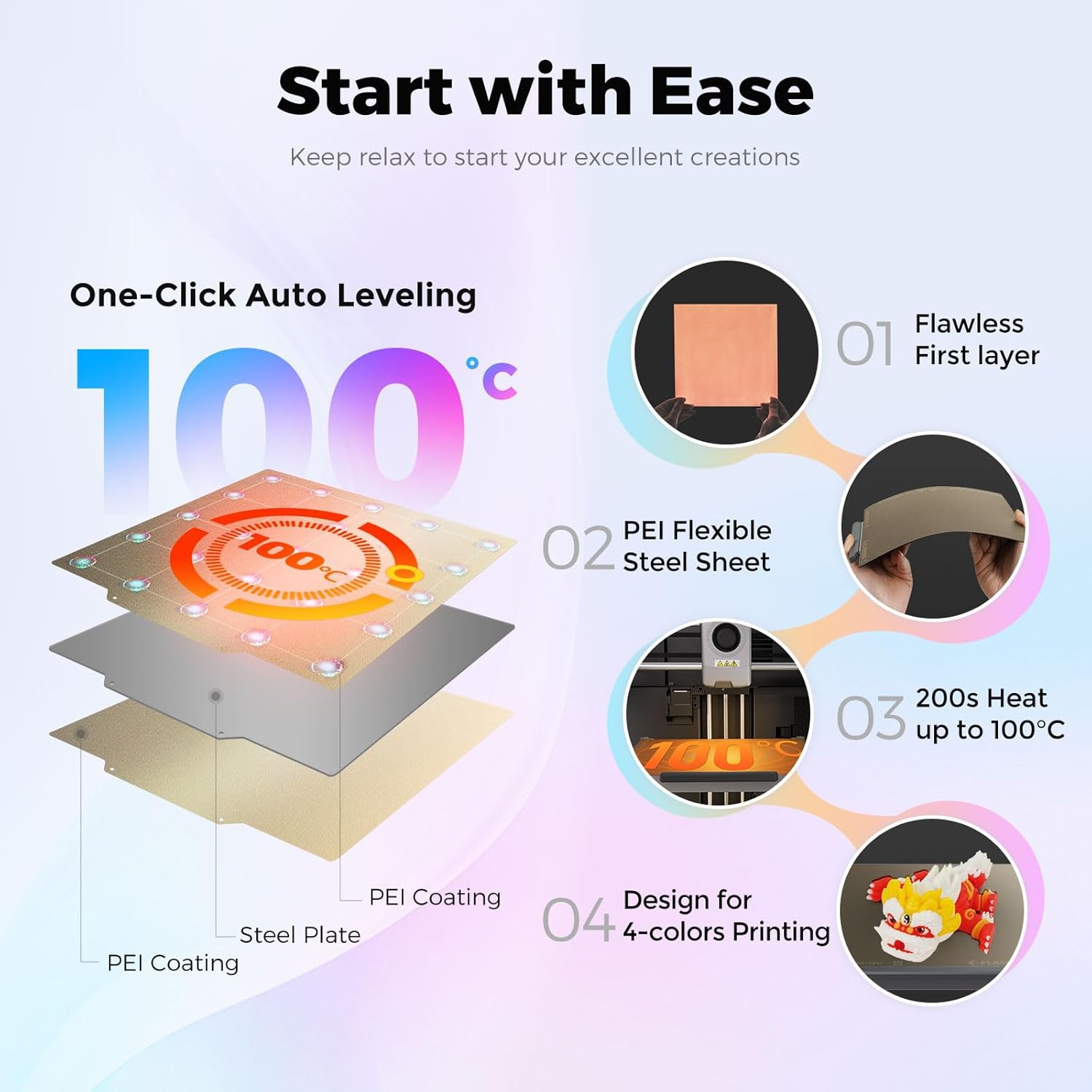
Figure 3.2: One-Click Auto Leveling ensures a flawless first layer.
Video 3.2: A note on the AD5X 3D Printer, showing the screen interface and leveling process.
4. Иштөө нускамалары
4.1 Software Installation and Slicing
The FLASHFORGE AD5X is compatible with Flash Maker and Orca-Flashforge (or Orca Slicer) for preparing your 3D models for printing.
- Download and install the latest version of FlashPrint or Orca-Flashforge from the official FLASHFORGE webсайт.
- 3D моделиңизди ачыңыз file (e.g., STL, OBJ) in the slicing software.
- Configure print settings such as layer height, infill density, print speed (up to 300mm/s), and travel speed (up to 600mm/s).
- For multi-color prints, ensure the color zones and filament types set in the software are consistent with the physical setup of the IFS. Inconsistent settings may lead to color errors in the model.
- G-кодун түзүү үчүн моделди кесип алыңыз file.
Video 4.1: Demonstration of the AD5X's capability for up to 4-color printing.
Видео 4.2: Бүттүview of the FLASHFORGE AD5X 3D Printer, including software interaction and printing.
4.2 Жөнөтүү Files to the Printer
The AD5X offers multiple connectivity options:
- Wi-Fi: Connect the printer to your local Wi-Fi network for wireless file transfer and remote monitoring via Flash Maker app or Orca-Flashforge.
- USB: Transfer G-code files using a USB drive.
- Ethernet: Connect the printer to your network via an Ethernet cable for stable data transfer.
4.3 Басып чыгарууну баштоо
- Select the desired G-code file from the printer's touchscreen interface.
- Confirm the print settings and material selection.
- Press 'Print' to begin. The printer will pre-heat the nozzle and build plate before starting the print.

Figure 4.1: Multi-device management allows remote control and monitoring of multiple printers.
5. Техникалык тейлөө
5.1 Соргучту тейлөө
The AD5X features a 300°C high-temperature direct extruder with quick-swap nozzles.
- Regularly inspect the nozzle for clogs or wear.
- To swap the nozzle, ensure the extruder is cooled down. Follow the quick-swap procedure outlined in the detailed user manual. Available nozzle diameters include 0.25mm, 0.4mm, 0.6mm, and 0.8mm.

Figure 5.1: The 300°C High Temp Direct Extruder with quick-swap nozzle options.
5.2 Build Plate Care
The PEI flexible steel sheet build plate provides excellent adhesion and easy print removal.
- Clean the build plate with isopropyl alcohol (IPA) before each print to ensure optimal adhesion.
- Avoid using sharp objects to remove prints, as this can damage the PEI surface.
5.3 Жалпы тазалоо
Keep the printer clean from dust and filament debris. Regularly wipe down the exterior and internal components (when powered off) with a soft, dry cloth.
6. Кыйынчылыктарды
6.1 Басып чыгаруудагы кеңири таралган көйгөйлөр
- Биринчи катмардын начар адгезиясы: Ensure the build plate is clean and properly leveled. Adjust Z-offset if necessary.
- Filament Extruding эмес: Check for clogged nozzle, tangled filament, or incorrect filament loading. The printer features filament detection to alert you to issues.
- Катмарды которуу: Verify that belts are properly tensioned and the printer is on a stable surface. The AD5X includes vibration compensation to minimize this issue.
6.2 Байланыш көйгөйлөрү
If you experience issues with Wi-Fi or Ethernet connectivity:
- Принтер Wi-Fi роутериңиздин чегинде экенин текшериңиз.
- Verify network settings on the printer and your computer/app.
- Restart both the printer and your network router.
6.3 Power Loss Recovery
The AD5X features power loss recovery. In case of a power outage, the printer will resume printing from where it left off once power is restored.

Figure 6.1: ашыкview of additional functions including power loss recovery and filament detection.
7. Техникалык шарттар
| Өзгөчөлүк | Спецификация |
|---|---|
| Түзмөктүн аталышы | AD5X |
| Экструдер саны | 1 |
| Басып чыгаруу тактыгы | ±0.1mm (based on 100mm cubes) |
| Позициялоонун тактыгы | X/Y огу: 0.0125 мм, Z огу: 0.0025 мм |
| Катмардын калыңдыгы | 0.1-0.4мм |
| Build Volume | 220x220x220мм |
| Сопло диаметри | 0.4 мм (демейки), 0.25/0.6/0.8 мм (милдеттүү эмес) |
| Басып чыгаруу ылдамдыгы | 10-300мм/с |
| Макс ылдамдатуу | 20000мм/с² |
| Максималдуу саякат ылдамдыгы | 600мм/сек |
| Максималдуу экструдер температурасы | 300°C |
| Электр камсыздоо | Киргизүү: AC 100-120V/200-240V, 50/60Hz, 650W |
| Түзмөктүн өлчөмдөрү | 363x356x413мм |
| Таза Салмак | 11.4кг |
| Байланыш | USB/Wi-Fi/Ethernet |
| Иштөө Темп | 15-30°C |
| Шайкеш Операция системасы | Windows 7/8/10/11, Mac OS: support version 10.9 or later |
| Кесүү программасы | Orca-Flashforge/Orca кескич |
| Максималдуу керебет температурасы | 110°C |
| Тегиздөө ыкмасы | Бир чыкылдатуу менен автоматтык тегиздөө |
| Filament Run-out Reminder | Ооба |
| Энергияны жоготууларды калыбына келтирүү | Ооба |
| Акылдуу сенсордук экран | 4.3 дюймдук |
| Плитаны куруу | PEI болот барак |
8. Кепилдик жана колдоо
For warranty information and technical support, please refer to the official FLASHFORGE webсайтка кайрылыңыз же жергиликтүү дистрибьютериңиз менен байланышыңыз. Сатып алганыңыздын далили катары сатып алуу дүмүрчөгүңүздү сактаңыз.


