1. Киришүү
This manual provides comprehensive instructions for the installation, operation, and maintenance of your FOSCAM Home Security Camera System, which includes both the FOSCAM 3K 5MP WiFi Pet Camera and the FOSCAM 4MP WiFi IP Camera (R4S). These cameras are designed to provide reliable home security, pet monitoring, and baby monitoring with advanced features such as AI human detection, two-way audio, and extensive surveillance coverage.

Image: The FOSCAM 3K 5MP WiFi Pet Camera (left) and the FOSCAM 4MP WiFi IP Camera (R4S) (right).
2. Пакеттин мазмуну
Please verify that all components are present in your package. If any items are missing or damaged, contact FOSCAM customer support.
- FOSCAM 3K 5MP WiFi Pet Camera
- FOSCAM 4MP WiFi IP Camera (R4S)
- Кубаттуу адаптер (2)
- Монтаждоо кронштейндери (2)
- Mounting Screws and Wall Plugs (for each camera)
- Quick Start Guide
3. Продукт бүтүп калдыview
3.1 FOSCAM 3K 5MP WiFi Pet Camera
This camera offers 5MP resolution for clear images and features 360° panoramic viewing with 350° horizontal pan and 70° vertical tilt. It includes 6X digital zoom and supports dual-band 2.4GHz/5GHz WiFi connectivity.

Image: The FOSCAM 3K 5MP camera demonstrating its 360° expansive surveillance coverage with 350° horizontal and 70° vertical rotation, along with 6x digital zoom.
3.2 FOSCAM 4MP WiFi IP Camera (R4S)
The R4S camera provides 4MP Ultra HD 2K resolution. It also supports dual-band 2.4GHz/5GHz WiFi for stable and efficient connectivity.

Image: The FOSCAM 4MP R4S camera highlighting its Upgraded Ultra HD 2K resolution, indicating clearer image quality.
3.3 Жалпы өзгөчөлүктөрү
- Эки тараптуу аудио: Both cameras feature full-duplex two-way audio, allowing real-time conversation.
- AI аныктоо: Advanced AI capabilities for human, animal, and package detection (subscription sold separately).
- Купуялык маскасы: Customizable privacy zones to exclude specific areas from surveillance.
- Бир нече сактагыч параметрлери: Support for Cloud service, micro SD card (up to 256 GB, not included), NVR, NAS, or FTP server.
- Smart Home интеграциясы: Compatible with Alexa and Google Assistant.
- Кош тилкелүү WiFi: Support for both 2.4GHz and 5GHz WiFi networks for enhanced stability.

Image: Illustration of the full duplex 2-way audio feature, showing a user talking through the camera to family members.

Image: Depiction of AI Recognition Reminder powered by AWS, showing icons for AI Human Detection, Animal detection, and Package detection, with a mobile app interface displaying alerts.

Image: Graphic illustrating compatibility with both 2.4GHz and 5GHz dual-band WiFi for more stable and efficient connectivity.
4. Орнотуу
4.1 Баштапкы орнотуу
- Күйгүзүү: Connect the camera to a power outlet using the provided power adapter. The camera will initiate its self-test sequence.
- Download Foscam APP: Scan the QR code in the Quick Start Guide or search for "Foscam" in your mobile app store (iOS App Store or Google Play Store) to download and install the official Foscam application.
- Эсеп түзүү: Open the Foscam APP and register a new account or log in if you already have one.
- Камера кошуу: Tap the "+" icon in the app to add a new device. Follow the on-screen instructions to scan the QR code on the camera or manually enter the device ID.
4.2 Тармактык туташуу
The Foscam cameras support both 2.4GHz and 5GHz Wi-Fi networks. Ensure your mobile device is connected to the same Wi-Fi network you intend to connect the camera to during the setup process.
- Wi-Fi конфигурациясы: The app will guide you through selecting your Wi-Fi network and entering the password.
- Туташуу ырастоо: Once connected, the camera's indicator light will change, and the app will confirm successful connection.
- Жайгашкан жери: Position the camera in your desired monitoring area. For optimal performance, place it within range of your Wi-Fi router.
5. Иштөө нускамалары
5.1 Live View жана Control
- Түз эфирге кирүү: Open the Foscam APP and select the desired camera from your device list to view анын жандуу тоюту.
- Pan/Tilt/Zoom (3K 5MP Camera): Use the on-screen controls in the app to remotely pan the camera 350° horizontally and tilt it 70° vertically. Pinch to zoom for 6X digital zoom.
- Эки тараптуу аудио: Tap the microphone icon in the app to speak through the camera's speaker. Tap the speaker icon to listen to audio from the camera's microphone.
5.2 Жасалма интеллектти аныктоо жана эскертүүлөр
The cameras feature advanced AI capabilities to distinguish between human, animal, and package movements, reducing false alarms.
- Аныктоого уруксат берүү: Navigate to the camera settings in the Foscam APP and enable desired detection types (Human, Animal, Package).
- Иш зоналары: Customize specific detection areas to focus on critical zones and minimize unwanted alerts.
- Эскертмелер: When motion or a specific AI event is detected, the camera will immediately send notifications to your mobile device and begin video recording.

Image: Comparison showing how Human-only Detection reduces false alerts triggered by pets and other non-human movements.
5.3 Жазуу жана сактоо
The cameras offer flexible recording options and storage solutions.
- Пландаштырылган жаздыруу: Configure 24/7 scheduled recording through the app settings.
- Окуяны жаздыруу: Recordings are automatically triggered by motion or AI detection events.
- Сактоо параметрлери:
- Micro SD картасы: Insert a micro SD card (up to 256 GB, not included) into the camera's slot for local storage.
- Foscam Cloud Service: Subscribe to Foscam Cloud for secure off-site storage and easy access to recordings.
- NVR/NAS/FTP: Integrate with Network Video Recorders (NVR), Network Attached Storage (NAS), or FTP servers for advanced storage solutions.
6. Техникалык тейлөө
- Тазалоо: Камера линзасын жана корпусун тазалоо үчүн жумшак, кургак чүпүрөктү колдонуңуз. Абразивдүү тазалоочу каражаттарды же эриткичтерди колдонбоңуз.
- Программалык камсыздоонун жаңыртуулары: Regularly check for and install firmware updates via the Foscam APP to ensure optimal performance and security.
- Тармактын туруктуулугу: Ensure your Wi-Fi network is stable and has sufficient bandwidth for continuous video streaming.
- SD Card башкаруу: If using an SD card, periodically check its status and format it through the app if necessary to maintain recording efficiency.
7. Кыйынчылыктарды
| Көйгөй | Мүмкүн себеп | Чечим |
|---|---|---|
| Камера оффлайн | Электр кубаты жок; Wi-Fi өчүрүлгөн; роутерде көйгөй бар. | Check power connection; Reconnect Wi-Fi in app; Restart router. |
| Видеонун сапаты начар | Weak Wi-Fi signal; Lens dirty; Insufficient bandwidth. | Move camera closer to router; Clean lens; Check internet speed. |
| Кыймылды аныктоо эскертүүлөрү жок | Detection disabled; Sensitivity too low; Incorrect activity zone. | Enable detection in app; Adjust sensitivity; Redraw activity zones. |
| Эки тараптуу аудио иштебейт | Микрофон/динамик үнсүз; Колдонмонун уруксаттары. | Check audio settings in app; Grant microphone permission to Foscam APP. |
8. Техникалык шарттар
| Өзгөчөлүк | FOSCAM 3K 5MP Camera | FOSCAM 4MP R4S Camera |
|---|---|---|
| Резолюция | 5 мегапикселдүү (2560x1440) | 4 МП (2K Ultra HD) |
| Pan/Tilt | Туурасынан: 350°, Вертикалдуу: 70° | Not specified (fixed or limited) |
| Digital Zoom | 6X | Белгиленген эмес |
| Wi-Fi туташуусу | 2.4GHz & 5GHz Dual-band | 2.4GHz & 5GHz Dual-band |
| Аудио | Full Duplex Two-Way Audio | Эки тараптуу аудио |
| аныктоо | AI Human, Animal, Package Detection (subscription) | Адамды аныктоочу жасалма интеллект, үндү аныктоо |
| Сактагыч параметрлери | Cloud, Micro SD (up to 256GB), NVR, NAS, FTP | Cloud, Micro SD (up to 256GB), NVR, NAS, FTP |
| Шайкештик | Alexa, Google Жардамчысы | Alexa, Google Жардамчысы |
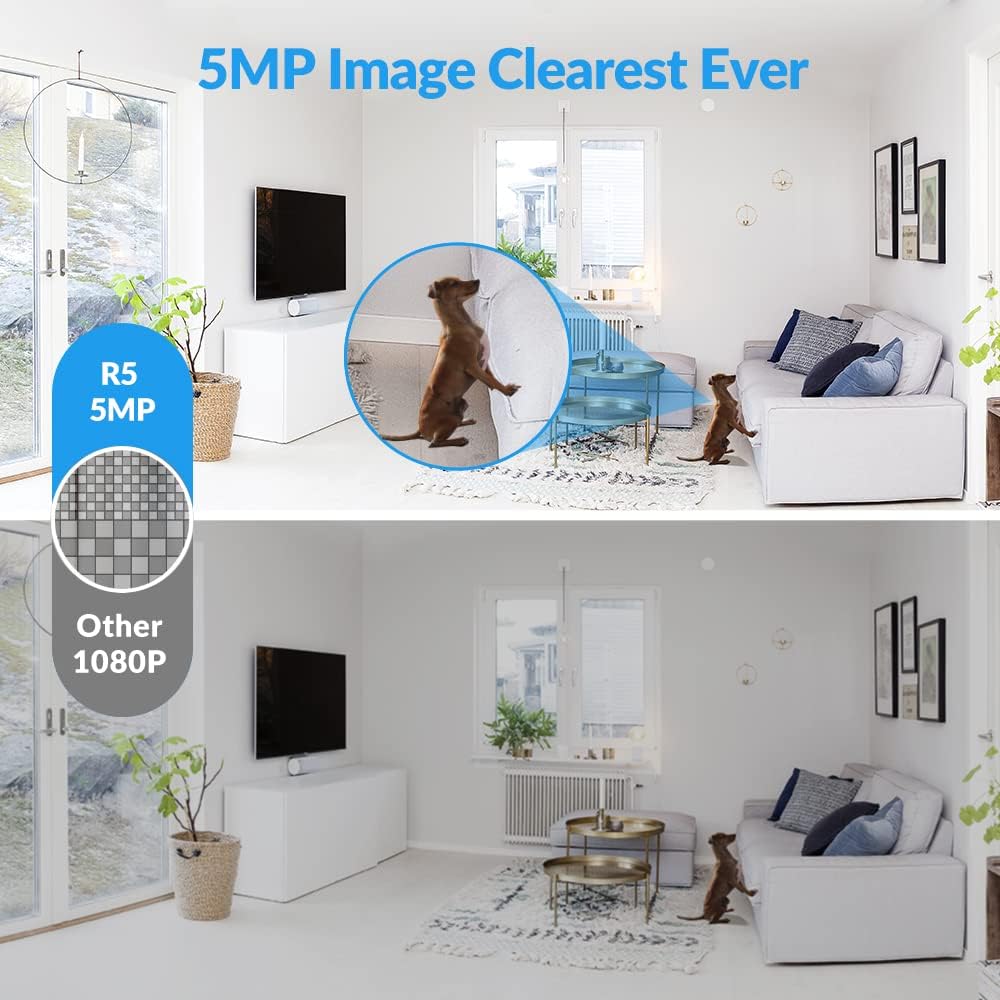
Image: Visual comparison demonstrating the superior clarity of 5MP image resolution (top) compared to standard 1080P (bottom).

Image: Details of new upgrades, including a Type-C interface replacing the old DC interface, new yellow and green indicator lights, and a resolution upgrade to 2560x1440 pixels from 2304x1536 pixels.
9. Кепилдик жана колдоо
FOSCAM products typically come with a limited warranty. Please refer to the warranty card included in your package or visit the official FOSCAM webдеталдуу кепилдик шарттары жана шарттары үчүн сайт.
For technical support, troubleshooting assistance, or any inquiries regarding your FOSCAM camera system, please contact FOSCAM customer support through their official webсайтты же Ыкчам баштоо колдонмоңузда берилген байланыш маалыматын.
Онлайн ресурстар:
- FOSCAM Official Webсайт: www.foscam.com
- Foscam APP: Available on iOS App Store and Google Play Store.


