1. Киришүү
This manual provides essential instructions for the setup, operation, and maintenance of your AKAI AKTV407QM 40-inch HD Smart TV. Please read this manual thoroughly before using your television to ensure proper functionality and safety. Keep this manual for future reference.
2. Коопсуздук маалыматы
Always observe the following safety precautions to prevent electric shock, fire, or damage to the television.
- Телевизорду жамгырга же нымга тийгизбеңиз.
- Телевизорду ачпаңыз casing; бардык тейлөөлөрдү квалификациялуу кызматкерлерге тапшырыңыз.
- Телевизордун айланасын туура желдетүүнү камсыз кылыңыз.
- Чагылган бороондо же көпкө чейин пайдаланылбай турганда сыналгыны розеткадан ажыратыңыз.
- Телевизорду күн нурунан жана жылуулук булактарынан алыс кармаңыз.
3. Пакеттин мазмуну
Таңгакта бардык буюмдар бар экенин текшериңиз:
- AKAI AKTV407QM 40-inch HD Smart TV
- Алыстан башкаруу (батареялар менен)
- Электр кабели
- Столдун стенди (2 даана)
- Стенд орнотуу үчүн бурамалар
- Колдонуучунун Колдонмосу (бул документ)
4. Орнотуу
4.1 Пакеттен чыгаруу
Carefully remove the television from its packaging. It is recommended to retain the packaging materials for future transport or servicing.
4.2 Стендди орнотуу
To install the table stand:
- Экранга зыян келтирбөө үчүн телевизорду жумшак, тегиз бетке ылдый каратып коюңуз.
- Ар бир стенд бөлүгүн телевизордун түбүндөгү тиешелүү уячаларга тууралаңыз.
- Берилген бурамалар менен стенддерди бекитиңиз. Алардын бекем кысылганын текшериңиз.
4.3 Дубалга орнотуу (кошумча)
If you choose to wall mount your TV, remove the table stands. Use a VESA-compatible wall mount kit (not included) appropriate for a 40-inch television. Consult a professional for wall mounting to ensure safety and proper installation.
4.4 Перифериялык түзүлүштөрдү туташтыруу
Жеткиликтүү портторду колдонуп, түзмөктөрүңүздү сыналгыга туташтырыңыз:
- Антенна/кабель: Connect your DVB-T/T2 or DVB-S2 antenna/cable to the RF input ports.
- HDMI түзмөктөрү: Use HDMI cables to connect Blu-ray players, game consoles, or other devices to the HDMI ports (3 available).
- USB түзмөктөрү: Insert USB drives for media playback into the USB 2.0 ports (2 available).
- Ethernet: Зымдуу интернет байланышы үчүн, Ethernet кабелин RJ-45 портуна туташтырыңыз.
- Digital Audio Out: Connect a soundbar or audio receiver via the optical digital audio output.
4.5 Алгачкы күйгүзүү жана биринчи жолу орнотуу
- Электр шнурду сыналгыга, андан кийин розеткага туташтырыңыз.
- Пульттагы же сыналгыдагы кубат баскычын басыңыз.
- Follow the on-screen instructions to complete the initial setup, which includes language selection, network connection (Wi-Fi or Ethernet), and channel scanning for DVB-T/T2 and DVB-S2 signals.
- The TV operates on the VIDAA operating system. During setup, you will be guided through connecting to your home network and accessing smart features.
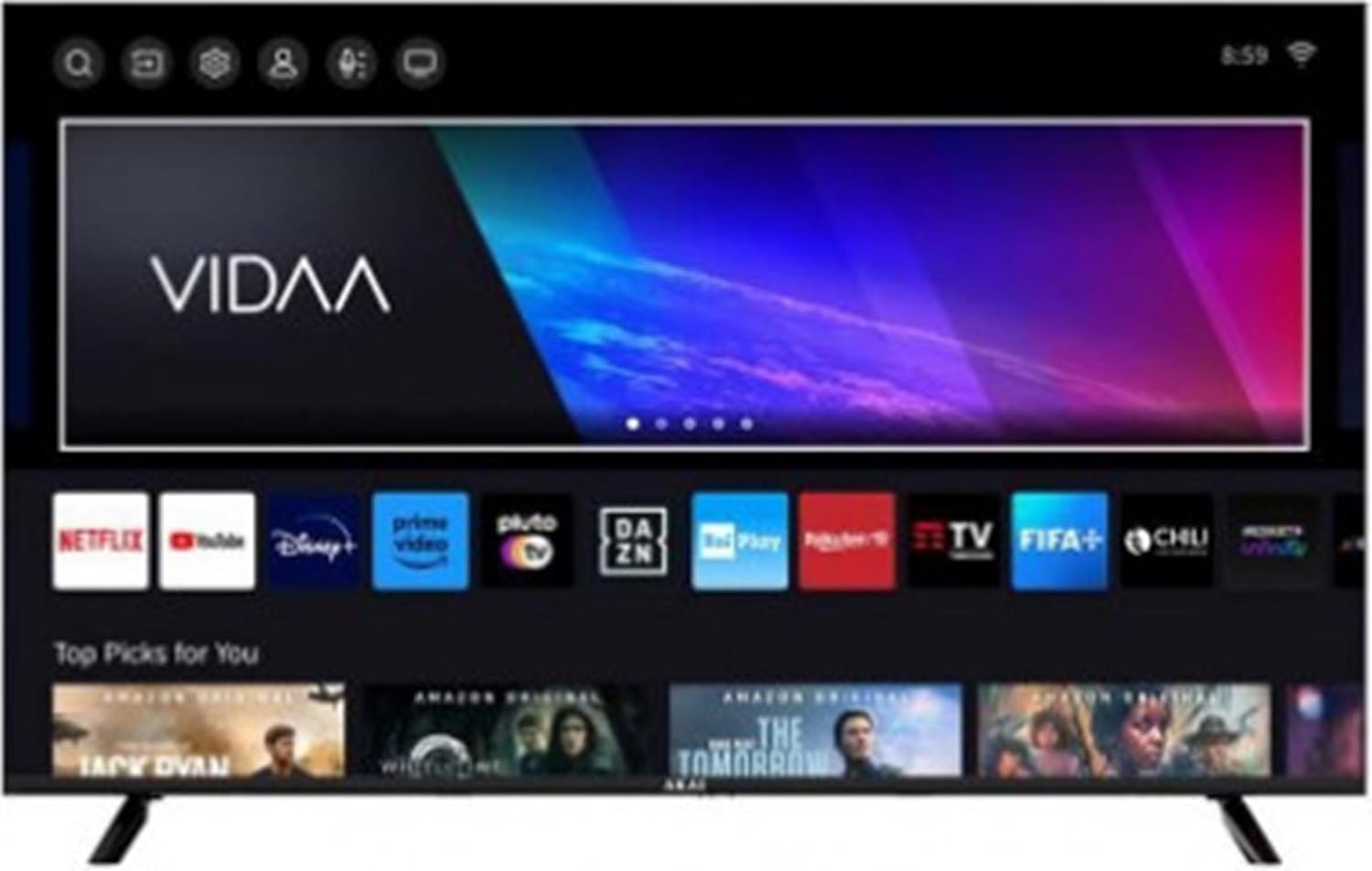
Image 1: The AKAI AKTV407QM Smart TV displaying its VIDAA operating system interface, showing various streaming application icons and content recommendations.
5. Сыналгыңызды иштетүү
5.1 Алыстан башкарууview
Familiarize yourself with the remote control buttons for navigation and function access. Common buttons include Power, Volume Up/Down, Channel Up/Down, Input Source, Home (for Smart TV interface), Navigation (arrow keys), OK, Back, and dedicated app buttons (if present).
5.2 Негизги функциялар
- Күйгүзүү/өчүрүү: басыңыз Күч баскычы.
- Үндү тууралоо: колдонуу Көлөм +/- баскычтар.
- Канал тандоо: колдонуу Канал +/- баскычтар же сандык баскычтоп.
- Киргизүү булагы: басыңыз Киргизүү button to switch between HDMI, TV, and other connected sources.
5.3 Smart TV өзгөчөлүктөрү (VIDAA OS)
Your AKAI AKTV407QM runs on the VIDAA operating system, providing access to various streaming services and applications.
- Башкы экран: басыңыз Үй button to access the main VIDAA interface, where you can find installed apps, recommended content, and settings.
- Колдонмого мүмкүндүк алуу: Navigate to and select applications like Netflix, YouTube, Amazon Prime Video, Disney+, DAZN, Rai Play, Rakuten TV, FIFA+, and Pluto TV.
- Web Браузер: Интегралдык колдонуу web интернетте серептөө үчүн браузер.
- Тармак туташуусу: Ensure your TV is connected to Wi-Fi or Ethernet for full Smart TV functionality. Go to Орнотуулар > Тармак байланыштарды башкаруу үчүн.
5.4 Сүрөт жана үн орнотуулары
Сиздин жекелештирүү viewугуу жана угуу тажрыйбасы:
- Сүрөт режимдери: Adjust brightness, contrast, color, and sharpness. Select from preset modes (e.g., Standard, Dynamic, Movie) or customize your own.
- Үн режимдери: Choose from various audio presets (e.g., Standard, Music, Movie, Speech) or adjust equalizer settings.
6. Техникалык тейлөө
6.1 Телевизорду тазалоо
- Тазалоодон мурун дайыма сыналгыдан ажыратыңыз.
- Экранды жана шкафты сүртүү үчүн жумшак, кургак чүпүрөктү колдонуңуз.
- өжөр белгилери үчүн, жеңил гampчүпүрөккө суу же жумшак, абразивдүү эмес экран тазалагыч. Тазалоочу каражатты түз экранга чачпаңыз.
- Спирт, бензол, суюлткуч же башка учуучу заттарды колдонуудан алыс болуңуз.
6.2 Программалык камсыздоо жаңыртуулары
Your TV may receive software updates to improve performance and add new features. Ensure your TV is connected to the internet. You can usually check for updates in the Орнотуулар > Система > Программаны жаңыртуу меню.
7. Кыйынчылыктарды
Көп кездешүүчү көйгөйлөрдүн чечимдери үчүн ушул бөлүмгө кайрылыңыз. Эгерде көйгөй чечилбесе, кардарларды колдоо кызматына кайрылыңыз.
| Көйгөй | Мүмкүн чечим |
|---|---|
| Күч жок | Check if the power cord is securely connected to the TV and the power outlet. Ensure the outlet is functional. |
| Сүрөт жок, бирок үн бар | Туура киргизүү булагы тандалганын текшериңиз. Тышкы түзмөктөргө кабелдик байланыштарды текшериңиз. |
| Үн жок, бирок сүрөт бар | Check the volume level and mute status. Ensure audio cables are correctly connected. |
| Пульт иштебей жатат | Батареяларды алмаштырыңыз. Пульт менен сыналгынын IR сенсорунун ортосунда эч кандай тоскоолдуктар жок экенин текшериңиз. |
| Wi-Fi'га туташпай жатат | Ensure Wi-Fi is enabled on the TV. Check your router and modem. Re-enter the Wi-Fi password. |
| Smart TV колдонмолору жүктөлбөй жатат | Check your internet connection. Try restarting the TV. Ensure apps are updated. |
8. Техникалык шарттар
Technical specifications for the AKAI AKTV407QM Smart TV:
- Модель аты: AKTV407QM
- Экрандын өлчөмү: 40 дюйм (100 см)
- Дисплейдин чечилиши: 1366 x 768 пиксель (HD форматында даяр)
- Дисплей технологиясы: LED
- Экран формасы: Жалпак
- Аспект катышы: 16:9
- Түпкү жаңыртуу ылдамдыгы: 60 Гц
- Операция системасы: VIDAA
- Санарип тюнер: DVB-T/T2, DVB-S2
- Аудио чыгаруу: 2 x 8 Вт
- HDMI порттору: 3
- USB 2.0 порттору: 2
- Ethernet LAN (RJ-45) порттору: 1
- Санарип аудио чыгышы: 1 (оптикалык)
- Wi-Fi: Ооба
- Power Consumption (Stand-by): 0.5 Вт
- Энергия эффективдүүлүгү классы: F (Scale A to G)
- AC Input Voltage: 100 - 240 В
- AC киргизүү жыштыгы: 50/60 Гц
- Өлчөмдөрү (стенд менен): 892 мм (W) x 207 мм (D) x 559 мм (H)
- Өлчөмдөрү (стендсиз): 892 мм (W) x 85 мм (D) x 508 мм (H)
- Салмагы: 28 килограмм
- Колдоого алынган интернет кызматтары: Netflix, YouTube, Amazon Prime Video
9. Кепилдик жана колдоо
For warranty information and technical support, please refer to the warranty card included with your product or visit the official AKAI webсайт. Кепилдик дооматтар үчүн сатып алганыңыздын далилин сактаңыз.


