Introduction
This manual provides essential information for the safe and efficient use of your Itel A50 Dual SIM smartphone. Please read this manual carefully before using the device to ensure optimal performance and to prevent damage.

Figure 1: Itel A50 Dual SIM Smartphone (Cyan Blue)
The image displays the Itel A50 smartphone in cyan blue, showcasing both its front screen and the textured back panel with the triple camera module and flash. The phone has a sleek design with rounded corners.
Жайгашуу
1. SIM карталарды жана эстутум картасын салуу
The Itel A50 supports dual SIM cards and an external memory card (up to 2TB). Ensure the device is powered off before inserting or removing cards.
- Аппараттын капталындагы SIM карта салгычын табыңыз.
- Салгычты ачуу үчүн берилген SIM чыгаруучу куралды колдонуңуз.
- Carefully place your Nano-SIM cards and microSD card into the designated slots on the tray. Ensure the gold contacts face downwards.
- Аспапты акырын ордунан чыккыча кайра түртүңүз.
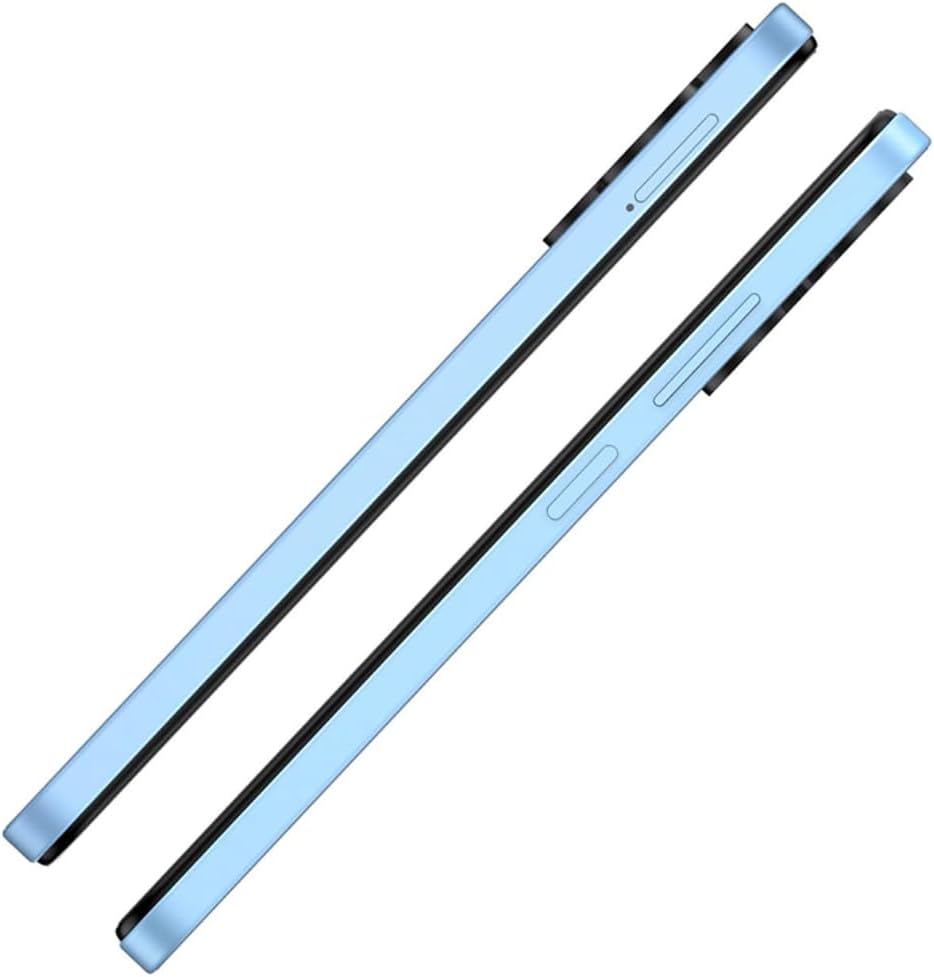
2-сүрөт: Каптал View SIM лоток менен
This image shows the right side of the Itel A50 smartphone, highlighting the elongated volume rocker and the power button below it. The SIM card tray slot is visible above the volume buttons.
2. Батареяны заряддоо
Before first use, fully charge the device battery. The Itel A50 comes with a 5000mAh battery.
- USB Type-C кабелин телефондун ылдый жагындагы заряддоо портуна туташтырыңыз.
- Кабелдин экинчи учун кубат адаптерине туташтырыңыз жана аны розеткага сайыңыз.
- Экранда заряддоо индикатору пайда болот.

Figure 3: Charging Port
The image shows the bottom edge of the Itel A50 smartphone with a white USB-C charging cable plugged into the central port. To the left of the charging port, a 3.5mm headphone jack is visible, and to the right, a speaker grille.
Иштөө нускамалары
1. Күйгүзүү/өчүрүү
- Күйгүзүү үчүн: Press and hold the Power button (located on the right side) until the Itel logo appears.
- Өчүрүү үчүн: Кубат параметрлери менюсу чыкканга чейин Кубат баскычын басып, кармап туруңуз, андан кийин "Өчүрүү" дегенди тандаңыз.
- Кайра баштоо үчүн: Кубат параметрлери менюсу пайда болгонго чейин Кубат баскычын басып, кармап туруңуз, андан кийин "Кайра баштоо" тандаңыз.

4-сүрөт: Алдыңкы дисплей
This image displays the front of the Itel A50 smartphone, showing its large screen with a waterdrop notch at the top for the front camera. The display shows a vibrant, abstract wallpaper.
2. Негизги навигация
- Сенсордук экран: Tap, swipe, pinch-to-zoom to interact with the interface.
- Башкы экран: Колдонмолорго жана виджеттерге кире турган негизги экран.
- Эскертмелер: Экрандын өйдө жагынан төмөн карай сүрүңүз view notifications and quick settings. The integrated Dynamic Bar provides essential notifications more seamlessly.
3. Камераны колдонуу
The Itel A50 features a rear camera system for capturing photos and videos.
- Үй экраныңыздан же колдонмо суурмасынан Камера колдонмосун ачыңыз.
- Каалаган режимиңизди тандаңыз (фото, видео, портрет ж.б.).
- Сүрөткө тартуу же видео жазууну баштоо/токтоо үчүн жапкычты таптаңыз.

5-сүрөт: Арткы камера модулу
This image shows the back of the Itel A50 smartphone, highlighting the prominent camera island in the upper left corner. The island contains three circular lenses and a flash, with "AI CAMERA" text visible. The back panel has a subtle textured pattern.
Техникалык тейлөө жана кам көрүү
- Тазалоо: Экранды жана корпусту тазалоо үчүн жумшак, мамыксыз чүпүрөктү колдонуңуз. Абразивдүү тазалоочу каражаттарды же эриткичтерди колдонбоңуз.
- Температура: Аппаратты өтө жогорку температурага (ысык же муздак) тийгизбеңиз.
- Суу каршылык: The Itel A50 is not water-resistant. Avoid contact with liquids.
- Батареянын иштөө мөөнөтү: To prolong battery life, avoid fully discharging the battery frequently. Optimize power consumption using the built-in power-saving solutions.
- Программалык камсыздоо жаңыртуулары: Оптималдуу иштөөнү жана коопсуздукту камсыз кылуу үчүн түзмөгүңүздүн программасын жаңыртып туруңуз.
Проблемаларды чечүү
| Көйгөй | Мүмкүн чечим |
|---|---|
| Түзмөк күйбөйт. | Батарея заряддалганын текшериңиз. Заряддоочу түзүлүшкө туташтырып, кайра күйгүзүүгө аракет кылуудан мурун бир нече мүнөт күтө туруңуз. |
| Экран жооп бербей жатат. | Күйгүзүү баскычын болжол менен 10-15 секунд басып жана кармап туруу менен мажбурлап өчүрүп-күйгүзүүнү аткарыңыз. |
| Начар тармак сигналы. | SIM картанын салынышын текшериңиз. Тармакты жакшыраак каптаган аймакка жылыңыз. Аппаратты кайра иштетиңиз. |
| Колдонмолор жай же бузулуп жатат. | Close background apps. Clear app cache. Ensure sufficient storage space. Restart the device. The device is designed for smooth and efficient operations, optimizing performance for specific scenarios. |
| Батарея бат эле түгөнөт. | Reduce screen brightness. Disable unnecessary features (Wi-Fi, Bluetooth, GPS) when not in use. Use power-saving modes. |
Техникалык шарттар
| Өзгөчөлүк | Деталь |
|---|---|
| Модель аты | T603 (Item model number: A667LP) |
| Бренд | Itel |
| Операция системасы | OS 14 |
| Орнотулган RAM эстутум көлөмү | 8 GB (3+5GB RAM) |
| Эстутум сактоо сыйымдуулугу | 128 GB (Supports up to 2TB external memory) |
| CPU модели | 1.2 ГГц Cortex A8 процессору |
| CPU ылдамдыгы | 2 ГГц |
| Screen Size | 6.6 дюйм (Көрүнүүчү экран диагоналы: 7 дюйм/17 см) |
| Зымсыз оператор | Кулпусу ачылган |
| Уюлдук технология | 4G |
| Батареялар | 1 литий-иондук батарея талап кылынат (кошулган), 5000 мАч |
| Пакеттин өлчөмдөрү | 18 x 9 x 4.5 см; 187 г |
| Дата биринчи жеткиликтүү | 25-сентябрь 2024-жыл |
| Өндүрүүчү | itel |
Кепилдик жана колдоо
For warranty information and technical support, please refer to the warranty card included in your product packaging or visit the official Itel webсайт. Кепилдик дооматтар үчүн сатып алганыңыздын далилин сактаңыз.
For further assistance, you may contact Itel customer service through their official channels.


