Introduction
This manual provides comprehensive instructions for the safe and efficient operation of your Ulefone Note 18 Pro smartphone. Please read this manual thoroughly before using your device to ensure proper functionality and to prevent damage.

1-сүрөт: Алдыңкы жана арткы view of the Ulefone Note 18 Pro, showcasing its design and key specifications like Android 14, 64MP camera, and 256GB ROM.
Жайгашуу
1. Кутудан чыгаруу жана алгачкы текшерүү
Пакетти ачканда, бардык компоненттер бар экенин жана бузулбаганын текшериңиз. Стандарттык пакеттин мазмуну төмөнкүлөрдү камтыйт:
- Ulefone Note 18 Pro Smartphone
- Кубаттуу адаптер
- USB Type-C кабели
- SIM чыгаруучу курал
- Protective TPU Phone Case
- Tempered Glass Screen Protector
- Колдонуучунун Колдонмосу (бул документ)

2-сүрөт: Contents typically found within the Ulefone Note 18 Pro retail packaging.
2. SIM карта жана MicroSD карта орнотуу
The Ulefone Note 18 Pro supports dual SIM cards and expandable storage via a microSD card. Use the provided SIM ejector tool to open the SIM tray located on the side of the device.
- Телефондун капталындагы SIM салгычты табыңыз.
- SIM чыгаруучу куралды лотоктун жанындагы кичинекей тешикке кыстарыңыз жана лоток чыкканча акырын басыңыз.
- SIM салгычты кылдаттык менен сууруп алыңыз.
- Place your Nano-SIM cards and/or microSD card into the designated slots on the tray, ensuring correct orientation as indicated on the tray.
- Табаны телефондун ичине акырын түртүңүз, ал чыкылдагыча.

3-сүрөт: Illustration of the dual SIM and microSD card slot for the Ulefone Note 18 Pro.
3. Баштапкы күйгүзүү жана орнотуу устасы
Press and hold the Power button on the side of the device until the Ulefone logo appears. Follow the on-screen instructions to complete the initial setup, which includes selecting your language, connecting to a Wi-Fi network, and setting up your Google account.
Түзмөгүңүздү иштетүү
1. Дисплей жана навигация
The Ulefone Note 18 Pro features a 6.78-inch HD+ display with a 90Hz refresh rate for smooth visuals. Navigate the interface using touch gestures such as tapping, swiping, pinching, and spreading.

4-сүрөт: Деталдаштырылган view of the Ulefone Note 18 Pro's 6.78-inch HD+ display and its key visual specifications.
2. Камера системасы
Сиздин аппаратыңыз ар тараптуу камера системасы менен жабдылган:
- 64MP Негизги камера: For high-resolution photos with vibrant colors and sharp detail.
- 50MP Ultra кең камера: Сиздин чөйрөңүздү кеңейтет view пейзаждар жана топтук кадрлар үчүн.
- 32MP алдыңкы камера: Таза селфи жана видео чалуулар үчүн.
Access various photography modes such as Night Mode, Portrait Mode, HDR, and AI enhancements through the camera application.

5-сүрөт: Бүттүview of the Ulefone Note 18 Pro's triple camera setup and front camera.
3. Батарея жана заряддоо
The Ulefone Note 18 Pro is powered by a 5450mAh battery, providing extended usage times. It supports 18W fast charging. Use the provided charger and cable for optimal charging performance.
- Сүйлөшүү убактысы: 30 саатка чейин
- Күтүү убактысы: 295 саатка чейин
- Видеону ойнотуу: 12 саатка чейин
- Толук кубаттоо убактысы: Approximately 3.2 hours with 18W fast charging.
4. Customizable Shortcut Key
The device features a customizable key that can be configured for quick access to various functions or applications. You can set it for single click, double click, or long press actions.
- Бир чыкылдатуу: No operation (default), Start Soundrecording, Open Flashlight, Screenshots, Open Zello, Open SOS, Open Game Mode.
- Эки жолу басуу: Assignable to various apps or functions.
- Узак басуу: Assignable to various apps or functions.
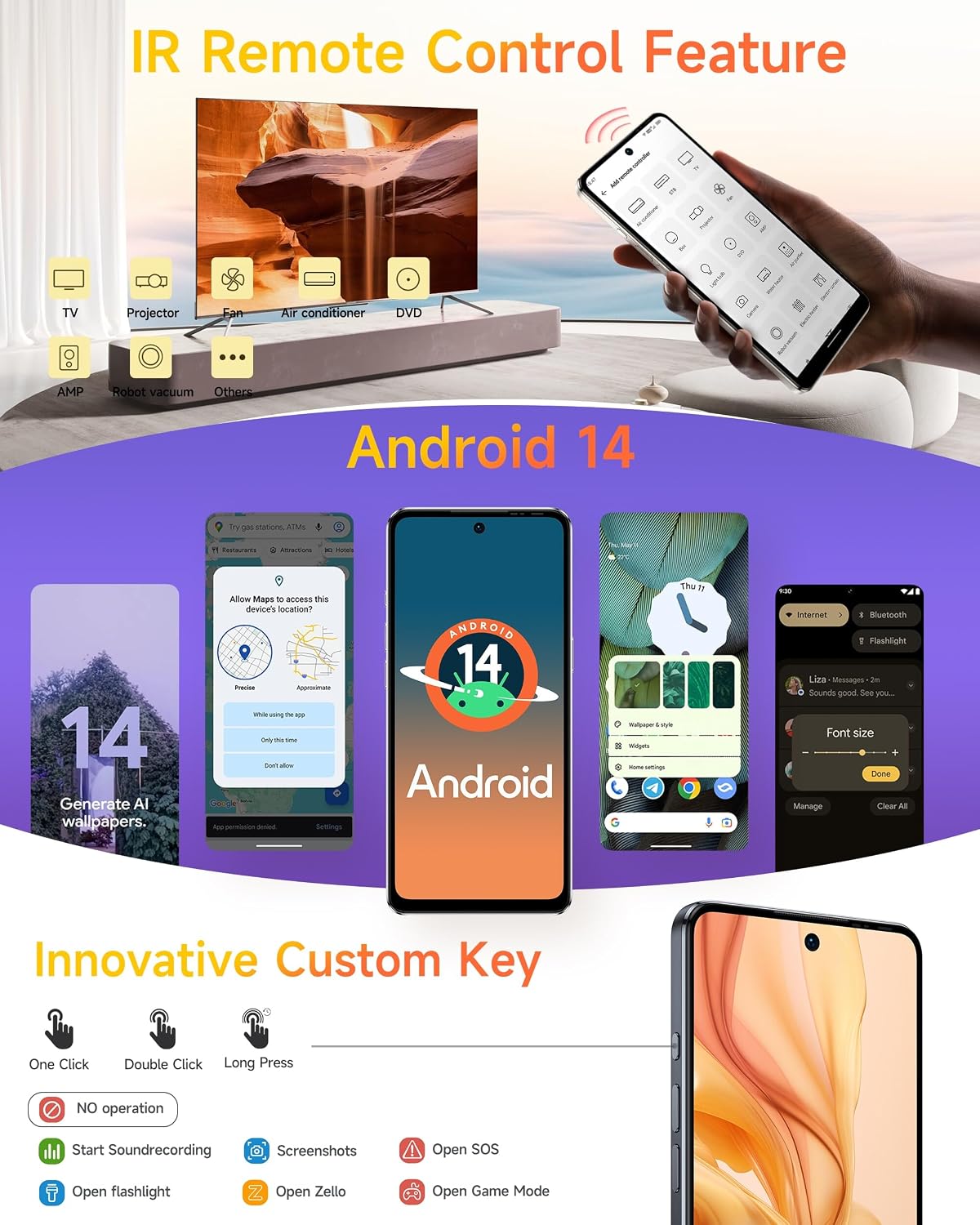
6-сүрөт: The innovative custom key and its configurable actions on the Ulefone Note 18 Pro.
5. IR Blaster (Infrared Remote Control)
The built-in IR Blaster allows your phone to function as a universal remote control for compatible household appliances such as TVs, air conditioners, projectors, and more. Use the pre-installed remote control application to configure and operate your devices.
6. NFC with Google Pay
The Near Field Communication (NFC) feature enables contactless payments via Google Pay (where available), quick pairing with NFC-enabled accessories, and data exchange. Ensure NFC is enabled in your phone's settings for these functions.
7. Android 14 операциялык системасы
The Ulefone Note 18 Pro runs on Android 14, offering enhanced personalization options, improved privacy controls, and a secure, ad-free user experience. Explore features like AI-generated wallpapers and refined themes.

7-сүрөт: Visual representation of Android 14's personalized, private, and secure features on the device.
8. Security Features: Face Unlock and Fingerprint ID
Unlock your device securely using either Face Unlock or the integrated Fingerprint ID sensor. Configure these options in the Security settings menu.
9. Global Navigation and FM Radio
The device supports multiple global navigation satellite systems (GPS, GLONASS, BeiDou, Galileo) for accurate positioning. It also includes a headset-free FM radio for listening to local broadcasts.

8-сүрөт: Additional features including biometric security, navigation, and multimedia capabilities.
Техникалык тейлөө
1. Заряддоо боюнча көрсөтмөлөр
To prolong battery life, avoid extreme temperatures during charging. Use only Ulefone-approved chargers and cables. Do not leave the device charging for extended periods after it reaches 100%.
2. Сактагычты башкаруу
The Ulefone Note 18 Pro comes with 256GB of internal storage, expandable up to 2TB via a microSD card. Regularly manage your storage by deleting unnecessary files, clearing app caches, and moving large media files тышкы сактагычка.

9-сүрөт: Memory and storage configuration of the Ulefone Note 18 Pro.
3. Программалык камсыздоону жаңыртуу
Regularly check for and install system updates to ensure your device has the latest security patches, features, and performance improvements. Updates can be found in the Settings menu under "System" or "About phone."
4. Аспапты тазалоо
Use a soft, lint-free cloth to clean the screen and body of the phone. Avoid using harsh chemicals or abrasive materials. The device is splash-proof, but it is not fully waterproof; avoid submerging it in liquids.
Проблемаларды чечүү
This section addresses common issues you might encounter with your Ulefone Note 18 Pro.
Жалпы маселелер жана чечимдер:
- Түзмөк күйбөй жатат: Батарея заряддалганын текшериңиз. Заряддагычты туташтырыңыз жана кайра күйгүзүү аракетинен мурун бир нече мүнөт күтүңүз.
- Начар тармак сигналы: Check if your SIM card is properly inserted. Move to an area with better network coverage. Contact your carrier if the issue persists.
- Колдонмолор бузулуп же катып жатат: Фондук колдонмолорду жабуу. Көйгөйлүү колдонмонун кэшин тазалаңыз (Орнотуулар > Колдонмолор > [Колдонмонун аты] > Сактагыч > Кэшти тазалоо). Аппаратты кайра иштетиңиз.
- Батареянын бат түгөнүп калышы: Reduce screen brightness, disable unused features like Wi-Fi, Bluetooth, GPS when not needed. Check battery usage in settings to identify power-hungry apps.
- Device slow or unresponsive: Free up storage space. Restart the device. Consider a factory reset as a last resort (back up your data first).
Заводдун баштапкы абалга келтирүү:
Заводдук жөндөөлөргө кайтаруу телефонуңуздагы бардык маалыматтарды өчүрүп, аны баштапкы заводдук жөндөөлөрүнө кайтарат. Улантуудан мурун бардык маанилүү маалыматтардын камдык көчүрмөсүн жасаңыз.
- барыңыз Орнотуулар.
- Тандоо Система.
- таптаңыз Параметрлерди баштапкы абалга келтирүү.
- Тандоо Бардык дайындарды өчүрүү (дескриптке кайтаруу).
- Чечимиңизди ырастап, суралса, PIN/сырсөзүңүздү киргизиңиз.
Техникалык шарттар
Key technical specifications for the Ulefone Note 18 Pro:
| Өзгөчөлүк | Спецификация |
|---|---|
| Модель аты | Ulefone Note 18 Pro Phone Unlocked |
| Операция системасы | Android 14 |
| Дисплей өлчөмү | 6.78 дюйм |
| Display Resolution | 1280 x 720 (HD+) |
| Процессор | MediaTek Helio G91 Octa Core (up to 2 GHz) |
| RAM | 12 ГБ (6 ГБ физикалык + 6 ГБ виртуалдык) |
| Ички сактагыч | 256 ГБ |
| Кеңейтүүчү сактагыч | Up to 2 TB (microSD, sold separately) |
| Башкы камера | 64 депутат |
| Ультра кең камера | 50 депутат |
| Алдыңкы камера | 32 депутат |
| Батарея сыйымдуулугу | 5450 мАч |
| Заряддоо | 18W Fast Charging (approx. 3.2 hours for full charge) |
| Өлчөмдөр | 6.65 x 3.02 x 0.35 дюйм |
| Салмагы | 7.4 унция (211 грамм) |
| Байланыш | 4G LTE, Wi-Fi, Bluetooth, GPS, NFC |
| Аудио Jack | 3.5 мм |
| Өзгөчөлүктөр | Dual SIM, Built-In GPS, IR Blaster, Customizable Key, Face Unlock, Fingerprint ID, Splash Proof |
Кепилдик жана колдоо
Ulefone provides support and warranty services for your device.
- Кепилдик: The Ulefone Note 18 Pro comes with a 1-Year Non-artificial damage warranty.
- Техникалык колдоо: 24-hour technical support is available.
- Кайтаруулар: 30-day return policy without reason.
- Efficient Service: 1 Year Efficient Service.
For detailed warranty terms, service requests, or technical assistance, please refer to the official Ulefone webсайтка же түздөн-түз кардарларды колдоо менен байланышыңыз.

10-сүрөт: Ulefone's customer support and warranty details.


