1. Киришүү
Thank you for choosing the Lubluelu SL60 Pro Robot Vacuum Cleaner and Mop. This manual provides essential information for the safe operation, maintenance, and troubleshooting of your device. Please read it thoroughly before use and retain it for future reference.
2. Маанилүү коопсуздук нускамалары
Жаракат алуу же бузулуу коркунучун азайтуу үчүн, бул коопсуздук көрсөтмөлөрүн кунт коюп окуп чыгыңыз жана продуктуну колдонуу учурунда аларды жеткиликтүү жерде сактаңыз.
- Бул шайманды 8 жаштан жогорку балдар жана физикалык, сезүү же акыл-эс жөндөмү начар же тажрыйбасы жана билими жок адамдар колдонсо болот, эгерде алар көзөмөлгө алынган же шайманды коопсуз колдонуу боюнча нускама алган болсо жана келтирилген коркунучтарды түшүнсө. .
- Балдар шайман менен ойнобошу үчүн аларды көзөмөлгө алуу керек.
- Тазалоо жана колдонуучу тейлөөнү балдар көзөмөлсүз жасабашы керек.
- Only use the power adapter supplied by the manufacturer.
- Шайманды ачык от же морт буюмдар бар жерлерде колдонбоңуз.
- Тазалоодон же техникалык тейлөөдөн мурун роботтун өчүрүлгөнүн жана розеткадан суурулганын текшериңиз.
- Do not immerse the robot or charging base in water.
- Чачты, кенен кийимдерди, манжаларды жана дененин бардык бөлүктөрүн тешиктерден жана кыймылдуу бөлүктөрдөн алыс кармаңыз.
3. Пакеттин мазмуну
Verify that all components are present and in good condition upon unpacking. If any items are missing or damaged, please contact customer support.
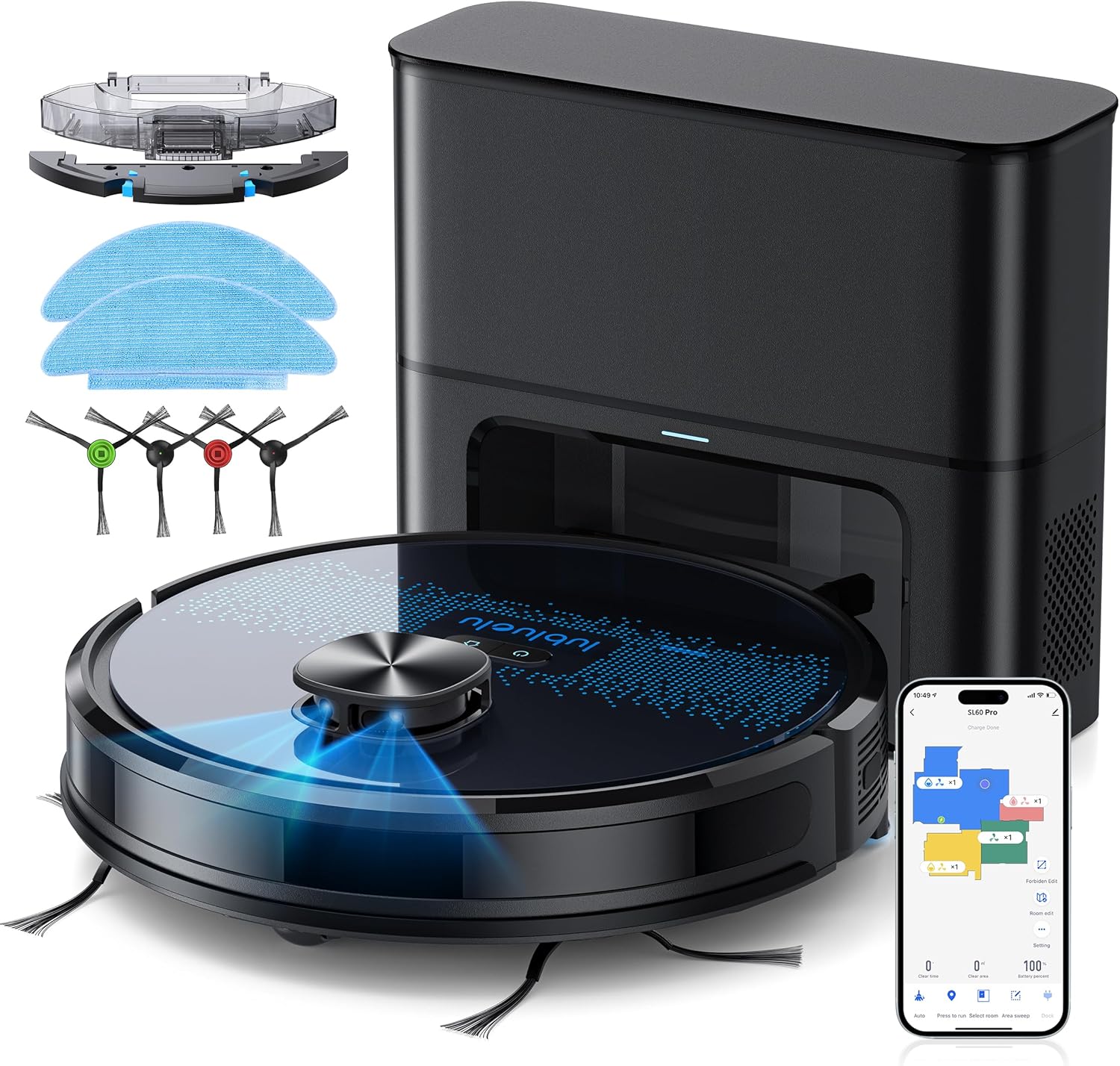
- Lubluelu SL60D Robot Vacuum Cleaner
- D3 Self-Emptying Station
- Extra Dust Bag (2.5L capacity)
- Mop Pad (2 pieces)
- Тазалоо куралы
- Каптал щеткалары (2 жуп)
- Кошумча HEPA чыпкасы
- User Manual
4. Продукт бүтүп калдыview
The Lubluelu SL60 Pro is an advanced robot vacuum and mop designed for efficient home cleaning. It features LIDAR navigation, 4000Pa suction power, a 2.5L self-emptying dust station, and smart app control.
4.1 Негизги өзгөчөлүктөрү
- LIDAR Navigation: Equipped with 8-meter laser range and SLAM algorithm for accurate mapping and efficient route planning.
- Self-Emptying Station: Automatically empties the robot's dustbin into a 2.5L disposable bag, requiring manual emptying only every 60 days.
- 4000Па Соруу кубаттуулугу: Powerful brushless motor with three adjustable suction levels for effective cleaning on various surfaces, including carpets.
- 3-бирде тазалоо: Sweeps, vacuums, and mops simultaneously with electronic water control and Y-shaped mopping patterns.
- Көп кабаттуу үйлөрдүн картасын түзүү: Stores up to 5 maps for multi-level homes, allowing for customized cleaning plans.
- Ыңгайлаштырылган тазалоо: Set no-go zones, virtual walls, spot cleaning, edge cleaning, and scheduled cleaning via the app.
- Автоматтык түрдө заряддоо: Returns to the charging base when battery is low (below 15%) and resumes cleaning from where it left off once charged to 80%.
- Төмөн ызы-чуу операциясы: Болжол менен 55 дБ чыңалууда иштейт.

5. Орнотуу
5.1 Роботту заряддоо
Before first use, fully charge the robot. Place the self-emptying station against a wall with at least 0.5 meters of clear space on either side and 1.5 meters in front. Ensure the power cable is securely connected.

5.2 Каптал щеткаларды орнотуу
Attach the side brushes by pressing them onto the square posts at the bottom of the robot until they click into place.
5.3 Installing the Dust Bin/Water Tank
The robot comes with a combined dust bin and water tank. Fill the water tank with clean water (do not use cleaning solutions that may clog the system). Attach the mop pad to the bottom of the tank. Insert the assembly into the robot until it locks.
5.4 Wi-Fi жана колдонмого туташуу
To unlock all smart features, connect your robot to the Lubluelu app (Smartlife app). Ensure your Wi-Fi network is 2.4GHz.
- Download the 'Smartlife' app from your mobile app store.
- Каттоо же өз эсебиңизге кирүү.
- Press and hold the power button on the robot for 3-5 seconds until the Wi-Fi indicator light blinks rapidly.
- In the app, tap 'Add Device' and select 'Robot Vacuum (Wi-Fi)' under 'Small Home Appliances'.
- Follow the in-app instructions to connect the robot to your 2.4GHz Wi-Fi network.
6. Операция
6.1 Тазалоону баштоо/тындыруу
- Баштоо: Press the power button on the robot or tap 'Start' in the app.
- Тыныгуу: Press the power button again or tap 'Pause' in the app.
- Базага кайтуу: Press the home button on the robot or tap 'Recharge' in the app.
6.2 Тазалоо режимдери
The robot offers various cleaning modes accessible via the Smartlife app:
- Автоматтык тазалоо: The robot intelligently maps and cleans your home using its LIDAR navigation.
- Тазалоо: Роботту белгилүү бир кичинекей аймакты интенсивдүү тазалоого багыттайт.
- Аймакты тазалоо: Картада робот тазалоо үчүн атайын аймактарды аныктаңыз.
- Четтерин тазалоо: Робот дубалдарды жана эмеректердин четтерин тазалайт.
- Пландаштырылган тазалоо: Роботту автоматтык түрдө тазалоо үчүн атайын убакыттарды коюңуз.

6.3 Шыпыргы функциясын колдонуу
Ensure the water tank is filled and the mop pad is attached. The app allows you to adjust water flow levels for different floor types.
6.4 Managing Maps and No-Go Zones
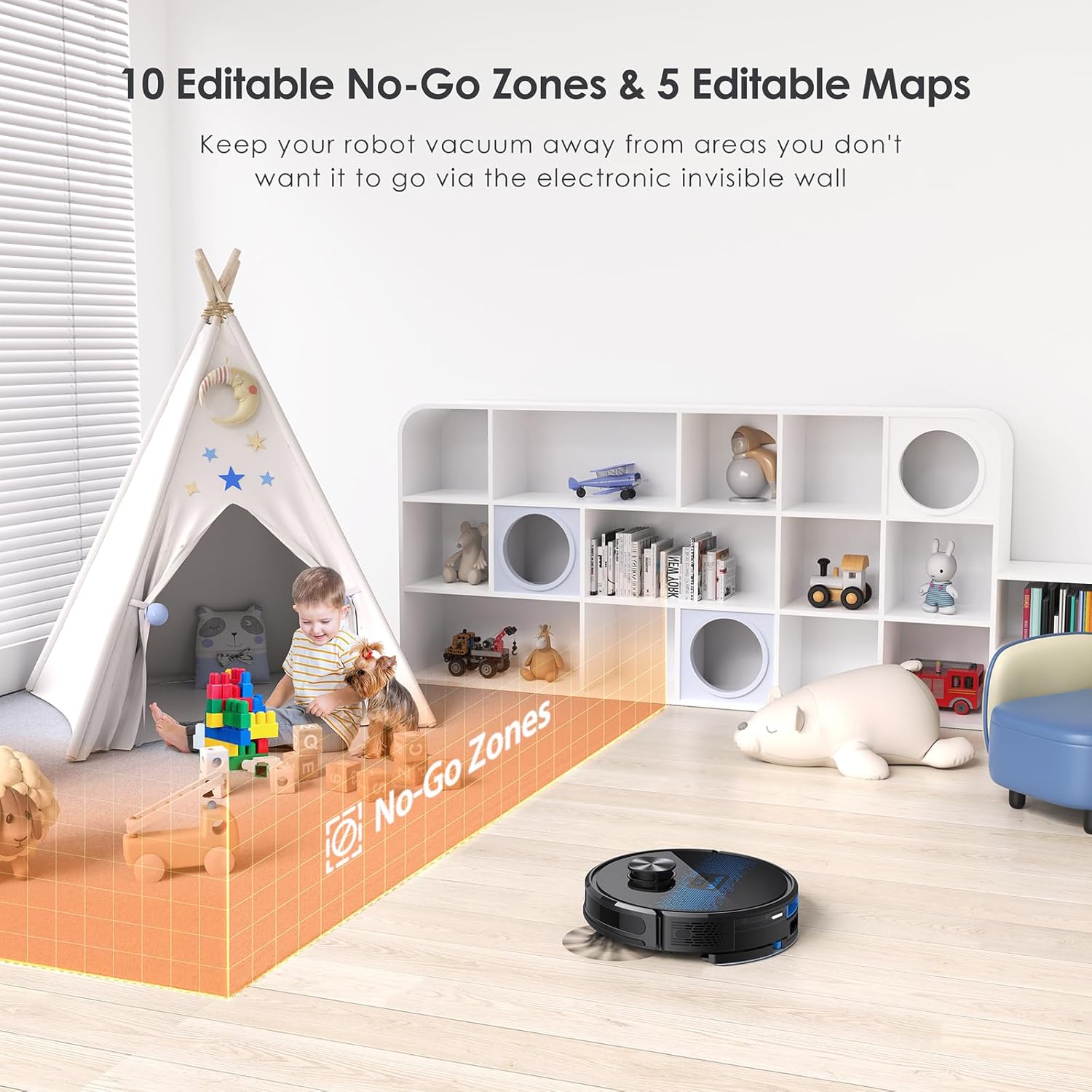
The SL60 Pro can store up to 5 different maps, useful for multi-level homes. You can also define up to 10 no-go zones or virtual walls to restrict the robot from certain areas.
6.5 Үн менен башкаруу
The robot is compatible with Amazon Alexa and Google Assistant. Follow the instructions in the Smartlife app to link your device for voice commands.
7. Техникалык тейлөө
Үзгүлтүксүз техникалык тейлөө оптималдуу иштешин камсыздайт жана робот чаң соргучуңуздун иштөө мөөнөтүн узартат.
7.1 Чаң урнасын бошотуу
The self-emptying station automatically handles dust collection. The 2.5L dust bag in the station should be replaced approximately every 60 days, depending on usage.

7.2 Негизги щетканы тазалоо
Periodically remove the main brush and clean it using the provided cleaning tool to remove tangled hair and debris.
7.3 Каптал щеткаларды тазалоо
Check side brushes for wear and tear. Remove any tangled hair or debris. Replace if damaged.
7.4 Фильтрди тазалоо
Tap the filter to remove loose dirt. Rinse the filter with water if necessary, ensuring it is completely dry before reinstallation.
7.5 Суу резервуарды жана швабраны тазалоо
After each mopping session, empty any remaining water from the tank and clean the mop pad. The mop pad can be hand-washed or machine-washed.
7.6 Сенсорлорду жана заряддоо контакттарын тазалоо
Wipe all sensors and charging contacts on both the robot and the charging station with a clean, dry cloth to ensure proper function.
8. Кыйынчылыктарды
If you encounter issues with your Lubluelu SL60 Pro, refer to the following common problems and solutions:
| Көйгөй | Мүмкүн себеп | Чечим |
|---|---|---|
| Робот күйбөйт. | Low battery or power switch off. | Ensure the power switch is on and charge the robot. |
| Робот Wi-Fi'га туташа албайт. | Incorrect Wi-Fi band (not 2.4GHz), wrong password, or router too far. | Ensure 2.4GHz Wi-Fi, verify password, move robot closer to router, or reset Wi-Fi on robot. |
| Робот бат-баттан тыгылып калат. | Obstacles, tangled cables, or uneven surfaces. | Clear the cleaning area of obstacles, cables, and small items. Use no-go zones for problematic areas. |
| Начар тазалоо көрсөткүчү. | Full dustbin, dirty brushes/filter, or low suction setting. | Empty dustbin, clean brushes and filter, increase suction power via the app. |
| Чыпкалоо функциясы иштебейт. | Empty water tank, dry mop pad, or clogged water nozzle. | Fill water tank, moisten mop pad, clean water nozzle. |
For further assistance, please contact Lubluelu customer support.
9. Техникалык шарттар
| Өзгөчөлүк | Деталь |
|---|---|
| Бренд | Lubluelu |
| Модель аты | SL60 Pro |
| Түс | Blue Black |
| Продукциянын өлчөмдөрү (робот) | 32 x 32 x 10 см |
| Элемент Салмагы | 4.4 килограмм |
| Соруу күчү | 4000 Па чейин |
| Чаң баштыктарынын сыйымдуулугу (Станция) | 2.5 литр |
| Суу резервуарынын сыйымдуулугу | 250 миллилитр |
| Тtage | 14.4 вольт |
| Ызы-чуу деңгээли | 55 децибел |
| Runtime | 2 саат 30 мүнөткө чейин |
| Навигация түрү | ЛИДАР |
| Шайкеш түзмөктөр | Smartphone (Wi-Fi 2.4GHz), Amazon Alexa, Google Assistant |
| Өзгөчөлүктөр | LIDAR Navigation, Smart Mapping, Obstacle Avoidance, Edge Cleaning, Wet/Dry Mopping, App Control, No-Go Zones, Continuous Breakpoint Cleaning, Multi-Stage Mapping |
10. Кепилдик жана колдоо
Lubluelu is committed to customer satisfaction. For any issues with your robot vacuum, please contact our customer service team. We provide lifetime technical support.
- Кепилдик: Кепилдиктин конкреттүү чоо-жайын билүү үчүн сатып алуу документтериңизден караңыз.
- Колдоо кызматы менен байланышуу: For technical assistance or service inquiries, please email us or visit our official webсайт.