Introduction
The Spedal CL871 Motorcycle Smart Monitor is designed to enhance your riding experience with integrated navigation, smart features, and robust durability. This 6.25-inch LCD screen provides crystal-clear visibility and responsive touch control, supporting both Apple CarPlay and Android Auto for seamless smartphone integration.
This manual provides detailed instructions for the setup, operation, maintenance, and troubleshooting of your Spedal CL871 device. Please read it thoroughly before use to ensure optimal performance and safety.
Негизги өзгөчөлүктөрү
- Integrated Navigation & Smart Features: Experience seamless navigation with the CL871 Motorcycle Smart Monitor, supporting CarPlay and Android Auto. The 6.25-inch LCD screen features an upgraded high-resolution display with a peak brightness of 900 nits, ensuring crystal-clear visibility even under direct sunlight.
- Direct Bluetooth Connectivity: Easily connect your helmet or Bluetooth earphones directly through your smartphone, reducing sound quality loss and keeping your phone safely stored in your pocket. The device supports voice control via Siri or Google Assistant.
- Автоматтык жарыктык жөндөө: The display features an auto-brightness adjustment function, ensuring excellent visibility even in bright sunlight. Whether in dim or bright environments, the screen adapts for a clear view of navigation or media.
- IP67 Waterproof & Dustproof Design: Built to withstand the elements, this IP67-rated motorcycle CarPlay system offers protection against rain, dust, and dirt. Ride with confidence, knowing your device is durable and reliable in any weather condition.
- Wide Compatibility & Easy Installation: Designed to support a wide range of motorcycle models, the CL871 operates with a power voltage range of 9-18V, making it compatible with various brands and bikes. The included installation tools allow for quick and hassle-free setup.
Орнотуу жана орнотуу
The Spedal CL871 is designed for straightforward installation on most motorcycles. Ensure your motorcycle's power system is within the 9-18V range for compatibility.
Пакеттин мазмуну:
- Spedal CL871 Smart Monitor Unit
- Монтаждык кашаа жана жабдуу
- Power Cable (for 9-18V connection)
- Колдонуучунун Колдонмосу (бул документ)
- Орнотуу куралдары
Орнотуу кадамдары:
- Монтаждоо ордун тандоо: Select a secure and visible location on your motorcycle's handlebar.
- Монтаждык кронштейнди тиркөө: Securely fasten the provided mounting bracket to the chosen location using the included tools. Ensure it is stable and does not obstruct your view же башкаруу.
- Туташуу кубаты: Connect the power cable to your motorcycle's electrical system. The device operates on 9-18V. It is recommended to connect the red ACC wire to a switched power source (e.g., ignition) and the black wire to ground.
- Аппаратты орнотуу: Slide the Spedal CL871 unit onto the mounted bracket until it clicks securely into place.
- Баштапкы күйгүзүү: Turn on your motorcycle's ignition. The CL871 should power on automatically.
Эскертүү: This product is not compatible with dash cameras. Tire Pressure Monitoring System (TPMS) sensors must be purchased separately.

Figure 1: Spedal CL871 unit with included mounting hardware and a motorcycle for scale.
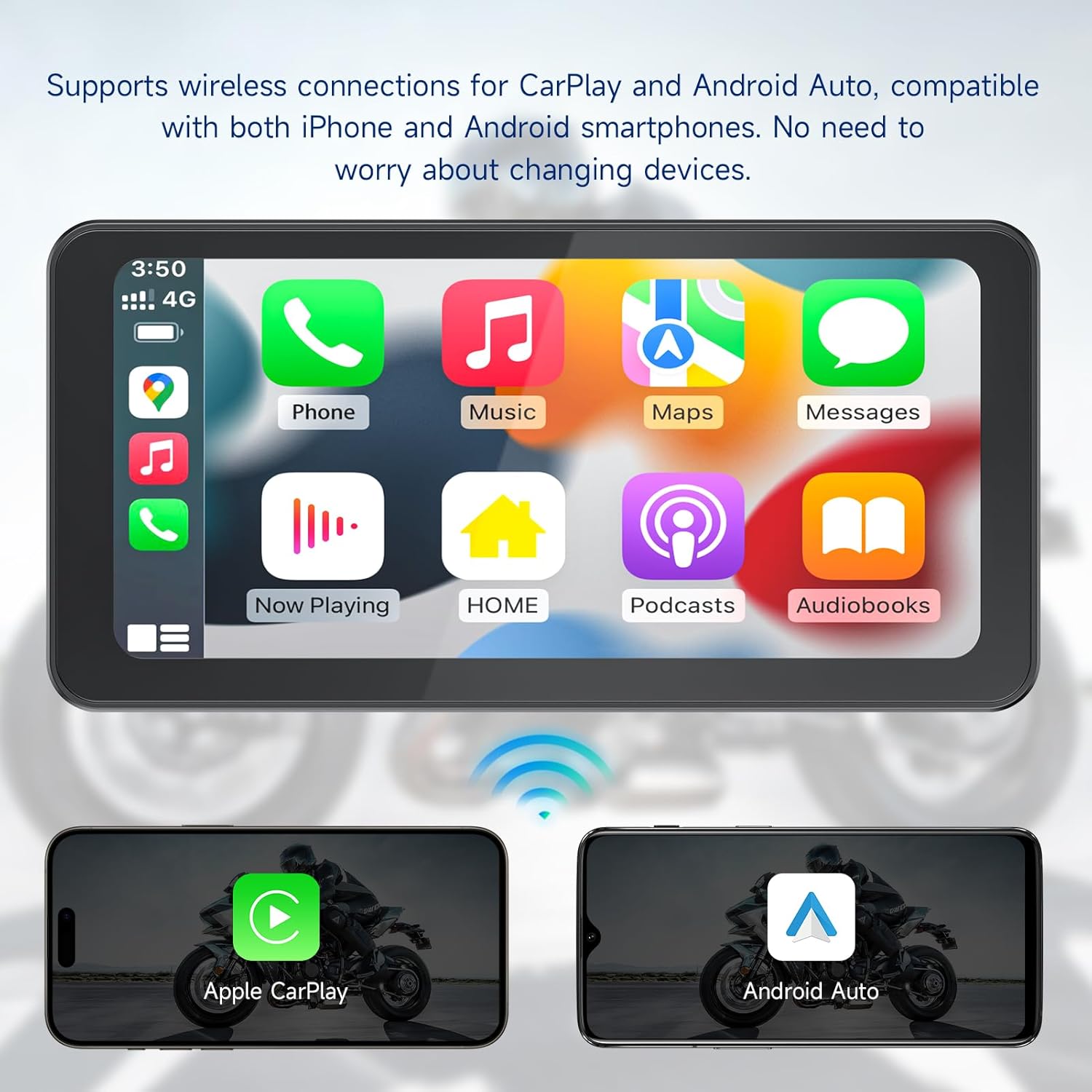
Figure 2: The CL871 supports wireless Apple CarPlay and Android Auto connections, compatible with both iPhone and Android smartphones.
Иштөө нускамалары
Connecting to Your Smartphone (CarPlay/Android Auto):
- Смартфонуңузда Bluetooth жана Wi-Fi иштетилгенин текшериңиз.
- On the CL871 screen, navigate to the connection settings.
- Select either "CarPlay" or "Android Auto" based on your phone's operating system.
- Follow the on-screen prompts to pair your smartphone via Bluetooth. Once paired, the system will automatically establish a Wi-Fi connection for CarPlay or Android Auto functionality.
- Your phone's interface will now be mirrored on the CL871 screen, allowing access to navigation, music, calls, and messages.
Bluetooth Headset Connection:
The CL871 allows direct connection to your helmet's Bluetooth system or Bluetooth earphones, ensuring clear audio without routing through your phone.
- Bluetooth гарнитураңызды жупташтыруу режимине коюңуз.
- On the CL871, go to Bluetooth settings and search for available devices.
- Select your headset from the list to pair.
- Once connected, all audio from the CL871 (navigation prompts, music, calls) will be routed to your headset.

Figure 3: Enhanced Bluetooth connectivity allows direct pairing with your helmet or earphones for superior audio quality.
Voice Control (Siri/Google Assistant):
Utilize voice commands for hands-free operation, keeping your focus on the road.
- Activate Siri (for iOS) or Google Assistant (for Android) through the CL871 screen or by using your phone's voice command trigger.
- You can then issue commands such as:
- "Navigate to [destination]"
- "Play [song/artist]"
- "Call [contact name]"
- "Send a message to [contact name]"
- "Adjust volume"

Figure 4: Hands-free voice control for navigation, music, and calls via Siri or Google Assistant.
Автоматтык жарыктык жөндөө:
The CL871 features an integrated light sensor that automatically adjusts screen brightness based on ambient light conditions. This ensures optimal visibility whether you are riding in bright sunlight or at night.
- No manual adjustment is typically required for brightness.
- The screen will dim in low light and brighten in direct sunlight to maintain readability.

Figure 5: The automatic light sensing function ensures clear display under any lighting conditions.
Техникалык тейлөө
To ensure the longevity and optimal performance of your Spedal CL871, follow these maintenance guidelines:
- Тазалоо: жумшак колдонуу, damp cloth to clean the screen and exterior. Avoid abrasive cleaners, solvents, or harsh chemicals, as these can damage the display or casing.
- Суу өткөрбөйт дизайн: The device is IP67 rated for water and dust resistance. While it can withstand rain and splashes, avoid submerging it in water for extended periods. Ensure all ports and covers are securely closed to maintain water resistance.
- Температура диапазону: The CL871 is designed to operate in temperatures from -4°F to 158°F (-20°C to 70°C). Avoid exposing the device to extreme temperatures outside this range for prolonged periods.
- Сактагыч: Узак мөөнөткө колдонулбаганда, аспапты күн тийбеген, салкын, кургак жерде сактаңыз.
- Кабелдик текшерүү: Periodically inspect the power cable and connections for any signs of wear, fraying, or damage. Replace damaged cables immediately.
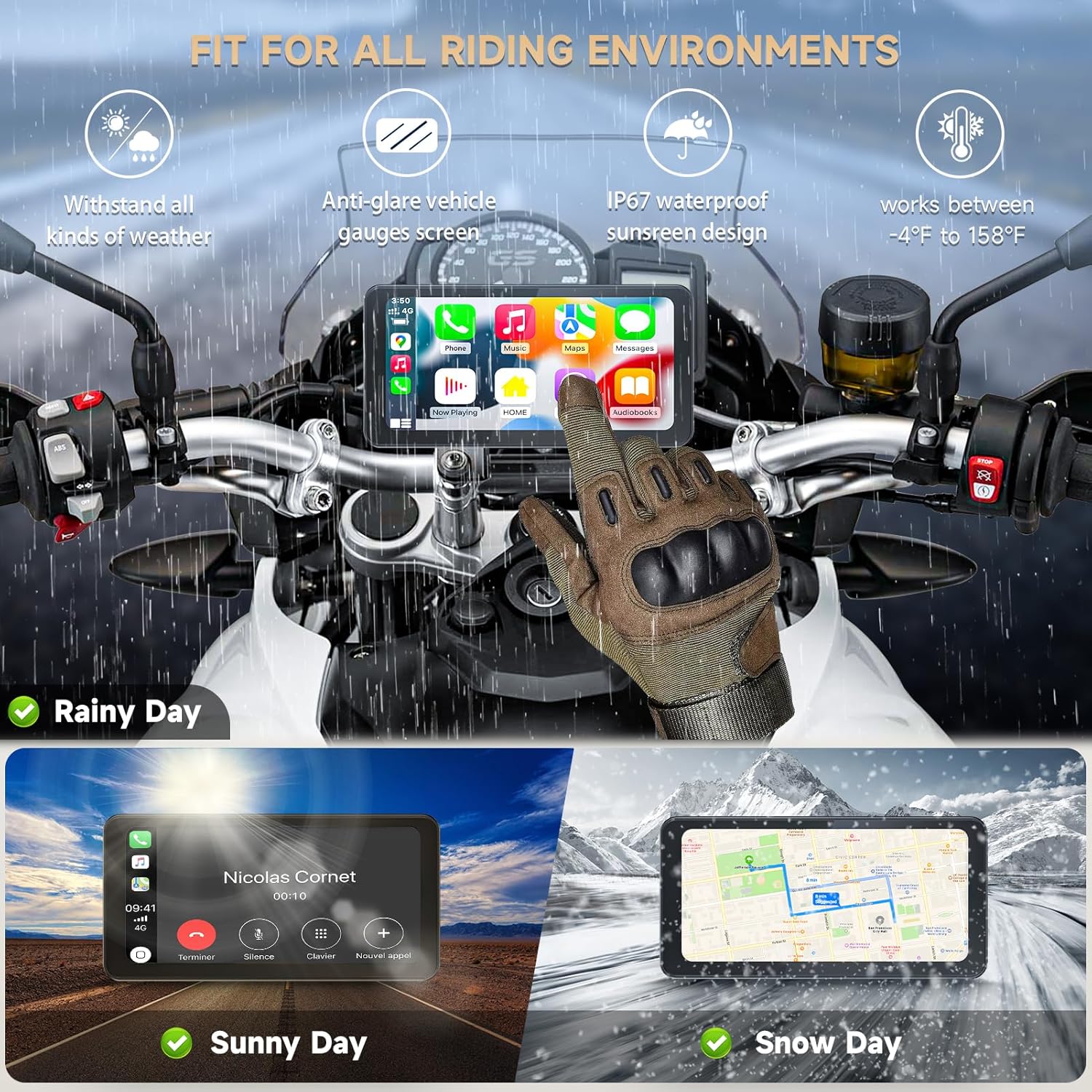
Figure 6: The CL871 is built to withstand all kinds of weather, from rainy days to snowy conditions, and operates effectively between -4°F and 158°F.
Проблемаларды чечүү
If you encounter issues with your Spedal CL871, refer to the following common problems and solutions:
| Көйгөй | Мүмкүн себеп | Чечим |
|---|---|---|
| Түзмөк күйбөйт. | No power connection, incorrect wiring, or blown fuse. | Check power cable connections to the motorcycle battery and ignition. Ensure the voltage is within 9-18V. Inspect fuses. |
| CarPlay/Android Auto туташпай жатат. | Bluetooth/Wi-Fi issues, phone compatibility, or software glitch. | Ensure Bluetooth and Wi-Fi are enabled on your phone. Restart both the CL871 and your phone. Forget and re-pair the Bluetooth connection. Verify your phone's OS is compatible. Some Android phones may experience intermittent disconnections; try updating phone software or CL871 firmware if available. |
| Экран күңүрт же окулбайт. | Extreme lighting conditions, or automatic brightness sensor issue. | The device has automatic brightness adjustment. Ensure the light sensor is not obstructed. If the issue persists, contact customer support. |
| Гарнитурадан аудио жок. | Headset not paired, volume too low, or headset issue. | Ensure your Bluetooth headset is properly paired with the CL871. Check volume levels on both the CL871 and your headset. Try re-pairing the headset. |
| Сенсордук экран жооп бербейт. | Software freeze or physical damage. | Restart the CL871 unit. If the problem persists, contact customer support. |
If the problem persists after attempting these solutions, please contact Spedal customer support for further assistance.
Техникалык шарттар
| Өзгөчөлүк | Деталь |
|---|---|
| Модель аты | CL871 |
| Дисплей өлчөмү | 6.25 дюйм |
| Резолюция | 1280 x 720 |
| Операциялык системанын шайкештиги | Android, iOS (for CarPlay/Android Auto) |
| Байланыш технологиясы | Bluetooth, USB |
| Монтаж түрү | Рул монтажы |
| Унаа кызматынын түрү | Мотоцикл |
| Power Voltage Диапазон | 9-18V |
| Суу өткөрбөйт/чаң өткөрбөйт | IP67 |
| Иштөө температурасы | -4°F – 158°F (-20°C – 70°C) |
| Элемент Салмагы | 31.5 фунт |
| Пакеттин өлчөмдөрү | 8.5 x 5.43 x 4.49 дюйм |
Кепилдик жана колдоо
The Spedal CL871 comes with a 1 жылдык өндүрүүчү кепилдик. Spedal is committed to customer satisfaction and provides 24/7 кардарларды колдоо.
If you encounter any issues such as defects, missing parts, or other concerns, please contact Spedal customer support. They provide repair, replacement, or refunds to ensure your satisfaction.
For support, please visit the official Spedal website or contact their customer service channels as provided in your product packaging or purchase documentation.


