1. Киришүү
This manual provides essential instructions for the safe and efficient operation, setup, and maintenance of your OMTech Turbo-535 50W CO2 Laser Engraver and Cutter. Please read this manual thoroughly before using the machine to ensure proper functionality and to prevent injury or damage.

Figure 1: OMTech Turbo-535 50W CO2 Laser Engraver and Cutter machine, front-side view. The machine features a blue and grey casing with a transparent lid and a control panel on the right side.
2. Коопсуздук маалыматы
Operating a laser engraver requires strict adherence to safety protocols. Failure to follow these guidelines can result in serious injury or damage to the equipment.
2.1 Жалпы коопсуздук чаралары
- Always wear appropriate laser safety glasses when the machine is in operation.
- Ensure the work area is well-ventilated to remove fumes and smoke.
- Иш учурунда машинаны эч качан кароосуз калтырбаңыз.
- Keep a fire extinguisher nearby and know how to use it.
- Do not engrave or cut materials that produce toxic fumes or are highly flammable.
- Ensure all safety interlocks are functioning correctly. The machine features an automatic shutdown when the lid is opened.
2.2 Электр коопсуздугу
- Connect the machine to a properly grounded power outlet.
- Машинаны ным колдор менен же дamp шарттар.
- Regularly inspect power cords for damage.
- The machine includes a safety relay and dual circuit design to minimize electrical malfunctions.

Figure 2: The OMTech laser engraver features Class 1 laser safety with comprehensive safety devices, including a flame-retardant window for safe observation of the engraving process.
3. Продукт бүтүп калдыview
The OMTech Turbo-535 is a versatile 50W CO2 laser engraver and cutter designed for precision work on various non-metallic materials. It offers a generous working area and advanced features for both hobbyists and commercial users.
3.1 Негизги өзгөчөлүктөрү
- 50W CO2 Laser Tube: Provides reliable power for engraving and cutting, with a lifespan of up to 1,000 hours, extendable at lower settings.
- Чоң иш аянты: A 300 x 500 mm work surface with both honeycomb and aluminum slat tables.
- Жогорку ылдамдык: Engraving speeds up to 600 mm/s for efficient project completion.
- Материалдык шайкештик: Capable of engraving up to 10mm deep into non-metallic materials such as wood, glass, acrylic, and leather.
- Integrated Air Assist: Effectively removes smoke and dust, protecting laser optics and ensuring clean engraving.
- Санарип башкаруу панели: User-friendly interface with indicator lights (green, yellow, red) for real-time status and a reset button for quick issue resolution.
- Программалык шайкештик: Supports LightBurn (macOS/Windows) and includes free RDWorks software (Windows).
- Rotary Axis Support: Compatible with rotary attachments for engraving cylindrical objects.

Figure 3: ашыкview of the OMTech Turbo-535's key features, highlighting its 50W laser power, 600mm/s maximum engraving speed, 500x300mm processing area, and support for rotary engraving.

Figure 4: The digital control panel provides an intuitive interface for operating the machine, compatible with various design software.
4. Орнотуу
Proper setup is crucial for the performance and safety of your laser engraver. Follow these steps carefully.
4.1 Пакеттен чыгаруу жана жайгаштыруу
- Машинаны таңгагынан этияттык менен чыгарыңыз. Бардык таңгактоочу материалдарды келечекте ташуу же сактоо үчүн сактап коюңуз.
- Place the machine on a stable, level surface capable of supporting its weight (75 kg). Ensure adequate clearance around the machine for ventilation and access.
- Verify all included components are present: 1 CO2 laser engraver machine, 1 accessory kit.
4.2 Электрдик туташуу
- Connect the power cable to the machine and then to a grounded AC power outlet.
- Ensure the emergency stop button is disengaged (pulled out) before powering on.
4.3 Ventilation System Setup
The integrated air assist and exhaust system are vital for safety and clean operation.
- Connect the exhaust hose to the machine's exhaust port and route it to an external vent or a dedicated fume extractor.
- If using an external air compressor for enhanced air assist, connect it to the designated port.
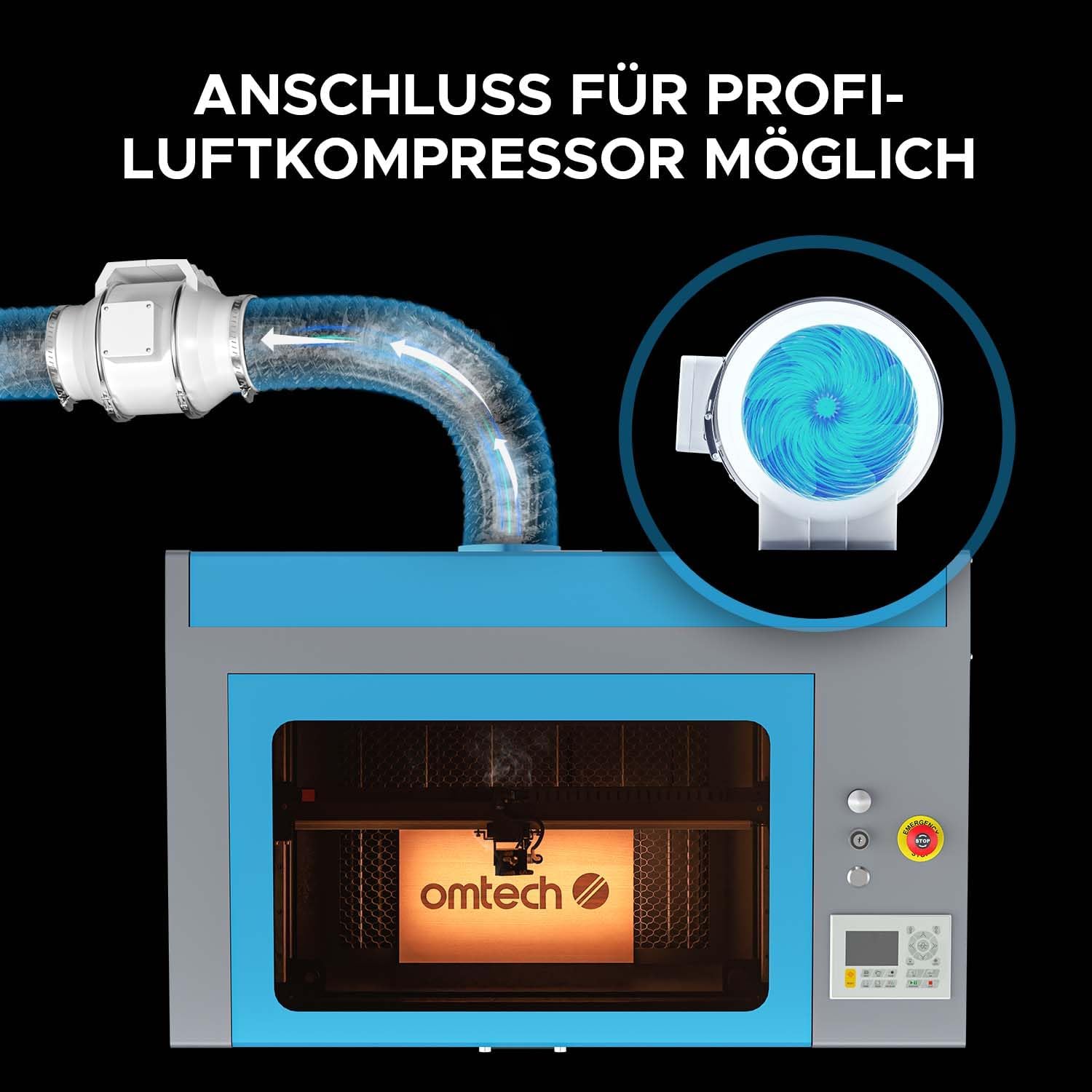
Figure 5: The machine allows for connection to a professional air compressor to enhance air assist, which helps clear smoke and debris from the engraving area.

Figure 6: A powerful exhaust fan system is integrated to provide quick and efficient ventilation, ensuring a cleaner and safer workspace.
5. Иштөө нускамалары
This section outlines the basic steps for operating your OMTech Turbo-535 laser engraver.
5.1 Software Installation and Setup
- Install the provided RDWorks software or your preferred compatible software (e.g., LightBurn).
- Follow the software's instructions to connect it to the laser engraver.

Figure 7: The laser engraver is compatible with professional software like LightBurn and RDWorks, allowing for versatile design and control.
5.2 Гравировка/кесүүгө даярдоо
- Place the material to be processed on the appropriate work table (honeycomb for cutting, aluminum slats for engraving). The machine offers a 300x500mm working area.
- Adjust the focus of the laser head according to the material thickness.
- Ensure the lid is securely closed before starting any operation.

Figure 8: The machine includes both a honeycomb bed and an aluminum slat bed, providing flexibility for various engraving and cutting tasks within the 300x500mm work area.
5.3 Starting an Operation
- Load your design into the software.
- Set the appropriate laser power, speed, and other parameters for your material.
- Initiate the job from the software or the machine's digital control panel.
- Monitor the process through the flame-retardant viewтерезе.

Figure 9: The OMTech laser engraver is capable of high-speed engraving, reaching up to 600 mm/s, which significantly boosts productivity.

Figure 10: The 50W laser can cut through materials like 15mm acrylic and 14mm wood in a single pass, demonstrating its cutting capability.
6. Техникалык тейлөө
Үзгүлтүксүз тейлөө сиздин лазердик оюгучуңуздун узак иштөөсүн жана оптималдуу иштешин камсыздайт.
6.1 Күнүмдүк тейлөө
- Clean the work area and honeycomb/slat bed to remove debris.
- Inspect the laser lens and mirrors for dust or residue and clean them with appropriate lens cleaning solution and wipes.
6.2 Апталык тейлөө
- Check and clean the exhaust fan and ducting.
- Lubricate the guide rails and bearings as per manufacturer recommendations.
6.3 Лазердик түтүккө кам көрүү
The 50W DC laser tube has a lifespan of up to 1,000 hours, which can be extended by operating at lower power settings. Avoid operating the laser at 100% power for extended periods to maximize its lifespan.

Figure 11: The powerful DC laser tube is a core component, offering high efficiency and a long operational lifespan with proper care.
7. Кыйынчылыктарды
Бул бөлүмдө сиз кабылышы мүмкүн болгон жалпы маселелерди чечүү жолдору каралган.
7.1 Жалпы маселелер жана чечимдер
| Көйгөй | Мүмкүн себеп | Чечим |
|---|---|---|
| Лазер атылбайт | Lid open, emergency stop engaged, power issue, laser tube fault. | Close lid, disengage emergency stop, check power connections, consult support if tube fault suspected. |
| Гравюра сапаты начар | Incorrect focus, dirty optics, wrong power/speed settings, material issues. | Adjust focus, clean lens/mirrors, optimize settings for material, use suitable materials. |
| Машина жооп бербей жатат | Software connection issue, control panel error, machine frozen. | Check USB/network connection, use the reset button on the control panel, power cycle the machine. |
| Ашыкча түтүн/буун | Ineffective ventilation, wrong material. | Ensure exhaust system is clear and running, verify material is safe for laser processing. |
For issues not listed here, please refer to the comprehensive troubleshooting guide available on the OMTech support webсайтка же кардарларды тейлөөгө кайрылыңыз.
8. Техникалык шарттар
| Өзгөчөлүк | Деталь |
|---|---|
| Өндүрүүчү | OMTech |
| Модель номери | DE-0503 |
| Продукциянын өлчөмдөрү (L x W x Y) | 103 x 65 x 57 см |
| Салмагы | 75 кг |
| Лазердик күч | 50 Вт |
| Гравюра аянты | 500 x 300 мм |
| Max Engraving Speed | 600 мм/с |
| Power Type | AC |
| Камтылган компоненттер | 1 CO2 laser engraver machine, 1 accessory kit |
| Запастык бөлүктөрдүн болушу | Маалымат жеткиликсиз |
9. Кепилдик жана колдоо
For warranty information, technical support, or to purchase spare parts, please visit the official OMTech webсайтка же кардарларды тейлөө бөлүмүнө кайрылыңыз. Кепилдиктин конкреттүү шарттары жана шарттары үчүн сатып алуу документтериңизден караңыз.
OMTech Official Webсайт: www.omtechlaser.com


