LAUNCH X431 CRP919 EV Scanner User Manual
Model: LAUNCH X431 CRP919 EV
Бренд: LAUNCH
1. Киришүү
The LAUNCH X431 CRP919 EV is a state-of-the-art diagnostic scan tool designed for both traditional internal combustion engine (ICE) vehicles and the rapidly growing new energy vehicle (NEV) market, including hybrid and electric vehicles (EVs). This intelligent scanner provides comprehensive system diagnostics, advanced service functions, and bidirectional control capabilities, making it an essential tool for professional technicians and advanced DIY enthusiasts.
Equipped with an Android 10.0 operating system, a 7.0-inch touch screen, and robust hardware, the CRP919 EV offers fast, efficient, and accurate vehicle diagnostics. It supports modern communication protocols like CANFD and DOIP, ensuring broad compatibility with vehicles up to the latest models.

Figure 1.1: LAUNCH X431 CRP919 EV Scanner and its protective carrying case.
2. Коопсуздук маалыматы
Always observe the following safety precautions when operating the LAUNCH X431 CRP919 EV scanner to prevent personal injury or damage to the device or vehicle:
- Диагностикалык кабелди туташтыруудан же ажыратуудан мурун, унаанын от алдыруу системасы өчүрүлгөндүгүн текшериңиз.
- Do not operate the scanner in wet conditions or with wet hands.
- Keep the device away from strong magnetic fields and high temperatures.
- Always refer to the vehicle manufacturer's service manual for specific diagnostic procedures and safety warnings, especially when working with high-voltage EV systems.
- Use appropriate personal protective equipment (PPE) when performing vehicle diagnostics.
- Do not attempt to disassemble or modify the scanner. Refer all servicing to authorized personnel.
3. Кутуда эмне бар
Пакетти ачканда, төмөнкү компоненттердин бардыгы камтылганын текшериңиз:
- LAUNCH X431 CRP919 EV Main Unit
- Main Diagnostic Cables
- Type-C заряддагыч
- Power Adaptors (various regional types)
- User Manual
- Quick Start Guide
- Коргоочу куту
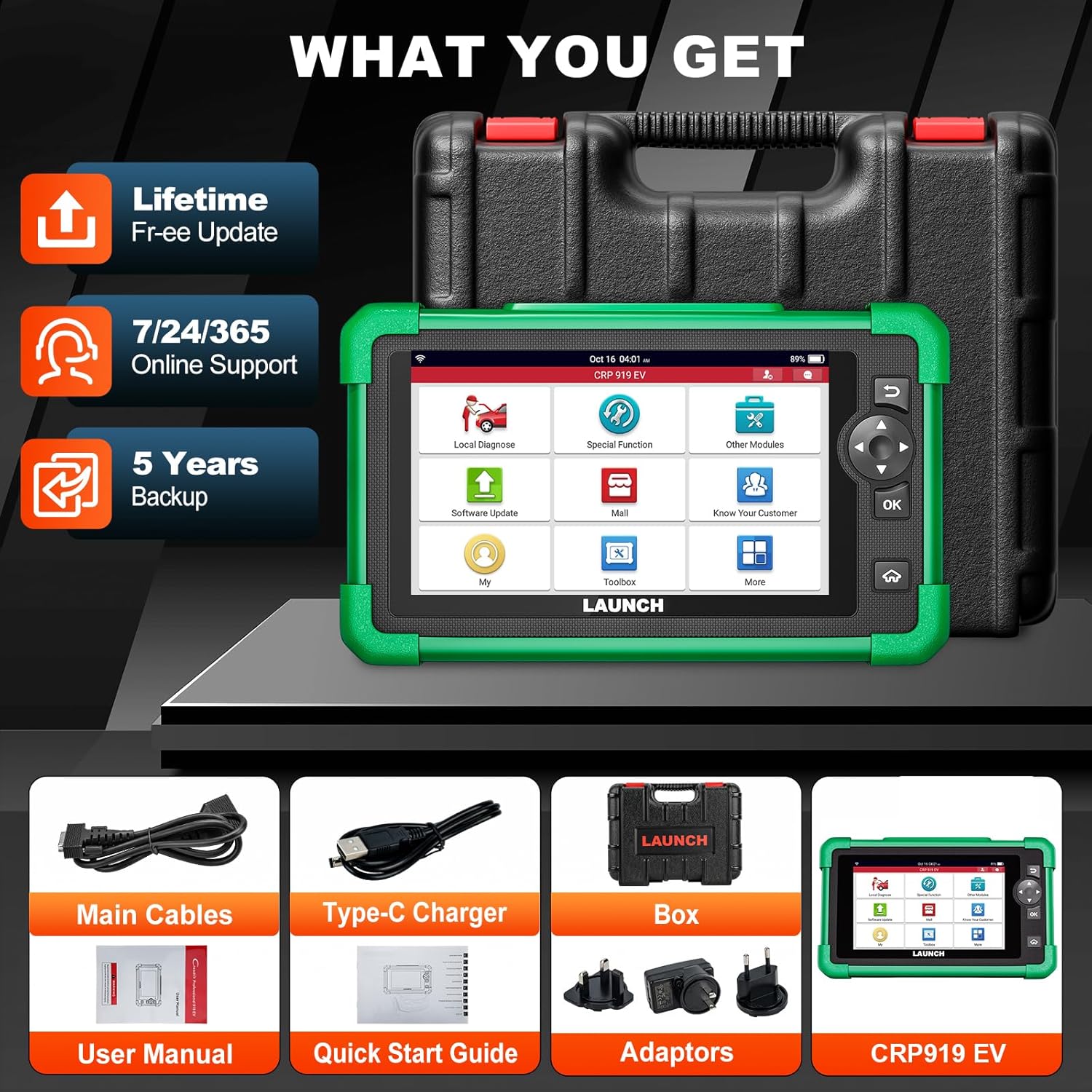
Figure 3.1: Included components with the LAUNCH X431 CRP919 EV scanner.
4. Орнотуу
4.1 Алгачкы заряддоо
Before first use, fully charge the CRP919 EV scanner. Connect the Type-C charger to the device's charging port and plug it into a power outlet. The charging indicator will show the charging status. A full charge can provide up to 15 hours or more of battery life.
4.2 Күйгүзүү/өчүрүү
- Күйгүзүү үчүн: Экран жарыктанганга чейин түзмөктүн капталында жайгашкан Кубат баскычын басып, кармап туруңуз.
- Өчүрүү үчүн: Өчүрүү менюсу пайда болгонго чейин Кубат баскычын басып, кармап туруңуз. "Өчүрүү" тандап, ырастаңыз.
4.3 Тармактык туташуу
For software updates, online feedback, and cloud services, connect the device to a Wi-Fi network:
- Негизги менюдан "Орнотуулар" баскычын таптаңыз.
- "Wi-Fi" тандап, аны күйгүзүңүз.
- Тизмеден каалаган Wi-Fi тармагын тандап, суралса, сырсөздү киргизиңиз.
- Confirm connection. The device supports 2.4GHz and 5GHz dual-band Wi-Fi for faster transmission.
4.4 Программалык камсыздоо жаңыртуулары
Regular software updates are crucial for optimal performance, new vehicle coverage, and bug fixes. The CRP919 EV offers 2 years of free updates.
- Түзмөктүн Wi-Fi тармагына туташканын текшериңиз.
- From the main menu, tap "Software Update".
- The system will check for available updates. Follow the on-screen prompts to download and install them.

Figure 4.1: Software update interface and hardware optimization.
5. Иштөө нускамалары
The LAUNCH X431 CRP919 EV provides a wide range of diagnostic and service functions. Below are key operational aspects:
5.1 Унаага туташуу
- Locate the vehicle's OBD-II diagnostic port (usually under the dashboard).
- Connect the main diagnostic cable to the CRP919 EV and then to the vehicle's OBD-II port.
- Унаанын от алдыруучу системасын "ON" абалына коюңуз (кыймылдаткыч өчүрүлгөн).
- On the scanner, select "Local Diagnose" to begin communication.
5.2 Full System Diagnostics (EV & ICE)
This function allows you to scan all available electronic control units (ECUs) in the vehicle, including engine, transmission, ABS, SRS, and specific EV high-voltage системалары.
- Автоматтык сканерлөө 2.0: The device features an intelligent Auto VIN function that automatically identifies the vehicle's VIN for quick system access.
- Коддорду окуу/тазалоо: Retrieve diagnostic trouble codes (DTCs) and clear them after repairs.
- Live Data Stream: View real-time data parameters from various sensors and components in text, graph, or multi-in-one formats.
- EV System Diagnostics: Specifically for EVs, perform battery pack analysis and high-voltage system diagnostics. This includes reading/clearing codes, performing HV parts replacement, and generating HV system diagnostic reports.

Figure 5.1: ашыкview of All System Diagnose capabilities.
5.3 Эки багыттуу башкаруу (активдүү тест)
Bidirectional control allows the scanner to send commands to vehicle ECUs to perform specific tests and functions, such as activating solenoids, relays, or motors, to verify system integrity without using the vehicle's controls.
- Access this function from the "Active Test" menu.
- Common tests include activating fuel pumps, cycling ABS solenoids, testing window motors, or operating cooling fans.
- This feature helps in quickly locating faulty components.

Figure 5.2: Bidirectional control functionality for component testing.
5.4 43+ Кызмат Функциялары
The CRP919 EV supports over 43 common maintenance and reset functions, accelerating repair processes.
- Майды калыбына келтирүү: Май алмашкандан кийин майдын иштөө тутумун баштапкы абалга келтириңиз.
- EPB баштапкы абалга келтирүү: Тормоз колодкасын алмаштыргандан кийин электрондук кол тормозду баштапкы абалга келтириңиз.
- SAS баштапкы абалга келтирүү: Рулдун бурчу сенсорун калибрлөө.
- BMS баштапкы абалга келтирүү: Register new battery and clear fault codes.
- дроссель кайра коюу: Relearn throttle body position.
- ABS кан агуу: ABS тормозунун кан чыгаруу процедураларын аткарыңыз.
- TPMS баштапкы абалга келтирүү: Дөңгөлөктүн басымын көзөмөлдөө тутумун баштапкы абалга келтирүү.
- And many more, including Injector Coding, Gear Reset, DPF Regeneration, etc.

5.3-сүрөт: Мисamples of 43+ service functions available.
5.5 ECU коддоосу
ECU Coding allows for customization of vehicle settings, module matching, unlocking hidden functions, and module retrofitting. This advanced function requires careful operation and knowledge of vehicle systems.
5.6 CANFD & DOIP Protocols
The CRP919 EV supports the latest CANFD and DOIP communication protocols, ensuring compatibility with newer vehicle models (up to 2024/2025) that utilize these advanced network architectures.
5.7 FCA AutoAuth
For FCA (Fiat Chrysler Automobiles) vehicles, the scanner supports FCA AutoAuth, allowing secure access to protected diagnostic functions on these vehicles.

Figure 5.4: Global compatibility and protocol support.
5.8 Кошумча функциялар
- WiFi Print: Directly print diagnostic reports via Wi-Fi.
- Cloud Health Report: Generate and store vehicle health reports in the cloud for easy access and sharing.
- Онлайн пикир: Submit feedback or issues directly to LAUNCH for support.
- DTCs Library: Built-in database for looking up diagnostic trouble code definitions.
- Remote Diagnose: Potential for remote assistance (requires additional setup/software).

Figure 5.5: User interface and support features.
6. Техникалык тейлөө
Proper maintenance ensures the longevity and optimal performance of your LAUNCH X431 CRP919 EV scanner:
- Тазалоо: Түзмөктү тазалоо үчүн жумшак, кургак чүпүрөктү колдонуңуз. Абразивдүү тазалоочу каражаттарды же эриткичтерди колдонбоңуз.
- Сактагыч: Store the scanner in its protective carrying case in a cool, dry place when not in use. Avoid extreme temperatures.
- Батареяга кам көрүү: For long-term storage, ensure the battery is charged to approximately 50-70% to preserve its lifespan. Recharge periodically if stored for extended periods.
- Программалык камсыздоо жаңыртуулары: Regularly update the software to ensure compatibility with new vehicles and access to the latest features and bug fixes.
- Кабелдик текшерүү: Periodically inspect diagnostic cables for any signs of wear, damage, or corrosion. Replace damaged cables immediately.
7. Кыйынчылыктарды
This section addresses common issues you might encounter with the CRP919 EV scanner.
| Көйгөй | Мүмкүн себеп | Чечим |
|---|---|---|
| Түзмөк күйбөйт. | Low battery; Power button not pressed long enough; Device malfunction. | Charge the device; Press and hold the Power button for 3-5 seconds; Contact technical support. |
| Унаага туташуу мүмкүн эмес. | Loose cable connection; Vehicle ignition off; Damaged OBD-II port; Vehicle not supported. | Ensure cable is securely connected; Turn ignition ON; Check vehicle's OBD-II port; Verify vehicle compatibility. |
| Software is slow or freezes. | Too many applications running; Low storage; Software bug. | Close unnecessary applications; Clear cache/data; Perform software update; Restart device. |
| Wi-Fi туташуу маселелери. | Incorrect password; Out of range; Router issue. | Re-enter password; Move closer to router; Restart router; Try another Wi-Fi network. |
| "Mall" features require additional payment. | Certain advanced features or brand-specific software are add-ons. | This is by design. Purchase desired add-ons through the "Mall" section if needed. |
8. Техникалык шарттар
| Өзгөчөлүк | Деталь |
|---|---|
| Модел | LAUNCH X431 CRP919 EV |
| Операция системасы | Android 10.0 |
| Дисплей | 7.0-inch Touch Screen, 1024x600 resolution |
| Процессор | 1.8GHz Octa-core Qualcomm Snapdragon CPU |
| Эстутум/Сактагыч | 64 ГБ (ички) |
| Батарея | 6000mAh rechargeable battery (up to 15+ hours) |
| Байланыш | 2.4GHz & 5GHz Dual-band Wi-Fi, USB Type-C |
| Өлчөмдөрү (L x W x Y) | 12.8" x 5.38" x 11.4" |
| Элемент Салмагы | 6.82 фунт |
| Колдоого алынган протоколдор | CANFD, DOIP, OBD-II/EOBD, etc. |
| Унаа камтуу | 150+ car brands, 1996-2025 models (including EV/HEV) |
9. Кепилдик жана колдоо
LAUNCH provides comprehensive support for the CRP919 EV scanner:
- Программалык камсыздоо жаңыртуулары: Enjoy 2 years of free software updates from the date of activation.
- Техникалык колдоо: Access 7/24/365 online support for any operational or technical queries.
- Онлайн ресурстар: Utilize the built-in "Online Library," "FAQ," and "Online Feedback" features for self-help and direct communication with LAUNCH support.
- Кепилдик: Refer to your purchase documentation for specific warranty terms and conditions. Typically, LAUNCH products come with a standard manufacturer's warranty covering defects in materials and workmanship.
For further assistance, please visit the official LAUNCH webсайтка же түздөн-түз кардарларды тейлөөгө кайрылыңыз.


