1. Киришүү
The CHNADKS GSP-70PRO is a professional temperature recorder designed for precise temperature monitoring during transport, storage, and sensitive processes. Equipped with a high-precision external probe, it measures temperatures from -40°C to +85°C with an accuracy of ±0.3°C, making it ideal for pharmaceutical and food cold chains, as well as laboratories. With an extended memory of 99,990 records, this device can store data over long periods, with adjustable sampling intervals from 5 seconds to 90 minutes. Its clear LCD screen displays real-time values, temperature alerts, recording status, and time. Thanks to its USB-C connection, the GSP-70PRO automatically generates professional PDF reports. For further analysis, you can also export Excel (.xlsx) files via the provided configuration tool (Windows only, macro-enabled). Customize high/low alert thresholds to receive visual and audible alarms if exceeded. The compact design with an integrated mounting clip makes it easy to install in refrigerated trucks, insulated containers, cold rooms, or medical refrigerators.
2. Негизги өзгөчөлүктөрү
- Precise Temperature Monitoring: High-precision sensor (±0.3°C) with a range of -40°C to 85°C. Ideal for food storage, pharmaceuticals, cold chain logistics, and laboratories.
- LCD Screen with Alarm Alerts: Real-time display with visual and audible alarms when temperature exceeds defined thresholds, ensuring the safety of sensitive products.
- USB Export & Large Memory: Easily transfer data via USB Type-C in PDF or Excel format. Stores up to 99,990 records for long-term monitoring and compliance.
- Long-Lasting & Rechargeable Battery: 3.7V rechargeable lithium battery offering up to 365 days of autonomy. Supports USB power for continuous monitoring of critical temperatures.
- Оңой орнотуу жана ар тараптуулугу: External probe for greater precision. Integrated mounting clip for easy installation in warehouses, laboratories, cold rooms, and during transport.
3. Пакеттин мазмуну
Сураныч, пакетте төмөнкү нерселерди текшериңиз:
- 1 x CHNADKS GSP-70PRO Temperature Data Logger
- 1 х Сырткы Температура Проби
- 1 x USB-C кабели
- 1 x Instruction Manual
4. Продукт бүтүп калдыview
Familiarize yourself with the components and display indicators of your GSP-70PRO temperature recorder.

Image: The CHNADKS GSP-70PRO Temperature Recorder, showing its main display and the connected external temperature probe.
4.1 ЖК дисплей индикаторлору
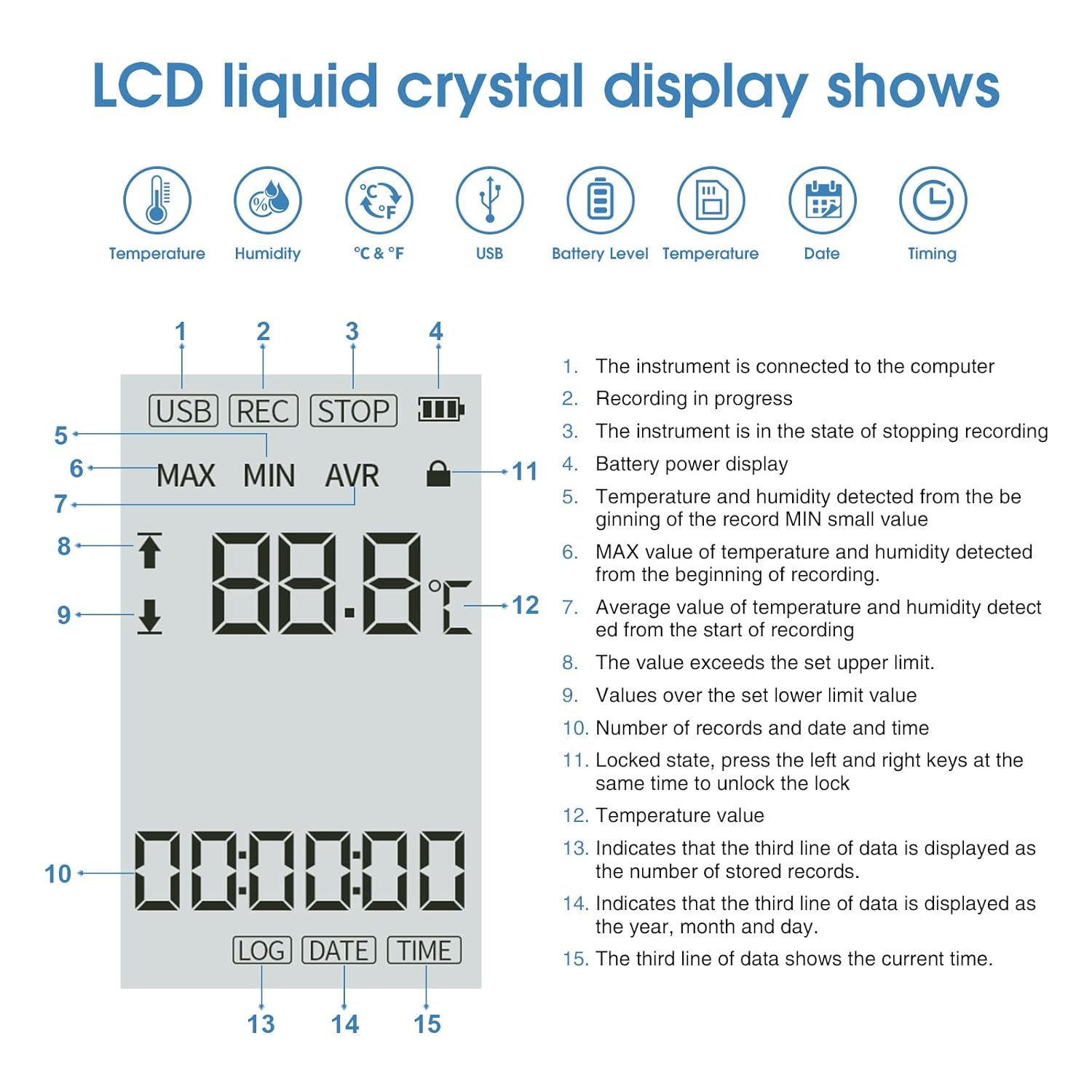
Image: A detailed diagram of the GSP-70PRO's LCD screen, highlighting various indicators and their corresponding functions.
- USB Connection Indicator: The instrument is connected to a computer.
- Recording Status: Indicates recording is in progress.
- Stop Recording Status: The instrument is in the state of stopping recording.
- Battery Power Display: Shows the current battery level.
- Temperature Detected: Displays the current temperature value.
- MAX Value: Shows the maximum temperature value detected since the beginning of recording.
- AVG Value: Shows the average temperature value detected since the start of recording.
- Upper Limit Exceeded: Indicates the temperature value exceeds the set upper limit.
- Lower Limit Exceeded: Indicates the temperature value is below the set lower limit.
- Record Count & Date/Time: Displays the number of records and the current date and time.
- Locked State: Indicates the device is locked. Press the left and right keys simultaneously to unlock.
- Current Temperature Value.
- Record Display Mode: Indicates the third line of data is displaying the number of stored records.
- Date Display Mode: Indicates the third line of data is displaying the year, month, and day.
- Time Display Mode: Indicates the third line of data is displaying the current time.
5. Орнотуу
5.1 Алгачкы заряддоо
Before first use, ensure the device is fully charged. Connect the GSP-70PRO to a USB power source using the provided USB-C cable. The battery indicator on the LCD will show charging status.
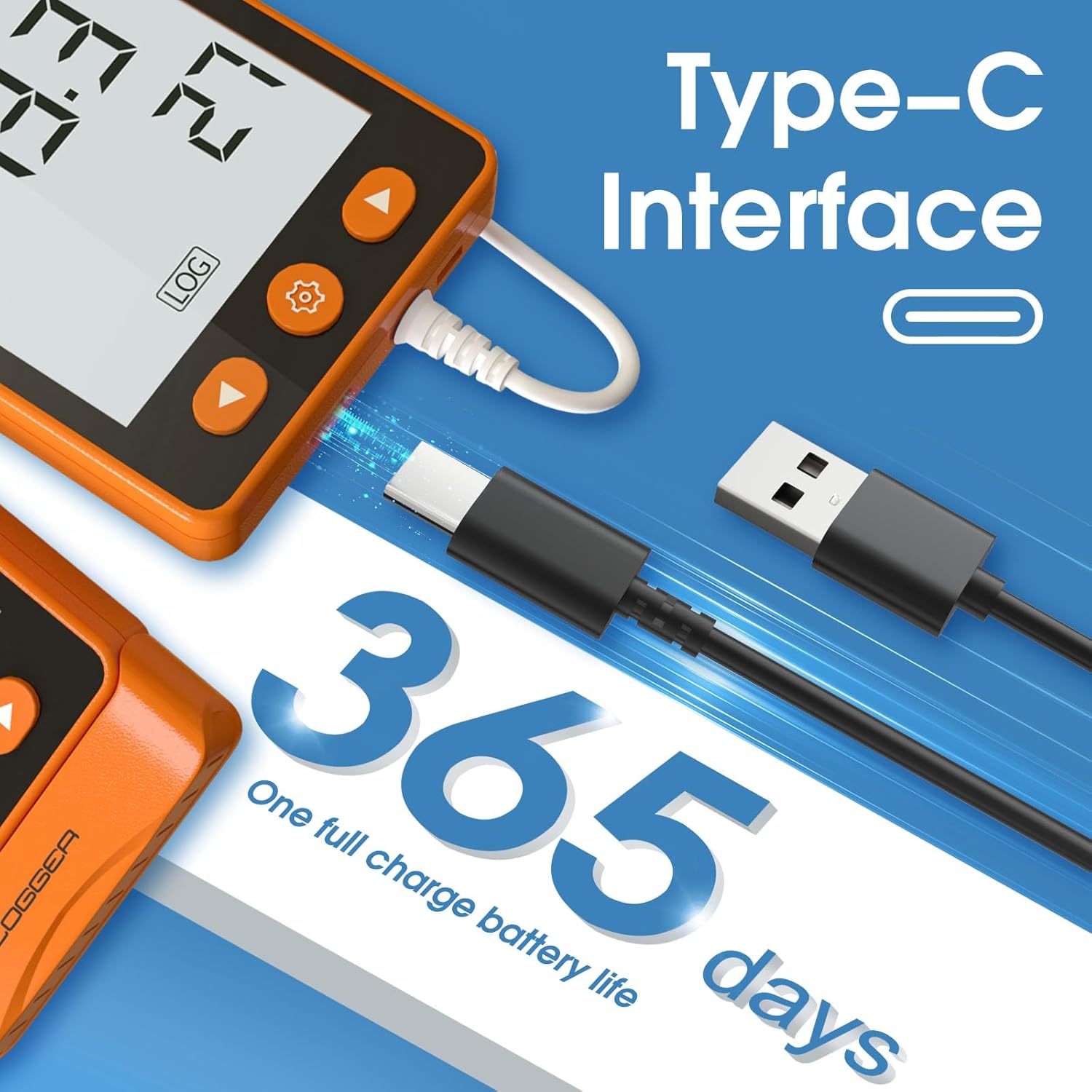
Image: The GSP-70PRO connected via its USB-C interface, illustrating its charging capability and long battery life.
5.2 Connecting the External Probe
Carefully insert the external temperature probe into the designated port on the device. Ensure a secure connection for accurate readings.
5.3 Basic Configuration (Optional)
While the device can generate PDF reports automatically, advanced settings like sampling interval, alarm thresholds, and start delay can be configured using the dedicated PC software (Windows only). Connect the device to your computer via USB-C to access these settings.
6. Иштөө нускамалары
6.1 Жаздырууну баштоо
Жазууну баштоо үчүн, басып, кармап туруңуз Start/Play button (usually the rightmost button) until the 'REC' indicator appears on the LCD screen. The device will begin logging temperature data at the configured interval.
6.2 Stopping a Recording
Жазууну токтотуу үчүн, басып, кармап туруңуз Токто button (usually the middle button with a gear icon or a square) until the 'STOP' indicator appears. Data logging will cease, and the data will be saved.
6.3 ViewLCD дисплейинде маалыматтарды киргизүү
Use the navigation buttons (left and right arrows) to cycle through different display modes on the LCD, such as current temperature, MAX/AVG values, record count, date, and time.
6.4 Сигналдын иштеши
If the temperature exceeds the pre-set high or low alarm thresholds, the device will trigger visual (flashing indicator) and audible alarms. To acknowledge or silence an audible alarm, press any button.
7. Маалыматтарды экспорттоо
The GSP-70PRO offers convenient data export options.
7.1 Автоматтык PDF отчетту түзүү
Connect the GSP-70PRO to a computer via the USB-C cable. The device will automatically generate a professional PDF report containing all recorded data, graphs, and statistical information. This report can be saved directly to your computer.

Image: The GSP-70PRO connected to a laptop, demonstrating the automatic generation of a PDF data report upon USB connection.
7.2 Excel Data Export (via Configuration Tool)
For more detailed analysis, you can export data in Excel (.xlsx) format. This requires the installation of the CHNADKS configuration tool on a Windows PC. Once installed and the device is connected, use the software to export data, ensuring macros are enabled for full functionality.
8. Техникалык тейлөө
8.1 Батареяны заряддоо
The GSP-70PRO features a rechargeable lithium battery. When the battery indicator shows low power, connect the device to a standard USB power adapter or a computer's USB port using the provided USB-C cable. A full charge can provide up to 365 days of operation, depending on usage and sampлинг аралыгы.
8.2 Тазалоо
Wipe the device and external probe with a soft, dry cloth. Do not use abrasive cleaners or immerse the device in water. Ensure the USB-C port is free from dust and debris.
9. Кыйынчылыктарды
- Түзмөк күйбөй жатат: Батарея заряддалганын текшериңиз. USB кубат булагына туташтырып, кайра аракет кылыңыз.
- No data recording: Check if the 'REC' indicator is active. If not, press and hold the Start button. Verify that the memory is not full.
- Туура эмес окуулар: Ensure the external probe is securely connected and positioned correctly in the environment to be monitored. Avoid placing the probe near heat sources or direct sunlight unless intended.
- Cannot export data: Ensure the device is properly connected to the computer via USB-C. For Excel export, confirm the configuration tool is installed and running on a Windows PC with macros enabled.
- LCD display is locked: Press the left and right navigation buttons simultaneously to unlock the screen.
10. Техникалык шарттар
| Өзгөчөлүк | Спецификация |
|---|---|
| Бренд | CHNADKS |
| Модель номери | GSP-70PRO |
| Температура диапазону | -40°Cден +85°Cге чейин |
| Температуранын тактыгы | ±0.3°C |
| Memory Capacity | 99,990 XNUMX жазуу |
| Sampling Interval | 5 секунддан 90 мүнөткө чейин жөнгө салынышы мүмкүн |
| Батарея | 3.7V кайра заряддалуучу литий батарейка |
| Батареянын иштөө мөөнөтү | 365 күнгө чейин (колдонууга жараша) |
| Берилиштер интерфейси | USB Type-C |
| Отчет форматы | PDF (automatic), Excel (.xlsx via software) |
| Сырткы материал | Пластик |
| Шайкештик | HACCP, GDP |
| Пакеттин өлчөмдөрү | 12 x 11.2 x 4.6 см |
| Пакет Салмагы | 240 грамм |
11. Колдонуу сценарийлери
The CHNADKS GSP-70PRO is suitable for a wide range of applications requiring precise temperature monitoring.

Image: A collage showing the GSP-70PRO in use in different environments such as a refrigerated vehicle, a server room, warehouse racking, and a pharmacy cooler.
- Refrigerated Transport (e.g., vaccine refrigerated vehicles, insulated containers)
- Cold Storage (e.g., cold rooms, warehouses, pharmacy coolers)
- Laboratories and Research Facilities
- Server Rooms and Data Centers
- Food Storage and Processing


