1. Киришүү
Сатып алганыңыз үчүн рахматasing the VILTROX AF 35mm F1.7 X-Mount lens. This high-performance autofocus prime lens is designed for Fujifilm X-mount mirrorless cameras, offering a bright f/1.7 aperture for excellent low-light performance and creative depth of field control. This manual provides essential information for the proper use, maintenance, and care of your lens.
2. Коопсуздук чаралары
- Do not look directly at the sun or other strong light sources through the lens, as this can cause permanent eye damage.
- Keep the lens away from water and moisture to prevent damage to electronic components.
- Avoid exposing the lens to extreme temperatures or rapid temperature changes.
- Do not attempt to disassemble or repair the lens yourself. Contact authorized service personnel for assistance.
- Балдар жетпеген жерде сактаңыз.
3. Пакеттин мазмуну
Пакетиңизде бардык буюмдар бар экенин текшериңиз:
- VILTROX AF 35mm F1.7 X-Mount Lens
- Алдыңкы линзанын капкагы
- Арткы линзанын капкагы
- Линза капкагы
- Линзалык баштык
- Көрсөтмө (бул документ)
- Кепилдик картасы

3.1-сүрөт: Пакеттин мазмуну
4. Продукт бүтүп калдыview
The VILTROX AF 35mm F1.7 X-Mount lens is a compact and lightweight prime lens designed for Fujifilm APS-C cameras. It offers a versatile 53mm equivalent focal length (in 35mm format) and a wide f/1.7 aperture.

Figure 4.1: VILTROX AF 35mm F1.7 X-Mount Lens with Hood

Figure 4.2: VILTROX AF 35mm F1.7 X-Mount Lens Front View
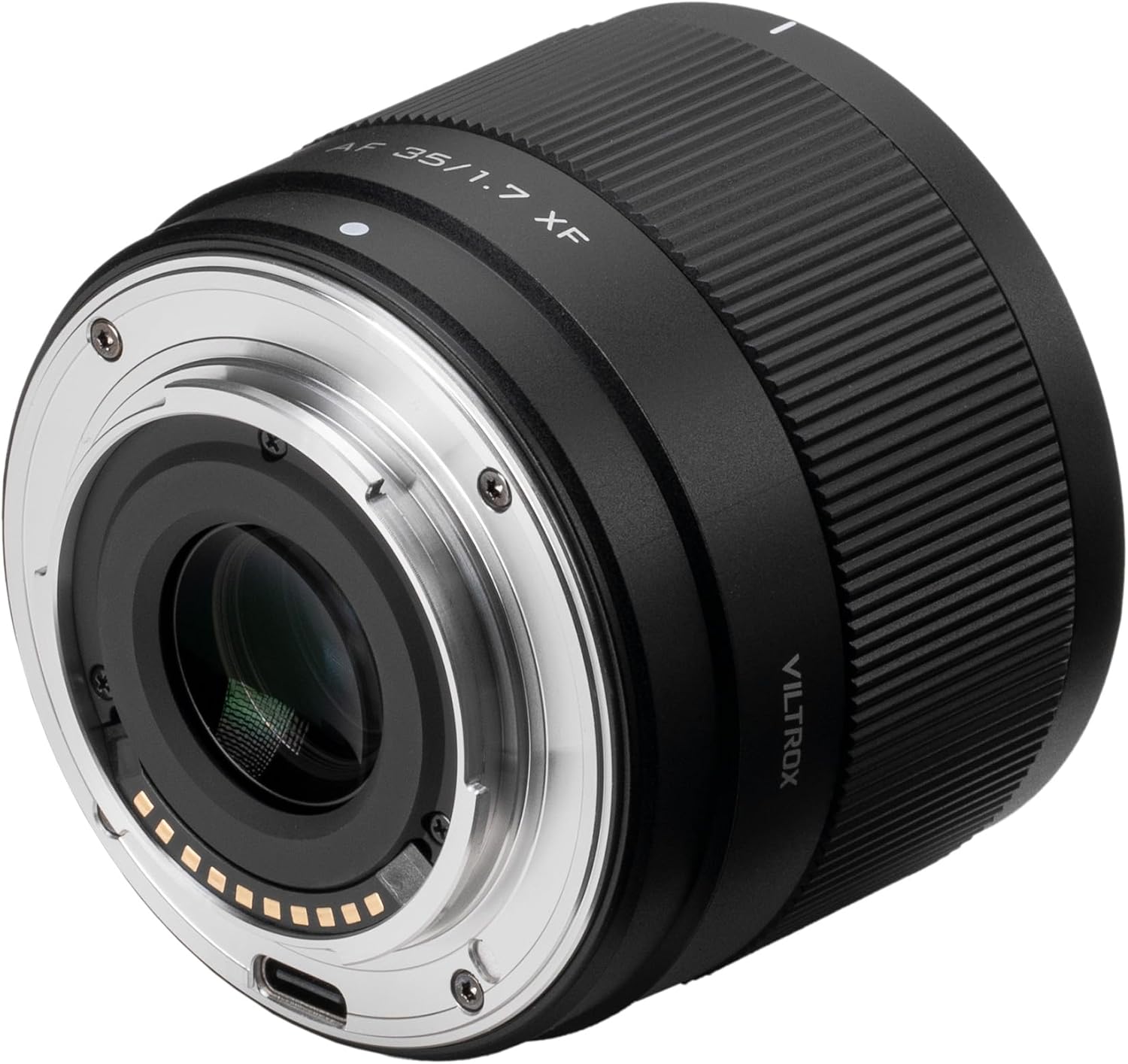
Figure 4.3: VILTROX AF 35mm F1.7 X-Mount Lens Rear View USB-C порту менен
5. Орнотуу
5.1 Линзаны камераңызга бекитүү
- Камераңыз өчүрүлгөнүн текшериңиз.
- VILTROX линзасынын арткы капкагын жана камераңыздын корпус капкагын алып салыңыз.
- Align the white index mark on the lens barrel with the corresponding index mark on your camera's lens mount.
- Объективди камера орноткучуна кыстарыңыз жана аны чыкылдатканча саат жебеси боюнча айлантыңыз. Линзаны мажбурлабаңыз.

Figure 5.1: Lens Mounted on a Fujifilm Camera
5.2 Линза капкагын бекитүү
The included lens hood helps to block stray light, reducing flare and ghosting, and provides physical protection for the front element.
- Линза капкагындагы белгини линзанын алдыңкы бетиндеги белги менен тегиздеңиз.
- Gently push the hood onto the lens and rotate it clockwise until it locks into place.
5.3 Микропрограмма жаңыртуулары
The lens features a USB-C port for firmware updates. Regularly checking for and installing the latest firmware ensures optimal performance and compatibility with new camera models.
- Расмий VILTROX сайтына кириңиз webакыркы микропрограмма жана жаңыртуу нускамалары үчүн сайт.
- Connect the lens to your computer using a USB-C cable.
- Follow the on-screen instructions provided by the firmware update tool.

Figure 5.2: USB-C Port for Firmware Updates
6. Операция
6.1 Автофокус (AF)
This lens is equipped with an STM motor for fast, precise, and quiet autofocus performance. It supports various AF modes available on your Fujifilm camera.
- Single AF (AF-S): Ideal for stationary subjects. Focus locks when the shutter button is half-pressed.
- Continuous AF (AF-C): Suitable for moving subjects. Focus continuously adjusts as long as the shutter button is half-pressed.
- Кол менен Фокус (MF): Rotate the focus ring on the lens to adjust focus manually.
The lens also features low focus breathing, which minimizes changes in the angle of view when adjusting focus, beneficial for video recording.
6.2 Диафрагманы башкаруу
The large f/1.7 maximum aperture allows for excellent performance in low-light conditions and provides a shallow depth of field for creating pleasing background blur (bokeh). Aperture can be controlled via your camera's settings.
6.3 Focal Length and Perspective
With a 35mm focal length (53mm equivalent on APS-C), this lens offers a natural perspective similar to the human eye, making it versatile for portraits, street photography, landscapes, and general-purpose shooting.
6.4 Minimum Focusing Distance
The lens has a minimum focusing distance of 0.33 meters (33cm), allowing for close-up shots with detailed subjects.

Figure 6.1: Key Features of the Lens
7. Техникалык тейлөө
7.1 Линзаны тазалоо
- Линзанын бетинен чаңды жана борпоң бөлүкчөлөрдү тазалоо үчүн үйлөмө щетканы колдонуңуз.
- For smudges or fingerprints, use a clean, soft microfiber cloth specifically designed for optics, along with a small amount of lens cleaning solution. Apply the solution to the cloth, not directly to the lens.
- Clean the lens body with a soft, dry cloth. Do not use organic solvents.
7.2 Сактоо
- Колдонулбай турганда, линзалардын алдыңкы жана арткы капкактарын бекитиңиз.
- Store the lens in a cool, dry, and well-ventilated area, away from direct sunlight and chemicals.
- If storing for extended periods, consider using a dehumidifying agent to prevent mold and mildew growth.
8. Кыйынчылыктарды
| Көйгөй | Мүмкүн себеп | Чечим |
|---|---|---|
| Камера линзаны тааныган жок | Improper mounting; dirty contacts; outdated firmware. | Re-mount the lens securely; clean lens and camera contacts with a dry cloth; update lens firmware. |
| Автофокус жай же так эмес | Low light conditions; subject lacks contrast; camera AF settings. | Use adequate lighting; focus on areas with good contrast; check camera AF mode and settings. |
| Сүрөттөр бүдөмүк | Туура эмес фокус; камеранын титирөөсү; кир линза элементи. | Ensure proper focus; use a faster shutter speed or tripod; clean the lens. |
| Lens hood does not attach securely | Incorrect alignment. | Ensure the alignment marks on the hood and lens are matched before twisting to lock. |
9. Техникалык шарттар
| Өзгөчөлүк | Деталь |
|---|---|
| Бренд | VILTROX |
| Модель номери | AF 35mm F1.7 XF |
| Фокустун узундугу | 35mm (53mm equivalent on APS-C) |
| Максималдуу диафрагма | f/1.7 |
| Минималдуу диафрагма | f/16 |
| Линзанын түрү | Стандарттык Prime Lens |
| Шайкеш орнотуулар | Fujifilm X |
| Оптикалык дизайн | 11 elements in 9 groups (including 2 HR, 1 ED, 1 ASPH elements) |
| Автофокус мотору | STM (Stepping Motor) |
| Минималдуу Фокустоо Дистанциясы | 0.33m (1.08 и) |
| Чыпка өлчөмү | 52мм |
| Өлчөмдөрү (Диаметр x Узундук) | Approximately 64mm x 54.7mm (2.5 x 2.15 inches) |
| Элемент Салмагы | Болжол менен 170 г (0.37 фунт) |
| Микропрограмманы жаңыртуу порту | USB-C |

Figure 9.1: Optical Design and MTF Chart

Figure 9.2: Lens Dimensions

Figure 9.3: Lens Weight
10. Кепилдик жана колдоо
VILTROX products are covered by a limited warranty. Please refer to the warranty card included in your package for specific terms and conditions. For technical support, service, or inquiries, please contact VILTROX customer service through their official webсайтка же продуктуну сатып алган сатуучуга.
VILTROX расмий Webсайт: www.viltrox.com


