1. Киришүү
This manual provides essential information for the safe and efficient operation of your Meizu mblu 21 smartphone. Please read it thoroughly before using the device.
The Meizu mblu 21 features a Prism Edge Design with a radiant gradient and a large immersive 6.79-inch HD display. It is equipped with a 13MP main camera and an 8MP front camera, powered by Android 14. The device includes a 4900mAh battery for extended use and supports 4G LTE connectivity, Dual-Band Wi-Fi, and Bluetooth 5.0.
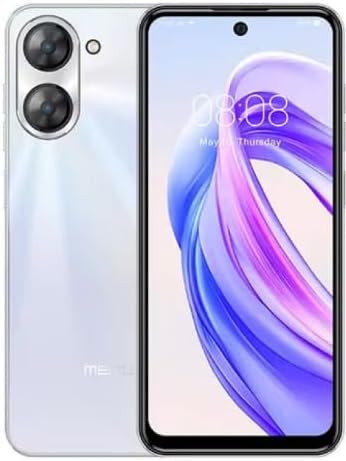
Сүрөт 1.1: Алдыңкы жана арткы view of the Meizu mblu 21 smartphone in White Diamond color.
2. Кутуда эмне бар
Пакетте бардык буюмдар бар экенин текшериңиз:
- Meizu mblu 21 Smartphone
- Кубаттуу адаптер
- USB кабели
- SIM чыгаруучу курал
- Quick Start Guide

Figure 2.1: Meizu mblu 21 smartphone alongside its power adapter.
3. Орнотуу
3.1. SIM карталарды жана MicroSD картасын салуу
The Meizu mblu 21 supports Dual Nano SIM cards and a MicroSD card for expandable storage. Locate the SIM tray on the side of the device.
- Power off the device before inserting or removing SIM/MicroSD cards.
- SIM салгычты ачуу үчүн берилген SIM чыгаруучу куралды колдонуңуз.
- Carefully place the Nano SIM cards and/or MicroSD card into the designated slots on the tray, ensuring correct orientation.
- Аспаптын ичине лотокту акырын түртүңүз.
3.2. Баштапкы күйгүзүү жана орнотуу устасы
- Press and hold the Power button until the Meizu logo appears.
- Follow the on-screen instructions to complete the initial setup, including selecting your language, connecting to a Wi-Fi network, and setting up your Google account.
4. Аппаратыңызды иштетүү
4.1. Дисплей жана навигация
The 6.79-inch HD display features a 90Hz adaptive refresh rate for smooth visuals. Navigate the interface using touch gestures: tap, swipe, pinch-to-zoom.
4.2. Камеранын функциялары
The device is equipped with a 13MP main camera and an 8MP front camera. Open the Camera application to capture photos and videos.
- 13MP Smart Camera: Ideal for capturing everyday moments with sharpness and true-to-life colors.
- 8MP алдыңкы камера: Designed for clear selfies and video calls.
4.3. Коопсуздук өзгөчөлүктөрү
- Side Unlock: A fast and secure fingerprint sensor integrated into the side power button for instant access.
- Smart Face Unlock: Use the front camera to unlock your device quickly and conveniently.
4.4. Байланыш
Your mblu 21 supports various connectivity options:
- 4G LTE: For mobile data connectivity. In the USA, this device is compatible with T-Mobile. Outside the USA, it works with any carrier worldwide.
- Кош тилкелүү Wi-Fi: Supports both 2.4GHz and 5GHz bands for seamless internet access.
- Bluetooth 5.0: For connecting wireless accessories with improved energy efficiency.
- VoLTE HD Calls: Enjoy sharper, clearer voice calls over LTE networks.

Figure 4.1: Key technology features of the Meizu mblu 21, including Android 14, Dual-Band Wi-Fi, Bluetooth 5.0, and VoLTE.
5. Техникалык тейлөө
5.1. Батареяга кам көрүү
The mblu 21 is equipped with a 4900mAh battery. To maximize battery lifespan:
- Ашыкча температурадан сактаныңыз.
- Use only the provided power adapter or certified compatible chargers.
- Батареяны бат-баттан толук кубаттап калуудан алыс болуңуз.

5.1-сүрөт: Ички view of the Meizu mblu 21, showcasing the 4900mAh battery and internal components.
5.2. Аппаратыңызды тазалоо
Телефондун экранын жана корпусун тазалоо үчүн жумшак, түксүз чүпүрөктү колдонуңуз. Катуу химиялык заттарды же абразивдүү материалдарды колдонуудан алыс болуңуз.
5.3. Программалык камсыздоону жаңыртуу
Regularly check for and install software updates to ensure optimal performance and security. Updates can be found in the device's settings menu.
6. Кыйынчылыктарды
If you encounter issues with your Meizu mblu 21, try the following solutions:
- Түзмөк жооп бербейт: Кайра күйгүзүүгө мажбурлоо үчүн кубат баскычын 10-15 секунд басып туруңуз.
- Тармакка туташуу маселелери:
- SIM карта туура салынганын текшериңиз.
- Учак режимин күйгүзүү жана өчүрүү.
- Check network settings (APN, preferred network type).
- Батареянын бат түгөнүп калышы:
- Фондо иштеп жаткан колдонулбаган колдонмолорду жабыңыз.
- Экран жарыктыгын азайтыңыз.
- Disable unnecessary features like GPS or Bluetooth when not in use.
- Аткаруу маселелери:
- Clear cache and data of problematic apps.
- Сактагычтан орун бошотуңуз.
- Consider a factory reset (Note: This will erase all data on your device. Back up important data first.).
7. Техникалык шарттар
| Өзгөчөлүк | Деталь |
|---|---|
| Модель аты | mblu 21 |
| Модель номери | M416L |
| Операция системасы | Android 14 |
| Screen Size | 6.79 дюйм |
| Эстутум сактоо сыйымдуулугу | 64 ГБ |
| RAM эстутум орнотулган өлчөмү | 4 ГБ |
| Батарея сыйымдуулугу | 4900 миллионamp Саат |
| Башкы камера | 13 депутат |
| Алдыңкы камера | 8 депутат |
| Зымсыз байланыш оператору (АКШ) | T-Mobile |
| Уюлдук технология | 4G LTE |
| Connectivity Technologies | 4G, Dual-Band Wi-Fi, Bluetooth 5.0 |
| Элемент Салмагы | 14 унция |
| Пакеттин өлчөмдөрү | 7 x 4 x 2 дюйм |
| Түс | White Diamond |
8. Кепилдик жана колдоо
Your Meizu mblu 21 smartphone comes with a manufacturer's warranty. Please refer to the warranty card included in your product packaging for specific terms and conditions.
For technical support, service, or further inquiries, please contact Meizu customer support through their official channels. Contact information can typically be found on the manufacturer's webсайтында же продукт документациясында.


