1. Киришүү
This manual provides essential information for the proper setup, operation, maintenance, and troubleshooting of your Meizu mblu 21 4G LTE smartphone. Please read this manual thoroughly before using your device to ensure optimal performance and longevity.
The Meizu mblu 21 features a 6.79-inch HD display, a 13MP dual camera system, and runs on Android 14. It is designed for efficient performance and reliable connectivity.
2. Орнотуу
2.1 Пакеттин мазмуну
Пакетиңизде төмөнкү заттар бар экенин текшериңиз:
- Meizu mblu 21 Smartphone
- Кубаттуу адаптер
- Ыкчам баштоо колдонмосу (эгер камтылган болсо)
2.2 SIM картаны жана MicroSD картасын орнотуу
The Meizu mblu 21 supports Dual Nano SIM cards and a MicroSD card for expandable storage.
- Түзмөгүңүздүн капталындагы SIM салгычты табыңыз.
- Insert the SIM ejector tool (not included, use a thin pin if necessary) into the small hole on the SIM tray to eject it.
- Place your Nano SIM card(s) and/or MicroSD card into the designated slots on the tray, ensuring proper orientation.
- SIM лотокту кылдаттык менен телефонго кайра кыстарыңыз.
2.3 Баштапкы күйгүзүү жана тармак конфигурациясы
- Press and hold the power button until the Meizu logo appears.
- Тил тандоо, Wi-Fi туташуусу жана Google каттоо эсебин орнотуу сыяктуу баштапкы орнотууну аяктоо үчүн экрандагы көрсөтмөлөрдү аткарыңыз.
- For cellular connectivity, ensure your SIM card is active. This device is an international version and in the USA market, it operates exclusively on T-Mobile's 4G LTE network. Outside the USA, it is compatible with various carriers worldwide.
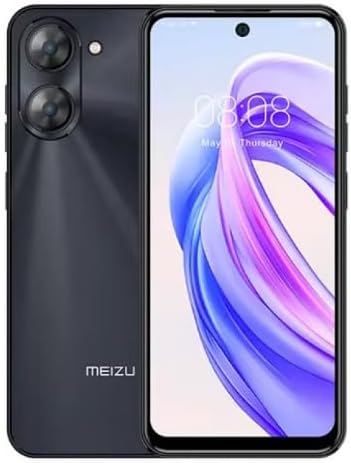
Сүрөт 2.3.1: Алдыңкы жана арткы view of the Meizu mblu 21 smartphone. The front displays the screen with a punch-hole camera, while the rear shows the dual camera module and the Meizu branding.
3. Иштөө нускамалары
3.1 Негизги навигация (Android 14)
Your Meizu mblu 21 runs on Android 14, offering an intuitive user experience. Use gestures or on-screen navigation buttons to move between apps, access settings, and manage notifications.
3.2 Камераны колдонуу
The device features a 13MP Smart Camera on the rear and an 8MP front camera. Open the Camera app to capture photos and videos. Utilize various modes and settings for optimal results.
3.3 Коопсуздук өзгөчөлүктөрү
Unlock your device using the side-mounted fingerprint sensor for instant access or the 8MP front camera for Smart Face Unlock.
3.4 Байланыш
- Wi-Fi: Supports Dual-Band Wi-Fi (2.4GHz and 5GHz) for stable internet access.
- Bluetooth: Bluetooth 5.0 for connecting to wireless accessories.
- VoLTE: Enjoy clearer voice calls with VoLTE HD Calls.

Сүрөт 3.4.1: Visual representation of key connectivity and operating system features, including Android 14, Dual-Band Wi-Fi, Bluetooth 5.0, and VoLTE HD Calls.
4. Техникалык тейлөө
4.1 Жалпы кам көрүү
- Аспабыңызды кургак жана катуу температурадан алыс кармаңыз.
- Экранды жана корпусту жумшак, мамыксыз чүпүрөк менен тазалаңыз. Күчтүү химиялык заттардан алыс болуңуз.
- Чийилип калуудан жана бузулуудан сактоо үчүн экранды коргоочу пленка менен, ал эми корпусун коргоочу кап менен коргоңуз.
4.2 Батареяны башкаруу
The 4900mAh battery is designed for all-day performance. To prolong battery life:
- Батареяны бат-баттан толук кубаттап калуудан алыс болуңуз.
- Кубаттоо үчүн берилген кубат адаптерин колдонуңуз.
- Optimize background app usage and screen brightness in settings.

Сүрөт 4.2.1: Ички view of the Meizu mblu 21 smartphone highlighting the 4900mAh battery, emphasizing its capacity for extended use.
5. Кыйынчылыктарды
5.1 Жалпы маселелер жана чечимдер
- Түзмөк күйбөй жатат: Батарея заряддалганын текшериңиз. Кубат адаптерине туташтырып, кайра аракет кылыңыз.
- Тармакка туташуу көйгөйлөрү: Check if your SIM card is properly inserted and active. Verify network settings and ensure you are within T-Mobile's coverage area in the USA.
- Жай аткаруу: Керексиз фон колдонмолорун жабуу. Кэшти жана убактылуу тазалоо files. Restart the device.
- Батареянын бат түгөнүп калышы: Reduce screen brightness, disable unused features like Bluetooth or GPS, and check for power-intensive apps.
If problems persist, consider performing a factory reset (back up your data first) or contacting customer support.
6. Техникалык шарттар
| Модель номери | M416L |
| Операция системасы | Android 14 |
| Дисплей | 6.79 Inches HD, 2340 x 1080 Resolution, 90Hz Adaptive Refresh Rate |
| Процессор | Octa Core 1.6GHz ARM Mali-G57 |
| Эс | 64 GB Internal Storage, 4 GB RAM |
| Батарея | 4900mAh (4.9E+3 Milliamp Hours) Lithium Polymer |
| Арткы камера | 13MP Smart Camera, 5P Precision Lens |
| Алдыңкы камера | 8MP |
| Уюлдук технология | 4G LTE FDD: 2,3,4,5,7,8,12,17,26,28,66; 3G WCDMA: 2/4/5/8; 2G Quad Band |
| SIM түрү | Dual Nano SIM + MicroSD |
| Wi-Fi | Кош тилкелүү (2.4 ГГц жана 5 ГГц) |
| Bluetooth | 5.0 |
| Аудио Jack | USB түрү C |
| Элемент Салмагы | 14 унция |
| FCC ID | 2ANQ6-M416L |

Сүрөт 6.1: The Meizu mblu 21 smartphone presented in its Titan Black color variant, showcasing анын дизайны.
7. Кепилдик жана колдоо
For warranty information, please refer to the warranty card included with your product or consult the retailer where the device was purchased. Meizu provides support for its products. For further assistance, please visit the official Meizu webсайтка же кардарларды тейлөөгө кайрылыңыз.


