1. Киришүү
Сатып алганыңыз үчүн рахматasing the Dolphin Audio DR30 Diver Sport Portable Speaker. This manual provides essential information for the safe and efficient operation of your device. Please read it thoroughly before use and retain it for future reference. The DR30 Diver Sport is a robust, waterproof portable speaker designed for various environments, featuring Bluetooth 5.3 connectivity, True Wireless Stereo (TWS) pairing, and integrated LED lights.
2. Кутуда эмне бар
- Dolphin Audio DR30 Diver Sport Portable Speaker
- USB-C заряддоо кабели
- Көмөкчү (AUX) кабели
- Колдонуучунун Колдонмосу (бул документ)
- Кепилдик картасы
3. Продукт бүтүп калдыview
Спикердин компоненттери жана башкаруу элементтери менен таанышыңыз.

Сүрөт 3.1: Алдыңкы view of the Dolphin DR30 Diver Sport speaker, demonstrating its waterproof design.

Figure 3.2: ашыкview of key features and specifications including connectivity options and battery performance.
Башкаруу каражаттары жана порттор
The DR30 speaker features intuitive controls, typically located on the top or side panel, and various input ports for versatile playback.
- Кубат баскычы: Динамикти күйгүзүү же өчүрүү үчүн басып туруңуз.
- Ойнотуу/тындыруу баскычы: Аудиону ойнотуу же тындыруу үчүн басыңыз.
- Үн баскычтары (+/-): Press to adjust volume. Hold to skip tracks.
- Режим баскычы: Press to switch between Bluetooth, USB, MicroSD, FM Radio, and AUX input modes.
- Жарык баскычы: Press to cycle through or turn off the flashing LED light modes.
- USB порт: USB флешкасын ойнотуу жана кубаттоо үчүн.
- MicroSD картасынын уячасы: MicroSD карталарын ойнотуу үчүн.
- AUX киргизүү (3.5 мм): For connecting external audio devices via the included AUX cable.
- USB-C заряддоо порту: Динамиктин ички батареясын заряддоо үчүн.
4. Орнотуу
4.1 Динамикти заряддоо
Before first use, fully charge the speaker. Use the provided USB-C cable to connect the speaker to a compatible USB power adapter (not included) or a computer's USB port.
- Заряддоо индикатору заряддоо учурунда күйөт.
- Кубаттоо аяктагандан кийин жарык өчөт же түсү өзгөрөт.
- Operating time is up to 7 hours at medium volume; standby time is up to 40 hours.

Figure 4.1: Charging the speaker and connecting an auxiliary device.
4.2 Күйгүзүү/өчүрүү
Press and hold the Power button for approximately 3 seconds to turn the speaker on or off. A sound indicator will confirm the action.
4.3 Bluetooth жупташтыруу
- Turn on the DR30 speaker. It will automatically enter Bluetooth pairing mode, indicated by a flashing LED light.
- Мобилдик түзмөгүңүздө Bluetooth иштетип, жеткиликтүү түзмөктөрдү издеңиз.
- Select "Dolphin DR30" from the list of devices.
- Жупташтырылгандан кийин, динамик ырастоо сигналын чыгарат жана LED жарыгы күйүп-өчүүнү токтотот.
- The Bluetooth range is approximately 32 ft. to 49 ft. (10-15 meters).
4.4 Чыныгы зымсыз стерео (TWS) жупташтыруу
The WaveSync TWS technology allows you to pair two DR30 speakers (sold separately) for a stereo audio experience.
- Ensure both DR30 speakers are powered on and not connected to any Bluetooth device.
- On one speaker (this will be the primary speaker), press and hold the TWS button (if available, or a combination of buttons as per specific model instructions) until you hear a pairing tone.
- Эки динамик бири-бирине автоматтык түрдө туташат. Туташтырылгандан кийин ырастоо сигналы чыгат.
- Now, connect your mobile device to the primary speaker via Bluetooth as described in Section 4.3. Audio will play in stereo through both speakers.
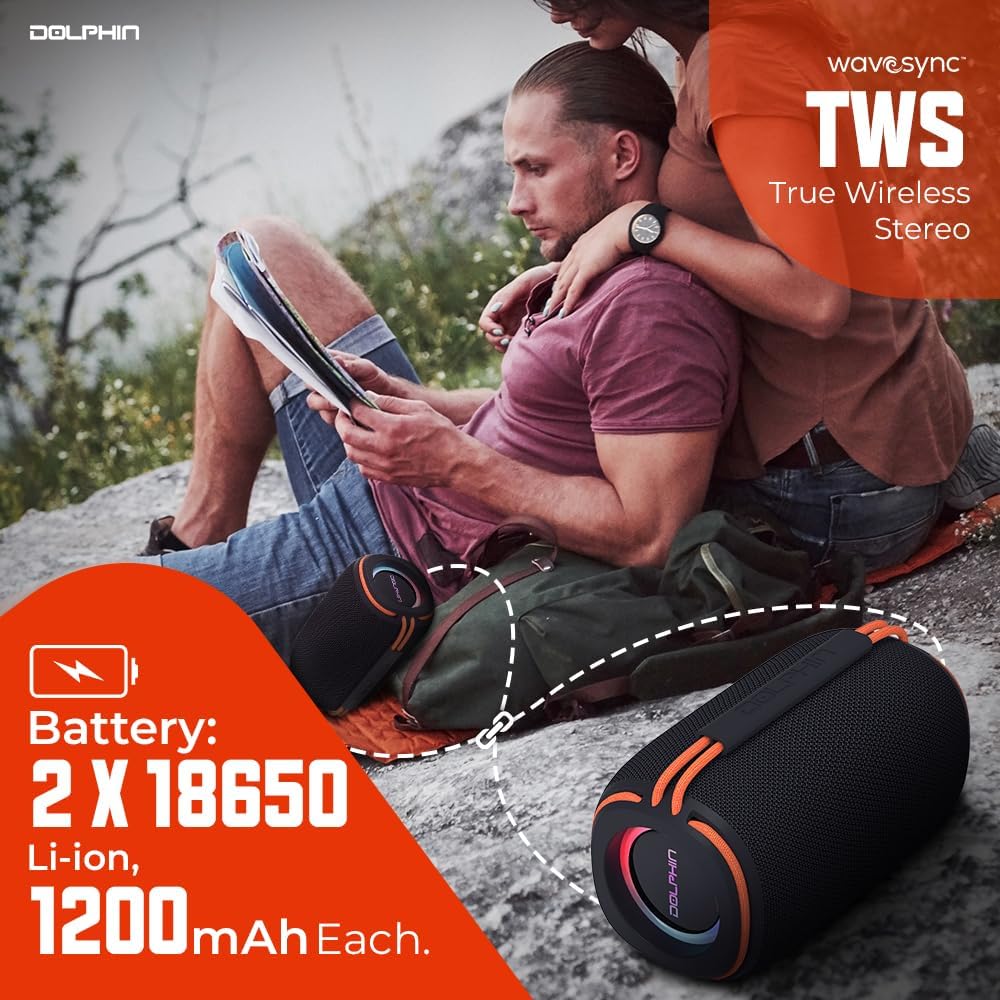
Figure 4.2: Two DR30 speakers connected via TWS for stereo sound.
4.5 Башка ойнотуу режимдери
Press the Mode button to cycle through available input sources:
- USB ойнотуу: Insert a USB drive into the USB port. The speaker will automatically switch to USB mode and begin playing supported audio files (WAV, MP3) up to 64 GB.
- MicroSD Card Playback: Insert a MicroSD card into the MicroSD card slot. The speaker will automatically switch to MicroSD mode and play supported audio files (WAV, MP3) up to 64 GB.
- FM радиосу: In FM mode, the speaker will automatically scan and save available radio stations. Use the volume buttons to navigate between stations.
- AUX киргизүү: Connect an external audio device (e.g., MP3 player, smartphone) to the 3.5mm AUX input using the provided AUX cable. The speaker will switch to AUX mode.
5. Иштөө нускамалары
5.1 Негизги аудио башкаруу элементтери
- Үнүн жогорулатуу/төмөндөтүү: '+' же '-' баскычтарын басыңыз.
- Кийинки / Мурунку трек: Hold the '+' button for the next track, and the '-' button for the previous track.
- Ойнотуу/тындыруу: Play/Pause баскычын басыңыз.
5.2 LED жарык режимдери
The DR30 features flashing side LED lights. Press the dedicated Light button to cycle through different light patterns or to turn the lights off.
5.3 Waterproof Guidelines (IPX6)
The DR30 Diver Sport speaker is rated IPX6 waterproof. This means it is protected against powerful water jets from any direction. It is suitable for use by the pool, at the beach, or in rainy conditions. However, it is жок designed for submersion in water. Ensure all port covers are securely closed before exposing the speaker to water.
6. Техникалык тейлөө
- Тазалоо: Динамикти жумшак менен сүртүңүз, гamp кездеме. Абразивдүү тазалагычтарды же эриткичтерди колдонбоңуз.
- Сактагыч: Динамикти түз күн нурунан жана өтө температурадан алыс салкын, кургак жерде сактаңыз.
- Батареяга кам көрүү: Батареянын иштөө мөөнөтүн узартуу үчүн, бат-баттан батарейканы толук зарядсыздандырбаңыз. Узак убакыт колдонулбаса да, динамикти үзгүлтүксүз заряддап туруңуз.
- Порттун капкактары: Always ensure the rubber port covers are firmly sealed to maintain the speaker's waterproof rating.
7. Кыйынчылыктарды
| Көйгөй | Мүмкүн себеп | Чечим |
|---|---|---|
| Динамик күйбөйт | Батарея аз; Кубат баскычы жетиштүү убакытка чейин басылган жок | Динамикти кубаттаңыз; Күйгүзүү баскычын 3 секунд басып туруңуз |
| Үн жок | Үнү өтө төмөн; Киргизүү режими туура эмес; Түзмөк туташкан эмес | Increase volume; Press Mode button to select correct input; Re-pair Bluetooth or check cable connection |
| Bluetooth туташпай жатат | Динамик жупташтыруу режиминде эмес; Аппарат өтө алыс; Интерференция | Ensure speaker is in pairing mode; Move device closer; Turn off other Bluetooth devices |
| TWS жупташтыруу ишке ашпай калды | Speakers already connected to another device; Too far apart | Disconnect speakers from other devices; Ensure speakers are close to each other during pairing |
8. Техникалык шарттар

Figure 8.1: Physical dimensions and weight of the DR30 speaker.
| Өзгөчөлүк | Деталь |
|---|---|
| Модель номери | DR-30 |
| Power Output | 15 Watts RMS (30 Watts Max) |
| Frequency Response | 40 Гцден 18 кГцге чейин |
| Bluetooth версиясы | v5.3 |
| Bluetooth диапазону | 32 ft. to 49 ft. (10-15 meters) |
| Айдоочунун өлчөмү | Single 3-inch full-range driver |
| Суу өткөрбөйт рейтинги | IPX6 |
| Ойнотуу параметрлери | Bluetooth, USB, MicroSD (up to 64 GB, WAV/MP3), FM Radio, 3.5mm AUX |
| Батарея түрү | Built-in Li-Ion (2 x 18650, 1200mAh each) |
| Иштөө убактысы | 7 саатка чейин (орточо көлөмдө) |
| Күтүү убактысы | 40 саатка чейин |
| Заряддоо порту | USB-C |
| Продукциянын өлчөмдөрү (D x W x Y) | 3.5" x 3.5" x 6.5" (8.9 см x 8.9 см x 16.5 см) |
| Элемент Салмагы | 1.2 фунт (0.54 кг) |
| Материал | Пластик |
| Башкаруу ыкмасы | Сенсордук баскычтар |
9. Кепилдик маалыматы
The Dolphin Audio DR30 Diver Sport Portable Speaker comes with a limited warranty. Please refer to the included warranty card for detailed terms, conditions, and registration information. Retain your proof of purchase for any warranty claims.
10. Колдоо
For technical assistance, troubleshooting beyond this manual, or general inquiries, please contact Dolphin Audio customer support. Refer to the warranty card or the official Dolphin Audio webбайланыш маалыматы үчүн сайт.




