Introduction
Сатып алганыңыз үчүн рахматasing the REACHER Digital Alarm Clock Radio (Model CR7WCA). This device is designed to enhance your sleep and wake-up experience by combining an alarm clock, FM radio, sleep sound machine, and a multi-color night light. Please read this manual carefully to ensure proper use and optimal performance.
Коопсуздук маалыматы
- Аппаратты сууга же ашыкча нымдуулукка дуушар кылбаңыз.
- Аппаратты жылуулук булактарынын жанына же тике күн нуруна коюудан алыс болуңуз.
- Берилген кубат адаптерин гана колдонуңуз.
- Аппаратты өз алдынча бөлүүгө же оңдоого аракет кылбаңыз. Жардам алуу үчүн кардарларды колдоо бөлүмүнө кайрылыңыз.
- Балдар жетпеген жерде сактаңыз.
Пакеттин мазмуну
- REACHER Digital Alarm Clock Radio (CR7WCA)
- Кубаттуу адаптер
- User Manual
Продукт бүттүview
The REACHER CR7WCA combines multiple functions in a compact design, ideal for your bedside table.

Сүрөт: Фронт view of the REACHER Digital Alarm Clock Radio, displaying the time 12:05 PM with a warm glowing night light at the base.

Сүрөт: The alarm clock radio placed on a wooden table, illustrating its versatile functions as an alarm clock, FM radio, nightlight, and sound machine. Note: Not solid wood, wood-look finish.
Башкаруу баскычтары жана порттору

Сүрөт: A diagram illustrating the control buttons on the top panel (e.g., Time Set, Alarm Set, Snooze) and the ports on the back (DC 5V power input, radio antenna, display dimmer, nightlight brightness control).
- Жогорку панелдеги баскычтар: Sleep Sound On/Off, Music Selection, Volume Up/Down, Time Set, Alarm Set/On/Off, Snooze/Nightlight Switch, FM Radio On/Off/Auto Scan.
- Back Panel Ports/Controls: DC 5V Power Input, Radio Antenna, Display Dimmer, Nightlight Brightness Control.
Жайгашуу
- Кубат туташуу: Connect the provided power adapter to the DC 5V input port on the back of the clock and plug it into a wall outlet. The display will light up.
- Батареянын камдык көчүрмөсү: The device includes a CR2023 battery (pre-installed) to maintain time and alarm settings during a power outage. This battery does not power the display or functions.
- Баштапкы убакыт жөндөөсү:
- Press and hold the 'Time Set' button. The hour digits will flash.
- Use the 'Volume Up/Down' buttons to adjust the hour.
- Press 'Time Set' again to confirm the hour and move to minutes. Adjust minutes using 'Volume Up/Down'.
- Press 'Time Set' once more to save the time.
Иштөө нускамалары
Ойготкучту орнотуу
- Ойготкуч убактысын коюу:
- Press and hold the 'Alarm Set' button. The alarm hour digits will flash.
- Use the 'Volume Up/Down' buttons to adjust the alarm hour.
- Press 'Alarm Set' again to confirm the hour and move to minutes. Adjust minutes using 'Volume Up/Down'.
- Press 'Alarm Set' once more to save the alarm time.
- Select Alarm Sound: After setting the time, the alarm sound icon will flash. Use the 'Music Selection' button to cycle through the 9 available alarm sounds (8 natural sounds + beep) or select FM radio.
- Adjust Alarm Volume: Use the 'Volume Up/Down' buttons to set the desired alarm volume (20-105dB).
- Сигналды иштетүү/өчүрүү: Briefly press the 'Alarm Set' button to toggle the alarm on or off. An alarm icon will appear on the display when active.
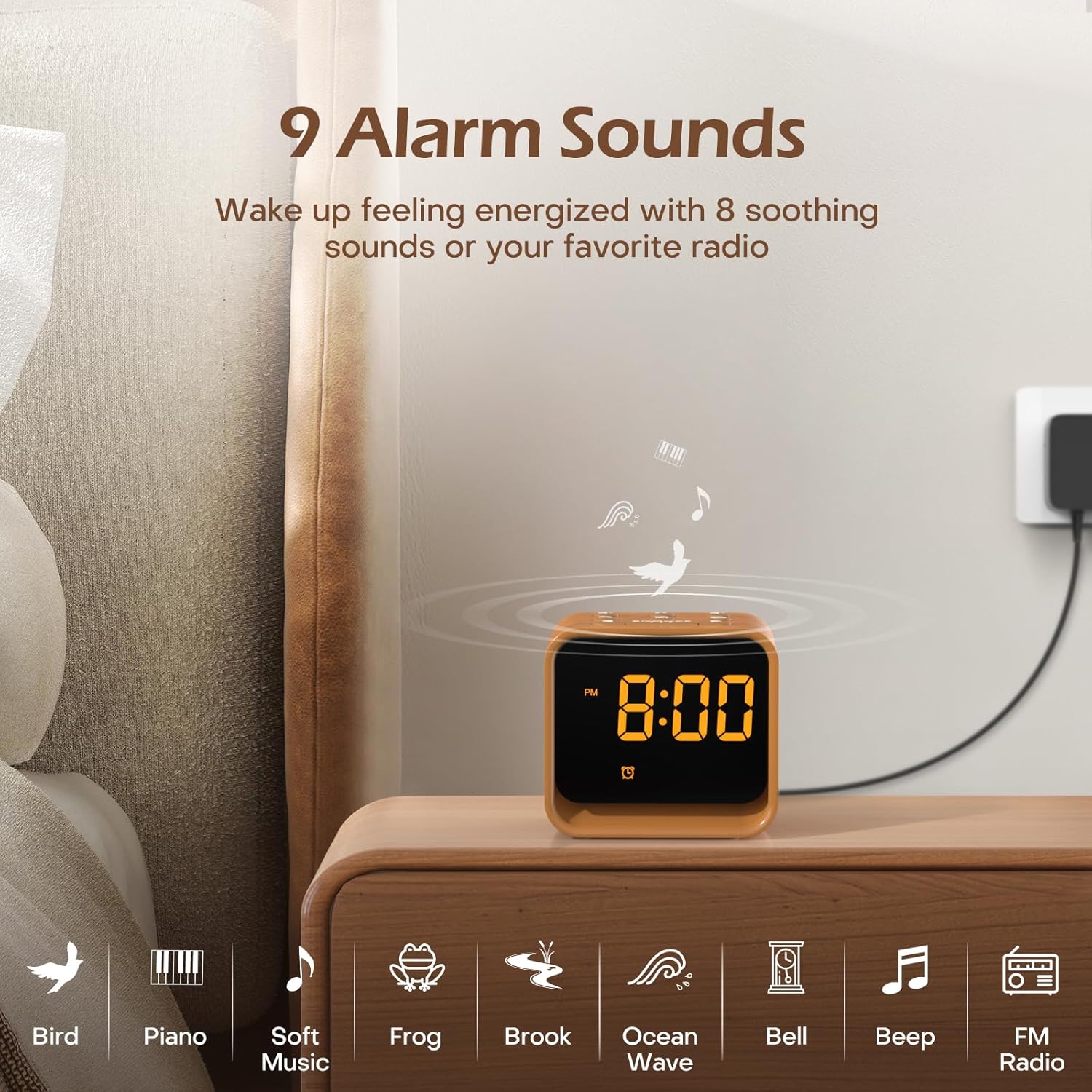
Сүрөт: An illustration of the nine available alarm sounds, including various natural sounds and classic alarm tones, designed for a gentle wake-up.
FM радиосунун иштеши
- Күйгүзүү/өчүрүү: Press the 'FM Radio On/Off/Auto Scan' button to turn the FM radio on or off.
- Автоматтык түрдө сканерлөө жана сактоо: When the radio is on, press and hold the 'FM Radio On/Off/Auto Scan' button to automatically scan for available stations and save them as presets.
- Change Stations: Use the 'Volume Up/Down' buttons to cycle through saved FM stations.
- Үндү тууралоо: Use the 'Volume Up/Down' buttons to adjust the radio volume (0-30 levels).

Сүрөт: Details of the FM Radio function, including frequency range (76-108 MHz), adjustable volume (0-30 levels), and an auto-off timer (0-180 minutes).
Уйкудагы үн машинасы
- Күйгүзүү/өчүрүү: Press the 'Sleep Sound On/Off' button to activate or deactivate the sleep sounds.
- Үн тандоо: Use the 'Music Selection' button to cycle through the 24 available soothing sounds (white noise, fan sounds, baby favorites, nature sounds).
- Үндү тууралоо: Use the 'Volume Up/Down' buttons to set the desired volume for the sleep sounds.
- Уйку таймери: The sleep timer allows the sound to play for a set duration before automatically turning off. Available settings typically include 30, 60, 90, 120, 150, or 180 minutes. Refer to the specific timer button or sequence on your device.

Сүрөт: Ички view of the clock radio, emphasizing its speaker and the variety of 24 soothing sounds available, categorized into white noise, fan sounds, baby favorites, and nature sounds.
Night Light
- Күйгүзүү/өчүрүү: Briefly press the 'Snooze/Nightlight Switch' button to turn the night light on or off.
- Түсү өзгөртүү: Press the 'Snooze/Nightlight Switch' button repeatedly to cycle through the 7 available colors.
- Жарыктыкты жөндөө: Use the 'Nightlight Brightness Control' on the back of the device to adjust the intensity of the night light.

Сүрөт: The clock radio featuring its 7-color dimmable bottom night light, which can be turned on or off to create a desired ambiance.
Дисплей жарыктыгы
The LED display brightness can be adjusted from 0% to 100% to suit your preference and avoid disturbing sleep.
- Жарыктыкты жөндөө: Use the 'Display Dimmer' control on the back of the device to slide and set the desired display brightness.
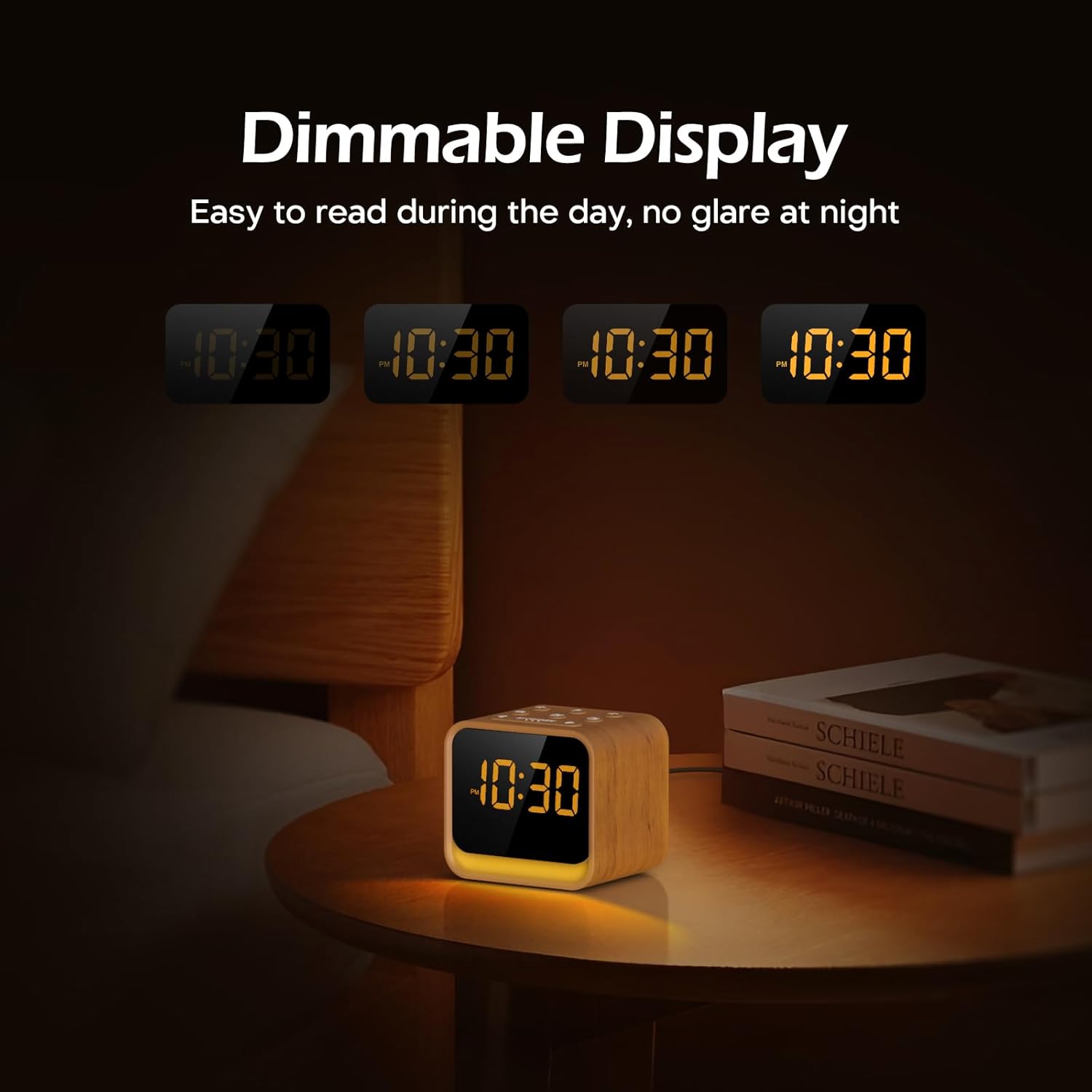
Сүрөт: The clock's display at different brightness settings, from 0% to 100%, illustrating the dimmable LED feature for comfortable viewкүнү-түнү иштейт.
Тындырма функциясы
When the alarm sounds, briefly press the 'Snooze/Nightlight Switch' button to activate the 9-minute snooze function. The alarm will sound again after 9 minutes.
Техникалык тейлөө
- Тазалоо: Аппаратты жумшак, кургак чүпүрөк менен сүртүңүз. Абразивдүү тазалагычтарды же эриткичтерди колдонбоңуз.
- Сактагыч: If storing for an extended period, disconnect from power and keep in a cool, dry place.
- Батареяны алмаштыруу: The CR2023 backup battery should last for several years. If settings are lost during a power outage, replace the battery by opening the battery compartment on the bottom of the unit.
Проблемаларды чечүү
| Көйгөй | Мүмкүн себеп | Чечим |
|---|---|---|
| Түзмөк күйбөйт. | Кубат адаптери туташкан эмес же туура эмес. | Ensure power adapter is securely connected to the device and a working power outlet. |
| Ойготкуч угулбайт. | Ойготкуч иштетилген эмес же үн өтө төмөн. | Check if the alarm icon is displayed. Increase alarm volume. |
| FM радиосун кабыл алуу начар. | Антенна узартылган эмес же тоскоолдук. | Fully extend the radio antenna. Try repositioning the device to reduce interference. |
| Time/settings are lost after power outage. | CR2023 камдык батареясы түгөндү. | CR2023 камдык батареясын алмаштырыңыз. |
Техникалык шарттар
- Бренд: REACH
- Модел: CR7WCA
- Материал: Пластик
- Түсү: Oak Wood finish
- Дисплей түрү: LED
- Дисплей жарыктыгы: 0-100% күңүрттөлүү
- Түнкү жарык: 7 Colors, Dimmable
- Сигнал үндөрү: 9 options (8 natural sounds + beep/FM radio)
- Уйку үндөрү: 24 options (White Noise, Fan, Baby Favorites, Nature Sounds)
- FM радио жыштыгы: 76-108 МГц
- Кубат булагы: Corded (DC 5V adapter)
- Камдык батарея: CR2023 (for settings memory)
- Болжолдуу өлчөмдөрү (пакет): 13.9 x 9.4 x 8 см
- Approximate Weight (Package): 0.49 кг
Кепилдик жана колдоо
REACHER products come with a standard manufacturer's warranty. For specific warranty details, technical support, or any questions regarding your device, please refer to the contact information provided with your purchase or visit the official REACHER webсайт.
For customer service inquiries, please retain your purchase receipt and product model number (CR7WCA).


