1. Киришүү
Welcome to the user manual for your FOXWELL BT301 Battery Tester and NT630 Plus OBD2 Scanner. This comprehensive guide provides detailed instructions on the setup, operation, maintenance, and troubleshooting of both devices. The BT301 is designed for testing 6V and 12V vehicle batteries, while the NT630 Plus offers advanced diagnostic capabilities for OBD2, Anti-lock Braking System (ABS), and Supplemental Restraint System (SRS/Airbag) in vehicles.
Please read this manual thoroughly before operating the devices to ensure correct usage and to prevent damage to the tools or your vehicle.
2. Коопсуздук маалыматы
Always observe the following safety precautions when working with vehicle electrical systems and diagnostic tools:
- Wear appropriate eye protection (safety goggles) and protective clothing.
- Жумуш аймагы жакшы желдетилип турушун камсыз кылыңыз.
- Keep a fire extinguisher nearby when working with batteries.
- Avoid smoking or open flames near vehicle batteries.
- Do not touch hot engine parts or exhaust systems.
- Keep the devices dry and clean. Do not expose them to moisture or extreme temperatures.
- Only use the provided cables and accessories.
- Disconnect the devices from the vehicle when not in use.
3. Пакеттин мазмуну
Пакетиңизде бардык буюмдар бар экенин текшериңиз:
- FOXWELL BT301 Battery Tester Unit
- FOXWELL NT630 Plus OBD2 Scanner Unit
- OBDII Diagnostic Cable (for NT630 Plus)
- Батарея Clamp Cable (for BT301)
- USB кабели (жаңыртуулар үчүн)
- Колдонуучунун Колдонмосу (бул документ)
4. Продукт бүтүп калдыview
4.1 FOXWELL BT301 Battery Tester
The BT301 is a dedicated 6V and 12V battery tester designed to accurately assess the health of your vehicle's battery, cranking system, and charging system. It supports various battery types including AGM flat plate, AGM spiral, GEL, EFB, and regular flooded batteries.
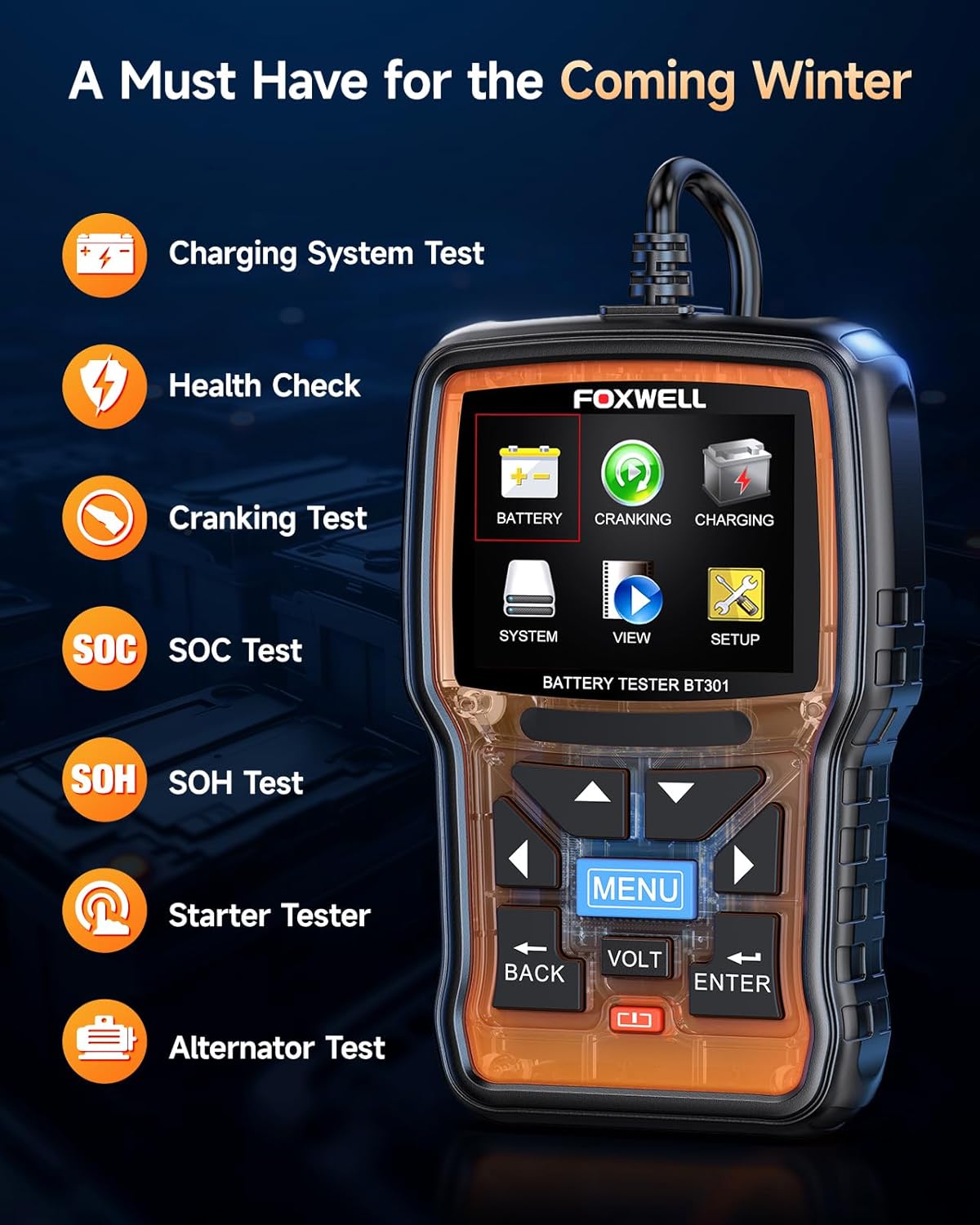
Сүрөт 4.1: FOXWELL BT301 Battery Tester displaying its main menu options.
Key Features of BT301:
- Батареянын ден соолугун текшерүү: Provides a comprehensive analysis of battery condition.
- Кранк сыноо: Стартердин моторунун иштешин баалайт.
- Заряддоо тутумунун сыноосу: Assesses the alternator and regulator's output.
- SOC Test: State of Charge test.
- SOH Test: State of Health test.
- 6V жана 12V батарейкаларды колдойт.
- Compatible with various battery types: AGM Flat Plate, AGM Spiral, GEL, EFB, Regular Flooded.
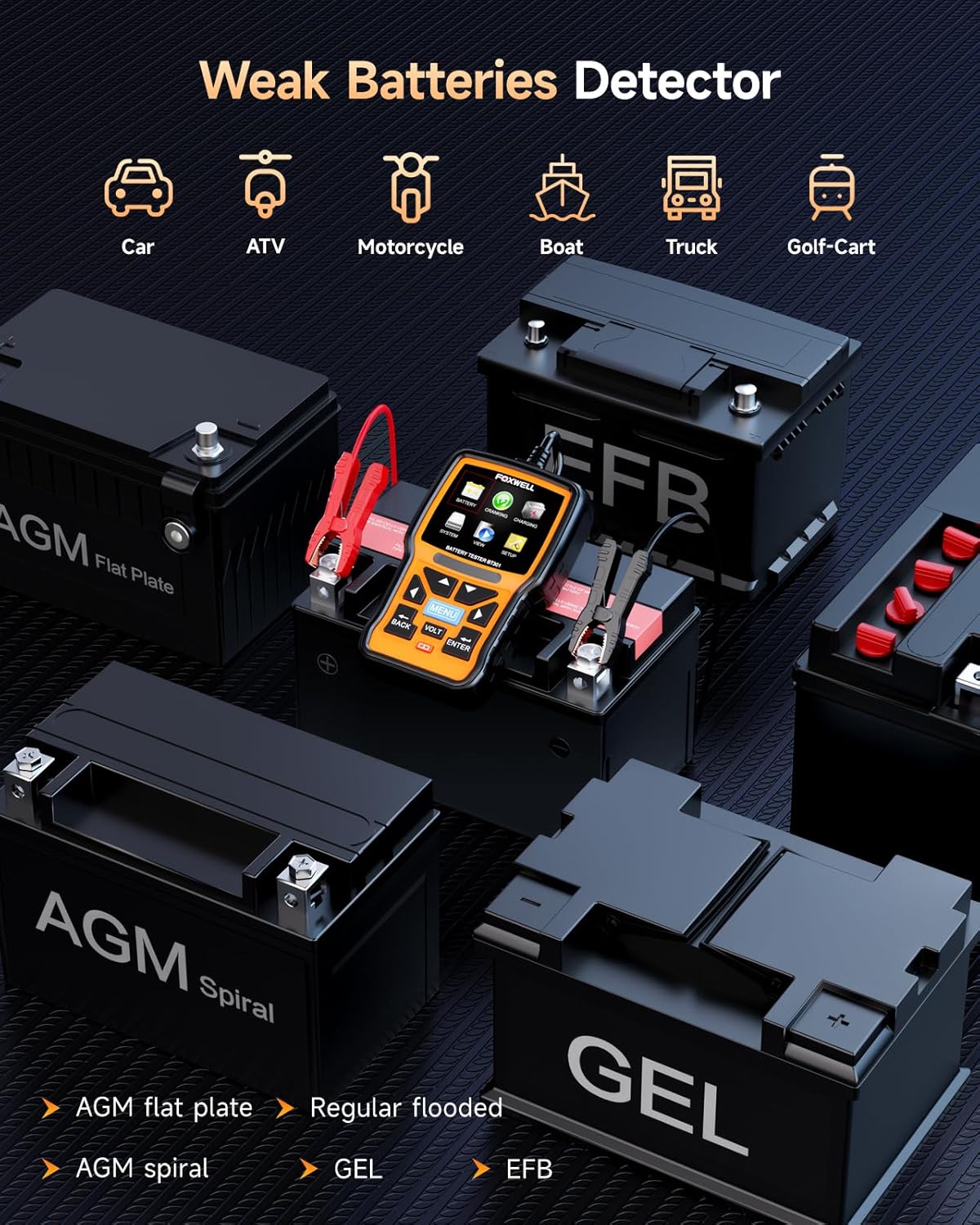
Сүрөт 4.2: The BT301 Battery Tester demonstrating compatibility with multiple battery types.
4.2 FOXWELL NT630 Plus OBD2 Scanner
The NT630 Plus is a powerful diagnostic tool that provides full OBD2 functions, along with specialized diagnostics for Anti-lock Braking System (ABS) and Supplemental Restraint System (SRS/Airbag). It also includes advanced service functions such as ABS Auto Bleed, Steering Angle Sensor (SAS) Calibration, Oil Service Light Reset, and Electronic Parking Brake (EPB) Reset.
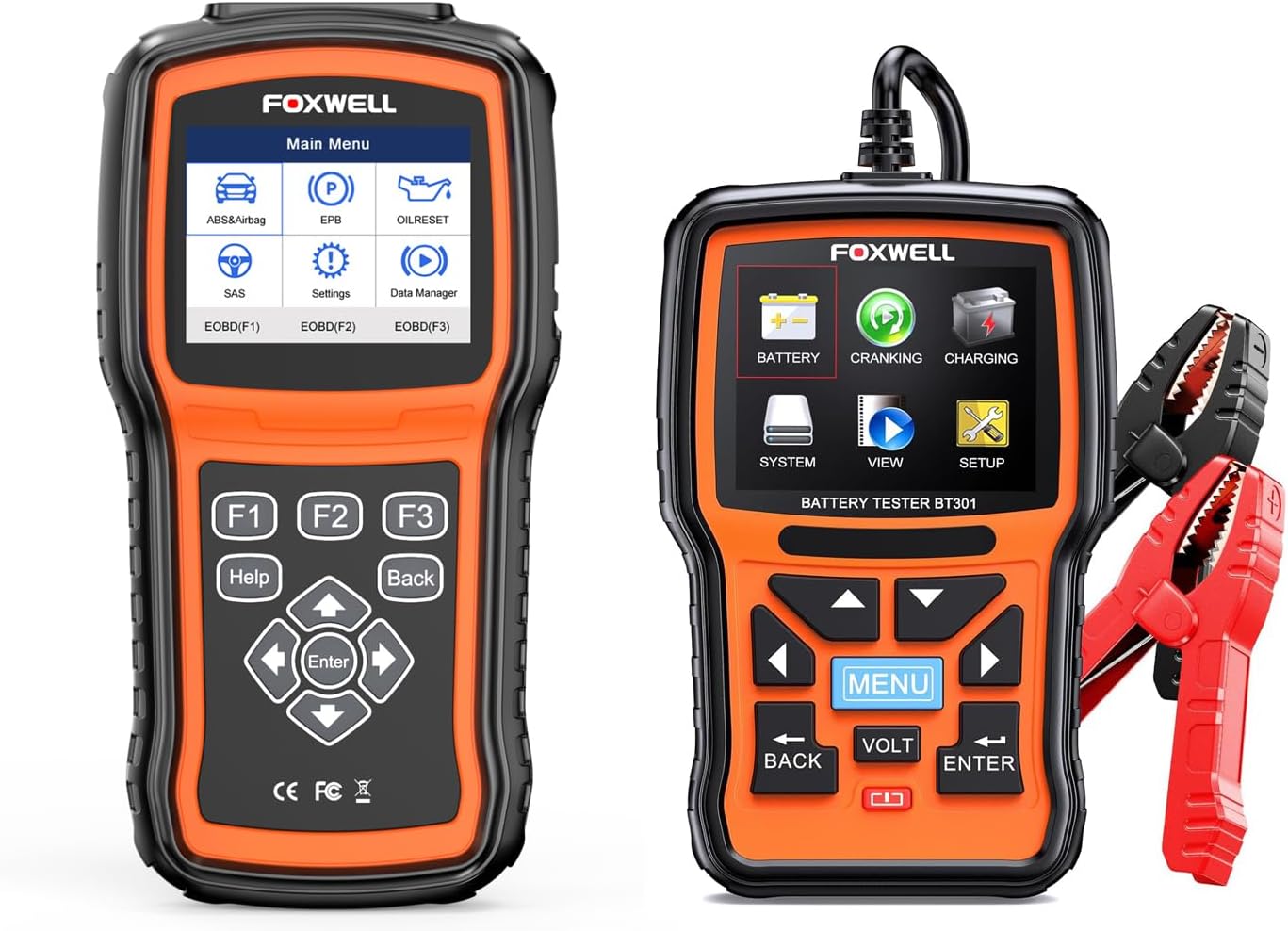
Сүрөт 4.3: The FOXWELL NT630 Plus OBD2 Scanner (left) and BT301 Battery Tester (right).
Key Features of NT630 Plus:
- Full OBD2/EOBD Functions: Read/Clear Codes, Live Data, Freeze Frame, I/M Readiness, O2 Monitor Test, On-Board Monitor Test, Component Test, Vehicle Info, Modules Present.
- ABS System Diagnostics: Reads and clears ABS fault codes, performs active tests, and supports ABS Auto Bleed.
- SRS/Airbag System Diagnostics: Reads and clears SRS fault codes, performs active tests.
- SAS калибрлөө: Руль бурчу сенсорун баштапкы абалга келтирет.
- Oil Service Light Reset: Май алмаштырылгандан кийин майдын тейлөө жарыгын баштапкы абалга келтирет.
- EPB баштапкы абалга келтирүү: Resets the electronic parking brake after maintenance.
- Automatic VIN identification.

Сүрөт 4.4: Visual representation of the three main diagnostic systems covered by the NT630 Plus.
5. Орнотуу
5.1 Initial Setup for BT301
Connecting the BT301:
- Унаанын от алдыруу системасы өчүрүлгөндүгүн текшериңиз.
- Кызыл позитивдүү (+) клды туташтырыңызamp батареянын оң терминалына.
- Кара негативди туташтыруу (-) clamp батареянын терс терминалына.
- The BT301 will power on automatically.
5.2 Initial Setup for NT630 Plus
Connecting the NT630 Plus:
- Унаанын 16-пиндүү маалымат туташтыргычын (DLC), адатта, айдоочу тарабындагы башкаруу панелинин астына жайгаштырыңыз.
- Ensure the vehicle's ignition is in the 'ON' position (engine can be off).
- Plug the OBDII diagnostic cable into the vehicle's DLC.
- Connect the other end of the cable to the NT630 Plus unit.
- The NT630 Plus will power on automatically.
6. Иштөө нускамалары
6.1 Using the BT301 Battery Tester
Негизги меню навигациясы:
Use the arrow keys (Up, Down, Left, Right) to navigate through menu options. Press the ENTER button to confirm a selection and the КАЙТ button to return to the previous screen. The МЕНЮ button typically returns to the main menu.
Батареяны текшерүү:
- Негизги менюдан тандаңыз БАТАРЕЯ жана басыңыз ENTER.
- Select the appropriate battery type (e.g., Regular Flooded, AGM, GEL) and press ENTER.
- Батареянын муздак иштетүүсүн киргизиңиз Amps (CCA) rating, usually found on the battery label, and press ENTER.
- The BT301 will perform the test and display the results, such as battery voltage, measured CCA, and overall battery health (e.g., 'GOOD BATTERY', 'CHARGE BATTERY', 'REPLACE BATTERY').

Сүрөт 6.1: Example of battery test results displayed on the BT301 screen.
Кран системасын сыноо:
- Негизги менюдан тандаңыз КРАНК жана басыңыз ENTER.
- Моторду иштетүү үчүн экрандагы көрсөтмөлөрдү аткарыңыз.
- The BT301 will analyze the cranking voltage and time, providing a result on the starter's performance.
Заряддоо тутумунун сыноосу:
- Негизги менюдан тандаңыз КУБАТТОО жана басыңыз ENTER.
- Follow the on-screen prompts, which may include revving the engine to a specific RPM.
- The BT301 will measure the alternator's output and ripple voltage, indicating the charging system's health.
6.2 Using the NT630 Plus OBD2 Scanner
Негизги меню навигациясы:
The NT630 Plus features function buttons (F1, F2, F3) for quick access, along with directional arrows, ENTER, КАЙТ, жана HELP buttons. Use the arrow keys to navigate and ENTER тандоолорду ырастоо үчүн.
OBD2 Diagnostics:
- Негизги менюдан тандаңыз EOBD(F1) or EOBD(F2) (depending on the specific menu layout) and press ENTER.
- Тандоо Коддорду окуу чейин view учурдагы, күтүлүп жаткан жана туруктуу диагностикалык көйгөй коддору (DTC).
- Тандоо Коддорду тазалоо to erase DTCs and turn off the Check Engine Light (MIL). Ensure the underlying issue is resolved before clearing codes.
- Тандоо Live Data чейин view real-time sensor data from the vehicle's engine control unit (ECU).
- Тандоо Кадрларды тоңдуруп коюу чейин view a snapshot of sensor data recorded when an emission-related fault occurred.
ABS System Diagnostics:
- Негизги менюдан тандаңыз ABS&Airbag жана басыңыз ENTER.
- Тандоо ABS from the submenu.
- Choose options like Коддорду окуу, Коддорду тазалоо, же Live Data to diagnose the ABS system.
- үчүн ABS Auto Bleed, select this function and follow the on-screen instructions carefully. This procedure helps remove air from the brake system after component replacement or fluid changes.

Сүрөт 6.2: Visual guide to the ABS Auto Bleed function.
SRS/Airbag System Diagnostics:
- Негизги менюдан тандаңыз ABS&Airbag жана басыңыз ENTER.
- Тандоо SRS/Airbag from the submenu.
- Choose options like Коддорду окуу or Коддорду тазалоо to diagnose the Supplemental Restraint System.

Сүрөт 6.3: Бүттүview of diagnostic functions available for ABS and SRS/Airbag systems.
Special Functions (NT630 Plus):
- SAS калибрлөө: Тандоо SAS from the main menu. This function is used to reset the steering angle sensor after steering system repairs or alignment. Follow the on-screen prompts carefully.
- Oil Service Light Reset: Тандоо МАЙ КАЛПЫНА КАЛТЫРУУ from the main menu. This function allows you to reset the oil service light after an oil change, ensuring the vehicle's maintenance schedule is correctly updated.
- EPB баштапкы абалга келтирүү: Тандоо EPB from the main menu. This function is essential when servicing components of the electronic parking brake system, such as replacing brake pads. It safely retracts and re-engages the parking brake calipers.

Сүрөт 6.4: Visual explanation of the SAS Calibration, Oil/Service Light Reset, and EPB Reset functions.
7. Техникалык тейлөө
7.1 Аспапка кам көрүү
- Тазалоо: жумшак колдонуу, damp аппаратты тазалоо үчүн чүпүрөк сasinг. Абразивдүү тазалагычтарды же эриткичтерди колдонбоңуз.
- Сактагыч: Store the devices in a dry, cool environment, away from direct sunlight and extreme temperatures.
- Программалык камсыздоо жаңыртуулары: Periodically check the FOXWELL official website for software updates to ensure your devices have the latest vehicle coverage and functionalities. Connect the device to a computer using the provided USB cable for updates.
- Кабелдик текшерүү: Regularly inspect the diagnostic cables and battery clamps for any signs of damage or wear. Replace damaged cables immediately.
8. Кыйынчылыктарды
If you encounter issues while using your FOXWELL devices, refer to the table below for common problems and their solutions.
| Көйгөй | Чечим |
|---|---|
| Түзмөк күйбөйт. | For BT301: Ensure battery clamps are securely connected to the correct battery terminals. For NT630 Plus: Verify the OBDII cable is firmly connected to the vehicle's DLC and the ignition is ON. Check vehicle's fuse for the OBDII port. |
| NT630 Plus fails to link with vehicle. | Confirm the vehicle's ignition is ON. Check if the OBDII cable is properly connected. Ensure the vehicle is OBDII compliant (most vehicles from 1996 onwards). Try connecting to a different OBDII compliant vehicle to rule out device issue. |
| BT301 shows 'Battery Error' or inconsistent results. | Ensure battery terminals are clean and free of corrosion. Verify that the correct battery type and CCA rating were entered. Ensure a stable connection of the battery clamps. |
| Cannot clear DTCs with NT630 Plus. | Ensure the ignition is ON and the engine is OFF. If the underlying fault is still present, the codes will reappear immediately. Address the root cause of the DTCs first. |
| Экран катып калган же жооп бербей жатат. | Disconnect the device from the vehicle/battery, wait a few seconds, and reconnect. If the issue persists, perform a software update if available. |
9. Техникалык шарттар
9.1 FOXWELL BT301 Battery Tester
- Operating Voltage: 6В - 12В
- Сыноо диапазону: 100-2000 CCA
- Дисплей: Арткы жарыктуу LCD
- Иштөө температурасы: 0°Cден 50°Cге чейин (32°F—122°F)
- Сактоо температурасы: -20°Cден 70°Cге чейин (-4°Fтен 158°Fге чейин)
9.2 FOXWELL NT630 Plus OBD2 Scanner
- Дисплей: Color TFT screen
- Operating Voltage: 8V - 18V (from vehicle battery)
- Байланыш: OBDII 16-pin DLC, USB
- Иштөө температурасы: 0°Cден 60°Cге чейин (32°F—140°F)
- Сактоо температурасы: -20°Cден 70°Cге чейин (-4°Fтен 158°Fге чейин)
- Протоколдор: Supports all OBDII protocols (ISO9141-2, ISO14230-4, SAEJ1850, ISO15765-4)


