1. Киришүү
Thank you for choosing the Douk Audio U8 HiFi Dual ES9038Q2M Bluetooth 5.0 Balanced DAC. This device is designed to deliver exceptional audio fidelity for your home audio and studio setups. It features advanced decoding capabilities, versatile input/output options, and high-resolution wireless streaming. This manual provides detailed instructions for setup, operation, and maintenance to ensure optimal performance and longevity of your U8 DAC.
2. Коопсуздук боюнча маанилүү маалымат
- Бул аппаратты жамгырга же нымга тийгизбеңиз.
- Агрегатты ажыратпаңыз. Бардык тейлөөлөрдү квалификациялуу кызматкерлерге тапшырыңыз.
- Ашыкча ысып кетүүнүн алдын алуу үчүн аппараттын айланасында туура желдетүүнү камсыз кылыңыз.
- Берилген кубат адаптерин гана колдонуңуз.
- Аппаратты жылуулук булактарынын жанына же тике күн нуруна коюудан алыс болуңуз.
- Балдар жетпеген жерде сактаңыз.
3. Пакеттин мазмуну
Пакетиңизде бардык буюмдар бар экенин текшериңиз:
- 1x Douk Audio U8 DAC Unit
- 1x USB кабели
- 1x Bluetooth антеннасы
- 1x Power адаптер
- 1x Алыстан башкаруу
- 1x CD Driver (for Windows systems)

Figure 3.1: Image displaying the complete contents of the Douk Audio U8 package, including the DAC unit, USB cable, Bluetooth antenna, power adapter, remote control, and CD driver.
4. Продукт бүтүп калдыview
The Douk Audio U8 DAC is a compact yet powerful audio device designed for high-fidelity sound reproduction. It integrates dual ES9038Q2M DAC chips, an XMOS XU208 USB processor, and a QCC5125 Bluetooth 5.0 chip to support a wide range of audio formats and connectivity options.
4.1 алдыңкы панели
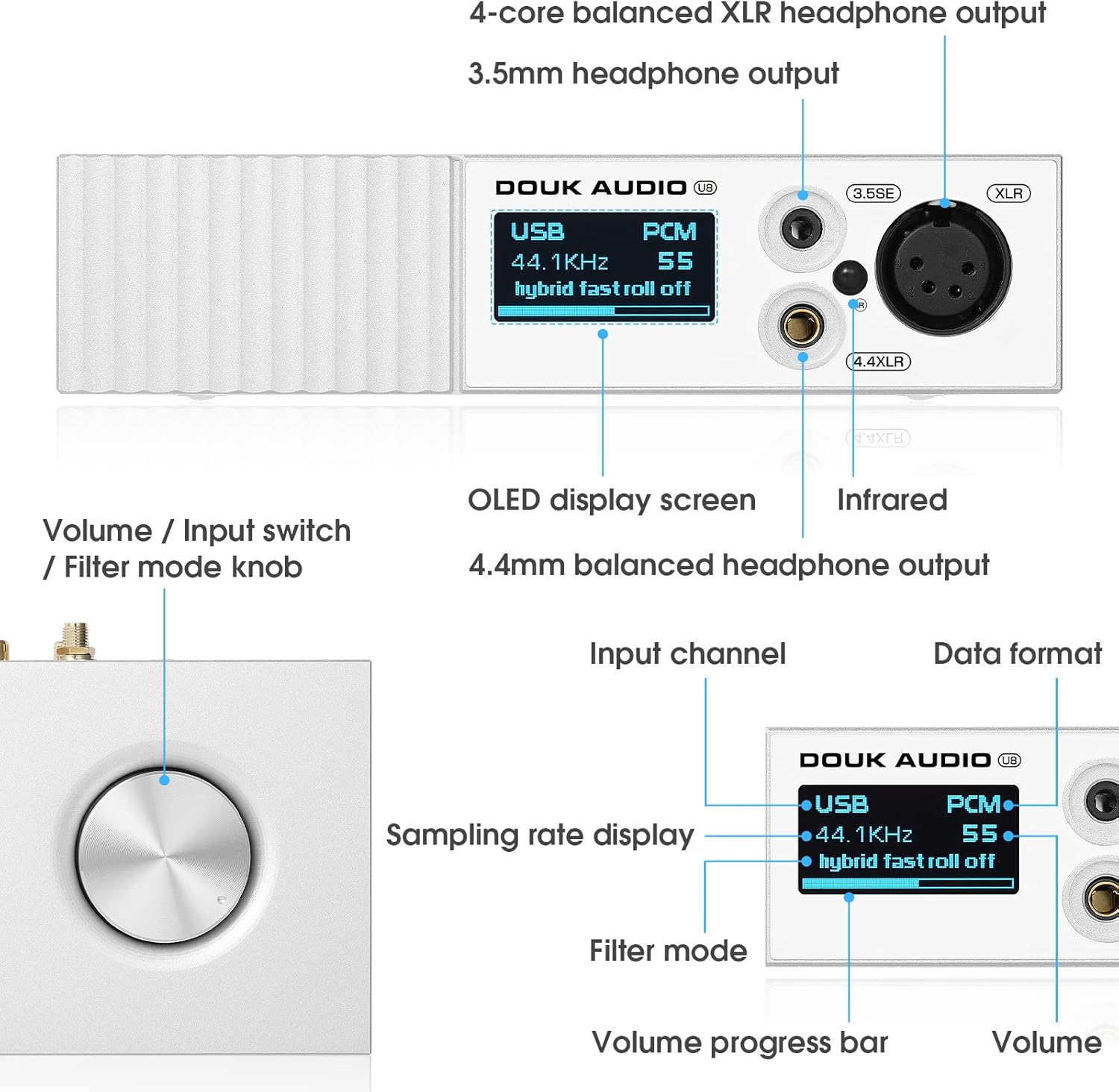
4.1-сүрөт: Детальдуу view of the Douk Audio U8 DAC front panel, labeling the OLED display screen, volume/input switch knob, 3.5mm headphone output, 4.4mm balanced headphone output, and 4-core balanced XLR headphone output.
- OLED дисплей экраны: Учурдагы киргизүүнү көрсөтөт, сampling rate, volume level, and filter mode.
- Volume / Input Switch / Filter Mode Knob: Rotate to adjust volume. Press to cycle through input sources. Press and hold to enter filter mode selection.
- 3.5 мм бир учтуу кулакчындын чыгышы: 3.5 мм уячасы бар кулакчындарды туташтыруу үчүн.
- 4.4 мм салмактуу гарнитуранын чыгышы: For connecting headphones with a 4.4mm balanced jack.
- 4-pin XLR Balanced Headphone Output: For connecting headphones with a 4-pin XLR balanced connector.
4.2 Арткы панель
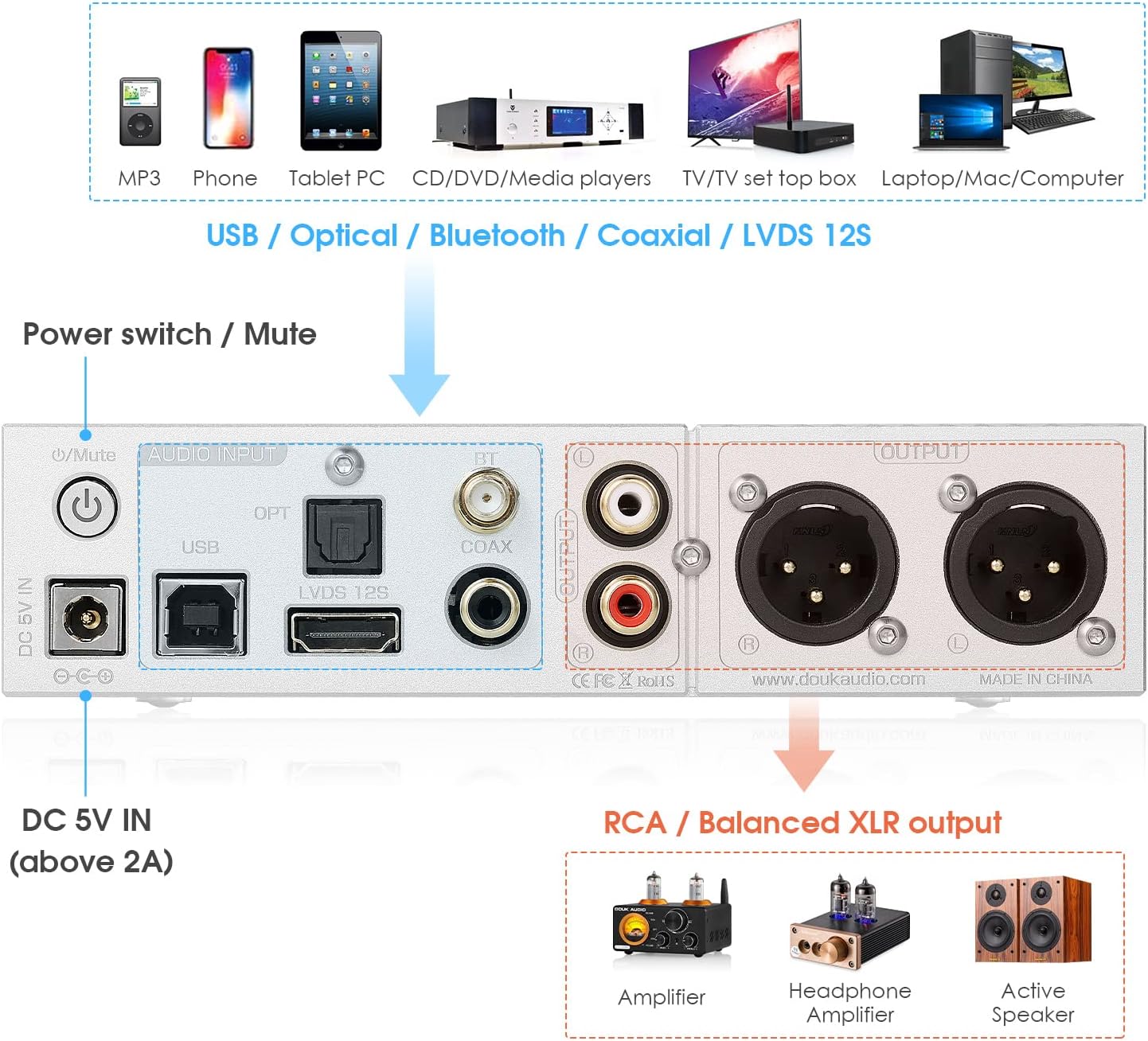
Figure 4.2: Detailed diagram of the Douk Audio U8 DAC rear panel, illustrating the DC 5V power input, power switch/mute button, and various audio inputs (USB, Optical, Bluetooth, Coaxial, LVDS I2S) and outputs (RCA, Balanced XLR).
- DC 5V IN (above 2A): Кубат киргизүү порту.
- Power Switch / Mute Button: Press to power on/off. Short press to mute/unmute.
- USB киргизүү: Connect to a computer or other USB audio source.
- Optical Input (OPT): Connect to optical audio sources.
- Bluetooth Antenna Port (BT): Connect the provided Bluetooth antenna.
- Coaxial Input (COAX): Connect to coaxial audio sources.
- LVDS I2S Input: High-performance digital audio input.
- RCA чыгышы (сол/оң): Тең салмаксыз аналогдук аудио чыгышы.
- Balanced XLR Output (L/R): Балансталган аналогдук аудио чыгаруу.
4.3 Алыстан башкаруу

Figure 4.3: Image of the Douk Audio U8 DAC remote control, showing buttons for menu navigation, input selection, volume adjustment, and playback controls.
The remote control allows for convenient operation of the U8 DAC from a distance, including input switching, volume adjustment, and filter mode selection.
5. Орнотуу колдонмосу
5.1 Драйверди орнотуу (Windows үчүн гана)
For Windows operating systems, a specific driver is required for USB audio functionality. Please contact Douk Audio customer support to obtain the latest driver. Insert the provided CD driver into your computer and follow the on-screen instructions for installation. Restart your computer after installation if prompted.
5.2 Кубатка туташуу
- Connect the provided power adapter to the DC 5V IN port on the rear panel of the U8 DAC.
- Кубат адаптерин ылайыктуу розеткага сайыңыз.
5.3 Аудио булактарын туташтыруу
The U8 DAC supports multiple digital audio inputs:
- USB: Connect a USB cable from your computer, smartphone (with OTG cable for Android, large current camera kit for iOS), or digital player to the USB input.
- Bluetooth: Screw the Bluetooth antenna into its designated port on the rear panel.
- Оптикалык (OPT): Connect an optical cable from your audio source (e.g., TV, game console) to the OPT input.
- Coaxial (COAX): Connect a coaxial cable from your audio source to the COAX input.
- IIS: Connect an IIS cable from a compatible source to the LVDS I2S input.
5.4 Аудио чыгарууларды туташтыруу
The U8 DAC offers various output options:
- RCA чыгаруу: Connect RCA cables from the U8 DAC to your amplifier, active speakers, or preampөмүрлүү.
- Балансталган XLR чыгаруу: For professional setups, connect XLR cables from the U8 DAC to compatible balanced ampкөтөргүчтөр же активдүү спикерлер.
- Headphone Outputs (3.5mm, 4.4mm, 4-pin XLR): Plug your headphones into the desired front panel output.

Figure 5.1: Diagram illustrating the various input (USB, Bluetooth, Optical, Coaxial, IIS) and output (RCA, XLR, 3.5mm, 4.4mm) options of the Douk Audio U8 DAC.

5.2-сүрөт: Ички view of the Douk Audio U8 DAC circuit board, highlighting the XMOS XU208 USB chip, ESS9038Q2M decoding chip, and QCC5125 Bluetooth chip, which contribute to its high-end audio processing capabilities.
6. Иштөө нускамалары
6.1 Күйгүзүү/өчүрүү
Press the power switch on the rear panel to turn the unit on or off. The OLED display will illuminate upon power-on.
6.2 Киргизүүнү тандоо
Short press the front panel knob or use the 'Input' button on the remote control to cycle through available input sources (USB, Bluetooth, Optical, Coaxial, IIS). The selected input will be displayed on the OLED screen.
6.3 Үндү башкаруу
Rotate the front panel knob clockwise to increase volume and counter-clockwise to decrease volume. Alternatively, use the volume up/down buttons on the remote control.
6.4 Чыпкалоо режимдери
The U8 DAC offers various digital filter modes to fine-tune the sound characteristics. Press and hold the front panel knob to enter filter mode selection, then rotate the knob to cycle through the options. Short press again to confirm your selection. You can also use the remote control to access and select filter modes.
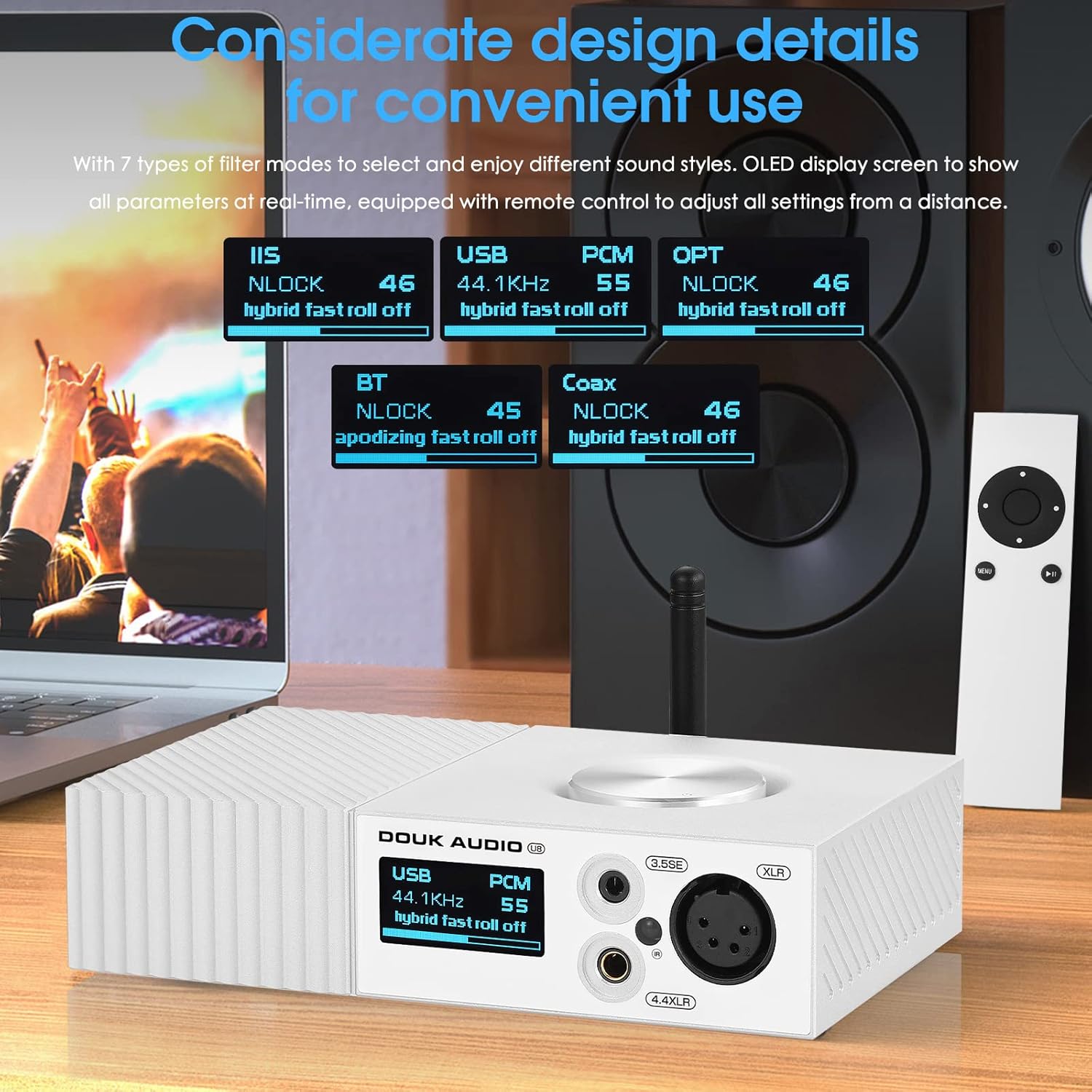
Figure 6.1: Close-up of the Douk Audio U8 DAC display showing different filter modes for various inputs like IIS, USB, OPT, BT, and Coax, highlighting user-friendly design.
6.5 Bluetooth жупташтыруу
- Select 'BT' as the input source on the U8 DAC. The display will show 'BT' and indicate it's ready for pairing.
- On your smartphone, tablet, or other Bluetooth device, go to Bluetooth settings and search for available devices.
- Select 'Douk Audio U8' from the list to pair.
- Once connected, the display will show 'BT' and the codec being used (e.g., LDAC, APTX-HD).
7. Техникалык тейлөө жана кам көрүү
- Тазалоо: Түзмөктүн сыртын тазалоо үчүн жумшак, кургак чүпүрөктү колдонуңуз. Катуу химиялык заттарды же абразивдүү тазалоочу каражаттарды колдонуудан алыс болуңуз.
- Сактагыч: Эгерде аппарат көпкө колдонулбаса, аны салкын, кургак жерде, күн нуру түз тийген жерден жана өтө жогорку температурадан алыс сактаңыз.
- Вентиляция: Ашыкча ысып кетүүнүн алдын алуу үчүн вентиляция тешиктери жабылбагандыгын текшериңиз.
8. Кыйынчылыктарды
| Көйгөй | Мүмкүн себеп | Чечим |
|---|---|---|
| Күч жок | Кубат адаптери туташкан эмес же туура эмес. | Check power connections. Ensure the power adapter is working. |
| Үн чыгышы жок | Incorrect input selected, volume too low, or output device not connected. | Verify input selection. Increase volume. Check connections to ampкөтөргүч/наушник. |
| USB input not working (Windows) | Driver not installed or incorrectly installed. | Install the correct USB driver. Restart computer. |
| Bluetooth жупташтыруу ишке ашпай калды | Device too far, U8 not in pairing mode, or interference. | Ensure U8 is in Bluetooth input mode. Move devices closer. Try re-pairing. |
| Алыстан башкаруу жооп бербей жатат | Batteries low or line of sight blocked. | Replace batteries. Ensure no obstructions between remote and U8. |
9. Техникалык шарттар
- DAC Chips: Кош ES9038Q2M
- USB Processor: XMOS XU208
- Bluetooth чипи: QCC5125
- Bluetooth версиясы: 5.0
- Bluetooth кодектери: LDAC, APTX-HD, AAC, SBC
- USB Input Support: PCM 32Bit/384kHz, DSD256
- IIS Input Support: PCM up to 32Bit/768kHz, DSD512
- Бурмалоо (THD+N): 0.0007%
- Сигнал-ызы-чуу катышы (SNR): 118дБ
- Киргизүүлөр: Bluetooth, USB, IIS, Optical, Coaxial
- Чыгуулары: Balanced XLR, RCA, 3.5mm Headphone, 4.4mm Balanced Headphone, 4-pin XLR Balanced Headphone
- Электр камсыздоо: DC 5V (2Адан жогору)
- Элемент Салмагы: 3 фунт (болжол менен 1.36 кг)
- Пакеттин өлчөмдөрү: 8 x 8 x 5 дюйм (болжол менен 20.3 x 20.3 x 12.7 см)
10. Кепилдик жана Кардарларды колдоо
Douk Audio products are designed for reliability and performance. This product comes with a standard manufacturer's warranty against defects in materials and workmanship. For specific warranty terms, please refer to the documentation included with your purchase or contact Douk Audio customer support.
If you encounter any issues or have questions regarding your Douk Audio U8 DAC, please visit the official Douk Audio website or contact their customer support team for assistance. Please have your model number (U8 or DZ096-NEW) and purchase information ready when contacting support.


