Introduction
Thank you for choosing the BETOWEY S5 Motorcycle Bluetooth Intercom. This device is designed to enhance your riding experience by providing clear communication, music playback, and GPS navigation capabilities. Featuring advanced Bluetooth 5.3 technology and multi-person intercom functionality, the S5 ensures stable and high-quality audio for solo rides or group adventures. Please read this manual thoroughly before use to ensure proper operation and maximize the product's lifespan.
Коопсуздук маалыматы
Always prioritize safety while riding. Ensure the device is securely installed and does not obstruct your vision or control of the motorcycle. Maintain a moderate volume level to remain aware of your surroundings and avoid distractions. Operating this device at excessive volumes can lead to hearing damage and may impair your ability to hear important traffic sounds.
Эскертүү: Do not attempt to install or operate the device while riding. Always stop in a safe location before making adjustments or troubleshooting.
Пакеттин мазмуну
Пакетиңизде бардык буюмдар бар экенин текшериңиз:
- Домофон аппараты
- Microphone & Headset (includes boom mic and button mic)
- Velcro Clamp
- USB кабели
- Бурама айдоочу
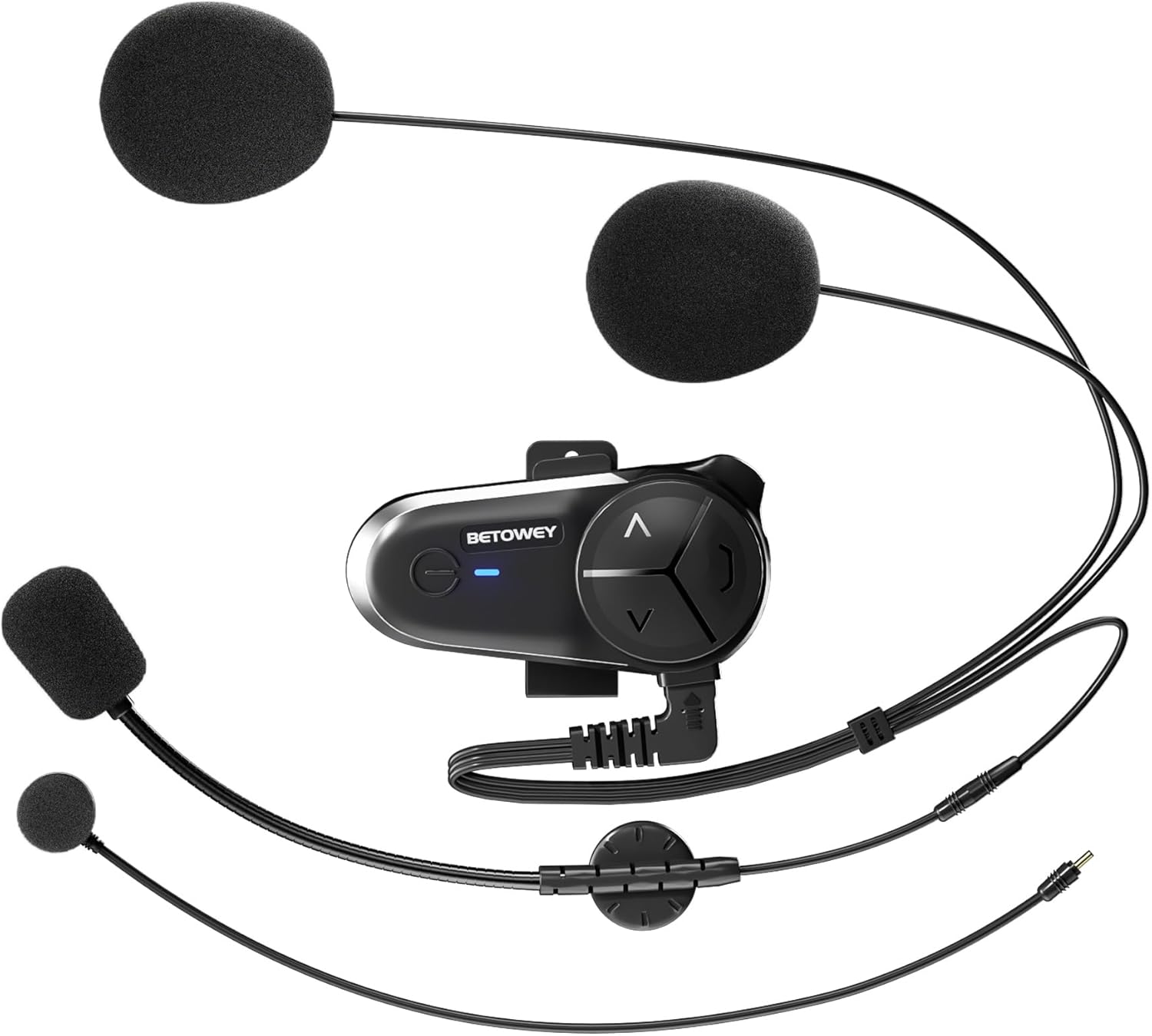
Image: All components included in the BETOWEY S5 package.
Продукт өзгөчөлүктөрү
- Өркүндөтүлгөн Bluetooth 5.3 технологиясы: Equipped with dual Bluetooth chips for clear and stable communication, supporting audio multitasking (intercom, music, FM radio, GPS simultaneously).
- Узартылган батареянын иштөө мөөнөтү: 1000mAh battery provides up to 150 hours standby and 16 hours continuous operating time.
- Multi-Person Intercom: Supports 2 to 10 riders with a maximum range of 500m between two units and up to 3000m for a group. Compatible with other brands' intercoms.
- Үндүн өзгөчө сапаты: 40mm high-fidelity speakers, DSP and CVC noise reduction technology, and an anti-wind microphone reduce environmental noise by up to 98%.
- Оңой орнотуу жана иштетүү: Designed for simple installation on various helmet types with intuitive controls.

Image: Dual Bluetooth chips enable simultaneous intercom, music, and GPS audio.

Image: High-fidelity speakers with noise reduction for clear sound.

Image: Long-lasting 1000mAh battery for extended use.

Image: Intuitive control design for easy operation.
Орнотуу боюнча колдонмо
The BETOWEY S5 offers two installation methods: a velcro clamp for temporary or easy removal, and a screw clamp for a more secure, permanent attachment.
Method 1: Velcro Clamp Орнотуу
- Attach the velcro clamp base to the intercom unit.
- Clean the desired helmet surface thoroughly where the intercom will be mounted.
- Peel off the protective film from the adhesive side of the velcro clamp.
- Firmly press the clamp onto the helmet surface and hold for a few seconds to ensure adhesion.
Method 2: Screw Clamp Орнотуу
- Бурама clamp base to the intercom unit.
- Клamp on the edge of the helmet shell.
- Use the provided screwdriver to tighten the screws, securing the clamp firmly to the helmet. Ensure it is tight but do not overtighten.
After mounting the main unit, install the speakers and microphone inside the helmet. The S5 comes with both a boom microphone (for open-face helmets) and a button microphone (for full-face helmets). Choose the appropriate microphone for your helmet type and position it close to your mouth for optimal voice pickup. Route the speaker wires and microphone cable neatly under the helmet padding.

Image: Visual guide for both velcro and screw clamp орнотуу ыкмалары.
Иштөө нускамалары
Күйгүзүү/өчүрүү
- Күйгүзүү: Индикатор күйгүчө кубат баскычын болжол менен 3 секунд басып туруңуз.
- Өчүрүү: Күйгүзүү баскычын болжол менен 3 секунд басып, индикатор өчкөнчө кармап туруңуз.
Bluetooth Pairing (First Use)
- Ensure the S5 is powered off.
- Күйгүзүү баскычын индикатор жарыгы кызыл жана көк түстөр менен кезектешип күйүп-өчкөнгө чейин 5-7 секунд басып туруңуз, бул жупташтыруу режимин көрсөтөт.
- On your mobile phone or Bluetooth device, search for "BETOWEY S5" in the Bluetooth settings.
- Select "BETOWEY S5" to connect. Once paired, the indicator light will flash blue slowly.
Домофондун иштеши
The S5 supports both 2-person and multi-person (up to 10 riders) intercom modes.
- 2-Person Intercom Pairing:
- Ensure both S5 units are powered off.
- On both units, press and hold the Intercom button (usually the large central button) for 5 seconds until the indicator lights flash red and blue alternately.
- Briefly press the Intercom button on one of the units. The units will search and connect. Once connected, the indicator lights will flash blue slowly.
- Multi-Person Intercom (Group Intercom):
- Pair the first two units as described above.
- To add a third unit, put the third unit into pairing mode (red/blue flashing). On one of the already paired units, briefly press the Intercom button to connect to the third unit.
- Repeat the process for additional units, connecting each new unit to an already connected unit.
- Домофонду баштоо/аяктоо: Once paired, a short press of the Intercom button will initiate or end an intercom conversation.

Image: The S5 supports group intercom for up to 10 riders over a 3000m range.
Audio Multitasking (Intercom, Music, GPS)
The S5 allows you to mix audio sources seamlessly. You can listen to music or GPS instructions while maintaining an active intercom conversation. The volume of background audio may automatically adjust when intercom is active.

Image: Multitasking audio allows seamless integration of intercom, music, and GPS.
Музыканы ойнотуу
- Ойнотуу/тындыруу: Кубат баскычын кыска басыңыз.
- Кийинки трек: Short press the "Next" button (usually the 'V' or down arrow).
- Мурунку трек: Short press the "Previous" button (usually the '^' or up arrow).
Үндү көзөмөлдөө
- Көлөмүн жогорулатуу: Long press the "Volume Up" button (usually the '^' or up arrow).
- Көлөмдү азайтуу: Long press the "Volume Down" button (usually the 'V' or down arrow).
FM радиосу
- FM радиосун күйгүзүү/өчүрүү: Күйгүзүү/өчүрүү баскычын эки жолу басыңыз.
- Каналдарды сканерлөө: While FM radio is on, long press the "Next" or "Previous" button to scan for stations.

Image: The S5 features a built-in FM radio for entertainment on the go.
Үн жардамчысы
- Үн Жардамчысын жандыруу: Triple-press the Power button to activate your phone's voice assistant (e.g., Siri, Google Assistant).
Техникалык тейлөө
- Тазалоо: жумшак колдонуу, damp Домофондун сыртын тазалоо үчүн чүпүрөктү колдонуңуз. Катуу химиялык заттарды же абразивдүү тазалоочу каражаттарды колдонбоңуз.
- Батареяга кам көрүү:
- Биринчи колдонуудан мурун аппаратты толук заряддаңыз.
- Recharge the battery when the low battery indicator is active.
- Avoid extreme temperatures during charging and storage to prolong battery life.
- If storing for an extended period, charge the device every 3-6 months to prevent deep discharge.
- Суу каршылык: The BETOWEY S5 is water-resistant (IP67 rated). While it can withstand splashes and light rain, avoid submerging the device in water. Ensure the charging port cover is securely closed when not charging.
Проблемаларды чечүү
| Көйгөй | Мүмкүн себеп | Чечим |
|---|---|---|
| Түзмөк күйбөйт. | Батарея аз. | Аппаратты толук заряддаңыз. |
| Телефон/домофон менен жупташтырылбай жатат. | Түзмөк жупташтыруу режиминде эмес; өтө алыс; кийлигишүү. | Ensure device is in pairing mode (flashing red/blue). Bring devices closer. Restart both devices. |
| Начар үн сапаты/ызы-чуу. | Microphone not positioned correctly; excessive wind noise; volume too low/high. | Adjust microphone position. Ensure anti-wind microphone is used. Adjust volume. |
| Домофон тез-тез өчүрүлөт. | Чектен чыгуу; тоскоолдуктар; кийлигишүү. | Stay within effective range. Avoid major obstacles. Re-pair if necessary. |
Техникалык шарттар
| Өзгөчөлүк | Деталь |
|---|---|
| Модель аты | BETOWEY BT-S5 |
| Байланыш технологиясы | Зымсыз (Bluetooth) |
| Bluetooth версиясы | 5.3 |
| Батарея сыйымдуулугу | 1000mAh |
| Батареянын иштөө мөөнөтү (иштеп жаткан) | 16 саатка чейин |
| Батареянын иштөө мөөнөтү (күтүү режими) | 150 саатка чейин |
| Заряддоо убактысы | Болжол менен 2.5 саат |
| Intercom Range (2-person) | 500 метрге чейин |
| Intercom Range (Group) | 3000 метрге чейин (10 чабандес үчүн) |
| Noise Reduction | DSP and CVC Noise Reduction Technology |
| Динамик өлчөмү | 40mm High-Fidelity Speakers |
| Сууга туруктуулук деңгээли | IP67 |
| Продукциянын өлчөмдөрү | 3.6 x 1.85 x 0.54 дюйм |
| Элемент Салмагы | 1.69 унция (48 грамм) |
| Өндүрүүчү | BTOOWEY |

Image: Physical dimensions and weight of the BETOWEY S5 intercom.
Кепилдик жана колдоо
BETOWEY products are designed for reliability and performance. For any questions, technical support, or warranty inquiries, please contact our customer service team.
Байланыш маалыматы:
- Электрондук почта: betowey_help@outlook.com
Please have your product model (BT-S5) and purchase details ready when contacting support.


