1. Киришүү
Сатып алганыңыз үчүн рахматasing the XO F41 Mirror Bluetooth Speaker. This device combines a digital clock display with a portable Bluetooth speaker, offering multiple playback options including Bluetooth, TF card, and FM radio. Please read this manual carefully before use to ensure proper operation and to maximize your experience with the product.

Image 1.1: The XO F41 Mirror Bluetooth Speaker in use, showing its digital clock display.
2. Продукциянын өзгөчөлүктөрү
- Bluetooth 5.3 туташуусу: Туруктуу жана натыйжалуу зымсыз аудио агымы үчүн.
- Күзгү дисплейи: Clear digital time display with adjustable brightness.
- Бир нече ойнотуу режимдери: Supports Bluetooth, TF card, and FM radio.
- Интегралдык микрофон: Үнсүз чалуу үчүн.
- Узак ойнотуу убактысы: Up to 8 hours at 50% volume, 5 hours at 100% volume.
- Компакт жана портативдик дизайн: Easy to carry and place anywhere.
- USB-C заряддоо: Заманбап жана ыңгайлуу заряддоо порту.
3. Пакеттин мазмуну
Сураныч, пакетте төмөнкү нерселерди текшериңиз:
- XO F41 Mirror Bluetooth Speaker
- USB-C заряддоо кабели
- User Manual

Image 3.1: The XO F41 Mirror Bluetooth Speaker packaging.
4. Түзмөктүн жайгашуусу жана башкаруу элементтери
Динамиктин баскычтары жана порттору менен таанышып алыңыз:
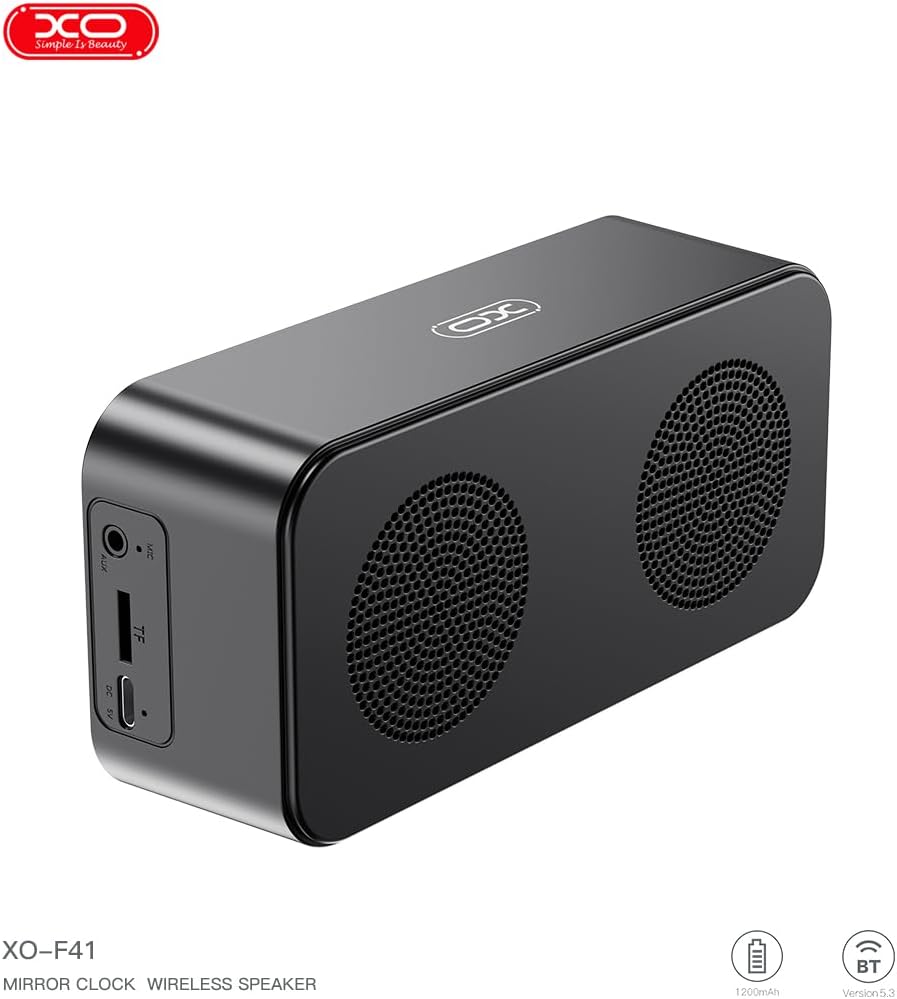
Сүрөт 4.1: Каптал view of the XO F41 with ports labeled.
- Кубат баскычы: Күйгүзүү/өчүрүү үчүн басып кармап туруңуз. Режимдерди которуштуруу үчүн кыска басыңыз.
- Ойнотуу/тындыруу баскычы: Аудиону ойнотуу же тындыруу. Чалууларга жооп берүү/аяктоо.
- Үндү жогорулатуу/Кийинки трек: Үнүн жогорулатуу үчүн кыска басыңыз, кийинки трекке узакка басыңыз.
- Үнүн азайтуу/Мурунку трек: Үндү азайтуу үчүн кыска басыңыз, мурунку трек үчүн көпкө басыңыз.
- USB-C порту: Аппаратты заряддоо үчүн.
- TF карта уячасы: Жергиликтүү музыканы ойнотуу үчүн TF (MicroSD) картасын салыңыз.
- AUX порту: Зымдуу аудио киргизүү үчүн.
5. Орнотуу
5.1 Динамикти заряддоо
- Берилген USB-C кабелин динамиктеги кубаттоо портуна туташтырыңыз.
- Кабелдин экинчи учун USB кубат адаптерине (кошумча эмес) же компьютердин USB портуна туташтырыңыз.
- The charging indicator will illuminate. It takes approximately 3 hours for a full charge.
- The indicator will turn off or change color once fully charged.
5.2 Күйгүзүү/өчүрүү
- Күйгүзүү үчүн: Кубат баскычын болжол менен 3 секунд басып, кармап туруңуз. Үндүү сигнал угасыз.
- Өчүрүү үчүн: Кубат баскычын болжол менен 3 секунд басып, кармап туруңуз. Үндүү сигнал угасыз.
6. Иштөө нускамалары
6.1 Bluetooth жупташтыруу
- Ensure the speaker is powered on and in Bluetooth mode. If not, short press the Power button to cycle through modes until "BT" or a Bluetooth icon appears on the display.
- Мобилдик түзмөгүңүздө Bluetooth иштетип, жеткиликтүү түзмөктөрдү издеңиз.
- Select "XO-F41" from the list of devices.
- Жупташтырылгандан кийин, динамик ийгиликтүү туташууну көрсөтөт жана сиз түзмөгүңүздөн аудиону ойнотууну баштасаңыз болот.
6.2 TF карта режими
- MP3 аудиосу бар TF (MicroSD) картасын салыңыз fileTF карта уячасына.
- The speaker will automatically switch to TF card mode and begin playing music. If not, short press the Power button to cycle to TF card mode.
- Use the Volume Up/Down buttons for track navigation and the Play/Pause button for playback control.
6.3 FM радио режими
- Short press the Power button to switch to FM radio mode. The display will show the FM frequency.
- Жеткиликтүү FM станцияларын автоматтык түрдө сканерлөө жана сактоо үчүн "Ойнотуу/Тынытуу" баскычын көпкө басып туруңуз.
- Short press the Volume Up/Down buttons to switch between saved stations.
6.4 Саат жана ойготкуч жөндөөлөрү
The XO F41 features a digital clock display. Specific instructions for setting the time and alarm are typically found in the detailed manual included with the product. Generally, a dedicated 'M' (Mode) or 'Set' button is used to enter time/alarm setting mode, and volume buttons are used to adjust values.

Image 6.1: The XO F41 speaker functioning as a bedside clock.
6.5 Дисплейдин жарыктыгын жөндөө
The display brightness is adjustable. Look for a dedicated button (often labeled with a sun icon or similar) or a combination of button presses (e.g., double-pressing the Power button) to cycle through brightness levels. Refer to the included quick start guide for exact steps.
7. Техникалык тейлөө
- Тазалоо: Динамиктин бетин тазалоо үчүн жумшак, кургак чүпүрөктү колдонуңуз. Абразивдүү тазалагычтарды же эриткичтерди колдонбоңуз.
- Сактагыч: Динамикти узак убакыт бою колдонбогондо, түз күн тийбеген, кургак, салкын жерде сактаңыз.
- Суу каршылык: Бул аппарат суу өткөрбөйт. Суунун же ашыкча нымдуулуктун таасиринен алыс болуңуз.
- Батареяга кам көрүү: Батареянын иштөө мөөнөтүн узартуу үчүн, бат-баттан батарейканы толук зарядсыздандырбаңыз. Аппаратты дайыма колдонууда болбосо да, үзгүлтүксүз заряддаңыз.
8. Кыйынчылыктарды
| Көйгөй | Мүмкүн себеп | Чечим |
|---|---|---|
| Динамик күйбөйт. | Батарея аз. | Динамикти кеминде 30 мүнөткө заряддаңыз. |
| Bluetooth аркылуу жупташтыруу мүмкүн эмес. | Speaker not in pairing mode; Bluetooth disabled on device; too far from device. | Ensure speaker is in Bluetooth mode. Enable Bluetooth on your device. Move speaker closer to your device (within 10 meters). |
| No sound from TF card. | TF картасы туура эмес салынган; колдоого алынбайт file формат; аудио жок files on card. | Reinsert TF card. Ensure files are in MP3 format. Verify audio files картада бар. |
| FM радиосун кабыл алуу начар. | Алсыз сигнал; экологиялык кийлигишүү. | Move the speaker to a different location. Re-scan for stations. |
9. Техникалык шарттар
| Өзгөчөлүк | Деталь |
|---|---|
| Модель номери | XO-F41 |
| Bluetooth версиясы | Bluetooth V5.3 |
| Bluetooth жыштыгы | 2.402 ГГц-2.480 ГГц |
| Батарея сыйымдуулугу | 1200mAh |
| Заряддоо киргизүү | USB-C, DC5V/0.5A |
| Заряддоо убактысы | Болжол менен 3 саат |
| Ойнотуу убактысы | 8H (50% volume); 5H (100% volume) |
| Натыйжалуу аралык | 10 метрден аз |
| Максималдуу күч | 5W |
| Үн катуулаткыч бирдиги | 52мм |
| Ызы-чуунун катышы | >80дБ |
| Продукциянын өлчөмдөрү | 15 x 3.81 x 11 см (болжол менен 150 x 45 x 72 мм) |
| Продукт Салмагы | 320 g (approx. 0.28 kg) |
| Материал | Пластик |
| Өзгөчө өзгөчөлүк | Жөнгө салынуучу жарыктык |

Image 9.1: Detailed product parameters.
10. Кепилдик маалыматы
The XO F41 Mirror Bluetooth Speaker comes with a standard manufacturer's warranty. Please refer to the warranty card included in your package for specific terms, conditions, and duration. Keep your purchase receipt as proof of purchase for any warranty claims.
11. Кардарларды колдоо кызматы
For further assistance, technical support, or inquiries regarding your XO F41 Mirror Bluetooth Speaker, please contact the retailer or manufacturer's customer service department. Contact details are typically provided on the product packaging or the official brand webсайт.