1. Киришүү
This manual provides comprehensive instructions for the setup, operation, and maintenance of your Dune HD Pro 8K Plus Media Player. The Dune HD Pro 8K Plus is an advanced media player designed for high-quality audio and video playback, supporting 8K resolution, Dolb Visio, and a powerful S928X media processor. Please read this manual thoroughly before using the device to ensure optimal performance and longevity.
2. Продукт бүтүп калдыview
2.1 Негизги өзгөчөлүктөрү
- Advanced S928X Media Processor: Features a high-end S928X media processor with Dolb Visio VS10 engine for superior image quality and performance.
- Full 8K Support: Supports true 8Kp60 HDR video decoding and output, with capabilities to downscale 8K content and upscale any content to 8K. Includes YouTube 8K HDR support.
- AV1 Video Codec: Integrates the new AV1 video codec for improved video quality and efficiency.
- Жогорку аткаруу: Equipped with a powerful CPU (four 2.0 GHz ARM A55 cores, one 1.9 GHz ARM A76 core) and Mali G57 GPU, LPDDR4X RAM, and eMMC for lightning-fast system performance.
- Dolb Visio VS10 Engine: Ensures maximum image quality across various content types (SDR, HDR, Dolb Visio) and output signals, enhancing conversion quality.
- Comprehensive Dolb Visio Support: Supports all common Dolb Visio profiles and a wide range of Dolb Visio file format variations.
- HD Audio Passthrough: Capable of outputting all HD audio formats (up to Dolb TruHD and DTS X) in end-to-end bitstream mode via HDMI. Supports high-quality music playback via HDMI and S/PDIF.
- Натыйжалуу муздатуу: Utilizes the entire metal casing as a heat sink for effective passive cooling of the S928X processor.
- Байланыш: Includes HDMI 2.1a, BT5, WiFi6, 1Gbit Ethernet, USB 3.0, Optical S/PDIF.
- Эстутум: 8GB RAM / 64GB internal storage.
2.2 Пакеттин мазмуну
Төмөндө тизмеленген нерселердин баары пакетиңизге камтылганын текшериңиз:
- Dune HD Pro 8K Plus Media Player x1
- Bluetooth алыстан башкаруу x1
- AAA батареялары x2 (алыстан башкаруу үчүн)
- Power Supply (12V 2A) x1
- HDMI Cable (8K Ultra High Speed) x1

Image: Contents of the Dune HD Pro 8K Plus retail box, showing the media player, remote, power adapter, and cables.
2.3 Продукт Views and Connectors

Сүрөт: алдыңкы view of the Dune HD Pro 8K Plus media player, displaying the front panel with a digital clock and status indicator.
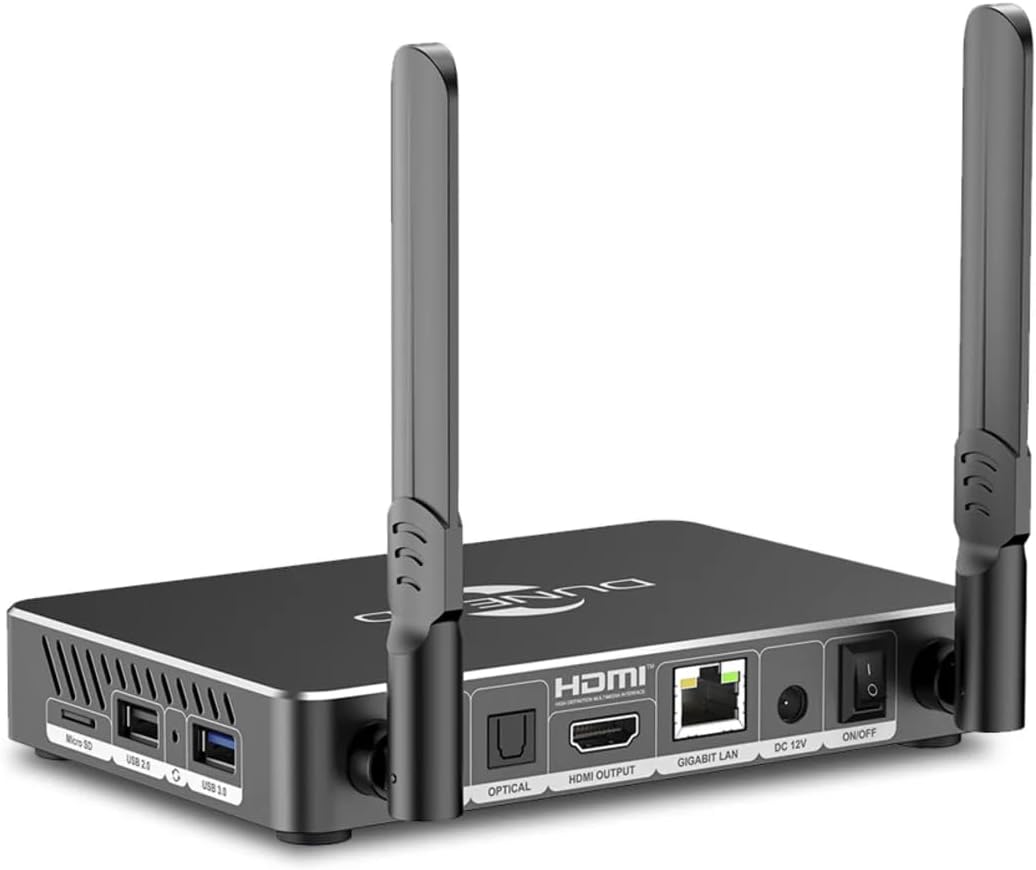
Сүрөт: Арткы view of the Dune HD Pro 8K Plus, highlighting the various connectivity ports including Optical S/PDIF, HDMI Output, Gigabit LAN, DC 12V power input, and power ON/OFF switch.

Сүрөт: каптал view of the Dune HD Pro 8K Plus, showing the MicroSD card slot, USB 2.0 ports, and a USB 3.0 port.

Image: The Bluetooth remote control for the Dune HD Pro 8K Plus, featuring buttons for power, navigation, media playback, voice search, and IR learning.
For a detailed diagram of the connectors, refer to the image below:

Image: Diagram illustrating the numbered connectors on the Dune HD Pro 8K Plus: 1. MicroSD card slot, 2. USB 2.0 host, 3. Recovery button, 4. USB 3.0 host, 5. 3.5mm analog audio output (stereo), 6. Optical S/PDIF output, 7. HDMI output, 8. Ethernet 10/100/1000 Mbit/s, 9. DC input 12V, 10. Power ON/OFF switch.
3. Орнотуу
3.1 Connecting the Media Player
- Сыналгыга туташуу: Use the provided 8K Ultra High Speed HDMI cable to connect the HDMI OUTPUT port on the media player to an HDMI input port on your TV or display.
- Кубатка туташуу: Connect the power supply to the DC 12V input port on the media player, then plug the power adapter into a wall outlet.
- Тармакка туташуу (милдеттүү эмес):
- текст: For a stable connection, connect an Ethernet cable from your router to the GIGABIT LAN port on the media player.
- Зымсыз: The device supports WiFi6. You can configure Wi-Fi settings after initial boot-up.
- Аудио туташуу (кошумча): If using an external audio system, connect an optical S/PDIF cable from the OPTICAL port on the media player to your audio receiver, or use the 3.5mm analog audio output.
3.2 Алыстан башкарууну жөндөө
- Bluetooth алыстан башкаруу пультунун арткы жагындагы батарея бөлүмүн ачыңыз.
- Туура полярдуулукту (+/-) камсыз кылуу менен эки AAA батарейкасын салыңыз.
- Close the battery compartment. The remote control is pre-paired with the media player. If pairing is required, follow the on-screen instructions during the first boot or refer to the troubleshooting section.
3.3 First Boot and Initial Configuration
- Бардык байланыштар коопсуз экенин текшериңиз.
- Turn on the media player using the power ON/OFF switch on the rear panel.
- Switch your TV's input source to the corresponding HDMI port.
- Follow the on-screen prompts to complete the initial setup, which may include language selection, network configuration, and system updates.
4. Операция
4.1 Негизги навигация
Use the directional pad (up, down, left, right) and the "ENTER" button on the remote control to navigate through the user interface. The "BACK" button returns to the previous screen, and the "HOME" button takes you to the main menu.
4.2 Медиа ойнотуу
- Жергиликтүү сактагыч: Connect USB drives or MicroSD cards to the respective ports. The media player will detect the storage, and you can browse fileорнотулган колдонушат file менеджер.
- Тармак сактагычы: Медиага кирүү files from network-attached storage (NAS) or shared folders on your computer via SMB/NFS protocols. Configure network shares in the settings menu.
- Агым кызматтары: Utilize pre-installed applications or download new ones from the app store (e.g., YouTube 8K HDR) to access online streaming content.
4.3 Өркүндөтүлгөн функциялар
- Үн менен издөө: Press the microphone button on the remote control to activate voice search for content or system commands.
- IR үйрөнүү: The remote control supports IR learning, allowing you to program certain buttons to control your TV (e.g., power, volume). Refer to the remote control's specific instructions for this feature.
- Колдонмону башкаруу: Download the Dune HD control application on your smartphone or tablet for an alternative control method.
5. Техникалык тейлөө
5.1 Тазалоо
To clean the media player, use a soft, dry cloth. Do not use liquid cleaners, aerosols, or abrasive materials, as these can damage the device. Ensure the device is powered off and unplugged before cleaning.
5.2 Программалык камсыздоо жаңыртуулары
Regularly check for and install software updates to ensure optimal performance, security, and access to new features. Updates can typically be found in the system settings menu under "About" or "System Update." Ensure a stable internet connection during updates.
6. Кыйынчылыктарды
| Көйгөй | Мүмкүн себеп | Чечим |
|---|---|---|
| Күч жок | Power cable not connected; power outlet faulty; device off. | Ensure power cable is securely connected. Try a different power outlet. Check the power ON/OFF switch on the rear panel. |
| Телевизордо сүрөт жок | Incorrect HDMI input selected; HDMI cable faulty; TV not compatible. | Select the correct HDMI input on your TV. Try a different HDMI cable. Ensure your TV supports the output resolution (e.g., 8K, 4K). |
| Үн жок | Volume too low; incorrect audio output settings; audio cable faulty. | Increase volume on TV/receiver and media player. Check audio output settings in the media player's menu. Verify audio cable connections. |
| Алыстан башкаруу жооп бербей жатат | Batteries low/dead; remote not paired. | Replace batteries. If the remote is not paired, go to system settings and follow the pairing instructions for Bluetooth devices. |
| Тармакка туташуу маселелери | Incorrect Wi-Fi password; router issues; Ethernet cable disconnected. | Verify Wi-Fi password. Restart your router. Check Ethernet cable connection. Ensure DHCP is enabled on your router or configure static IP. |
| Түзмөк катып калат же бузулат | Software glitch; overheating; corrupted data. | Restart the device by unplugging and replugging the power. Ensure adequate ventilation. Perform a factory reset if issues persist (Эскертүү: Бул бардык маалыматтарды өчүрөт). |
6.1 Заводдук абалга кайтаруу
If you encounter persistent issues, a factory reset may resolve them. This will restore the device to its original factory settings and erase all user data, installed applications, and configurations.
- багыттоо Орнотуулар > Система > Параметрлерди баштапкы абалга келтирүү.
- Тандоо Бардык дайындарды өчүрүү (дескриптке кайтаруу).
- Confirm your choice. The device will restart and begin the reset process.
7. Техникалык шарттар
| Өзгөчөлүк | Деталь |
|---|---|
| Бренд | Dune HD |
| Модель аты | Pro 8K Plus |
| Элемент моделинин номери | Pro 8K Plus (D1006) |
| Процессор | Hi-End version of Amlogic S928X with Dolb Visio VS10 engine |
| CPU | Four 2.0 GHz ARM A55 cores, one 1.9 GHz ARM A76 core |
| GPU | Мали G57 |
| Operating Memory (RAM) | 8 ГБ LPDDR4X |
| Flash Memory (Storage) | 64 ГБ eMMC |
| Wi-Fi | 802.11b/g/n/ac/ax (Wi-Fi 6) 2.4 + 5 GHz, 2T2R |
| Bluetooth | Bluetooth 5.2 |
| Ethernet | Gigabit Ethernet (1 Gbit/s) |
| USB порттору | 1x USB 3.0, 2x USB 2.0 |
| Video Output | HDMI 2.1a |
| Резолюцияны колдоо | 8Kp60 HDR, 4Kp60, 1080p |
| Аудио чыгаруу | HDMI, Optical S/PDIF, 3.5mm analog audio jack |
| Колдоого алынган Интернет кызматтары | YouTube (8K HDR supported) |
| Controller Type | App Control, Bluetooth Remote Control (with Voice Search, IR Learning, AirMouse) |
| Операция системасы | Dune HD OS + Android 11.0 |
| Filesystems Supported | FAT16/FAT32, exFAT, NTFS, HFS/HFS+ (Mac OS X), EXT2/EXT3/EXT4, BTRFS |
| Продукциянын өлчөмдөрү | 6.3 x 4.53 x 1.02 дюйм (16 x 11.5 x 2.6 см) |
| Элемент Салмагы | 2.44 фунт (1.11 кг) |
| Түс | Кара |
| Электр камсыздоо | 12V 2A |
| Дата биринчи жеткиликтүү | 6-декабрь, 2024-жыл |
| MAC дареги | 14:C0:89:92:9A:DD |
| Сериялык номер | FC188B001240900990 |
| Barcode (UPC/EAN) | 4897031343765 |
8. Кепилдик жана колдоо
8.1 Кепилдик маалыматы
This product is covered by a manufacturer's warranty. For specific warranty terms and conditions, please refer to the documentation included with your purchase or contact Dune HD customer support. Protection plans may also be available for extended coverage.
- Кайтаруу саясаты: Typically 30 days for refund/replacement from the date of purchase.
- Кошумча коргоо пландары:
- 2 жылдык коргоо планы
- 3 жылдык коргоо планы
- Толук коргоо (айлык жазылуу)
8.2 Кардарларды колдоо
For technical assistance, troubleshooting, or general inquiries, please contact Dune HD customer support.
- Официалдуу Webсайт: www.dune-hd.com
- Колдоо баракчасы: support.dune-hd.com
- Importer Support Email: support@atdbaltics.com
- Dune HD Amazon Store: Visit the Dune HD Store on Amazon
Android Google LLC соода белгиси болуп саналат.


