1. Киришүү
The Lian Li UNI Fan L-Wireless Controller is designed to provide wireless control for various Lian Li L-Wireless Sync enabled products. This controller serves as a central hub for managing lighting effects and fan speeds across compatible devices, including UNI Fan SL-Infinity Wireless, CL Wireless, SL & TL Wireless, Strimer Wireless, and Hydroshift II.
Эскертүү: If you purchase a 3-pack of UNI Fan Wireless versions or the PW24-1W-T (24-pin Wireless Strimer), a controller is typically included. A separate purchase of this L-Wireless Controller is required for single-pack fan functionality or as a replacement.

Image 1.1: The Lian Li L-Wireless Controller, designed for wireless synchronization.
2. Пакеттин мазмуну
Пакетиңизде бардык буюмдар бар экенин текшериңиз:
- L-Wireless Controller
- 1 to 3 PWM SATA Cable
- USB/PWM Header Cable
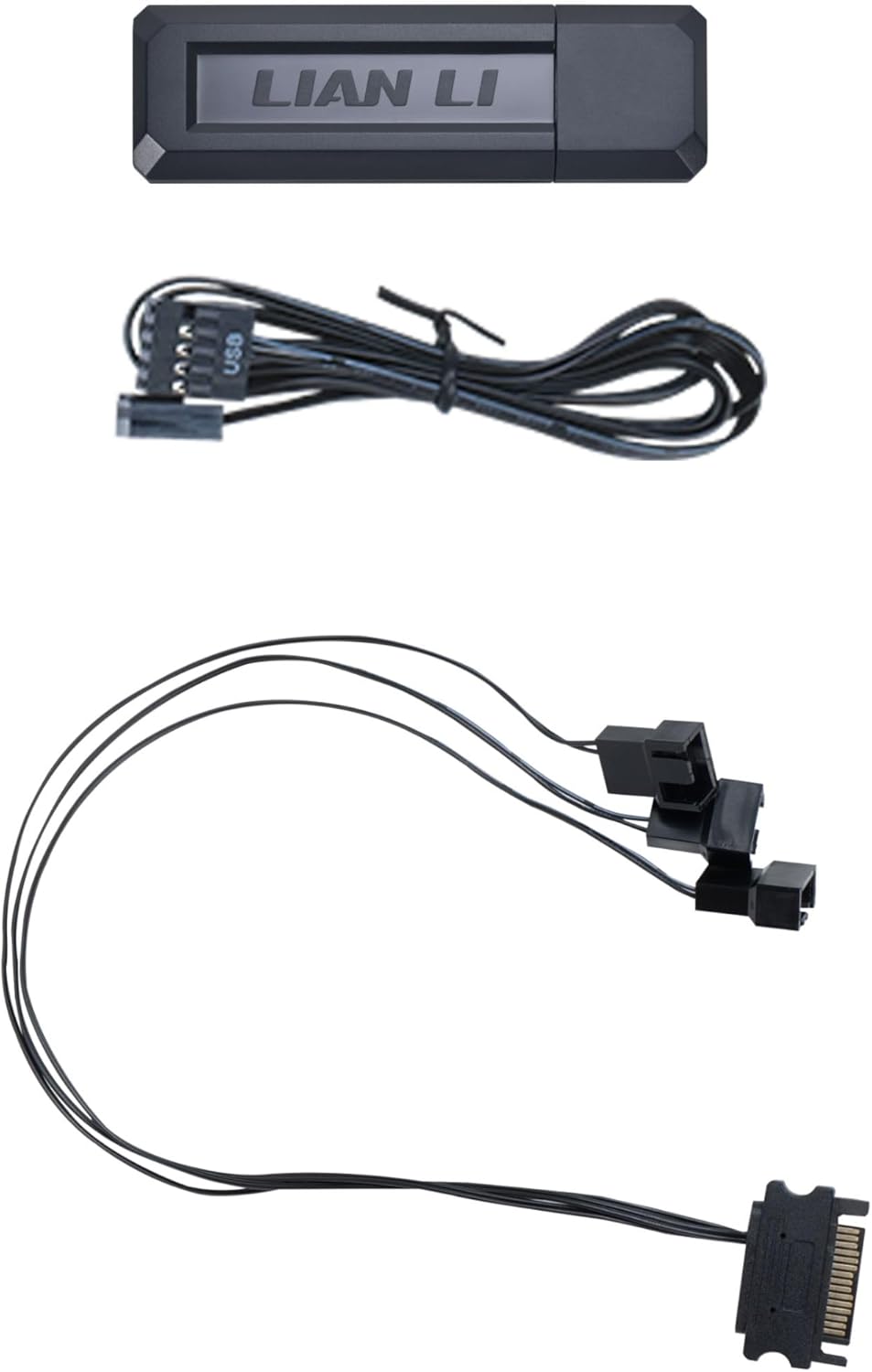
Image 2.1: L-Wireless Controller, USB/PWM header cable, and 1-to-3 PWM SATA cable.

Image 2.2: Visual representation of the package contents for both black (RF-T-B) and white (RF-T-W) versions.
3. Шайкештик
The L-Wireless Controller is compatible with the following Lian Li products:
- UNI Fan SL-Infinity Wireless Series
- UNI Fan CL Wireless Series
- UNI Fan SL Wireless Series
- UNI Fan TL Wireless Series
- Strimer Wireless Series
- Hydroshift II
4. Орнотуу жана орнотуу
The L-Wireless Controller offers two primary connection options for installation:
4.1. Connecting to a USB Type-A Port
- Locate an available USB Type-A port on the rear I/O panel of your computer.
- Insert the L-Wireless Controller directly into the USB Type-A port.

Image 4.1: The L-Wireless Controller connected to an external USB Type-A port.
4.2. Connecting to a Motherboard 9-pin USB Header
- Connect the USB header cable from the L-Wireless Controller to an available 9-pin USB header on your motherboard.
- Connect the PWM header cable from the L-Wireless Controller to an available PWM fan header on your motherboard.

Image 4.2: Connecting the USB and PWM cables to the motherboard headers.
Маанилүү эскертүү: To synchronize fan speed with the motherboard, ensure the PWM cable from the controller is connected to a motherboard fan header for proper functionality.
4.3. Providing Extra Fan Power (Optional)
If your motherboard's 4-pin PWM port provides insufficient power (below 1A), which may cause fans to flicker white during startup, use the included 1 to 3 PWM-to-SATA adapter for additional power. Connect the fan to another 4-pin PWM port or use the provided adapter for stable performance.

Image 4.3: The 1 to 3 PWM-to-SATA adapter for supplemental fan power.
5. Operation with L-Connect 3 Software
The L-Wireless Controller is managed through the Lian Li L-Connect 3 software, which provides comprehensive control over lighting effects, fan speed, and LCD screen settings for compatible UNI FAN series products.
5.1. Lighting Effects Control
L-Connect 3 allows you to customize ARGB lighting effects for your connected devices. You can select various lighting modes, adjust brightness, and change the direction of effects.

Image 5.1: L-Connect 3 interface showing lighting effect customization options.
5.2. Fan Speed Management
You can configure fan speeds within L-Connect 3. Fan speeds can be automatically adjusted based on system temperature or manually set using custom RPM curves.

Image 5.2: L-Connect 3 interface displaying fan speed control and RPM curve settings.
5.3. L-Wireless Sync Setup
L-Connect 3 offers features for intuitive management of your wireless devices, including grouping, naming, and sorting fans for a personalized experience.

Image 5.3: L-Connect 3 L-Wireless Sync setup interface for device management.
6. Техникалык тейлөө
The L-Wireless Controller requires minimal maintenance. Keep the device clean and free from dust. Ensure proper airflow around the controller if it is installed internally. Avoid exposing the controller to extreme temperatures or moisture.
7. Кыйынчылыктарды
- Контроллер табылган жок: Ensure the controller is securely connected to either a USB Type-A port or the motherboard's 9-pin USB header. Try a different port or header. Verify that the L-Connect 3 software is installed and running.
- Fans Not Responding/Flickering: Check all cable connections, including the PWM and SATA power cables. If fans flicker white during startup, refer to Section 4.3 regarding 'Extra Fan Power' and use the provided PWM-to-SATA adapter if necessary.
- Lighting Effects Not Working: Ensure the L-Connect 3 software is open and the correct devices are selected. Check for software updates. Verify that the fans or Strimer cables are properly connected to the controller.
- Fan Speed Not Synchronizing with Motherboard: Confirm that the PWM cable from the L-Wireless Controller is connected to a functional PWM fan header on your motherboard. Check motherboard BIOS settings for fan control.
8. Техникалык шарттар
| Өзгөчөлүк | Деталь |
|---|---|
| Продукт аты | L-Wireless Controller |
| Модел | RF-T-B (Black) |
| Өндүрүүчү | ЛИАН ЛИ |
| Элемент моделинин номери | RF-T-B.01 |
| Түс | Кара |
| Материал | Пластик |
| Элемент Салмагы | 2.11 унция (0.06 килограмм) |
| Продукциянын өлчөмдөрү (LxWxH) | 1.97 x 1.38 x 4.84 дюйм |
| Колдоо каналдары | 10 |
| Колдоого алынган продуктылар | TL Wireless Series, SL Wireless Series, Strimer Wireless, SL-Infinity Wireless, CL Wireless, Hydroshift II |
| UPC | 840353048171 |

Image 8.1: Detailed specifications for the L-Wireless Controller.
9. Кепилдик жана колдоо
Кепилдик жөнүндө маалымат, техникалык колдоо же кошумча жардам алуу үчүн, расмий Lian Li сайтына кириңиз. webсайтка же кардарларды тейлөөгө кайрылыңыз. Кепилдик дооматтар үчүн сатып алганыңыздын далилин сактаңыз.


