1. Киришүү
This manual provides detailed instructions for the setup, operation, maintenance, and troubleshooting of your ATTACK SHARK X66 Gasket Wireless Mechanical Keyboard. Please read this manual thoroughly before using the product to ensure optimal performance and longevity.

Сүрөт: жогорудан төмөнгө view of the ATTACK SHARK X66 Gasket Wireless Mechanical Keyboard, showcasing анын компакттуу жайгашуусу жана баскычтоп капкагынын дизайны.
2. Продукт бүтүп калдыview
2.1 Негизги өзгөчөлүктөрү
- 60% Compact Design: Features 66 keys and a volume knob, optimizing desktop space while maintaining portability.
- Upgraded Gasket Mount: Incorporates 5 layers of sound insulation (PORON Sandwich Foam, Foamed IXPE Under Shaft Pads, PET Acoustic Premium Pads, Shaft Seat Sound Deadening Foam, Customized Bottom Foams) for reduced noise and a smooth typing experience.
- Үч режимдеги туташуу: Supports Bluetooth, 2.4GHz wireless, and USB-C wired connections.
- Multi-Device Tasking: Three Bluetooth channels (FN+Q/FN+W/FN+E) for efficient switching between devices.
- Узак мөөнөттүү батарея: Equipped with a 3000mAh large-capacity rechargeable battery.
- Hot Swappable Switches: Full hot-swappable design compatible with 3-pin/5-pin switches, featuring pre-lubed Strawberry switches for a creamy sound and smooth keystroke.
- Динамикалык RGB арткы жарык: Offers 9 backlight colors and 18 lighting effects with 16 million LED colors, customizable via software.
- Туруктуу клавиатуралар: Features side-printed gradient PBT keycaps that are resistant to oiling, non-slip, and wear-resistant.

Сүрөт: бүттүview of the X66 keyboard highlighting key features such as RGB Backlight, Triple Mode Connectivity, Hot Swappable switches, PBT Keycaps, 60% Layout, 3000mAh Battery, and Gasket Structure.
2.2 Пакеттин мазмуну
- ATTACK SHARK X66 Mechanical Keyboard
- USB-C Cable (1.5 meters)
- 2-in-1 Key Puller and Switch Puller
- Additional Strawberry Switches (2 pieces)
- User Manual
3. Орнотуу
3.1 Байланыш режимдери
The X66 keyboard supports three connection modes: 2.4GHz wireless, Bluetooth, and USB-C wired.

Image: Diagram illustrating the three connectivity modes: Bluetooth 5.0, 2.4GHz Wireless with a USB dongle, and Type-C Wired connection.
- 2.4 ГГц зымсыз туташуу:
- 2.4 ГГц USB кабыл алгычын табыңыз.
- Ресиверди компьютериңиздеги жеткиликтүү USB портуна сайыңыз.
- On the keyboard, slide the mode switch to the '2.4G' position. The keyboard will automatically connect.
- Bluetooth байланыш:
- On the keyboard, slide the mode switch to the 'BT' position.
- Жупташтыруу режимине өтүү үчүн басып, кармап туруңуз FN + Q, FN + W, же FN + E for 3-5 seconds until the corresponding key's backlight flashes rapidly.
- On your device (PC, Mac, Tablet), search for Bluetooth devices and select 'ATTACK SHARK X66' to pair.
- Once paired, the key's backlight will stop flashing and remain steadily lit. You can pair up to three Bluetooth devices and switch between them using FN + Q/W/E.
- USB-C зымдуу туташуу:
- Берилген USB-C кабелин клавиатуранын USB-C портуна туташтырыңыз.
- Кабелдин экинчи учун компьютериңиздеги жеткиликтүү USB портуна туташтырыңыз.
- Баскычтоп автоматтык түрдө зымдуу режимге өтүп, кубаттай баштайт.
3.2 Operating System Switch
The keyboard features a dedicated switch for Windows and Mac operating systems.
- Locate the 'Win/Mac' switch on the side or back of the keyboard.
- Slide the switch to the appropriate operating system setting for optimal key mapping.
4. Иштөө нускамалары
4.1 Volume Knob Functionality
The aluminum CNC metal knob provides convenient control over audio.
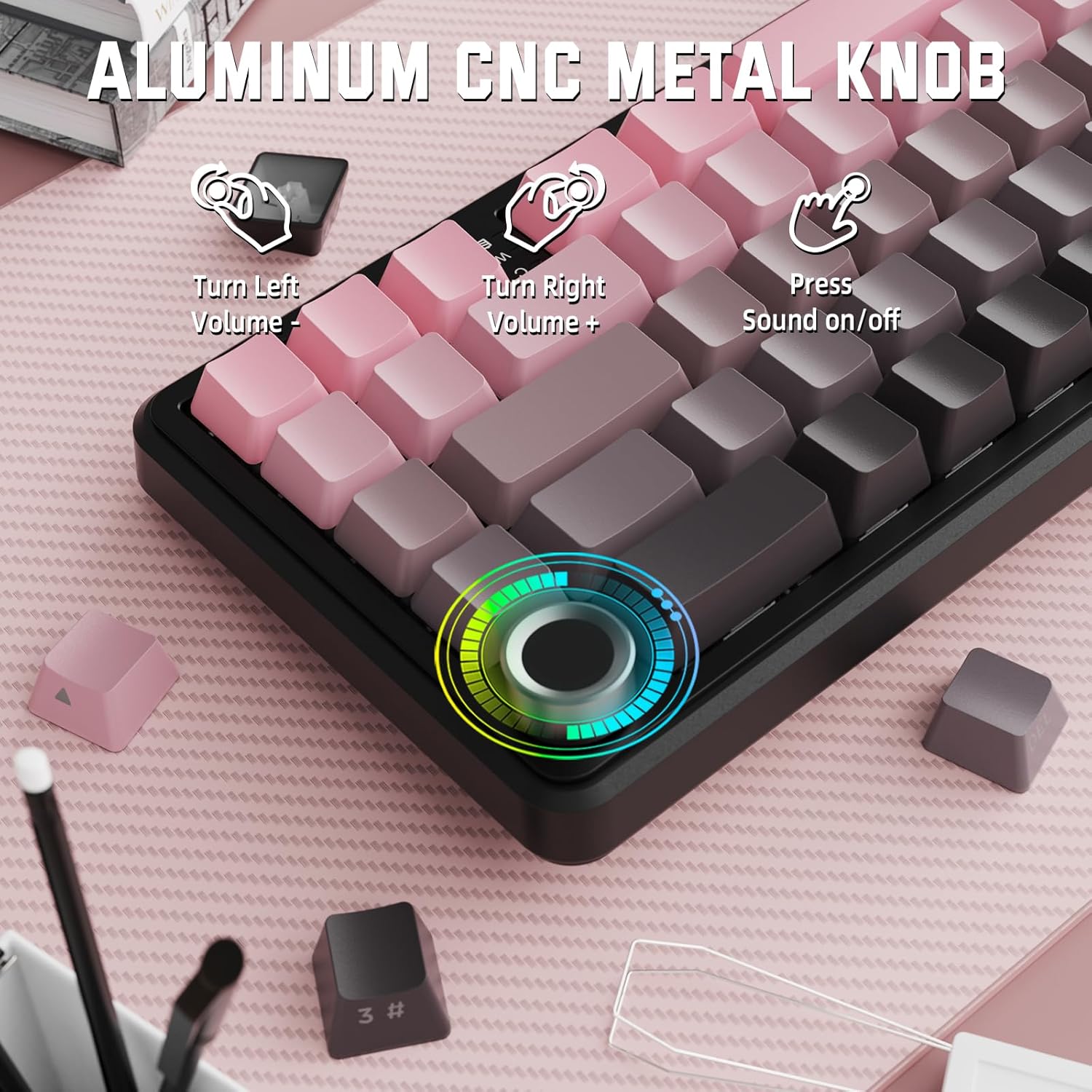
Image: Close-up of the volume knob with icons indicating its functions: Turn Left (Volume -), Turn Right (Volume +), Press (Sound on/off).
- Солго буруңуз: Үнүн азайтуу.
- Оңго бурулуу: Үнүн жогорулатуу.
- Пресс: Аудиону үнсүз кылуу/үнсүз кылуу.
4.2 Функция баскычтарынын айкалышы (FN ачкычы)
Due to the compact 60% layout, some functions are accessed via the FN key.
| Комбинация | Функция |
|---|---|
| FN + Q/W/E | Switch between Bluetooth devices 1, 2, and 3 |
| FN + Backspace | Батареянын сыйымдуулугун текшериңиз |
| FN + 1-0 (top row) | F1-F10 functions (e.g., FN+1 for F1) |
| FN + -/= | F11/F12 functions |
| FN + \| | Жок кылуу |
| FN + P | Басып чыгаруу экраны |
| FN + [ { | Үй |
| FN + ]} | Аягы |
| FN + ; : | Page Up |
| FN + ' " | Page Down |
| FN + Arrow Keys | Navigation (e.g., FN+Up Arrow for Page Up) |
5. Ыңгайлаштыруу
5.1 RGB Backlight Settings
The keyboard features dynamic RGB backlighting with multiple effects and colors.

Image: Visual representation of RGB backlight controls including turning on/off, changing lighting mode, speed, direction, brightness, and color, often in combination with the FN key.
- Turn on/off Lighting / Power Saving Mode: Specific key combination (refer to keyboard legends or software).
- Жарык режими: Cycle through 18 lighting effects.
- Жарык ылдамдыгы: Динамикалык жарыктандыруу эффекттеринин ылдамдыгын тууралаңыз.
- Жарык багыты: Change the direction of certain lighting effects.
- Жарык жарыктыгы: Арткы жарыктын интенсивдүүлүгүн тууралаңыз.
- Жарык түсү: Select from 9 preset backlight colors or customize via software.
5.2 Программалык камсыздоону программалоо
For advanced customization of RGB modes, macros, and key remapping, dedicated software is available.
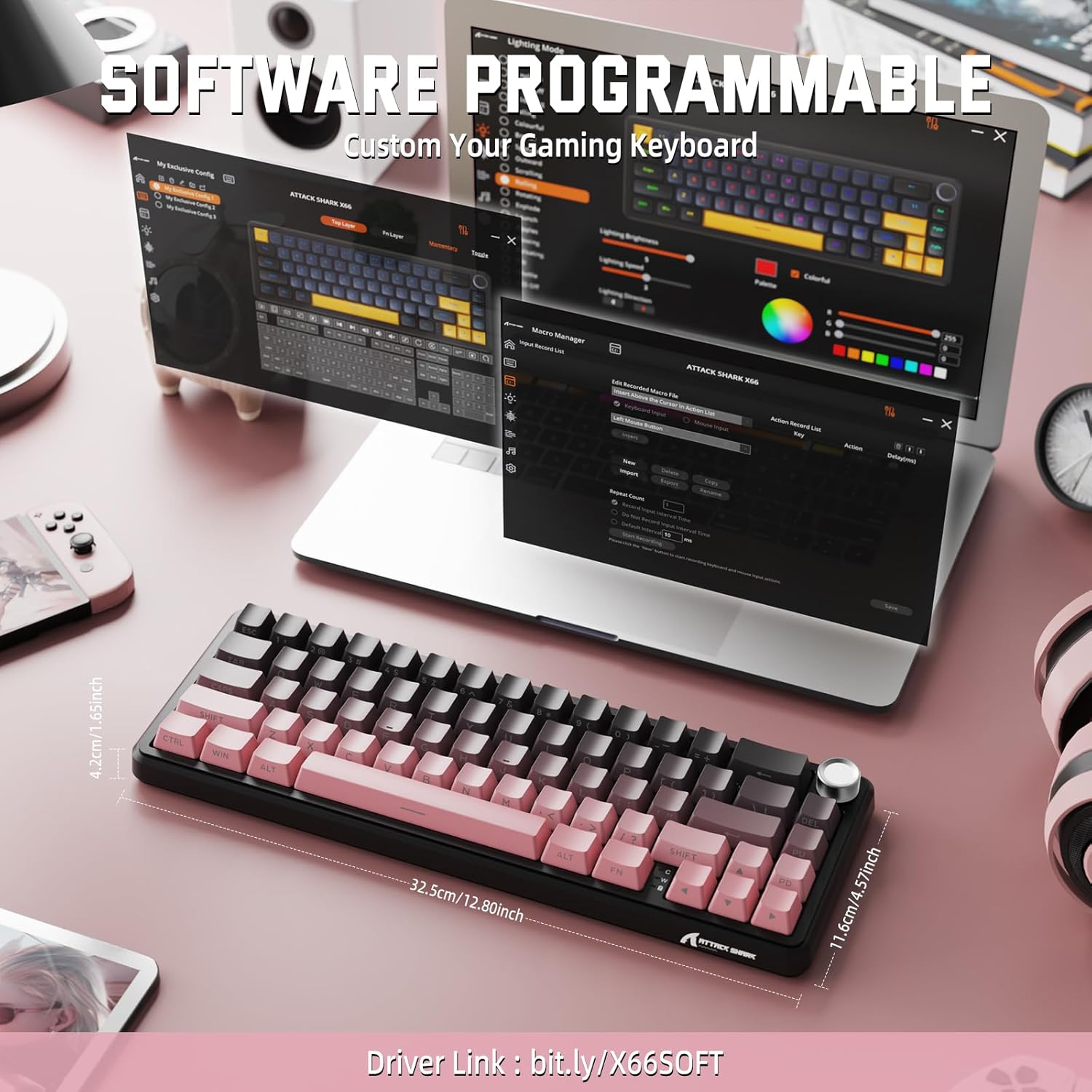
Image: Screenshot of the keyboard's software interface, showing options for custom key assignments, macro recording, and RGB lighting customization. A driver link is provided for download.
Download the official software from the manufacturer's webсайт. Программа сизге мүмкүнчүлүк берет:
- RGB жарык эффекттерин жана түстөрүн өзгөчөлөштүрүү.
- Program macros for complex key sequences.
- Жеке ачкычтарды ар кандай функцияларга алмаштырыңыз.
- Бир нече профессионал түзүңүз жана сактаңызfileар кандай колдонмолор же оюндар үчүн.
6. Техникалык тейлөө
6.1 Баскычтопту тазалоо
- Тазалоодон мурун клавиатураны бардык кубат булактарынан ажыратыңыз.
- Бир аз жумшак, түксүз кездемени колдонуңуз dampачкыч капкактарын жана шассиди сүртүү үчүн суу же жумшак тазалоо эритмеси менен жабыңыз.
- Ачкычтардын ортосундагы чаң жана таштанды үчүн кысылган абаны колдонуңуз.
- Катуу химиялык заттарды, абразивдерди же эриткичтерди колдонуудан алыс болуңуз.
6.2 Hot Swappable Switch Replacement
The keyboard's hot-swappable design allows for easy switch replacement without soldering.

Image: Illustration showing how to remove and insert mechanical switches on the X66 keyboard, highlighting compatibility with 3-pin and 5-pin switches.
- Каалаган клавиатураны акырын алып салуу үчүн берилген клавиатура тарткычын колдонуңуз.
- Которгучтун үстүнкү жана астыңкы клиптерин кылдаттык менен кармап, аны түз көтөрүү үчүн берилген которгуч тарткычты колдонуңуз.
- Жаңы которгучтун төөнөгүчтөрүн ПХБдагы тешиктерге тууралаңыз. Ийилип калбаш үчүн төөнөгүчтөр түз экенин текшериңиз.
- Жаңы которгучту ал чыкылдагыча акырын басыңыз.
- Баскычтын капкагын кайра бекитиңиз.
6.3 Батареяны башкаруу
The keyboard is equipped with a 3000mAh rechargeable battery.

Image: Visual guide on how to check the battery capacity using FN + Backspace, showing different battery level indicators (30%, 50%, 100%) with corresponding key light patterns.
- Заряддоо: Connect the keyboard via the USB-C cable to a computer or a USB power adapter. The charging indicator will show the charging status.
- Батареянын деңгээлин текшерүү: Басыңыз FN + Backspace to display the current battery capacity via the key backlights.
- Батареянын иштөө мөөнөтү: A full charge provides long-lasting usage, but actual duration varies based on RGB lighting usage and connection mode.
7. Кыйынчылыктарды
| Көйгөй | Мүмкүн себеп | Чечим |
|---|---|---|
| Баскычтоп жооп бербей жатат | Low battery, incorrect connection mode, driver issue. | Charge the keyboard. Ensure the mode switch is set correctly (2.4G, BT, or Wired). Reconnect the USB receiver/cable. Re-pair Bluetooth. Try a different USB port. |
| Bluetooth байланышы туруксуз | Интерференция, аралык, аз батарея. | Ensure no strong interference sources nearby. Move closer to the device. Charge the keyboard. Re-pair the Bluetooth connection. |
| 2.4 ГГц зымсыз туташуу жок | Receiver not plugged in, incorrect mode, interference. | Ensure the 2.4GHz receiver is securely plugged in. Set the keyboard mode switch to '2.4G'. Try a different USB port for the receiver. |
| RGB жарыгы иштебейт же туура эмес | Lighting settings, software issue. | Check lighting control key combinations (FN + lighting keys). Ensure software is installed and updated. Reset lighting settings via software. |
| Ачкычтар катталбайт же эки жолу терилбейт | Туура эмес өчүргүч, клавиатуранын астындагы калдыктар. | Remove keycap and clean around the switch. If issue persists, replace the switch using the provided switch puller and spare switches. |
| Volume knob not functioning | Software conflict, physical obstruction. | Ensure no software is overriding media controls. Check for any physical debris around the knob. Restart the computer. |
8. Техникалык шарттар
| Өзгөчөлүк | Деталь |
|---|---|
| Модель номери | X66 |
| Макет | 66 Keys, 60% Compact QWERTY |
| Байланыш | Bluetooth (5.0), 2.4GHz Wireless, USB-C Wired |
| Которгучтар | Hot Swappable (3-pin/5-pin compatible), Pre-lubed Strawberry Mechanical Switches |
| Баскыч капкактары | Side-printed Gradient PBT |
| Арткы жарык | RGB (16+ Million Colors, 9 preset colors, 18 effects) |
| Батарея сыйымдуулугу | 3000mAh |
| Шайкеш түзмөктөр | Windows, Mac OS, Laptop, PC, Tablet |
| Материал | Polybutylene Terephthalate, Polycarbonate |
| Элемент Салмагы | 2 фунт (болжол менен 0.91 кг) |
| Пакеттин өлчөмдөрү | 14.02 x 6.54 x 2.05 дюйм (болжол менен 35.6 x 16.6 x 5.2 см) |
| Өндүрүүчү | ATTACK SHARK |
9. Кепилдик жана колдоо
Кепилдик жөнүндө маалымат жана техникалык колдоо алуу үчүн, расмий ATTACK SHARK сайтына кайрылыңыз webсайтка же сатуучуга кайрылыңыз. Кепилдик дооматтар үчүн сатып алуу дүмүрчөгүңүздү сактаңыз.
Өндүрүүчү: ATTACK SHARK
Сатуучу: MAGIC-REFINER US
10. Продукт видеосу
Видео: Продукциянын расмий көргөзмөсүasing the features and design of the ATTACK SHARK X66 Gasket Wireless Mechanical Keyboard, including its compact size, RGB lighting, hot-swappable switches, and multi-mode connectivity. The video highlights the keyboard's aesthetic appeal and functional aspects.


