1. Киришүү
This manual provides detailed instructions for the installation, operation, and maintenance of your Xigmatek Aqua V AIR Arctic Mid-Tower PC Case. Please read this manual thoroughly before beginning any installation to ensure proper setup and safe operation. Retain this manual for future reference.
2. Коопсуздук маалыматы
Орнотуу жана эксплуатациялоо учурунда төмөнкү коопсуздук чараларын сактаңыз:
- Компоненттерди орнотуудан же алып салуудан мурун ар дайым кубат менен жабдууну розеткадан ажыратыңыз.
- Сезимтал компоненттердин электростатикалык разряддан (ЭСД) жабыркашын алдын алуу үчүн антистатикалык билек боону тагыныңыз.
- Handle components carefully. Avoid touching pins or circuit boards directly.
- Ашыкча ысып кетүүнүн алдын алуу үчүн PC корпусунун айланасында туура желдетүүнү камсыз кылыңыз.
- Майда тетиктерди жана шаймандарды балдардан алыс кармаңыз.
- Корпусту же анын бөлүктөрүн өзгөртүүгө аракет кылбаңыз, анткени бул сиздин кепилдикти жокко чыгарып, коопсуздукка коркунуч келтириши мүмкүн.
3. Пакеттин мазмуну
Пакетте бардык буюмдар бар экенин текшериңиз:
- Xigmatek Aqua V AIR Arctic Mid-Tower PC Case
- Кошумча жабдуулар топтому (бурамалар, бекиткичтер, кабелдик байлагычтар)
- Колдонуучунун Колдонмосу (бул документ)
If any items are missing or damaged, contact your retailer or Xigmatek support.
4. Продукт бүтүп калдыview
The Xigmatek Aqua V AIR Arctic is a mid-tower PC case designed for high-performance gaming configurations. It features tempered glass panels for component visibility and optimized airflow with pre-installed ARGB fans.

Сүрөт 4.1: Алдыңкы-сол view of the Xigmatek Aqua V AIR Arctic PC case, showcasing the tempered glass front and side panels, and the pre-installed ARGB fans.

4.2-сүрөт: Арткы view of the PC case, showing the I/O shield cutout, expansion slots, and rear fan mount.
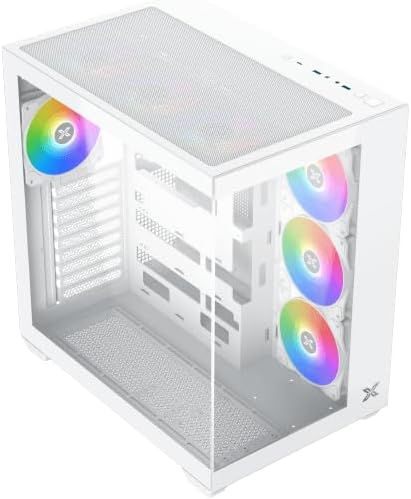
4.3-сүрөт: Жогору жактан ылдый бурчтуу view, highlighting the top mesh panel for additional cooling and the internal layout.
5. Орнотуу жана орнотуу
Follow these steps to install your PC components into the Xigmatek Aqua V AIR Arctic case.
5.1. Ишти даярдоо
- Корпусту тегиз, туруктуу бетке коюңуз.
- Remove the tempered glass side panel by unscrewing the thumb screws at the rear and carefully sliding it off. Place it on a soft, non-abrasive surface to prevent scratches.
- Remove the opposite steel side panel by unscrewing the thumb screws and sliding it off.
5.2. Motherboard орнотуу
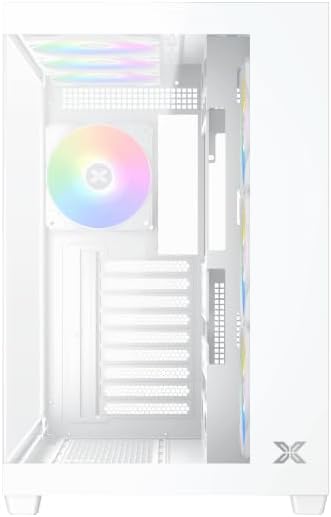
5.1-сүрөт: Интерьер view of the case, illustrating the motherboard mounting area and cable routing cutouts.
- I/O калканын корпустун арткы жагындагы оюкка орнотуңуз.
- Align your motherboard with the pre-installed standoffs. Ensure the standoffs match your motherboard's form factor (ATX, Micro ATX).
- Secure the motherboard using the provided screws from the accessory kit. Do not overtighten.
5.3. Электр менен камсыздоо блогун (PSU) орнотуу
- Locate the PSU mounting bracket at the bottom rear of the case.
- Slide your PSU into the designated compartment from the rear of the case.
- Secure the PSU to the case using the screws provided with your power supply.
5.4. Сактоочу дискти орнотуу
Корпус бир нече сактагыч дисктерди колдойт:
- 2.5" SSD: Mount directly to the SSD trays located behind the motherboard tray. Secure with screws.
- 3.5" HDD: Install into the drive cage located beneath the PSU shroud. Slide the drive into the tray and secure with screws.
5.5. Графикалык карта (GPU) жана кеңейтүү картасын орнотуу
- Корпустун арткы жагындагы керектүү кеңейтүү уячасынын капкактарын алып салыңыз.
- Графикалык картаңызды же башка кеңейтүү карталарын энелик платадагы тиешелүү PCIe уячаларына салыңыз.
- Карталарды берилген бурамалар менен бекитиңиз.
5.6. Кабелдик башкаруу
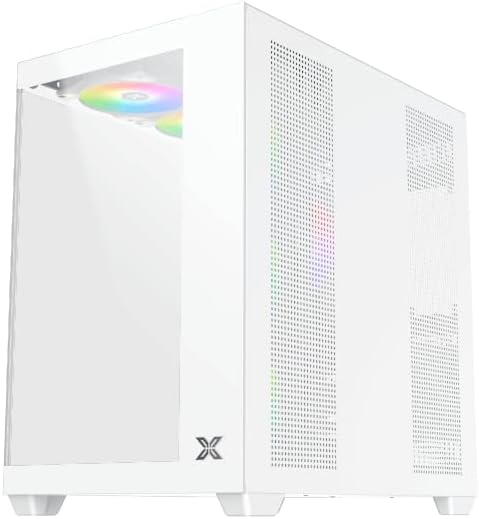
5.2-сүрөт: View behind the motherboard tray, illustrating the ample space and tie-down points for effective cable management.
Кабельдерди уюштуруу үчүн энелик плата лотоктун артындагы кабелдик маршруттук кескичтерди жана байлоо пункттарын колдонуңуз. Бул аба агымын жана эстетиканы жакшыртат.
- Connect all necessary power cables from the PSU to the motherboard, GPU, and storage drives.
- Connect front panel cables (USB, audio, power/reset switches, LED indicators) to the corresponding headers on your motherboard. Refer to your motherboard manual for specific header locations.
- Connect the ARGB fan cables to the integrated fan controller or directly to your motherboard's ARGB headers if available.
5.7. Fan and Radiator Support
The Xigmatek Aqua V AIR Arctic comes with 7 pre-installed 120mm ARGB fans. Additional cooling options are available:
- Алдыңкы: Supports up to 3 x 120mm or 2 x 140mm fans / 240mm, 280mm, 360mm radiators.
- Жогорку: Supports up to 3 x 120mm or 2 x 140mm fans / 240mm, 280mm, 360mm radiators.
- Арткы: 1 x 120 мм желдеткичти колдойт.
- Төмөнкү: Supports up to 3 x 120mm fans.
Ensure proper fan orientation for optimal airflow (intake at front/bottom, exhaust at rear/top).
6. Иштөө
Once all components are installed and cables are connected, replace the side panels. Connect your monitor, keyboard, mouse, and power cable. Press the power button on the front panel to start your system.
The pre-installed ARGB fans can be controlled via the integrated controller (if present) or through compatible motherboard software, allowing customization of lighting effects and fan speeds.
7. Техникалык тейлөө
Үзгүлтүксүз тейлөө сиздин PC компоненттеринин оптималдуу иштешин жана узак иштөөсүн камсыз кылууга жардам берет.
- Чаңды тазалоо: Periodically clean dust filters (top, front, bottom) to maintain good airflow. Use compressed air to remove dust from inside the case and components.
- Тышкы тазалоо: Сырткы беттерин жумшак менен сүртүңүз, гamp кездеме. Абразивдүү тазалагычтардан же эриткичтерден качыңыз.
- Кабель башкаруу текшерүү: Occasionally check cable routing to ensure no cables are obstructing fans or airflow.
8. Кыйынчылыктарды
Көйгөйгө туш болсоңуз, төмөнкү жалпы көйгөйлөрдү чечүү кадамдарын караңыз:
- Система иштебей жатат:
- PSU күйгүзүлгөнүн жана розеткага туура туташтырылганын текшериңиз.
- Verify all power cables (24-pin ATX, 8-pin CPU, PCIe, SATA) are securely connected.
- Check front panel power switch connections to the motherboard.
- Дисплейде чыгаруу жок:
- Ensure the monitor cable is connected to the graphics card (not the motherboard I/O if using a dedicated GPU).
- Графикалык картаны жана RAM модулдарын кайра орнотуңуз.
- Fans not spinning or ARGB not working:
- Желдеткичтин кубаттуулук туташууларын энелик платага же желдеткич контроллерине текшериңиз.
- Verify ARGB connections to the controller or motherboard headers.
- Ensure any fan control software or BIOS settings are correctly configured.
For more complex issues, consult your component manuals or contact Xigmatek technical support.
9. Техникалык шарттар
| Өзгөчөлүк | Деталь |
|---|---|
| Модель аты | Aqua V AIR Arctic |
| Модель номери | EN45837 |
| Иштин түрү | Орто мунара |
| Motherboard шайкештиги | ATX, Micro ATX |
| Материал | Болоттон жасалган эритме, чыңалган айнек |
| Түс | Ак |
| Алдын ала орнотулган күйөрмандар | 7 x 120мм ARGB күйөрмандары |
| Максималдуу GPU узундугу | 410 мм |
| USB порттору | 3 |
| Салмагы | 8.8 килограмм |
10. Кепилдик жана колдоо
Xigmatek products are manufactured to high quality standards. For warranty information, please refer to the warranty card included with your product or visit the official Xigmatek website. For technical support or inquiries, please contact Xigmatek customer service through their official channels.
Официалдуу Webсайт: www.xigmatek.com


