1. Киришүү
Thank you for choosing the OKP Life K5 Robot Vacuum. This intelligent cleaning device is designed to provide efficient and convenient floor cleaning for your home. Featuring Wi-Fi connectivity and remote control capabilities, the K5 offers multiple cleaning modes and smart navigation to ensure a thorough clean. Please read this manual carefully before using the product to ensure proper operation and maintenance.
2. Пакеттин мазмуну
Таңгактан чыгаргандан кийин бардык буюмдар бар экенин жана жакшы абалда экендигин текшериңиз.
- OKP Life K5 Robot Vacuum Cleaner (1 unit)
- Алыстан башкаруу (1 бирдик)
- Charging Dock (1 unit)
- Кубат адаптери (1 бирдик)
- Side Brushes (4 units, 2 for immediate use, 2 spares)
- Cleaning Tool (1 unit)
- Колдонуучунун колдонмосу (бул документ)

Image: The OKP Life K5 Robot Vacuum, its remote control, and a set of four side brushes, illustrating the typical package contents.
3. Продукт бүтүп калдыview
3.1 Роботтун вакуумдук компоненттери
Familiarize yourself with the main parts of your K5 Robot Vacuum.

Сүрөт: жогорудан ылдыйга view of the OKP Life K5 Robot Vacuum, highlighting its sleek, disc-shaped design and central power button.
- Main Body: Contains the motor, dustbin, and navigation sensors.
- Power Button/Indicator Light: For manual operation and status indication.
- Dustbin: 550ml capacity for collecting debris.
- Side Brushes: Two rotating brushes to sweep debris into the suction path.
- Driving Wheels: For movement across various floor types.
- Charging Contacts: For automatic recharging at the charging dock.
- Sensors: Anti-drop and anti-collision sensors for safe navigation.
3.2 Алыстан башкаруу
The remote control provides convenient access to various cleaning functions.

Image: A close-up of the white remote control for the OKP Life K5 Robot Vacuum, showing its various function buttons for control and mode selection.
- Power Button: Turns the robot on/off or starts/pauses cleaning.
- Directional Buttons: Manually control the robot's movement.
- Home Button: Sends the robot back to the charging dock.
- Mode Selection Buttons: Switch between Auto, Spot, Edge, and Zigzag cleaning modes.
- Suction Power Adjustment: Adjusts the vacuum's suction strength.
4. Орнотуу
4.1 Preparing the Robot
- Роботтон жана кубаттоочу доктон бардык коргоочу пленкаларды жана стикерлерди алып салыңыз.
- Каптал щеткаларды төрт бурчтуу мамыларга чыкылдаган үн чыкканча басып, аларды бекитиңиз.
4.2 Кубаттоочу докту орнотуу
- Кубаттоочу докту дубалга катуу, тегиз жерге коюңуз.
- Доктун эки тарабында кеминде 0.5 метр (1.6 фут) жана анын алдында 1.5 метр (4.9 фут) бош орун бар экенин текшериңиз.
- Кубаттуу адаптерди кубаттоо докуна, андан кийин розеткага сайыңыз.
4.3 Алгачкы заряддоо
For optimal performance, fully charge the robot before its first use.
- Manually place the robot onto the charging dock, ensuring the charging contacts align.
- The indicator light on the robot will show charging status (e.g., breathing light).
- Толук кубаттоо адатта 4-5 саатка созулат.

Image: The OKP Life K5 Robot Vacuum automatically navigating back to its charging dock, demonstrating its self-charging capability when the battery is low.
4.4 Wi-Fi жана колдонмого туташуу
The OKP Life App allows for advanced control and scheduling.
- Download the "OKP Life" app from the App Store (iOS) or Google Play Store (Android).
- Каттоо эсебин жана кирүү.
- Follow the in-app instructions to add your K5 robot vacuum. Ensure your Wi-Fi network is 2.4GHz.
- The robot can also be connected to Amazon Alexa and Google Assistant for voice control. Refer to the app for detailed instructions on integrating with these smart home platforms.

Image: A user interacting with the OKP Life K5 Robot Vacuum via a smartphone app, with icons indicating compatibility with Google Assistant and Amazon Alexa, and a note about 2.4GHz Wi-Fi connectivity.
5. Иштөө нускамалары
5.1 Тазалоону баштоо
- Роботтон: Press the power button on the robot once.
- Алыстан башкаруу пульту аркылуу: Алыстан башкаруу пультунун кубат баскычын басыңыз.
- Колдонмодон: Tap the "Start Cleaning" button in the OKP Life app.
- Үн буйругу: Use a connected smart assistant (e.g., "Alexa, turn on Robot Vacuum").
5.2 Pausing/Resuming a Clean
- Press the power button on the robot or remote, or use the app/voice command.
- Press again to resume cleaning.
5.3 Sending Robot to Charging Dock
- Press the "Home" button on the remote control or in the app.
- The robot will automatically return to its charging dock when the battery is low.
5.4 Тазалоо режимдери
The K5 offers multiple cleaning modes to suit different needs, selectable via the remote control or app.
- Автоматтык тазалоо: The robot intelligently navigates and cleans the entire accessible area. This is the default mode.
- Тазалоо: The robot cleans a concentrated area in a spiral pattern, ideal for localized dirt or spills.
- Четтерин тазалоо: Робот дубалдарды жана эмеректердин четтерин кылдат тазалоо үчүн тазалайт.
- Зигзаг менен тазалоо: The robot cleans in a systematic back-and-forth pattern, covering the maximum area and reducing missed spots.

Image: The OKP Life K5 Robot Vacuum cleaning a room, with an overlay illustrating its efficient Z-Shape (zigzag) cleaning path, designed to maximize coverage and minimize missed areas.
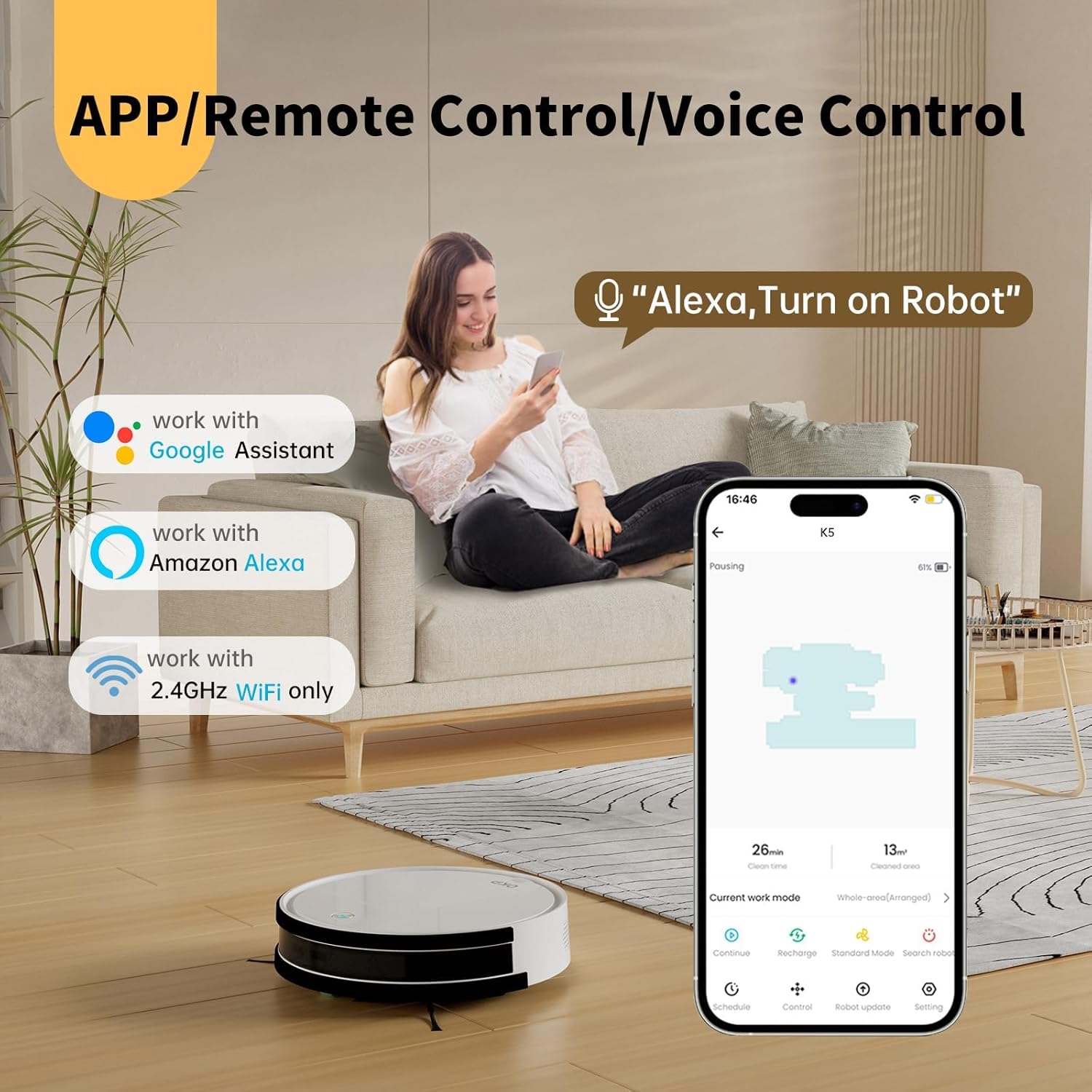
Image: The OKP Life K5 Robot Vacuum demonstrating its suction power, with illustrations of various debris types (debris, dust, beans, hair) being effectively vacuumed, indicating its versatility for different cleaning scenarios.
6. Техникалык тейлөө
Үзгүлтүксүз техникалык тейлөө оптималдуу иштешин камсыздайт жана робот чаң соргучуңуздун иштөө мөөнөтүн узартат.
6.1 Таштанды кутусун бошотуу
- Таштанды урнасын чыгаруу баскычын басып, таштанды челектерин чыгарыңыз.
- Таштанды челектин капкагын ачып, анын ичиндегисин таштанды челекке төгүңүз.
- Rinse the dustbin with water if necessary (ensure it is completely dry before reinserting).
6.2 Фильтрди тазалоо
- Чыпканы таштанды челекинен алып салыңыз.
- Чаңды кетирүү үчүн чыпканы акырын басыңыз. HEPA чыпкасын суу менен жуубаңыз.
- Колдонууга жараша чыпканы ар бир 3-6 ай сайын алмаштырып туруңуз.
6.3 Каптал щеткаларды тазалоо
- Remove the side brushes by pulling them upwards.
- Remove any hair or debris wrapped around the brushes.
- Reattach the brushes. Replace if worn or damaged.
6.4 Сенсорлорду жана заряддоо контакттарын тазалоо
- Wipe the anti-drop sensors, anti-collision sensors, and charging contacts on both the robot and the charging dock with a clean, dry cloth.
- Keep these areas clean to ensure proper navigation and charging.
7. Кыйынчылыктарды
If your robot vacuum encounters issues, refer to the following common problems and solutions.
| Көйгөй | Мүмкүн себеп | Чечим |
|---|---|---|
| Робот күйбөйт. | Батареянын аздыгы; Кубат өчүрүү. | Charge the robot; Ensure the main power switch (if present) is ON. |
| Робот заряддай албайт. | Заряддоо контакттары кир; Заряддоочу док-станция кубатталбайт. | Clean charging contacts; Ensure charging dock is plugged in and has power. |
| Робот бат-баттан тыгылып калат. | Obstacles; Sensors dirty. | Clear cables, rugs, or small objects; Clean sensors. |
| Начар тазалоо көрсөткүчү. | Толук таштанды челек; Бүктелген чыпка; Эскирген щеткалар. | Таштанды челекти бошотуңуз; Фильтрди тазалаңыз/алмаштырыңыз; Каптал щеткаларды тазалаңыз/алмаштырыңыз. |
| Wi-Fi/Колдонмого туташуу мүмкүн эмес. | Incorrect Wi-Fi band (only 2.4GHz supported); Incorrect password; Robot too far from router. | Ensure 2.4GHz Wi-Fi; Re-enter password; Move robot closer to router. |
Эгер көйгөй чечилбесе, кардарларды колдоо менен байланышыңыз.
8. Техникалык шарттар
| Бренд | OKP Life |
| Модель аты | K5 |
| Соруу күчү | 2100 PA |
| Таштанды кутусунун сыйымдуулугу | 550 мл |
| Power Source | Батарея менен иштейт |
| Форма фактору | Диск түрүндөгү |
| Өзгөчөлүктөр | Smart, Edge Cleaning, Obstacle Avoidance, Selective Room Cleaning, Bagless, Wi-Fi Connectivity, Remote Control, Voice Control (Alexa, Google Assistant), Automatic Charging, Multiple Cleaning Modes (Auto/Spot/Edge/Zigzag) |
| Өлчөмдөрү (болжол менен) | 280mm (width) x 77mm (height) / 11.02 inches (width) x 3 inches (height) |
9. Кепилдик жана колдоо
OKP Life products come with a standard manufacturer's warranty. Please refer to the warranty card included in your package or visit the official OKP Life webдеталдуу кепилдик шарттары жана шарттары үчүн сайт.
For technical support, troubleshooting assistance, or to order replacement parts, please contact OKP Life customer service through the contact information provided on their official website or within the OKP Life app.
Webсайт: Visit the OKP Life Store on Amazon


