1. Киришүү
Welcome to the user manual for your Nothing Phone (3a). This guide provides detailed instructions on setting up, operating, maintaining, and troubleshooting your device to ensure optimal performance and user experience.

Figure 1.1: The Nothing Phone (3a) showcasing its unique transparent back design and Glyph Interface.
2. Орнотуу
2.1. Кутудан чыгаруу жана алгачкы текшерүү
Upon receiving your Nothing Phone (3a), carefully open the packaging and inspect the contents. Ensure all items listed in the "What's in the Box" section are present and undamaged.
- Nothing Phone (3a) device
- USB-C Cable
- SIM лоток чыгаруучу
- Алдын ала колдонулган экран коргоочу
2.2. SIM картаны салуу
- Телефондун капталындагы SIM карта салгычын табыңыз.
- SIM лоток чыгаруучу куралды лотоктун жанындагы кичинекей тешикке киргизип, лоток чыгып кеткенче бекем басыңыз.
- Nano-SIM картаңызды(ларыңызды) алтын түстөгү контакттары ылдый каратып салгычка салыңыз.
- SIM лотокту кылдаттык менен телефонго кайра кыстарыңыз.
2.3. Баштапкы күйгүзүү жана орнотуу устасы
Press and hold the power button on the right side of the phone until the Nothing logo appears. Follow the on-screen instructions to complete the initial setup, including language selection, Wi-Fi connection, Google account sign-in, and data transfer.
3. Operating Your Nothing Phone (3a)
3.1. Nothing OS 3.1 Overview
The Nothing Phone (3a) runs on Nothing OS 3.1, an intuitive and customizable Android-based operating system. It features functional adaptations for an optimized user experience.

Figure 3.1: Visual representation of Nothing OS 3.1's customizable interface.
3.2. Камера системасы
The Nothing Phone (3a) is equipped with an advanced camera system designed to capture high-quality photos and videos.
- Негизги камера: 50-MP OIS (Optical Image Stabilization) main camera for detailed and stable shots.
- Телефото камера: 50-MP telephoto lens with up to 30x Ultra Zoom for capturing distant subjects.
- Ультра кең камера: 8-MP ultra-wide-angle lens for expansive landscape and group shots.
- Алдыңкы камера: 32-MP front camera for sharp selfies and video calls.

Figure 3.2: Detailed breakdown of the Phone (3a)'s Elite Camera System components.

Figure 3.3: Illustration of the telephoto zoom lens technology and its capability to capture distant scenes.
3.3. Essential Key and Essential Space
The Essential Key is a new physical button on the side of your device. A short press captures screen content, while a long press allows you to record voice notes, ideas, and inspirations. The Essential Space organizes your captures and provides personalized suggestions.

Figure 3.4: The Essential Key and its integration with the Essential Space for content organization.
3.4. Glyph Interface
The Glyph Interface on the back of the phone provides unique LED light and sound notifications for calls, messages, and other alerts, offering a distinct visual and auditory experience.

Figure 3.5: The Glyph Interface on the rear of the Nothing Phone (3a), demonstrating its illuminated patterns.
4. Техникалык тейлөө
4.1. Батареяны башкаруу
The Nothing Phone (3a) features a 5,000 mAh battery with 50W fast charging. To maximize battery lifespan:
- Ашыкча температурадан сактаныңыз.
- Заряддоо үчүн берилген USB-C кабелин колдонуңуз.
- Батареяны бат-баттан толук кубаттап калуудан алыс болуңуз.

Figure 4.1: Visual representation of the 5,000 mAh battery capacity.
4.2. Аппаратыңызды тазалоо
Use a soft, lint-free cloth to clean the screen and back of your phone. For stubborn smudges, slightly dampчүпүрөктү суу менен. Катуу химиялык заттарды же абразивдүү материалдарды колдонуудан алыс болуңуз.
4.3. Программалык камсыздоону жаңыртуу
Түзмөгүңүздө эң акыркы функциялар, коопсуздук жаңыртуулары жана иштеши жакшыртылганын текшерүү үчүн программалык камсыздоо жаңыртууларын дайыма текшерип, орнотуп алыңыз. багыттоо Орнотуулар > Система > Программаны жаңыртуу жаңыртууларды текшерүү үчүн.
5. Кыйынчылыктарды
5.1. Жалпы маселелер жана чечүү жолдору
| Маселе | Мүмкүн себеп | Чечим |
|---|---|---|
| Телефон күйбөй жатат | Батареянын аздыгы, программанын бузулушу | Charge the phone for at least 30 minutes. Perform a forced restart by holding the power button for 10-15 seconds. |
| Колдонмолор бузулуп же катып калууда | App bug, insufficient RAM, outdated software | Clear app cache/data. Close background apps. Update the app or phone software. |
| Батареянын иштөө мөөнөтү начар | High screen brightness, background apps, network issues | Adjust screen brightness. Close unused apps. Disable unnecessary features like GPS/Bluetooth. |
5.2. Заводдук абалга кайтаруу
If issues persist, a factory reset may be necessary. This will erase all data on your phone, so ensure you have backed up important information. Navigate to Орнотуулар > Система > Параметрлерди баштапкы абалга келтирүү > Бардык дайындарды тазалоо (деск. баштапкы абалга келтирүү).
6. Техникалык шарттар
Key technical specifications for the Nothing Phone (3a) (Model: A059).
| Өзгөчөлүк | Деталь |
|---|---|
| Модель аты | Эч нерсе жок Телефон (3a) |
| Модель номери | A059 |
| Операция системасы | Android 15, Nothing OS 3.1 |
| Дисплей | 6.77-inch Flexible FHD+ AMOLED, 120 Hz, 1.07 billion colors |
| Процессор | Snapdragon 7s Gen 3 (2.5 GHz, 8-core) |
| RAM | 12 GB (up to 20GB RAM Boost) |
| Сактагыч | 256 ГБ |
| Башкы камера | 50-MP OIS |
| Телефото камера | 50-MP (30x Ultra Zoom) |
| Ультра кең камера | 8-МП |
| Алдыңкы камера | 32-МП |
| Батарея | 5,000 мАч (50 Вт тез кубаттоо) |
| Өлчөмдөр | 7.75 x 0.83 x 16.35 см |
| Салмагы | 201 грамм |
| Суу/чаңга туруктуулук | IP64 |
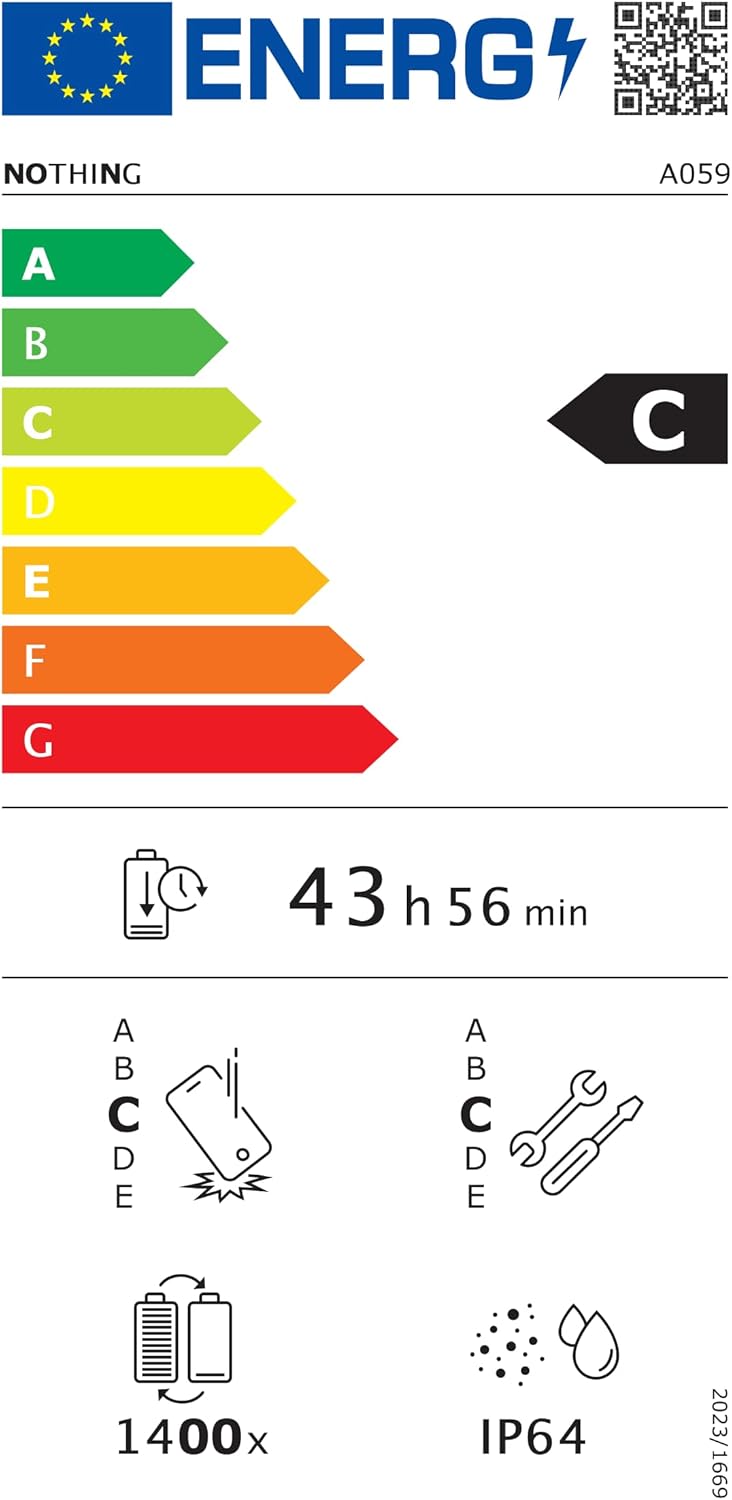
Figure 6.1: EU Energy Label for Nothing Phone (3a), indicating energy efficiency and IP64 rating. More details available at eprel.ec.europa.eu/qr/2179652.
7. Кепилдик жана колдоо
Your Nothing Phone (3a) comes with a manufacturer's warranty. Please refer to the warranty card included in your product packaging for specific terms and conditions.
For further assistance, technical support, or warranty claims, please visit the official Nothing support webсайтка же кардарларды тейлөөгө кайрылыңыз. боюнча көбүрөөк маалымат таба аласыз Nothing Store on Amazon.


