1. Киришүү
Thank you for choosing the DreamSky DS2208 Wooden Digital Alarm Clock. This manual provides detailed instructions for setting up and operating your new alarm clock. Please read it thoroughly to ensure proper use and to maximize the features of your device. Keep this manual for future reference.

Сүрөт 1.1: Алдыңкы view of the DreamSky DS2208 Wooden Digital Alarm Clock.
2. Коопсуздук маалыматы
- Кубат адаптери тиешелүү розеткага туташтырылганын текшериңиз.
- Саатты сууга же ашыкча нымдуулукка дуушар кылбаңыз.
- Avoid placing the clock in direct sunlight or near heat sources.
- Берилген кубат адаптерин гана колдонуңуз.
- Балдар жетпеген жерде сактаңыз.
3. Пакеттин мазмуну
Сураныч, пакетте төмөнкү нерселерди текшериңиз:
- DreamSky DS2208 жыгачтан жасалган санариптик ойготкуч саат
- 5V/1.2A кубат адаптери
- User Manual
Note: AAA batteries for alarm backup are not included.

Image 3.1: Included items and product dimensions.
4. Продукт бүтүп калдыview
The DreamSky DS2208 features a clear digital display and intuitive controls for ease of use.
4.1 Дисплейдин элементтери
- Large LED Numbers: Displays time, 1.8 inches tall for high visibility.
- AM/PM индикатору: 12 сааттык формат үчүн.
- Ойготкуч сүрөтчөсү: Indicates when the alarm is active.
- DST көрсөткүчү: Shows when Daylight Saving Time is enabled.
4.2 Башкаруу каражаттары жана порттор
- SOZE баскычы: Located on top, used for snooze and display brightness adjustment.
- Убакытты коюу баскычы: Typically on the back, for setting time.
- Ойготкуч орнотуу баскычы: Typically on the back, for setting alarm.
- Үндү көзөмөлдөө: For adjusting alarm volume.
- DST ON/OFF Button: For enabling/disabling Daylight Saving Time.
- 12/24 саат баскычы: For switching between 12-hour and 24-hour time formats.
- DC IN порту: Кубат адаптерин туташтыруу үчүн.
- USB кубаттоо порту: Тышкы түзмөктөрдү кубаттоо үчүн.
- Батарея бөлүмү: For AAA backup batteries (not supplied).
5. Орнотуу
5.1 Кубат туташтыруу
- Insert 2 AAA batteries (not included) into the battery compartment for alarm backup during power outages. These batteries do not power the main display.
- Connect the provided 5V/1.2A power adapter to the DC IN port on the back of the clock.
- Кубат адаптерин кадимки электр розеткасына сайыңыз. Дисплей күйөт.
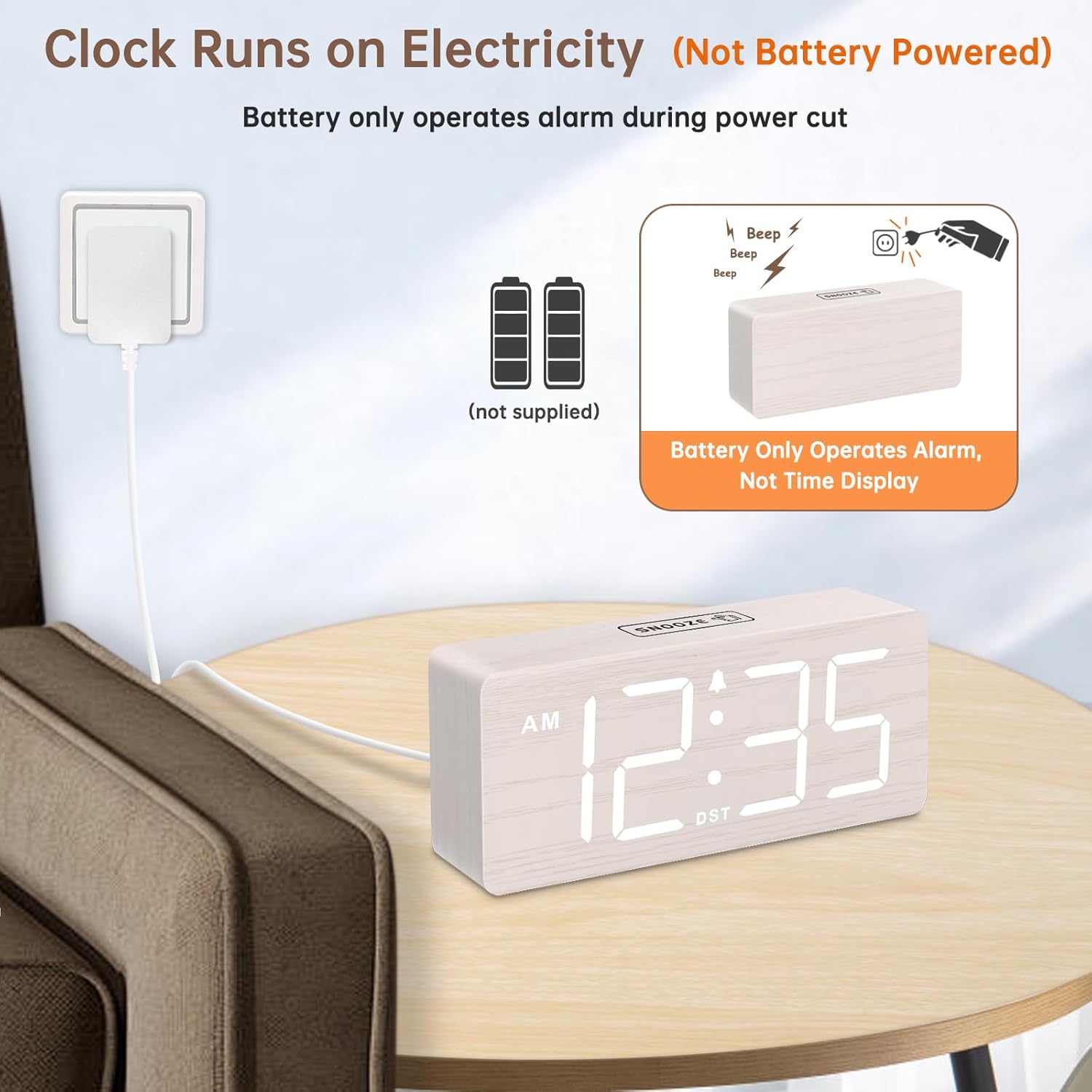
Image 5.1: Powering the clock via the included adapter. Batteries provide alarm backup only.
6. Иштөө нускамалары
6.1 Убакытты коюу
- басып, кармап туруңуз Убакыт коюу button (location typically on the back). The hour digits will flash.
- колдонуу +/- buttons (or similar, refer to specific button labels on your unit) to adjust the hour.
- Басыңыз Убакыт коюу again to confirm the hour and move to minute adjustment. The minute digits will flash.
- колдонуу +/- мүнөттөрдү тууралоо үчүн баскычтар.
- Басыңыз Убакыт коюу once more to save the time and exit time setting mode.
6.2 12/24 саат форматы
To switch between 12-hour (AM/PM) and 24-hour (military) time formats, press the 12/24HR button (typically on the back).

Image 6.1: Adjusting DST and 12/24-hour time format.
6.3 Сигналды коюу
- басып, кармап туруңуз Ойготкуч орнотулган баскычы. Ойготкуч сааттарынын сандары өчүп калат.
- колдонуу +/- ойготкуч саатын тууралоо үчүн баскычтар.
- Басыңыз Ойготкуч орнотулган again to confirm the alarm hour and move to minute adjustment. The alarm minute digits will flash.
- колдонуу +/- ойготкуч мүнөттөрдү тууралоо үчүн баскычтар.
- Басыңыз Ойготкуч орнотулган once more to save the alarm time. The alarm icon will appear on the display, indicating the alarm is active.
- To turn the alarm off, press the Ойготкуч орнотулган button briefly until the alarm icon disappears.
6.4 Ойготкучтун үнүн тууралоо
The alarm volume can be adjusted to 5 levels (V1 to V5), ranging from 70dB to 105dB. While the alarm is sounding, press the Үндү көзөмөлдөө button (or a designated +/- button) to cycle through the volume levels.

Image 6.2: Adjustable alarm volume and snooze feature.
6.5 Тындыруу функциясы
Ойготкуч басылганда, басыңыз СОЮЗ button on top of the clock. The alarm will pause for 9 minutes and then sound again. To cancel the snooze and turn off the alarm completely, press any other button (e.g., Alarm Set button).
6.6 Дисплейдин жарыктыгын жөндөө
The clock features 6 dimmable brightness levels (OFF, L1-L5). To adjust the brightness, press the СОЮЗ button (or a dedicated dimmer button) repeatedly to cycle through the levels. Level OFF turns the display off completely.
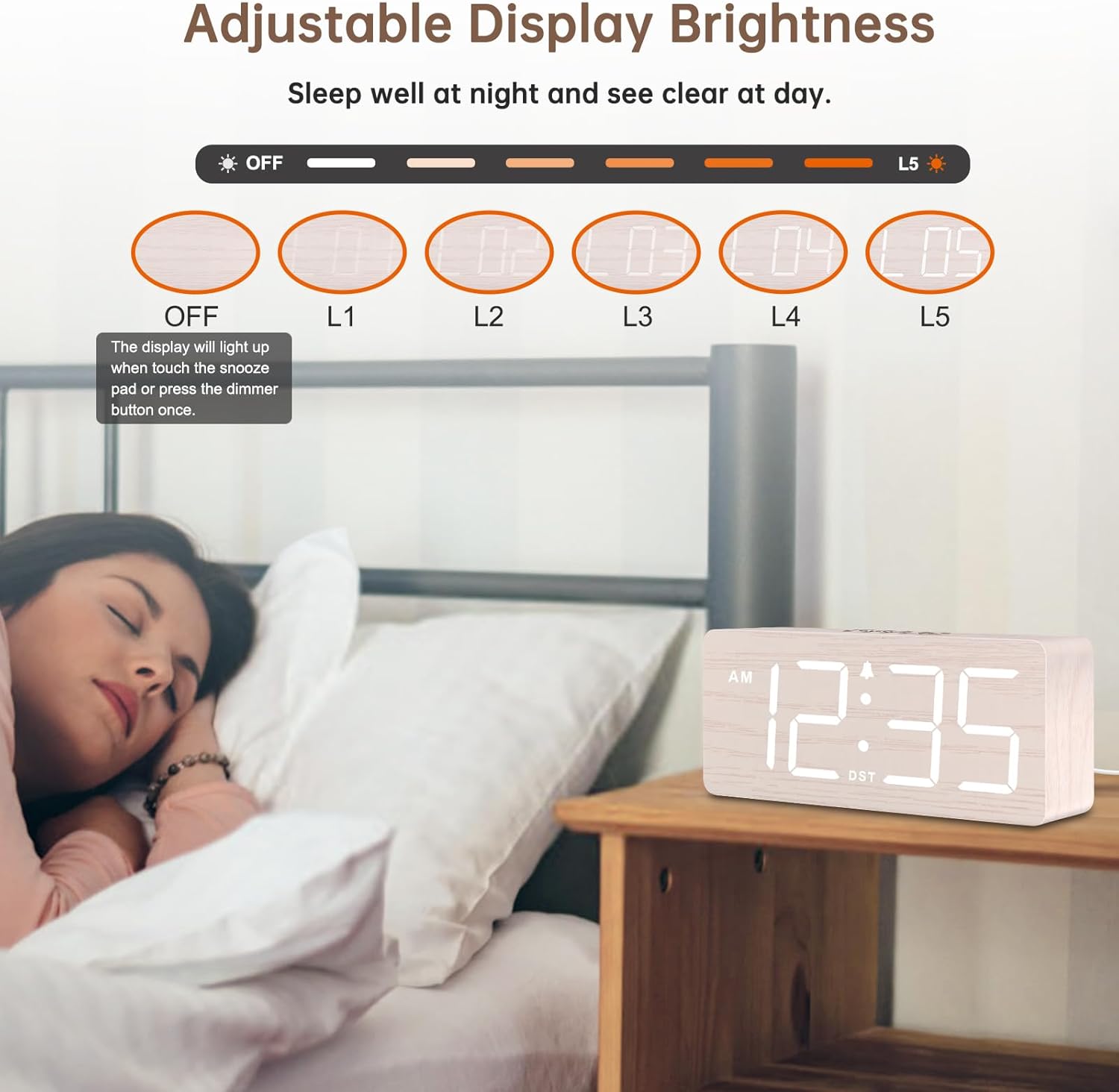
Image 6.3: Adjustable display brightness levels.
6.7 Жайкы убакыт (DST)
To enable or disable Daylight Saving Time, press the DST ON / OFF button (typically on the back). The time will adjust by one hour forward or backward, and the DST indicator will appear/disappear.
6.8 USB кубаттоо порту
The clock includes an extra USB charging port on the back. You can use this port to charge your mobile devices (e.g., smartphone, tablet) while the clock is plugged into power.

Image 6.4: Using the extra USB charging port.
7. Техникалык тейлөө
- Саатты жумшак, кургак чүпүрөк менен тазалаңыз. Абразивдүү тазалагычтарды же эриткичтерди колдонбоңуз.
- If not in use for an extended period, unplug the clock and remove the backup batteries.
8. Кыйынчылыктарды
| Көйгөй | Мүмкүн себеп | Чечим |
|---|---|---|
| Display is off / Clock not working | розеткага кошулбаган; Күч алtage; Display brightness set to OFF. | Ensure power adapter is securely plugged in. Check power outlet. Press SNOOZE button to adjust brightness. |
| Ойготкуч угулбайт | Alarm not set; Alarm volume too low; Alarm turned off. | Verify alarm time is set and alarm icon is displayed. Adjust alarm volume. Ensure alarm is not deactivated. |
| Убакыт туура эмес | Time not set correctly; DST enabled/disabled incorrectly. | Reset the time following section 6.1. Check DST setting. |
| USB кубаттоо иштебейт | Clock not powered; Device cable faulty. | Ensure clock is plugged into a wall outlet. Try a different USB cable or device. |
9. Техникалык шарттар
- Бренд: DreamSky
- Модел: DS2208
- Дисплей түрү: Digital LED
- Кубат булагы: Corded Electric (5V/1.2A adapter)
- Батареянын камдык көчүрмөсү: 2 x AAA batteries (not included, for alarm only)
- Продукциянын өлчөмдөрү: 6.1"W x 2.8"H x 1.6"D
- Элемент Салмагы: 9.9 унция (0.28 кг)
- Өзгөчөлүктөр: Large numbers, 6-level dimmer, 5-level adjustable alarm volume, Snooze, DST, 12/24-hour format, USB charging port.
- Материал: Wood (finish)
10. Кепилдик жана колдоо
This DreamSky product comes with a 1 жылдык алмаштыруу кепилдиги сатып алынган күндөн тартып.
For technical support, warranty claims, or any questions regarding your DreamSky DS2208 alarm clock, please contact DreamSky customer service through the retailer's platform or visit the official DreamSky webбайланыш маалыматы үчүн сайт.
Кепилдик максатында сатып алуунун далили катары сатып алуу дүмүрчөгүңүздү сактап коюңуз.


