1. Продукт бүтүп калдыview
The Anpviz JB35X is a full metal ceiling mount junction box bracket designed for specific Anpviz IP PoE cameras. This bracket provides a secure and organized solution for camera installation, protecting network cables from environmental elements.
Негизги өзгөчөлүктөрү:
- Full metal construction with surface spray treatment for durability.
- Integrated cable holes for organized cable management and protection.
- Suitable for both indoor and outdoor ceiling mounting applications.
Шайкештик:
This junction box is compatible with the following Anpviz camera series:
- U-Series Cameras: IPC-D350W-S, IPC-D363WD-SA, IPC-D383WD-SA, IPC-D351WD-SL, IPC-D381WD-SL.
- H-Series Cameras: IPC-D3053WD-S, IPC-D3083WD-S, IPC-D383WD-S, IPC-D3653WD-SA, IPC-D3853WD-SA.

Сүрөт 1: Алдыңкы view of the Anpviz JB35X Ceiling Mount Junction Box Bracket. This image shows the white, circular metal housing designed to protect camera wiring.
2. Пакеттин мазмуну
Пакетте бардык буюмдар бар экенин текшериңиз:
- Anpviz JB35X Junction Box Bracket
- Монтаждоо бурамалар
- Other accessories as specified by the manufacturer (e.g., holes sticker, cable tie, foam pad, if applicable).

Figure 2: Diagram illustrating the Anpviz JB35X junction box, its compatibility with certain camera models, and a list of included accessories such as screws, cable tie, and foam pad.
3. Орнотуу боюнча колдонмо
Follow these steps for proper installation of the Anpviz JB35X junction box bracket.
- Монтаждоо бетин даярдаңыз: Ensure the ceiling or wall surface is clean, flat, and capable of supporting the weight of the junction box and the camera.
- Бургулоо пункттарын белгилөө: Use the junction box as a template to mark the drilling points for the mounting screws. Ensure proper alignment for cable entry. Refer to the dimension diagram for precise measurements.
- Бургулоо тешиктери: Drill pilot holes at the marked locations. The size of the drill bit should be appropriate for the provided mounting screws and any wall anchors if necessary.
- Маршруттук кабелдер: If routing cables through the mounting surface, ensure the necessary holes are made for cable passage into the junction box.
- Mount the Junction Box: Secure the junction box to the prepared surface using the provided screws. Ensure it is firmly attached and stable.
- Connect Camera Wiring: Route the camera's network and power cables through the designated cable holes in the junction box. Make all necessary connections inside the box.
- Камераны тиркөө: Mount the compatible Anpviz camera onto the junction box bracket according to the camera's specific installation instructions. Ensure all connections are secure and weatherproofed if installed outdoors.
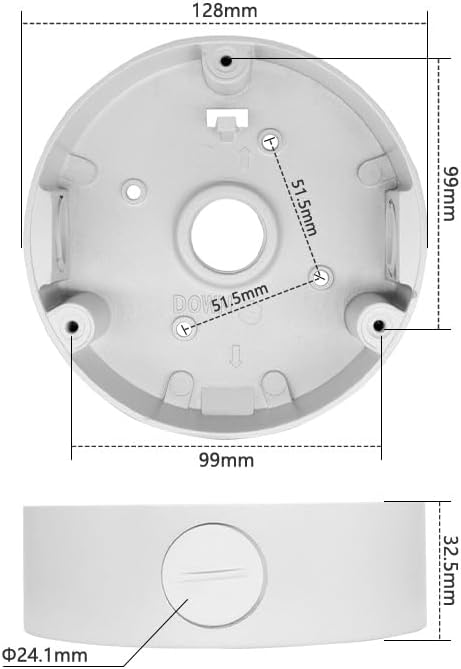
Figure 3: Technical diagram displaying the precise dimensions of the Anpviz JB35X junction box, including its diameter (128mm), height (32.5mm), and screw hole spacing (99mm and 51.5mm). This is crucial for accurate installation planning.
4. Иштөө нускамалары
The Anpviz JB35X junction box is a passive mounting accessory. Once installed correctly, its primary function is to provide a stable mounting platform and protect the camera's wiring connections. No active operation is required from the junction box itself.
Ensure that all cables are properly routed and secured within the junction box to prevent damage or interference.
5. Техникалык тейлөө
To ensure the longevity and optimal performance of your Anpviz JB35X junction box and the attached camera, consider the following maintenance guidelines:
- Үзгүлтүксүз текшерүү: Periodically inspect the junction box and its mounting for any signs of loosening, corrosion, or damage, especially in outdoor environments.
- Тазалоо: Зарыл болсо, туташтыргыч кутучанын сыртын жумшак, d менен акырын тазалаңызamp кездеме. Финишке зыян келтирүүчү катаал химиялык заттарды же абразивдүү материалдарды колдонуудан алыс болуңуз.
- Кабелдин бүтүндүгү: Ensure that all cables entering and exiting the junction box remain intact and free from cuts or wear.
- Дат каршылык: While the product is designed to be rust-resistant, extreme conditions may still affect its finish over time. Address any signs of rust promptly to prevent further degradation.
6. Кыйынчылыктарды
This section addresses common issues related to the installation and function of the junction box.
- Junction Box Not Mounting Securely:
- Verify that the mounting surface is appropriate and structurally sound.
- Ensure the correct drill bit size was used for pilot holes and that screws are fully tightened.
- If mounting to drywall or similar materials, use appropriate wall anchors (not included unless specified).
- Cables Not Fitting or Protected:
- Confirm that cable diameters are within the capacity of the junction box's cable entry points.
- Ensure cables are routed neatly to avoid pinching or excessive bending.
- Camera Not Attaching to Junction Box:
- Double-check the compatibility list in Section 1 to ensure your camera model is supported.
- Align the camera's mounting holes with those on the junction box.
7. Техникалык шарттар
| Өзгөчөлүк | Деталь |
|---|---|
| Продукциянын өлчөмдөрү | 4.99 x 4.99 x 1.38 дюйм (128 x 128 x 35 мм болжол менен) |
| Элемент Салмагы | 10.7 унция (0.30 кг) |
| Модель номери | JB35X |
| Материал | Full Metal Design |
| Түс | Ак |
| Өзгөчөлүктөр | Датка туруктуу |
| Монтаж түрү | Шыпка орнотуу |
| Шайкеш түзмөктөр | Anpviz U-Series and H-Series IP PoE Cameras |
8. Кепилдик маалыматы
For detailed warranty information regarding the Anpviz JB35X Ceiling Mount Junction Box Bracket, please refer to the official Anpviz website or contact Anpviz customer support directly. Warranty terms and conditions may vary by region and purchase date.
9. Кардарларды колдоо кызматы
If you encounter any issues or have questions not covered in this manual, please visit the official Anpviz support page or contact their customer service team for assistance. Contact details are typically available on the Anpviz webсайт.
Anpviz Official Webсайт: www.anpviz.com (Эскертүү: Бул толтургуч URL. Refer to your product packaging or official Anpviz documentation for the correct support webсайт.)


