Продукт бүттүview
The ATK Blazing Sky Z1 Pro is an ultra-lightweight wireless gaming mouse designed for right-handed users, featuring an ergonomic shape. It supports an 8000Hz polling rate for both wired and 2.4Ghz wireless connections, ensuring ultra-low latency. The mouse is equipped with a 250mAh battery, providing up to 80 hours of continuous usage at 1000 Hz polling rate, and weighs approximately 53 grams.
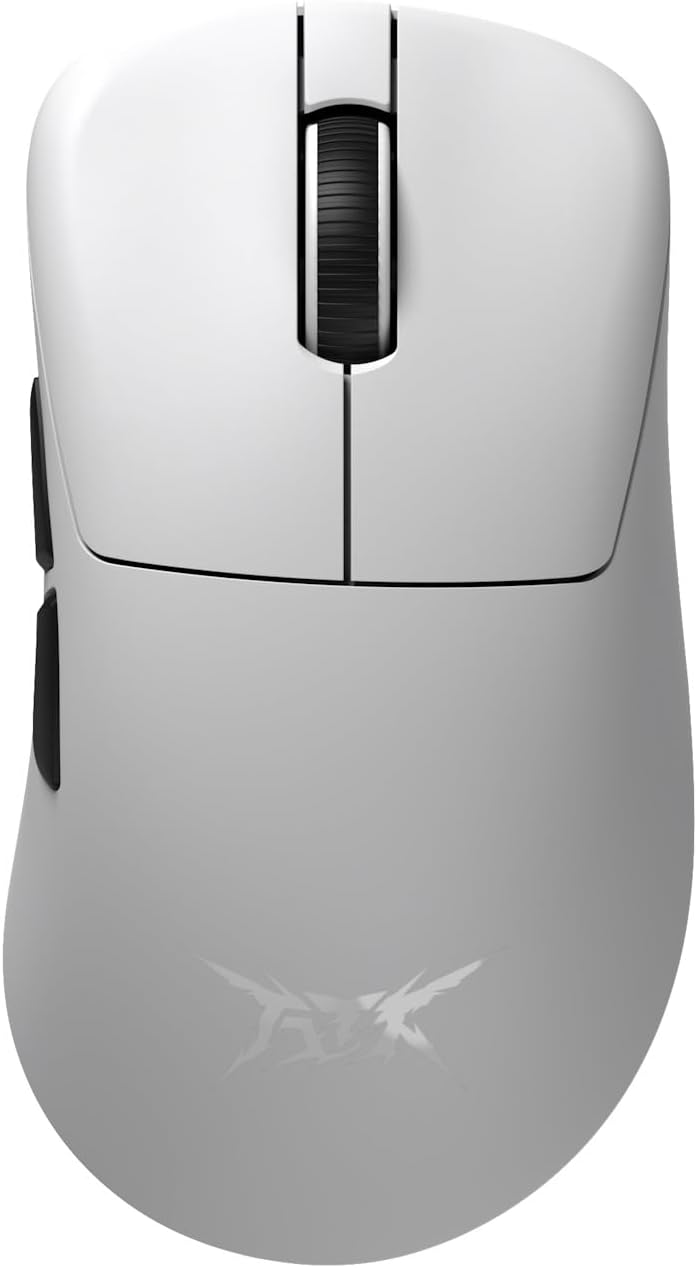
Жогорку view of the ATK Z1 Pro White gaming mouse, showing the scroll wheel and main click buttons.

Side view of the ATK Z1 Pro White gaming mouse, highlighting the two programmable side buttons and the ATK logo.

Артка view of the ATK Z1 Pro White gaming mouse, showing the ergonomic curve.

Фронт view of the ATK Z1 Pro White gaming mouse, showing the USB-C port for charging and wired connection.
Пакеттин мазмуну
The ATK Wireless Gaming Mouse Z1 Pro White package includes:
- ATK Wireless Gaming Mouse Z1 Pro White
- ATK 8K Dongle
- USB-C - USB-A кабели (заряддоо жана зымдуу туташуу үчүн)
- Колдонуучунун Колдонмосу (бул документ)
- 1 x 9V Battery (pre-installed or included)
Орнотуу колдонмосу
1. Чычканды заряддоо
Before first use, it is recommended to fully charge the mouse. Connect the provided USB-C cable to the mouse's front port and the other end to a USB-A port on your computer or a USB power adapter. The mouse features a 250mAh battery.
2. Connecting Wirelessly (2.4Ghz)
- Insert the ATK 8K Dongle into an available USB port on your computer.
- Чычкандын астыңкы жагында жайгашкан кубат баскычын колдонуп, чычканды күйгүзүңүз.
- The mouse should automatically connect to the dongle. If not, press the pairing button (if available, refer to the bottom of the mouse for specific button layout) to initiate pairing mode.

The ATK 8K Dongle, enabling 8K polling rate for wireless connection.
3. Connecting Wired
Connect the USB-C cable from the mouse to a USB-A port on your computer. The mouse will function in wired mode and charge simultaneously. Wired connection supports an 8000Hz polling rate.
Иштөө нускамалары
Чычкан баскычтары жана функциялары
- Сол чыкылдатуу баскычы: Primary action. Features an Omron optical switch for 3x faster response and 70 million click durability.
- Оң баскычты чыкылдатуу: Экинчилик аракет.
- Жылдыруу дөңгөлөгү: Өйдө/төмөн сыдырыңыз, ортоңку чыкылдатыңыз.
- Каптал баскычтары (Алга/Артка): Default navigation. These can often be customized via software.
- DPI баскычы: (If present, typically on the bottom or top) Cycles through DPI settings. The PAW3950 sensor supports up to 30,000 DPI (overclockable to 36,000 DPI).

Illustration of the Omron optical switch, providing high durability and fast response.
Polling Rate and Performance
The ATK Z1 Pro supports an 8000Hz polling rate in both wired and 2.4Ghz wireless modes. This high polling rate ensures minimal delay between mouse movement and on-screen action. The mouse is equipped with a high-performance Nordic 52840 chip, combined with Smartspeed Wireless Gen-2 and ATK ApexShark firmware, achieving a click response rate of less than 0.4ms.

The Nordic 52840 chip, central to the mouse's high-performance wireless capabilities.
Lift-Off Distance (LOD) Adjustment
The PAW3950 sensor allows for adjustable Lift-Off Distance (LOD) settings of 0.7mm, 1.0mm, and 2.0mm. This setting can typically be adjusted via the mouse's companion software (if available) or a combination of button presses. Refer to the official ATK website for software downloads and detailed instructions.
Техникалык тейлөө
Тазалоо
- Чычкандын бетин сүртүү үчүн жумшак, кургак чүпүрөктү колдонуңуз.
- өжөр кир үчүн, бир аз гampчүпүрөктү суу же жумшак тазалоо эритмеси менен жууп салыңыз. Катуу химиялык заттардан алыс болуңуз.
- Clean the optical sensor on the bottom of the mouse periodically with a cotton swab to ensure accurate tracking.
Батареяга кам көрүү
- Чычканды экстремалдык температурага тийгизүүдөн сактаңыз.
- If storing the mouse for an extended period, ensure it is partially charged (around 50%) and turn off the power.
- The mouse uses a 250mAh battery. If replacement is needed, contact ATK support.
Проблемаларды чечүү
| Көйгөй | Мүмкүн болгон себеп / Чечим |
|---|---|
| Чычкан жооп бербей жатат (Зымсыз) |
|
| Чычкан жооп бербей жатат (зымдуу) |
|
| Курсордун туура эмес кыймылы |
|
| Батареянын иштөө мөөнөтү күтүлгөндөн кыска |
|
Техникалык шарттар
| Өзгөчөлүк | Деталь |
|---|---|
| Бренд | АТК |
| Моделдер сериясы | Z1 Pro |
| Элемент моделинин номери | 71018 |
| Байланыш | USB, 2.4Ghz Wireless |
| Кыймылды аныктоо технологиясы | Оптикалык (PAW3950 сенсор) |
| Макс DPI | 30,000 DPI (Overclockable to 36,000 DPI) |
| Макс IPS | 750IPS |
| Макс ылдамдатуу | 50G |
| Добуш берүү көрсөткүчү | Up to 8000Hz (Wired & Wireless with 8K Dongle) |
| Которуу түрү | Omron Optical Switch |
| Коммутатордун бышыктыгы | 70 миллион чыкылдатуу |
| Click Response Speed | 0.4 мс кем |
| Чипсет | Скандинавия 52840 |
| Батарея түрү | 250mAh (кайра заряддалуучу) |
| Батареянын иштөө мөөнөтү | Up to 80 hours (at 1000 Hz) |
| Салмагы | 53 г (болжол менен) |
| Эргономика | Asymmetric Right-Handed |
| Lift-Off Distance (LOD) | 0.7мм / 1.0мм / 2.0мм |
| Аппараттык платформа | PC |
| Операция системасы | Windows |
| Түс | Ак |
Кепилдик жана колдоо
This ATK Wireless Gaming Mouse Z1 Pro White is covered by a Domestic Genuine Product Co., Ltd. Gate Warranty. For warranty claims, technical support, or service inquiries, please contact ATK customer support through their official webпродукт сатылып алынган сайт же сатуучу.
Кепилдикти текшерүү үчүн сатып алганыңыздын далилин сактап коюңуз.


