Introduction
This manual provides detailed instructions for the operation and maintenance of your FOXWELL NT909 Wireless Bidirectional Scan Tool and BT301 Car Battery Tester. Please read this manual thoroughly before using the devices to ensure proper function and safety.
The FOXWELL BT301 is an advanced battery analyzer designed for testing 6V and 12V automotive batteries. It offers a new user interface and digital screen for improved readability and provides precise results on battery condition, cranking, and charging systems.
Коопсуздук маалыматы
Ар дайым төмөнкү коопсуздук чараларын сактаңыз:
- Батареялардын жанында иштеп жатканда көздү коргоочу көз айнек тагыныңыз.
- Ensure proper ventilation when testing batteries.
- Батарея кислотасы менен тийбеңиз.
- Do not smoke or allow sparks/flames near batteries.
- Connect the battery tester clamps correctly: red to positive (+), black to negative (-).
- Refer to your vehicle's service manual for specific battery testing procedures.
Пакеттин мазмуну
Пакетиңизде бардык буюмдар бар экенин текшериңиз:
- FOXWELL NT909 Wireless Bidirectional Scan Tool
- FOXWELL BT301 Car Battery Tester
- Колдонуучунун колдонмосу / Ыкчам баштоо колдонмосу
- Ташуу кутусу
- Necessary cables and adapters (e.g., OBDII cable for NT909)

Image: FOXWELL BT301 Battery Tester, quick start guide, and cables displayed next to a carrying case. This image shows the complete package contents.
Орнотуу жана баштапкы колдонуу
FOXWELL BT301 Car Battery Tester Setup
- Батареяны даярдоо: Ensure the vehicle's ignition is off and all accessories are turned off. Clean the battery terminals if necessary to ensure good contact.
- Сыноочуну туташтыруу:
- кызыл cl туташтырууamp BT301дүн батареянын оң (+) терминалына туташтырыңыз.
- Кара cl туташтырыңызamp of the BT301 to the negative (-) terminal of the battery.

Image: The FOXWELL BT301 Car Battery Tester with its red and black clamps connected to the corresponding terminals of a car battery. This illustrates the correct connection procedure.
- Күйгүзүү: BT301 батареяга туташтырылгандан кийин автоматтык түрдө күйөт.
- Баштапкы жөндөөлөр: Follow the on-screen prompts to select language and battery type (e.g., Regular Flooded, AGM Flat Plate, AGM Spiral, GEL, EFB).
FOXWELL NT909 Wireless Bidirectional Scan Tool Setup
- Аппаратты заряддоо: Ensure the NT909 tablet is fully charged before first use.
- Connect VCI (Vehicle Communication Interface): Plug the VCI module into the vehicle's OBDII port, usually located under the dashboard.
- VCIди планшет менен жупташтырыңыз: Turn on the NT909 tablet. Navigate to the Bluetooth settings or the dedicated VCI pairing menu on the tablet to establish a wireless connection with the VCI module.
- Программалык камсыздоо жаңыртуулары: Connect the NT909 to a Wi-Fi network and check for any available software or firmware updates to ensure optimal performance and vehicle compatibility.
Иштөө нускамалары
Using the FOXWELL BT301 Car Battery Tester
The BT301 offers various testing modes for comprehensive battery analysis.
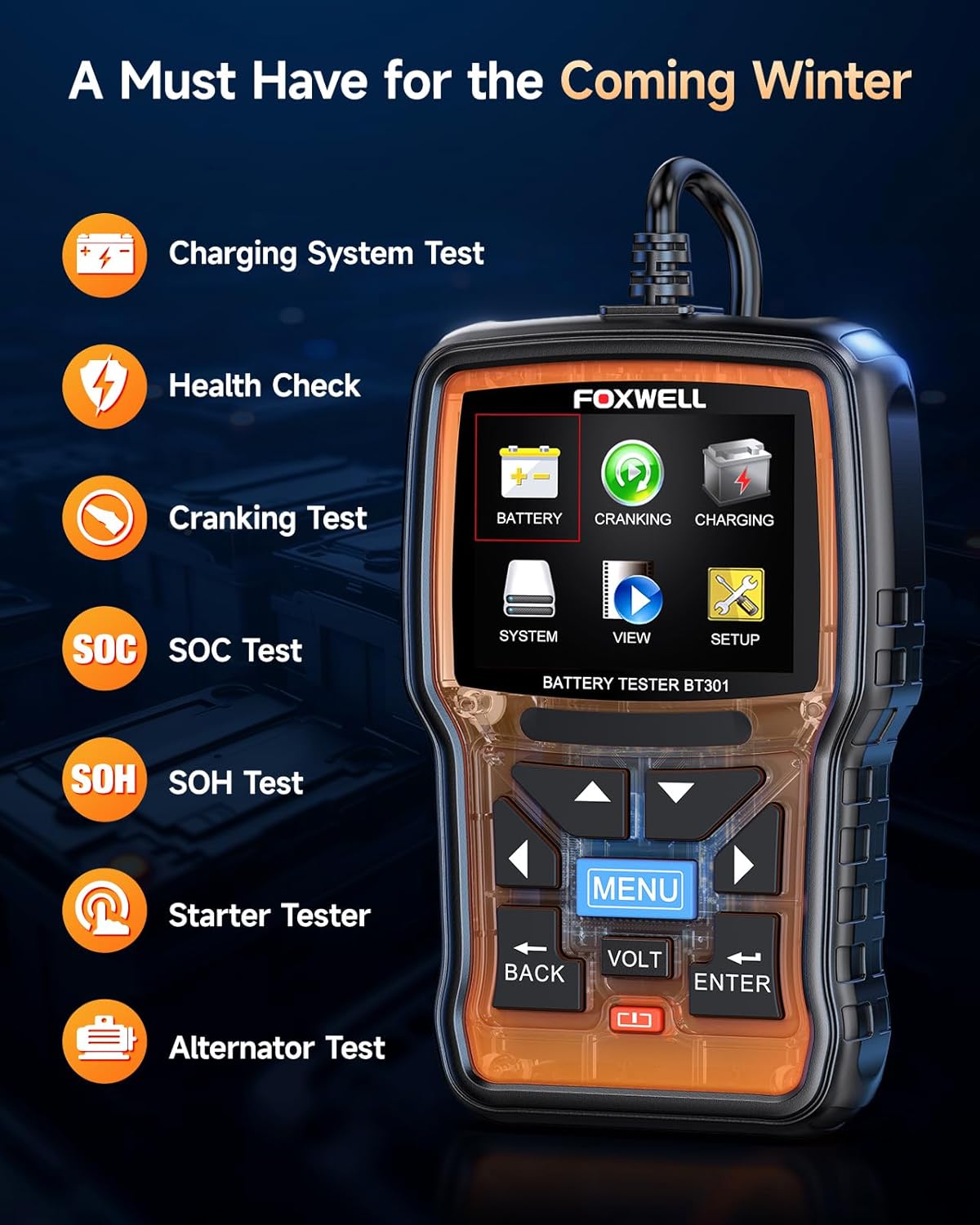
Image: The FOXWELL BT301 Car Battery Tester's main menu, displaying options such as Battery Test, Cranking Test, Charging Test, System, View, and Setup. This image highlights the user interface.
- Батарея сыноо:
- Негизги менюдан "Батарея" тандаңыз.
- Input the battery's CCA (Cold Cranking Amps) rating, which is usually found on the battery label.
- The tester will perform a quick analysis and display the battery's health status, voltagд, жана ички каршылык.
- Results may include "Good Battery", "Charge Battery", or "Replace Battery".

Image: A close-up of the FOXWELL BT301 Car Battery Tester's screen displaying various diagnostic messages such as "GOOD BATTERY", "CHARGE BATTERY", "REPLACE BATTERY", "CRANKING NORMAL", and "LOW OUTPUT". This demonstrates the clear output provided by the device.
- Кранк сыноо:
- Select "Cranking" from the main menu.
- Follow the on-screen instructions to start the vehicle's engine.
- Сыноочу айлануу көлөмүн өлчөйтtage and time, providing an assessment of the starter system's performance.
- Заряддоо сыноо:
- Select "Charging" from the main menu.
- Моторду иштетиңиз жана анын бош иштөөсүнө уруксат бериңиз.
- The BT301 will analyze the alternator's output and rectifier ripple, indicating if the charging system is functioning correctly.
- View Маалыматтар: The "View" option allows you to review мурда сакталган тест жыйынтыктары.
- Жайгашуу: The "Setup" menu allows you to adjust language, backlight, and other system settings.
Using the FOXWELL NT909 Wireless Bidirectional Scan Tool
The NT909 is a comprehensive diagnostic tool. Specific operations will vary by vehicle and desired function.
- Унаа тандоо: From the main menu, select the vehicle manufacturer, model, and year.
- Системаны сканерлөө: Perform an "Auto Scan" or select specific systems (e.g., Engine, ABS, Airbag) for diagnosis. The tool will read diagnostic trouble codes (DTCs) and display live data.
- DTCлерди окуу/тазалоо: View current, pending, and historic fault codes. Clear codes after repairs are completed.
- Жандуу маалыматтар: Monitor real-time sensor data, such as engine RPM, coolant temperature, and oxygen sensor readings. Data can often be displayed in text, graph, or gauge format.
- Эки багыттуу башкаруу (активдүү тесттер): This feature allows the user to send commands to vehicle systems to perform specific tests, such as activating ABS pumps, cycling solenoids, or performing injector kill tests. Always ensure you understand the implications of active tests before performing them.
- Атайын функциялар: Access various service functions like oil reset, EPB (Electronic Parking Brake) reset, SAS (Steering Angle Sensor) calibration, DPF (Diesel Particulate Filter) regeneration, and more.
- Отчетту түзүү: After diagnosis, the NT909 can generate diagnostic reports that can be saved or printed.

Image: The FOXWELL NT909 Wireless Bidirectional Scan Tool tablet displaying its home screen with various application icons, alongside its VCI (Vehicle Communication Interface) module. This image shows the primary components of the scan tool.
Техникалык тейлөө
- Тазалоо: Аппараттарды жумшак менен сүртүңүз, гamp кездеме. Абразивдүү тазалагычтарды же эриткичтерди колдонбоңуз.
- Сактагыч: Store the devices in their protective carrying case in a dry, cool environment away from direct sunlight and extreme temperatures.
- Программалык камсыздоо жаңыртуулары: Regularly check for and install software updates for the NT909 to ensure compatibility with new vehicle models and to access the latest features.
- Battery Care (NT909): For optimal battery life, avoid fully discharging the tablet frequently. Charge it regularly.
- Кабелдик текшерүү: Бардык кабелдерди жана туташтыргычтарды бузулган жерлерин мезгил-мезгили менен текшерип туруңуз. Бузулган компоненттерди дароо алмаштырыңыз.
Проблемаларды чечүү
| Көйгөй | Мүмкүн себеп | Чечим |
|---|---|---|
| BT301 does not power on. | Poor connection to battery terminals; battery completely dead. | Камсыз кылуу clamps are securely connected. Check battery voltage with a multimeter; if below 6V, the battery may be too discharged for the tester to power on. |
| BT301 displays "Error" or inconsistent readings. | Loose connections; dirty battery terminals; incorrect battery type/CCA input. | Clean battery terminals. Re-secure clamps. Verify correct battery type and CCA input in settings. |
| NT909 VCI not connecting to tablet. | VCI not powered; Bluetooth not enabled; VCI not paired. | Ensure VCI is plugged into vehicle's OBDII port and vehicle ignition is on (or accessory mode). Check tablet's Bluetooth settings. Re-pair VCI in the NT909's settings. |
| NT909 cannot communicate with vehicle. | Incorrect vehicle selection; faulty OBDII port; outdated software. | Verify vehicle information (make, model, year). Check vehicle's OBDII port with another device. Update NT909 software. |
Техникалык шарттар
FOXWELL BT301 Car Battery Tester
- Тtage диапазону: 6В - 12В
- Сыноо стандарттары: CCA, BCI, CA, MCA, JIS, DIN, IEC, EN, SAE, GB
- Батареянын түрлөрү: Кадимки суу каптаган, AGM жалпак пластинасы, AGM спиралы, гель, EFB
- Дисплей: Санарип LCD
- Иштөө температурасы: 0°Cден 50°Cге чейин (32°F—122°F)
FOXWELL NT909 Wireless Bidirectional Scan Tool
- Операция системасы: Android негизинде
- Байланыш: Wi-Fi, Bluetooth (VCI үчүн)
- Дисплей: High-resolution touchscreen
- Функциялары: Full system diagnostics, bidirectional control, special functions, live data, DTC reading/clearing.
- Унаа камтуу: Extensive coverage for various makes and models (refer to FOXWELL website for latest list).
Кепилдик жана колдоо
For warranty information, please refer to the warranty card included with your product or visit the official FOXWELL website. Technical support can be obtained through the FOXWELL customer service channels, which typically include online support, email, and phone assistance.
Official FOXWELL Webсайт: www.foxwelltech.com


