1. Киришүү
Thank you for choosing the CHNADKS EMF Meter. This device is an upgraded 3-in-1 rechargeable electromagnetic field radiation detector designed for comprehensive environmental monitoring. It provides accurate measurements of electric field intensity, magnetic field strength, and radiation power, making it an essential tool for home, office, and industrial EMF inspections.
This manual provides detailed instructions on how to set up, operate, and maintain your EMF meter to ensure optimal performance and longevity.
2. Коопсуздук маалыматы
Түзмөктү колдонуудан мурун бардык коопсуздук эскертүүлөрүн жана көрсөтмөлөрүн кунт коюп окуп чыгыңыз. Бул көрсөтмөлөрдү аткарбоо электр тогуна урунууга, өрткө же олуттуу жаракат алууга алып келиши мүмкүн.
- Аппаратты ажыратууга же өзгөртүүгө аракет кылбаңыз. Оңдоо иштери квалификациялуу кызматкерлер тарабынан гана жүргүзүлүшү керек.
- Keep the device away from water and other liquids to prevent damage and electric shock.
- Аппаратты экстремалдык температурага, тике күн нуруна же жогорку нымдуулукка дуушар кылуудан алыс болуңуз.
- Заряддоо үчүн берилген Type-C кабелин гана колдонуңуз.
- Эгерде аппарат бузулгандай көрүнсө же туура эмес иштесе, аны колдонбоңуз.
- This device is for measurement purposes only and should not be used as a substitute for professional safety assessments or medical advice.
3. Продукт бүтүп калдыview
3.1 Компоненттер
The CHNADKS EMF Meter consists of the following main components:
- LCD дисплей: 2.0" TFT color screen for displaying measurements and settings.
- Башкаруу баскычтары: Power/HOLD, AVG, MAX buttons for operation and mode selection.
- USB Type-C порту: For charging the built-in lithium battery.
- Индикатор жарыгы: Green LED for charging status.
- Камтылган сенсорлор: Dual sensors for electric, magnetic, and radiation power detection.

Сүрөт 3.1: Алдыңкы view of the EMF Meter showing its display and control buttons with an overlay of the menu options.
3.2 Негизги өзгөчөлүктөрү
- Multifunctional Precision Detection: Accurately measures electric field intensity (0.1-2000V/m), magnetic field strength (0.1-1200Gs), and radiation power (0.2-5400mW/cm²). Features built-in dual sensors for static magnetic polarity detection.
- Smart Alerts & Custom Thresholds: Equipped with dual sound and flash alarms that activate when readings exceed user-defined safety levels. Allows for personalized threshold settings for various environments.
- Intuitive 2.0" TFT Color Screen & Bilingual Menu: Displays real-time electric/magnetic field fluctuations through a graphical waveform. The simplified menu and one-touch HOLD/MAX key ensure ease of operation.
- 20-Hour Portable Power & Auto-Sleep Mode: Features a built-in rechargeable lithium battery providing up to 20 hours of continuous use. Supports Type-C fast charging with a green LED indicator and includes auto-hibernation/shutdown modes for energy conservation.
- Компакттуу жана бышык дизайн: Ultra-lightweight (67g) and IP3X-rated for dust/water resistance, making it highly portable for on-the-go testing in diverse settings.
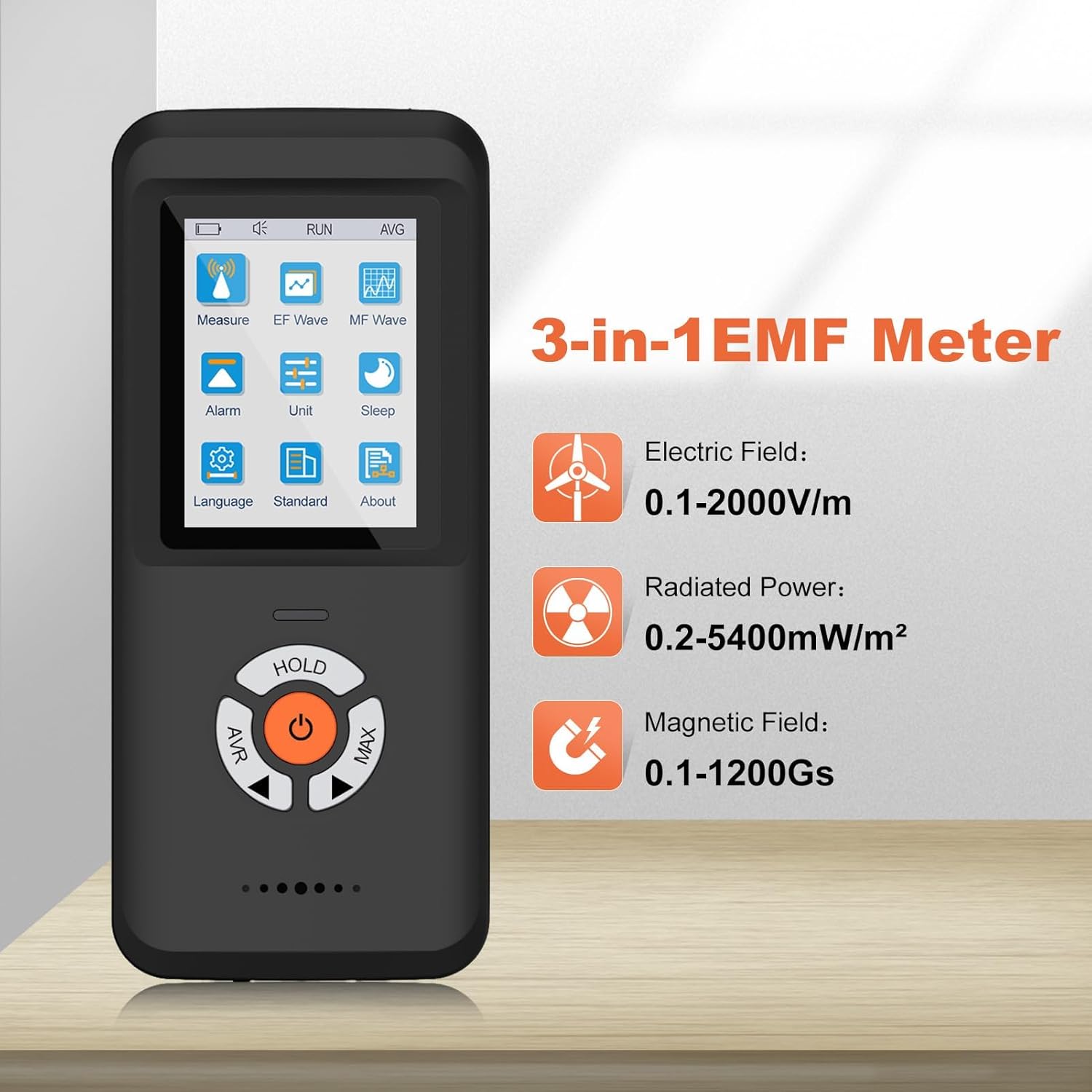
Figure 3.2: Illustration of the 3-in-1 measurement capabilities of the EMF Meter, detailing the ranges for Electric Field, Radiated Power, and Magnetic Field.
4. Орнотуу
4.1 Аппаратты заряддоо
Before first use, fully charge the EMF Meter. The device comes with a built-in rechargeable lithium battery.
- Түзмөктөгү Type-C заряддоо портун табыңыз.
- Connect the provided Type-C USB cable to the device and the other end to a compatible USB power source (e.g., computer USB port, USB wall adapter).
- The green LED indicator will illuminate during charging. Once fully charged, the indicator may change or turn off depending on the device's design.
- A full charge provides approximately 20 hours of continuous use.

Figure 4.1: The EMF Meter being charged via its Type-C port, highlighting its long battery life.
4.2 Баштапкы күйгүзүү
Press and hold the power button (usually the central button) until the LCD screen illuminates. The device will typically start in a default measurement mode.
5. Иштөө нускамалары
5.1 Негизги өлчөө
To perform a basic measurement:
- Түзмөк күйгүзүлгөнүн текшериңиз.
- Hold the EMF Meter in your hand and slowly move it towards the object or area you wish to measure.
- Observe the real-time readings on the LCD display. The device will show values for Electric Field, Radiated Power, and Magnetic Field simultaneously.

Figure 5.1: Using the EMF Meter to measure electromagnetic fields in a vehicle, demonstrating its portability and ease of use.

Figure 5.2: The EMF Meter being used to detect radiation from a common household device like a WiFi router.

5.3-сүрөт: Мисamples of common household items and appliances where the EMF Meter can be used for radiation detection.
5.2 Дисплейди түшүнүү
The 2.0" TFT color screen provides a clear and comprehensive view of the measurement data:
- Сандык баалуулуктар: Real-time readings for Electric Field (V/m), Radiated Power (mW/cm² or µW/cm²), and Magnetic Field (Gs or mT).
- Graphical Waveform Display: Shows fluctuations over time, providing a visual representation of the field strength.
- Батарея көрсөткүчү: Учурдагы батарея деңгээлин көрсөтөт.
- Ойготкучтун көрсөткүчү: Visual alert when thresholds are exceeded.

Figure 5.4: The EMF Meter's display, illustrating both numerical measurements and the real-time electric field waveform.

Figure 5.5: A closer look at the electric field waveform display, showing fluctuations over time.

Figure 5.6: A closer look at the magnetic field waveform display, illustrating its real-time representation.
5.3 Setting Alarms and Thresholds
The device can be configured to alert you when radiation levels exceed a set threshold. Refer to the on-screen menu for "Alarm" settings.
- Navigate to the "Alarm" option in the menu.
- Adjust the threshold values for Electric Field, Radiated Power, and Magnetic Field as needed.
- When a measurement exceeds the set threshold, the device will emit a sound and/or flash an alarm.

Figure 5.7: The EMF Meter indicating an alarm with sound, signifying high radiation levels detected near a smartphone.
5.4 Өлчөө бирдиктерин өзгөртүү
The device allows you to switch between different units for Radiated Power and Magnetic Field measurements.
- Access the "Unit" setting in the device's menu.
- Select your preferred units (e.g., mW/cm² or µW/cm² for Radiated Power; mT or Gs for Magnetic Field).

Figure 5.8: The unit selection interface on the EMF Meter, allowing users to customize measurement units.
5.5 HOLD/MAX Function
The device features a one-touch HOLD/MAX key for convenience:
- басыңыз БЕРҮҮ button to freeze the current readings on the display. This is useful for recording specific values.
- басыңыз МАКС button to display the maximum value recorded during a measurement session.
- Pressing the button again typically releases the HOLD or resets the MAX value.

Figure 5.9: Demonstrating the use of the HOLD button to pause and review өлчөө окуулары.
6. Техникалык тейлөө
6.1 Тазалоо
Түзмөктүн иштешин жана көрүнүшүн сактоо үчүн:
- Аппаратты жумшак, кургак чүпүрөк менен аарчыңыз.
- Do not use abrasive cleaners, solvents, or strong chemicals, as these may damage the casing же дисплей.
6.2 Сактоо
When not in use, store the EMF Meter in a cool, dry place, away from direct sunlight and extreme temperatures. Keep it away from strong magnetic fields to prevent potential interference or damage to the sensors.
6.3 Батареяга кам көрүү
To prolong the life of the built-in lithium battery:
- Батареяны бат-баттан толук кубаттап калуудан алыс болуңуз.
- If storing for an extended period, charge the device to approximately 50% capacity.
- Recharge the device every few months if not in use to prevent deep discharge.
7. Кыйынчылыктарды
| Көйгөй | Мүмкүн себеп | Чечим |
|---|---|---|
| Түзмөк күйбөйт. | Батарея аз. | Берилген Type-C кабелин колдонуу менен аппаратты заряддаңыз. |
| Readings appear inconsistent or fluctuate wildly. | Interference from other electronic devices; device not stable. | Move away from other electronics. Ensure the device is held steadily. |
| Alarm does not sound when expected. | Alarm thresholds not set correctly; alarm function disabled. | Check and adjust alarm settings in the menu. Ensure alarm volume is not muted. |
| Экран бош же катып калган. | Программанын катасы; аз батарея. | Press and hold the power button to force a restart. If issue persists, charge the device. |
8. Техникалык шарттар
| Параметр | Нарк |
|---|---|
| Модель номери | EM-102 |
| Электр талаасынын диапазону | 0.1 - 2000 V/m |
| Магниттик талаа диапазону | 0.1 - 1200 Gs |
| Radiation Power Range | 0.2 - 5400 mW/cm² |
| Дисплей | 2.0 дюймдук TFT түстүү экран |
| Батарея | 1 литий-иондук батарейка (кошулган) |
| Батареянын иштөө мөөнөтү | Болжол менен 20 саат үзгүлтүксүз колдонуу |
| Заряддоо порту | C түрүндөгү USB |
| Өлчөмдөр | 6.85 x 4.41 x 1.14 дюйм |
| Салмагы | 6.74 унция (болжол менен 191 г) |
| Өндүрүүчү | CHNADKS |
| кутуга киргизилген | EMF Meter, USB Type-C Charging Cable, Wrist Lanyard |
9. Кепилдик жана колдоо
For any questions, technical support, or warranty inquiries regarding your CHNADKS EMF Meter, please contact CHNADKS customer service through the retailer's platform or the official brand webсайт. Кепилдик дооматтары үчүн сатып алганыңыздын далилин сактап коюңуз.


