Introduction
The Kipcush K8 White Noise Machine is designed to create a calming environment for improved sleep and relaxation. It features a variety of soothing sounds, a soft night light, and customizable settings to suit individual preferences. This manual provides detailed instructions for the safe and effective use of your device.
Коопсуздук маалыматы
- Do not use near water to prevent electric shock.
- Avoid high volume levels to protect hearing.
- Чоңдордун көзөмөлү жок балдар үчүн арналган эмес.
- Use only with a compatible 5V power adapter and the provided USB-A to coaxial connector cable.
Пакеттин мазмуну
Сураныч, пакетте төмөнкү нерселерди текшериңиз:
- Kipcush K8 White Noise Machine
- USB-A to Coaxial Connector Cable
- User Manual
Эскертүү: A power adapter is not included and must be supplied by the user (5V recommended).
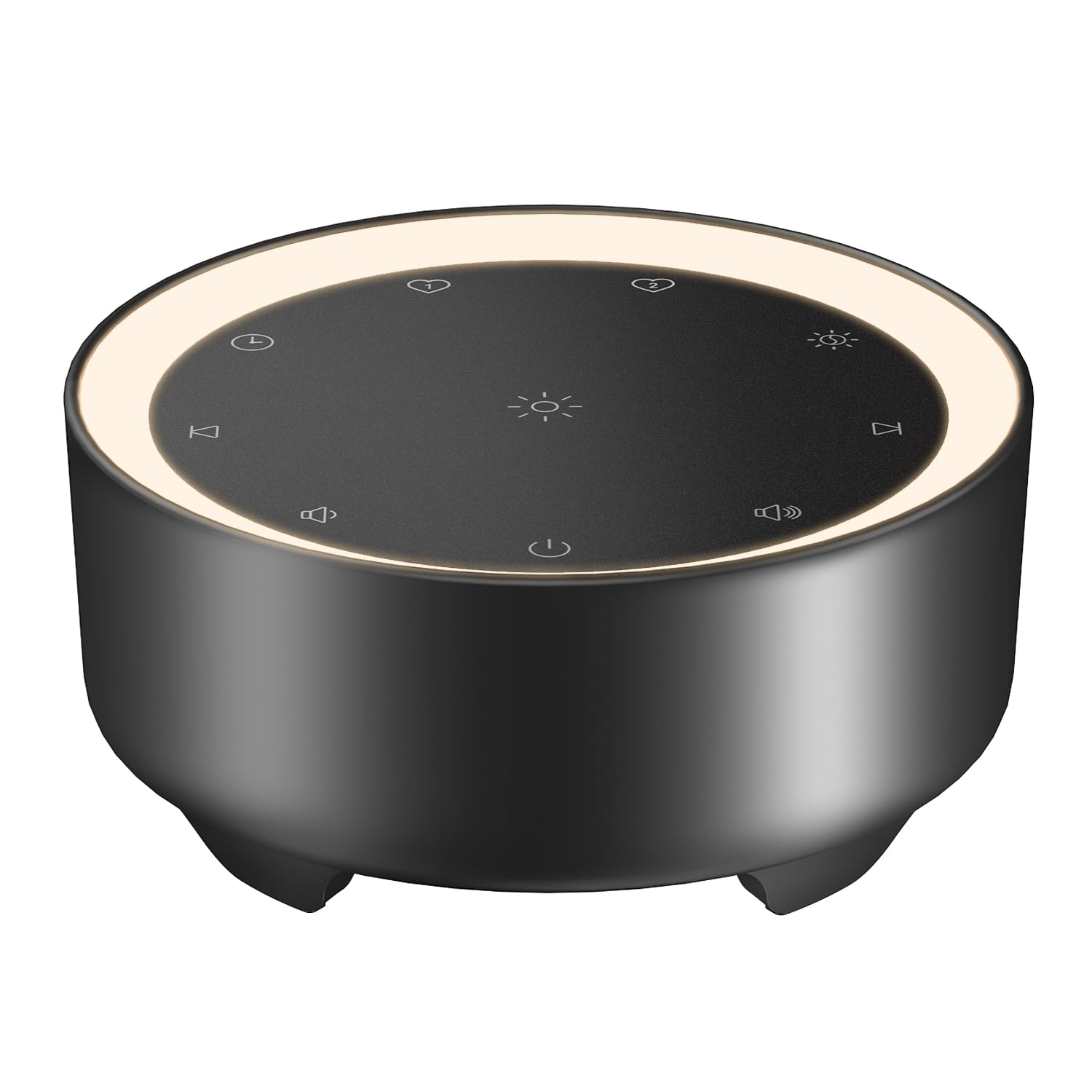
Image: Kipcush K8 White Noise Machine with its USB cable, illustrating the compact design and power connection.
Продукт өзгөчөлүктөрү
- 20 Тынчтандыруучу үн: Includes white noise, fan sounds, nature recordings, and lullabies.
- 2 Customizable Shortcuts: Save your favorite sounds for instant playback.
- Soft Glow Night Light: Three adjustable brightness levels for a calm environment.
- Бир нече таймер параметрлери: 15, 30, 60, 90, 120 minutes, or continuous 8-hour playback.
- Эстутум функциясы: Automatically saves last sound, volume, and light settings.
- USB менен иштейт: Flexible use with power banks, laptops, wall chargers, or car USB ports.
- Компакт жана көчмө: Small size for easy travel and placement.

Image: A visual representation of the 20 distinct sound options, including various white noises, fan sounds, nature sounds like rain and ocean, and lullabies.

Image: The device highlighting its timer functions, offering various durations from 15 minutes to 8 hours for automatic shut-off.
Жайгашуу
- Кубат туташуу: Connect the provided USB-A to coaxial connector cable to the device. Plug the USB-A end into a compatible 5V power adapter (not included), power bank, laptop, or car USB port.
- Жайгашкан жери: Place the device on a stable, flat surface away from water or excessive heat.
Video: An official Kipcush video demonstrating the white noise sound machine in various usage scenarios, including setup and operation.
Иштөө нускамалары

Сүрөт: деталдуу view of the touch-sensitive control panel with labels for each function.
- Күйгүзүү/өчүрүү: басыңыз Кубат баскычы (circle with vertical line) to turn the device on or off.
- Үн тандоо: басыңыз Кийинки трек (right arrow) or Мурунку трек (left arrow) buttons to cycle through the 20 available sounds.
- Үндү тууралоо: басыңыз Көлөм + (speaker with plus) or Көлөмү - (speaker with minus) buttons to adjust the sound level.
- Түнкү жарыкты башкаруу: басыңыз Night Light (sun icon) button to turn the light on/off and cycle through three brightness levels.
- Таймерди орнотуу: басыңыз Таймер (clock icon) button to select a desired duration (15, 30, 60, 90, 120 minutes, or 8 hours continuous play). The device will automatically turn off after the selected time.
- Customizable Shortcuts (Favorite Sounds):
- To save a favorite sound: While a sound is playing, long-press either Сүйүктүү 1 (heart icon 1) or Сүйүктүү 2 (heart icon 2) button until you hear a confirmation tone.
- To play a favorite sound: Tap the corresponding Сүйүктүү 1 or Сүйүктүү 2 button for instant playback.
- Эстутум функциясы: The device automatically remembers your last sound, volume, and light settings when powered off and will resume these settings upon restart.

Image: The device showcasing the unique Favorite Button feature for quick sound recall.
Техникалык тейлөө
- Тазалоо: Аппаратты жумшак, кургак чүпүрөк менен сүртүңүз. Суюк тазалагычтарды же абразивдүү материалдарды колдонбоңуз.
- Сактагыч: Аппаратты колдонбогондо салкын, кургак жерде сактаңыз.
- Кабельге кам көрүү: Avoid bending or twisting the power cable excessively to prevent damage.
Проблемаларды чечүү
| Көйгөй | Мүмкүн себеп | Чечим |
|---|---|---|
| Түзмөк күйбөйт. | Электр кубаты жок же байланыш үзүлгөн. | Ensure the USB cable is securely connected to both the device and a working 5V power source. Try a different power adapter or USB port. |
| Үн жок. | Үн өтө төмөн же үнсүз. | Increase the volume using the Volume + button. Ensure a sound is selected. |
| Түнкү жарык иштебейт. | Light is off or at lowest setting. | Tap the Night Light button to cycle through brightness levels or turn it on. |
| Түзмөк күтүүсүздөн өчөт. | Timer activated. | Check the timer setting. If continuous play is desired, ensure the 8-hour option is selected or no timer is set. |
Техникалык шарттар
- Модель аты: K8
- Бренд: Kipcush
- Кубат булагы: Corded Electric (USB-powered, 5V)
- Материал: Пластик
- Түсү: Кара (продукциянын варианты боюнча)
- Пакеттин өлчөмдөрү: 4.37 x 4.29 x 2.99 дюйм
- Элемент Салмагы: 9.14 унция
- Үн параметрлери: 20 (White Noise, Fan, Nature, Lullabies)
- Таймер параметрлери: 15, 30, 60, 90, 120 minutes, 8 hours continuous
- Түнкү жарык: 3 жөнгө салынуучу жарыктык деңгээли
Кепилдик жана колдоо
The Kipcush K8 White Noise Machine comes with a 24 айлык кепилдик from the date of purchase. This warranty covers manufacturing defects and ensures long-term reliability.
For professional customer support, please contact Kipcush directly through their official channels. Refer to the product packaging or the Kipcush webбайланыш маалыматы үчүн сайт.


