1. Киришүү
Thank you for choosing the Keenstar Conical Burr Coffee Grinder. This manual provides essential information for the safe and efficient operation, maintenance, and troubleshooting of your new coffee grinder. Please read it thoroughly before first use and retain it for future reference.
The Keenstar CG-180 is designed to provide consistent and precise coffee grounds for various brewing methods, from espresso to French press, enhancing your coffee experience.
2. Коопсуздук нускамалары
- Шайманды иштетүүдөн мурун бардык көрсөтмөлөрдү окуп чыгыңыз.
- Мотордук базаны сууга же башка суюктуктарга батырбаңыз.
- Колдонбогондо, тетиктерди чогултууда же демонтаждоодон мурун жана тазалоодон мурун розеткадан сууруп алыңыз.
- кыймылдуу бөлүктөргө тийбегиле.
- Эч кандай шайманды зымы же сайы бузулган, же шайман иштебей калгандан кийин же кулап түшкөн же кандайдыр бир түрдө бузулгандан кийин иштетпеңиз.
- Өндүрүүчү тарабынан сунушталбаган же сатылбаган тиркемелерди колдонуу өрткө, электр шокуна же жаракатка алып келиши мүмкүн.
- Сыртта колдонбоңуз.
- Шнур столдун же столдун четине илинип калышына же ысык беттерге тийбеңиз.
- Ыстык газ же электр мешине же ысытылган мештин жанына коюуга болбойт.
- Always check the bean hopper for the presence of foreign objects before use.
- Бул шайман тиричиликте гана колдонуу үчүн.
3. Продукт бүтүп калдыview
The Keenstar Conical Burr Coffee Grinder features premium stainless steel conical burrs for consistent grinding, 34 adjustable grind settings, upgraded anti-static technology, and a user-friendly touchscreen interface.

Image: The Keenstar Conical Burr Coffee Grinder, showcasing its main components including the bean hopper, control panel, portafilter cradle, and ground coffee container.
Негизги өзгөчөлүктөрү:
- Premium Stainless Steel Conical Burrs: 40-millimeter burrs minimize grinding heat to preserve coffee bean essential oils, ensuring uniform grounds.
- 34 Precise Grind Settings: Adjustable settings from ultra-fine for espresso to coarse for French press.
- Upgraded Anti-static Technology: Prevents coffee grounds from scattering, keeping your workspace clean.
- Precision Timer & Touchscreen: Allows for accurate grind time selection (1-50 seconds) and cup selection.
- Portafilter Cradle: Grind directly into your portafilter for convenience (two sizes included).
- Компакт дизайн: Measures 5.2"L x 7.3"W x 14.2"H, fitting easily on kitchen countertops.
4. Орнотуу
Follow these steps to set up your Keenstar coffee grinder for first use:
- Таңылганын ачуу: Бардык компоненттерди таңгактан кылдаттык менен алып салыңыз.
- Таза: Wash the bean hopper, ground coffee container, and lid with warm, soapy water. Rinse thoroughly and dry completely before assembly.
- Bean Hopper орнотуу:
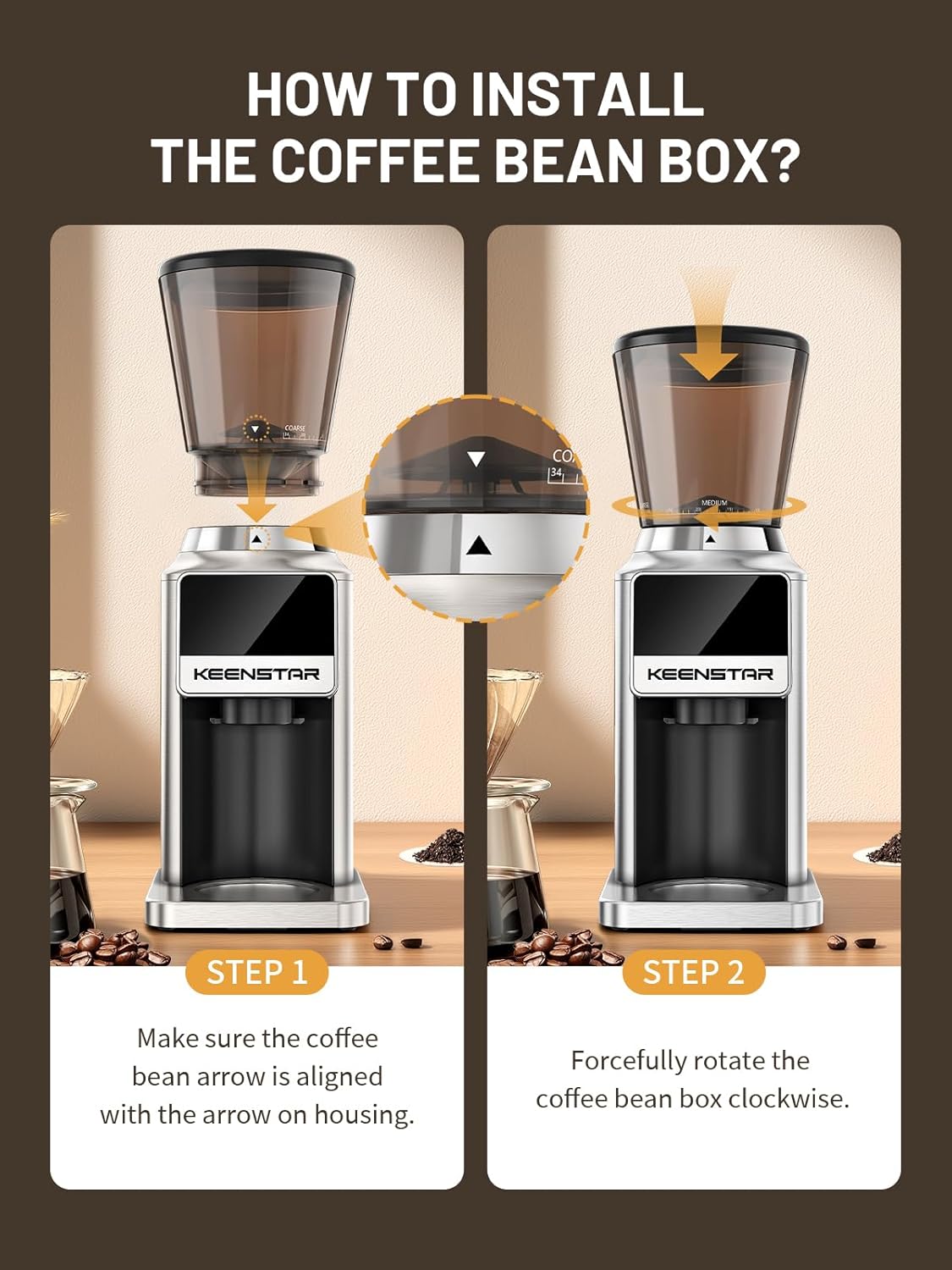
Image: Visual guide for installing the bean hopper. Step 1 shows aligning the arrow on the hopper with the arrow on the housing. Step 2 shows rotating the hopper clockwise to secure it.
- Ensure the coffee bean arrow on the hopper is aligned with the arrow on the grinder housing.
- Forcefully rotate the coffee bean box clockwise until it locks into place.
- If the bean hopper cannot be installed, turn the turntable counter-clockwise until it stops moving. Ensure the two white buckles are aligned with the triangle symbol on the outside, then attempt installation again.
- Insert Cradle: Choose the appropriate portafilter cradle (51-54mm or 58mm) and insert it into the designated slot, or place the grinding chamber if using the ground coffee container.
- Кофе буурчактарын кошуу: Бүтүндөй кофе дандарын буурчак бункерине куюңуз. Ашыкча толтурбаңыз.
- Плагин: Электр шнурын ылайыктуу электр розеткасына туташтырыңыз.
5. Иштөө нускамалары
Your Keenstar grinder offers precise control over your coffee grinding process.
5.1. Майдалоо орнотууларын тууралоо

Image: The grind setting dial with numbers from 1 to 34, indicating fine, medium, and coarse settings for various brewing methods.
The grinder features 34 adjustable grind settings. Rotate the grind setting ring located below the bean hopper to select your desired fineness:
- Жакшы (1-8): Ideal for Cezve, Espresso.
- Орто (9-24): Suitable for Moka Pot, Drip Coffee, Pour Over.
- Орой (25-34): Best for French Press.
5.2. Сенсордук экранды башкаруу панелин колдонуу

Image: The intelligent touchscreen display showing time and cup selection options.
The intuitive touchscreen allows you to select grind time or the number of cups:
- Time Selection (1-50s): Long press the "+" or "-" buttons to increase or decrease the grinding time in 0.1-second increments.
- Кубокту тандоо: Touch the cup icon to toggle between single or double cup modes, or select from 1 to 12 cups.
5.3. Майдалоо процесси
- Ensure the ground coffee container or your portafilter (with the appropriate cradle) is securely in place.
- Select your desired grind setting by rotating the ring.
- Set the grinding time or cup quantity using the touchscreen.
- Press the start button (power icon) on the touchscreen to begin grinding. The grinder will automatically stop once the set time or quantity is reached.
- Remove the ground coffee container or portafilter.
6. Техникалык тейлөө
Үзгүлтүксүз тазалоо жана тейлөө сиздин жаргылчактын узак иштөөсүн жана оптималдуу иштешин камсыз кылат.
6.1. Cleaning the Grinder

Image: A brush being used to clean the upper burr and grinding chamber, with the lower burr assembly held separately.
- Ажыратыңыз: Тазалоодон мурун жаргылчакты дайыма электр розеткасынан сууруп алыңыз.
- Bean Hopper алып салуу: Rotate the bean hopper counter-clockwise and lift it off.
- Жогорку бурчту алып салуу: Gently lift out the upper conical burr.
- Таза щетка: Use the included cleaning brush to remove any residual coffee grounds from the upper and lower burrs, as well as the grinding chamber.
- Жуу компоненттери: The bean hopper, ground coffee container, and their lids can be washed with warm, soapy water. Rinse thoroughly and dry completely. Do not wash the motor base or burrs with water.
- Базаны тазалоо: Wipe the exterior of the grinder base with a damp кездеме. Абразивдүү тазалагычтарды колдонбоңуз же негизди сууга салбаңыз.
- Кайра чогултуу: Once all parts are dry, reassemble the grinder by placing the lower burr back, then the upper burr, and finally the bean hopper.
6.2. Anti-static Technology
The upgraded anti-static technology helps prevent coffee grounds from clinging to surfaces and scattering. This feature minimizes mess and simplifies the cleaning process after each use.
7. Кыйынчылыктарды
If you encounter any issues with your Keenstar coffee grinder, please refer to the following common problems and solutions:
- Жаргылчак күйгүзбөйт:
- Электр шнурунун иштеген розеткага бекем сайылганын текшериңиз.
- Check if the bean hopper is correctly installed and locked into place. The grinder has a safety mechanism that prevents operation if the hopper is not properly secured.
- Майдалагыч иштеп жатканда токтойт:
- The grinder may have reached its set grinding time or cup quantity.
- Check for blockages in the burrs or grinding chamber. Unplug the unit and clean thoroughly.
- The unit may have overheated. Unplug and allow it to cool down for at least 30 minutes before attempting to use it again.
- Ыңгайсыз майдалоо:
- Ensure the burrs are clean and free of old coffee residue.
- Verify that the grind setting is appropriate for the type of coffee beans being used.
- Coffee grounds scattering:
- While the grinder has anti-static technology, some static may still occur depending on humidity and bean type. Ensure the ground coffee container or portafilter is properly seated.
- Bean hopper cannot be installed:
- Refer to the "Setup" section (Step 3) for detailed instructions on aligning and locking the bean hopper. Ensure the turntable is not obstructed.
Бул кадамдарды аткаргандан кийин көйгөй чечилбесе, кардарларды колдоо менен байланышыңыз.
8. Техникалык шарттар
| Модель номери | CG-180 |
| Бренд | KEENSTAR |
| Стиль | Конус бурр кофе жаргылчагы |
| Түс | Silver |
| Продукциянын өлчөмдөрү | 6"L x 8.5"W x 15"H (15.24 см L x 21.59 cm W x 38.1 cm H) |
| Элемент Салмагы | 4.5 фунт (2.04 кг) |
| Ватtage | 180 ватт |
| Тtage | 120 вольт |
| Жөндөөлөр | 34 так жөндөөлөр |
| Burr түрү | Дат баспас болоттон жасалган конус бурчтары |
| Башкаруу түрү | Touchscreen with Digital Timer |
9. Кепилдик жана колдоо
Keenstar is committed to providing high-quality products and customer satisfaction.
- Акчаны кайтарып берүү кепилдиги: Сатып алган күндөн тартып 30 күндүк акчаны кайтаруу кепилдигинен ырахат алыңыз.
- Акысыз алмаштыруу: Сатып алынгандан кийин 1 жылдын ичинде өндүрүштүк кемчиликтер үчүн акысыз алмаштыруу сунушталат.
- Lifetime After-Customer Service: Keenstar provides lifetime customer service support for your product.
For warranty claims, technical assistance, or any other inquiries, please contact Keenstar customer support through the retailer where you purchased the product or visit the official Keenstar webбайланыш маалыматы үчүн сайт.


