1. Продукт бүтүп калдыview
The VENTION Wireless HDMI Transmitter and Receiver kit provides a seamless solution for extending HDMI signals wirelessly. It eliminates the need for long HDMI cables, offering a plug-and-play experience for various applications including presentations, home entertainment, and gaming. This system supports high-definition video transmission up to 1080P@60Hz over distances of up to 50 meters (164 feet) in open environments.
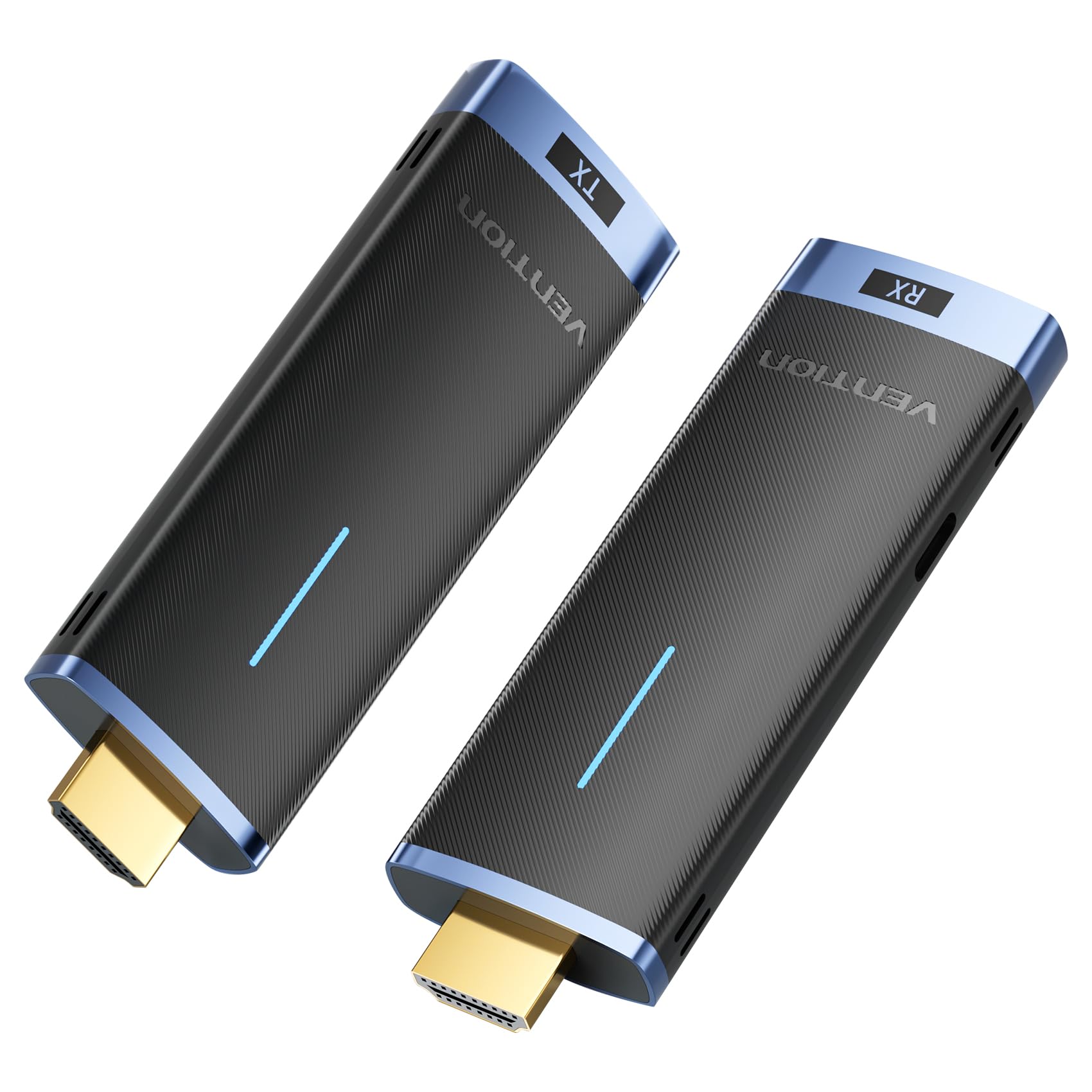
Image: The VENTION Wireless HDMI Transmitter (TX) and Receiver (RX) units.
2. Пакеттин мазмуну
Сураныч, бардык буюмдар бар экенин текшерүү үчүн пакетти текшериңиз:
- 1 x VENTION Wireless HDMI Transmitter (TX)
- 1 x VENTION Wireless HDMI Receiver (RX)
- USB-C Power Cable(s) (for RX and optional for TX)
- Колдонуучунун Колдонмосу (бул документ)
3. Орнотуу нускамалары
Follow these steps to set up your VENTION Wireless HDMI system:
- Connect the Receiver (RX): Plug the HDMI Receiver (RX) into an available HDMI input port on your display device (e.g., HDTV, projector, monitor). Connect the provided USB-C power cable to the RX unit and a power source (e.g., USB wall adapter, TV USB port). The RX unit requires external power to function.
- Adjust Input Source: On your display device, select the correct HDMI input source that the RX unit is connected to. This will allow the display to receive the signal from the wireless system.
- Connect the Transmitter (TX): Plug the HDMI Transmitter (TX) into the HDMI output port of your source device (e.g., PC, laptop, gaming console, camera). The TX unit can often draw power directly from the HDMI port. If the TX unit does not power on or the signal is unstable, connect a USB-C power cable to the TX unit and a power source.

Image: Step-by-step connection guide for the VENTION Wireless HDMI system, illustrating how to connect the RX to the display, select the input, and connect the TX to the source device.
The system is designed for plug-and-play operation, requiring no driver installation, Bluetooth pairing, or Wi-Fi configuration.

Image: The VENTION Wireless HDMI system highlighting its plug-and-play functionality, requiring no WiFi, Bluetooth, or app for setup.
4. Иштөө нускамалары
4.1 Негизги операция
Once both the Transmitter (TX) and Receiver (RX) are connected and powered, the system will automatically establish a wireless connection. Your source device's display should appear on the connected monitor/projector.
4.2 Display Modes (Mirror/Extend)
The system supports both Mirror and Extend display modes, depending on your source device's capabilities and settings:
- MirrorMode: Displays the same content on both your source device's screen and the external display.
- Узартуу режими: Allows you to extend your desktop across both your source device's screen and the external display, providing more workspace. Note: Ensure your computer supports extended mode.

Image: Visual representation of Mirror mode, where both screens show identical content, and Extend mode, where screens display different content.
4.3 Multiple Transmitters to One Receiver
The VENTION Wireless HDMI system allows for multiple transmitters to connect to a single receiver. This feature is particularly useful in conference settings, enabling quick switching between different presenters or source devices. Up to 8 pairs of kits can be used in the same location without interference.

Image: A conference room setup demonstrating one receiver connected to a display, receiving signals from multiple laptops equipped with transmitters, allowing for seamless switching.
4.4 Wireless Transmission Range
The system utilizes advanced 5GHz transmission technology for stable and efficient signal transfer. It offers a transmission range of up to 50 meters (164 feet) in environments with minimal interference. Please note that obstacles such as walls or floors can reduce the effective range to approximately 10 meters (32 feet).

Image: An illustration depicting the wireless transmission range of up to 50 meters (164 feet) in an open environment, with a note about reduced range through obstacles.
5. Техникалык тейлөө
To ensure the longevity and optimal performance of your VENTION Wireless HDMI system, follow these maintenance guidelines:
- Тазалоо: Use a soft, dry cloth to clean the devices. Avoid using liquid cleaners, aerosols, or solvents, as these may damage the product.
- Сактагыч: Түзмөктөрдү күн нурунан жана экстремалдык температурадан алыс салкын, кургак жерде сактаңыз.
- Колдонуу: Handle the transmitter and receiver with care. Avoid dropping them or subjecting them to strong impacts.
- Күч: Always use the provided USB-C power cables or certified equivalents to power the devices.
6. Кыйынчылыктарды
If you encounter issues with your VENTION Wireless HDMI system, refer to the following common problems and solutions:
| Көйгөй | Мүмкүн болгон себеп / Чечим |
|---|---|
| No signal or black screen |
|
| Үзгүлтүктүү сигнал же экрандын жымыңдашы |
|
| Аудио жок |
|
| Cannot stream copyrighted content (e.g., Netflix, Prime Video, YouTube) |
|
| Device gets hot quickly |
|
7. Техникалык шарттар
| Өзгөчөлүк | Деталь |
|---|---|
| Модель номери | ADCL0 |
| Продукциянын өлчөмдөрү | 1.26 x 4.13 x 0.49 дюйм |
| Элемент Салмагы | 6.4 унция |
| Зымсыз жыштык | 5 ГГц |
| Берүүнүн диапазону | Up to 50m (164ft) in open environments; approx. 10m (32ft) through walls/floors |
| Video Resolution Support | Up to 1920x1080@60Hz (1080P@60Hz) |
| Шайкештик | HD TVs, Projectors, Laptops, Cameras, Cable Boxes, PCs, DVDs, Gaming Consoles, Tablets |
| Туташтыргыч түрү | HDMI |
| Power Input | USB-C (RX required, TX optional) |
| Multiple TX to RX | Supports up to 8 transmitters to one receiver |
8. Кепилдик жана колдоо
For warranty information and technical support, please refer to the official VENTION webсайтка же түздөн-түз кардарларды тейлөөгө кайрылыңыз. Кепилдик дооматтар үчүн сатып алуу дүмүрчөгүңүздү сактаңыз.
Өндүрүүчү: ВЕНЦИЯ
Байланыш: Сураныч, кириңиз VENTION Store on Amazon же алардын кызмат адамы webколдоо булактары үчүн сайт.


