1. Киришүү
This manual provides detailed instructions for the installation, operation, and maintenance of your ZUMIMALL BK05 3MP Outdoor Security Camera. Please read this manual thoroughly before using the product to ensure proper functionality and safety.
Пакеттин мазмуну
Төмөндө тизмеленген нерселердин баары пакетиңизге камтылганын текшериңиз:
- BK05 Camera x1
- Колдонуучунун колдонмосу x1
- Charging Set (10ft USB-C Cable & Adapter) x1
- Бурамалар топтому x1
- Warning Card x1
- Позициялоочу чаптама x1

Image: Contents of the ZUMIMALL BK05 Security Camera package.
2. Продукт бүтүп калдыview
The ZUMIMALL BK05 is a 3MP outdoor security camera designed for comprehensive surveillance. It features 360° PTZ (Pan-Tilt-Zoom) auto-tracking, 24/7 continuous recording, dual-band 2.4G/5G WiFi connectivity, color night vision with a built-in floodlight, and two-way audio communication. The camera is also compatible with Alexa for voice control.
Негизги өзгөчөлүктөрү
- 3MP чечилиши: Так жана так видеону камсыз кылатtage.
- 360° PTZ Auto-Tracking: Automatically follows moving targets with 355° horizontal and 90° vertical rotation.
- 24/7 үзгүлтүксүз жаздыруу: Wired power ensures constant surveillance.
- Кош тилкелүү WiFi: Supports both 2.4GHz and 5GHz networks for flexible connectivity.
- Түнкү көрүнүш: Built-in floodlight enables full-color video even in low-light conditions.
- Эки тараптуу аудио: Integrated microphone and speaker for real-time communication.
- Motion & Noise Detection: Sends real-time alerts upon detecting activity.
- IP66 аба ырайы: Ар кандай тышкы аба ырайынын шарттарына туруштук берүү үчүн иштелип чыккан.

Image: Visual comparison highlighting the detail captured by the ZUMIMALL 3MP camera.
3. Орнотуу жана орнотуу
3.1 Физикалык орнотуу
The camera supports both ceiling and wall mounting. Use the included positioning sticker and screw set to mark and secure the installation location.
- Choose an ideal spot for mounting, ensuring a clear view жана электр розеткасына кирүү.
- Use the positioning sticker to mark drill holes.
- Тешиктерди бургула жана зарыл болсо, дубал анкерлерин салгыла.
- Secure the camera base with the provided screws.
- Connect the camera to the power adapter using the 10ft USB-C cable and plug it into a power outlet. Ensure the Type-C cable connector is waterproofed.

Image: Illustration of the two-step installation process for wall or ceiling mounting.
3.2 App Connection and Wi-Fi Setup
The ZUMIMALL BK05 camera connects via dual-band 2.4GHz or 5GHz Wi-Fi. For optimal performance, check signal stability via the ZUMIMALL app before setup.
- Download the ZUMIMALL app from your device's app store.
- Каттоо эсебин түзүү же кириңиз.
- Tap 'Add Device' and select your camera model (BK05).
- Follow the in-app instructions to connect the camera to your Wi-Fi network. You will be prompted to select either a 2.4GHz or 5GHz network and enter the password.
- Телефонуңузда көрсөтүлгөн QR кодун камеранын линзасы менен сканерлеңиз.
- Once connected, the camera will indicate successful pairing, and you can begin live viewing.
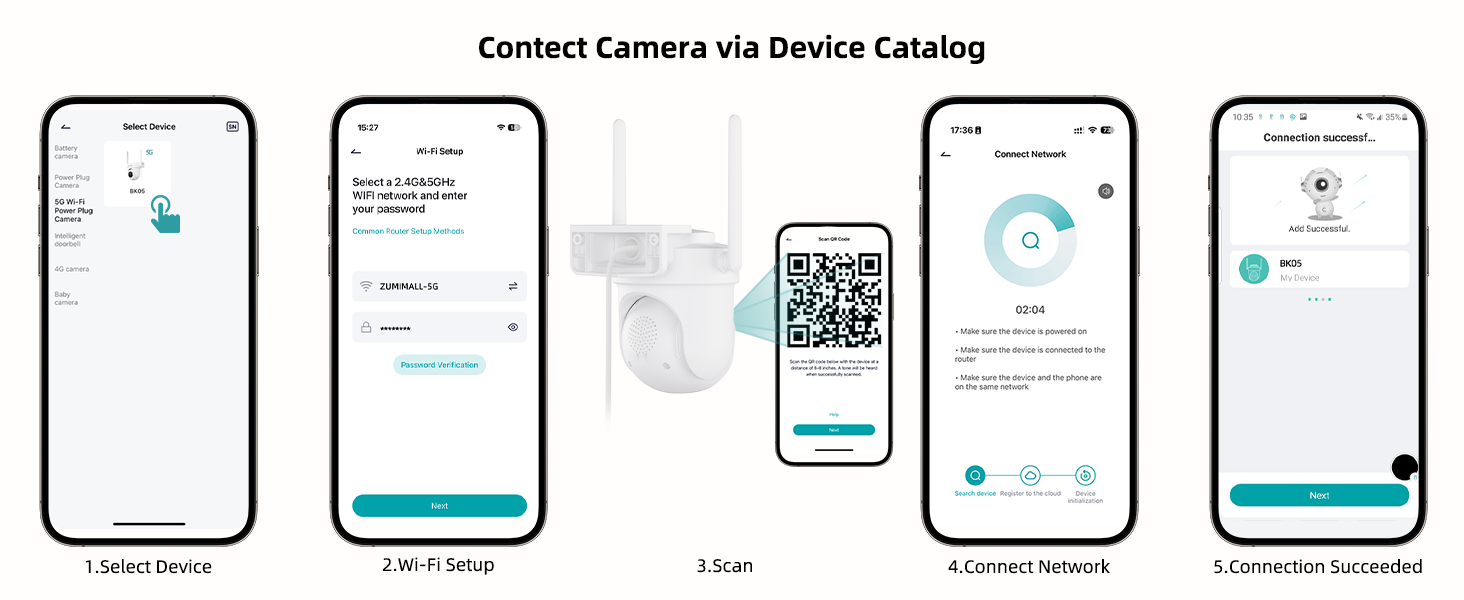
Image: Step-by-step guide for connecting the camera to the ZUMIMALL app.

Image: Explanation of dual-band Wi-Fi support (2.4GHz and 5GHz).
4. Иштөө нускамалары
4.1 Live View жана PTZ Control
Access the live feed through the ZUMIMALL app. You can remotely control the camera's pan (horizontal) and tilt (vertical) movements to adjust the viewбурч.
- From the app's home screen, tap on your camera to view жандуу тоют.
- Use the on-screen controls to pan (355°) and tilt (90°) the camera.

Image: PTZ control in action, showing the camera tracking movement.
4.2 Auto-Tracking and Motion Detection
The camera can automatically detect and track moving objects, sending alerts to your smartphone.
- Enable 'Motion Detection' and 'Auto-Tracking' in the camera settings within the app.
- Customize detection sensitivity (Low, Medium, High) to reduce false notifications.
- Set specific detection zones to monitor critical areas and ignore irrelevant ones.

Image: Demonstration of 360° motion tracking.

Image: Accurate detection settings within the app.

Image: Setting up a custom detection zone.
4.3 Жазуу жана сактоо
The camera supports 24/7 continuous recording and offers flexible storage options.
- Micro SD картасы: Insert a Micro SD card (up to 128GB, not included) for local storage. The camera will automatically overwrite old footagкарта толгондо.
- Булуттагы сактагыч: Optional cloud storage plans are available for event recordings (6-second clips, saved for 7 days free). Premium cloud storage offers additional features.

Image: 24/7 continuous recording feature.

Image: Non-subscription storage options with Micro SD card and cloud.
4.4 Night Vision and Floodlight
The camera provides clear night vision, including full-color options with its built-in floodlight.
- The built-in floodlight provides 33ft (10 meters) of color night vision.
- Adjust night vision settings in the app to choose between infrared (black and white) or color night vision.

Image: 2K Color Night Vision with spotlight functionality.
4.5 Эки тараптуу аудио
Камеранын эки тараптуу аудио функциясын колдонуп, коноктор менен байланышыңыз же баскынчыларды коркутуңуз.
- Түз эфирде микрофон сүрөтчөсүн басыңыз view камеранын динамиги аркылуу сүйлөшүү үчүн интерфейс.
- The camera's microphone captures audio from the surveillance area.

Сүрөт: эки тараптуу аудио байланыш өзгөчөлүгү.
4.6 Smart AI Analysis and Audible Alarm
The camera utilizes AI for intelligent detection and can trigger audible alarms.
- The camera can differentiate between humans, pets, cars, and packages (some features may require premium cloud plans).
- An audible alarm can be triggered when noise exceeds 65 decibels, providing proactive protection.
- When motion or humanoids are detected, the camera can trigger both audio and strobe light alarms.

Image: Smart AI analysis detecting different objects.

Image: Audible alarm feature with noise sensitivity settings.

Image: Audio warning and strobe light feature.
4.7 Alexa интеграциясы
Connect your ZUMIMALL camera with Amazon Alexa for convenient voice control.
- Ensure the camera is already added to the ZUMIMALL app.
- Alexa колдонмосун ачыңыз.
- Tap the "More" button in the bottom left corner.
- Select "Skills & Games" and search for "Zumimall."
- Click on the "Zumimall" skill, then tap "ENABLE TO USE."
- Log in to your Zumimall account and click "Authorize."

Image: Voice assistant integration with Alexa and Google Assistant.
4.8 Түзмөктү бөлүшүү
Share access to your camera with family members or trusted individuals.
- The ZUMIMALL app allows sharing with up to 5 online devices.
- There is no limit to the number of users you can share access with.

Image: Device sharing feature for multiple users and devices.
5. Техникалык тейлөө
5.1 Аба ырайына туруктуулук
The ZUMIMALL BK05 camera is IP66-rated, ensuring protection against dust and water jets. It is designed to function in temperatures ranging from -20°C to 50°C.
- Ensure the camera is installed correctly, following the instructions, especially regarding the waterproof Type-C cable connector.
- Do not install the camera upside down to maintain waterproof performance and proper feed display.
5.2 Жалпы кам көрүү
- Regularly check the camera lens for dirt or obstructions and clean gently with a soft, dry cloth.
- Ensure the power adapter remains dry for optimal performance.
- Periodically check the mounting for stability.
6. Кыйынчылыктарды
6.1 Жалпы маселелер жана чечимдер
- Камера Wi-Fi'га туташпай жатат:
Ensure your Wi-Fi network is 2.4GHz or 5GHz. Check Wi-Fi signal strength at the camera's location using the ZUMIMALL app. Verify the Wi-Fi password is correct. Try restarting your router and the camera. - Тез-тез өчүрүүлөр:
Improve Wi-Fi signal strength by moving the camera closer to the router or using a Wi-Fi extender. Ensure there are no major obstructions (e.g., thick walls) between the camera and the router. - Motion detection alerts are too frequent/infrequent:
Adjust the detection sensitivity settings in the app. Configure specific detection zones to focus on relevant areas. - Түнкү көрүү түшүнүксүз:
Ensure the camera lens is clean. Check if the floodlight is enabled for color night vision. Ensure there are no reflective surfaces close to the camera that could interfere with infrared or floodlight illumination. - Эки тараптуу аудио көйгөйлөрү:
Check the volume settings in the app. Ensure there are no obstructions blocking the microphone or speaker on the camera. Verify your phone's microphone permissions for the ZUMIMALL app. - Camera not recording 24/7:
Ensure the camera is continuously powered via the included adapter. If using an SD card, verify it is inserted correctly, formatted, and has sufficient storage capacity.
7. Техникалык шарттар
| Өзгөчөлүк | Спецификация |
|---|---|
| Модель аты | BK05 |
| Видео тартуунун резолюциясы | 3 МП (2К) |
| Байланыш технологиясы | Wireless (2.4G & 5G Wi-Fi), Plug-in Power |
| Viewбурч | 360 градус (355° панорама, 90° жантаюу) |
| Түнкү көрүү диапазону | 10 метр (33ft) |
| Сактагыч параметрлери | Micro SD (128 ГБ чейин), Булуттагы сактагыч |
| Аба ырайына каршылык | IP66 |
| Иштөө температурасы | -20°Cден 50°Cге чейин |
| Шайкеш түзмөктөр | Alexa, Smartphone (Android, iOS) |
| Power Source | Электр зымдары |
| Элементтин өлчөмдөрү (L x W x Y) | 5.9 x 5 x 5 дюйм |
| Элемент Салмагы | 16 унция (0.45 килограмм) |
8. Кепилдик жана колдоо
ZUMIMALL is committed to providing quality products and customer support.
8.1 Кардарларды колдоо
For any technical queries or assistance, please contact ZUMIMALL customer support. The brand offers one-on-one online support to ensure you receive the help you need.
8.2 Коргоо пландары
Extended protection plans are available for purchase to cover your device beyond the standard warranty period:
- 2 жылдык коргоо планы
- 3 жылдык коргоо планы
- Толук коргоо (жарамдуу сатып алууларды камтыган айлык план)
For details on these plans, please refer to the product listing or contact ZUMIMALL directly.


