1. Киришүү
This user manual provides comprehensive instructions for the safe and effective operation of your DEPSTECH DS320 Dual Lens Borescope and DS260 Endoscope Camera. Please read this manual thoroughly before use and retain it for future reference. This bundle offers versatile inspection capabilities for various applications, from home maintenance to professional diagnostics.
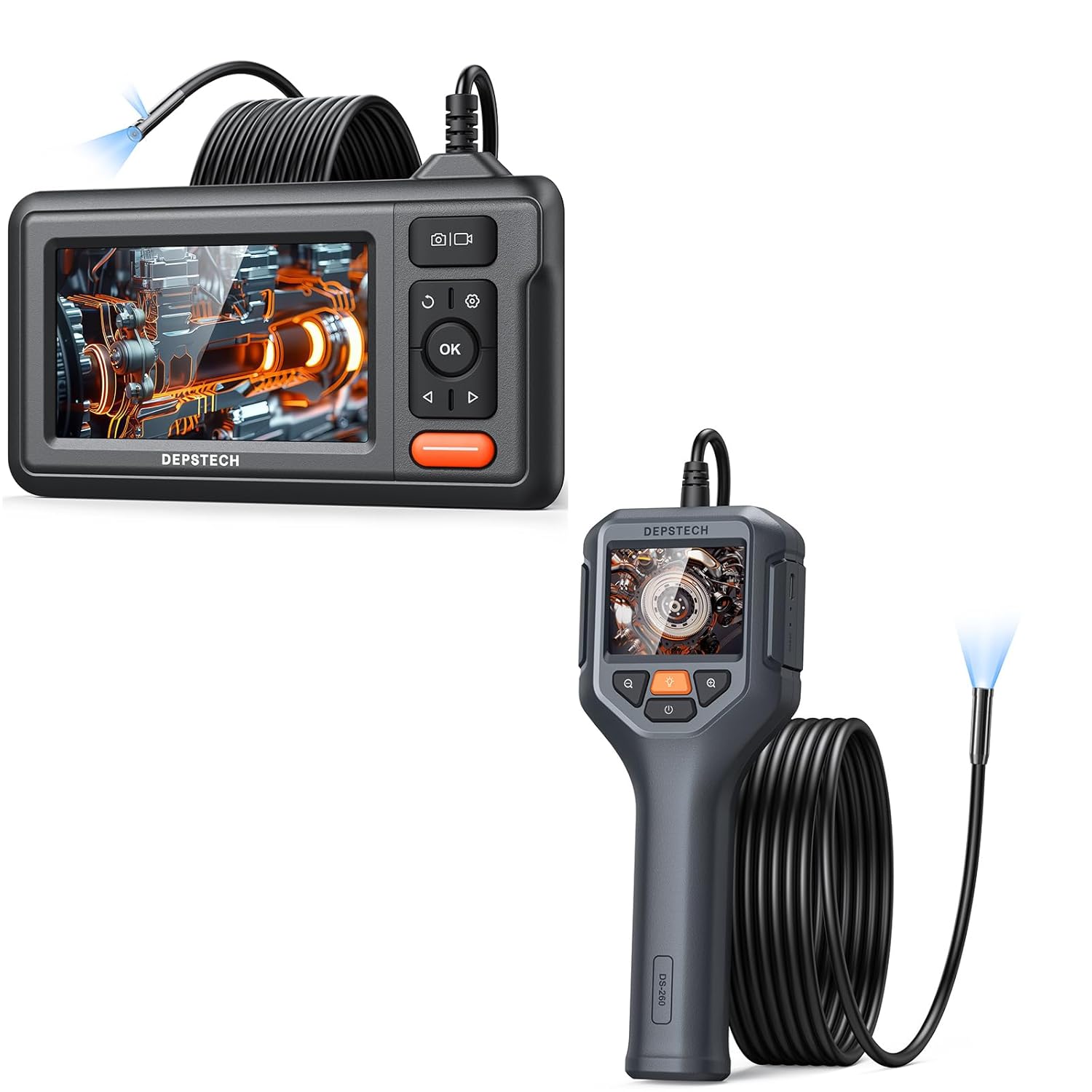
Figure 1.1: The DEPSTECH DS320 Dual Lens Borescope (top) and DS260 Endoscope Camera (bottom) included in the bundle.
2. Пакеттин мазмуну
Бардык буюмдардын бар экенин жана бузулбаганын текшерүү үчүн кутудан чыгаргандан кийин таңгактын мазмунун текшериңиз:
- 1 x DEPSTECH DS320 Dual Lens Borescope Unit
- 1 x DEPSTECH DS260 Endoscope Camera Unit
- 1 x USB Charging Cable (for DS320)
- 1 x USB Charging Cable (for DS260)
- 1 x User Manual
- Accessories (e.g., hook, magnet, side mirror - specific to model, check individual product packaging)
3. Продукт бүтүп калдыview
3.1 DEPSTECH DS320 Dual Lens Borescope

Сүрөт 3.1: Алдыңкы view of the DEPSTECH DS320 Borescope, showing the 4.3-inch IPS display and control buttons.
- 4.3 дюймдук IPS дисплей: High-definition screen for clear viewing.
- Dual Lens Probe: Features both a front-facing and a side-facing camera for comprehensive inspection.
- Жөнгө салынуучу LED жарыктары: 7 lights for illumination in dark environments.
- Башкаруу баскычтары: Power, OK, Navigation (Up/Down/Left/Right), Photo/Video capture, Settings, Light adjustment.
- Микро SD карта слоту: Тартылган сүрөттөрдү жана видеолорду сактоо үчүн.

Figure 3.2: Illustration of the DS320's dual lens system, showing both the front camera (A) and side camera (B) with their respective focal ranges.
3.2 DEPSTECH DS260 Endoscope Camera

Figure 3.3: The DEPSTECH DS260 Endoscope Camera, featuring an ergonomic handle and integrated display.
- 2.4 дюймдук IPS экран: Compact display integrated into the handheld unit.
- Эргономикалык тутка: Колду кармоонун ыңгайлуулугу жана колдонуунун жеңилдиги үчүн иштелип чыккан.
- Single Lens Probe: Standard forward-viewкамера.
- Жөнгө салынуучу LED жарыктары: For optimal illumination.
- Түздөн-түз операция: No Wi-Fi or app required.

Сүрөт 3.4: Жакын пландан view of the DS260's vivid 2.4-inch IPS screen, highlighting its display quality.
4. Орнотуу
4.1 Аппаратты заряддоо
Both the DS320 and DS260 units come with a built-in rechargeable battery. Before first use, fully charge the device.
- Connect the provided USB charging cable to the charging port on the device (DS320: side, DS260: bottom).
- Connect the other end of the USB cable to a standard 5V/1A USB power adapter (not included) or a computer USB port.
- Заряддоо индикатору кубаттоо учурунда күйөт жана толук заряддалганда өчөт же түсүн өзгөртөт.
4.2 Inserting a Micro SD Card (DS320 Only)
The DS320 requires a Micro SD card (not included, up to 32GB recommended) to save photos and videos. The DS260 does not support external storage.
- Locate the Micro SD card slot on the side of the DS320 unit.
- Gently insert the Micro SD card with the gold contacts facing down until it clicks into place.
- Чыгаруу үчүн картаны сыртка чыкканга чейин бир аз түртүңүз.
5. Иштөө нускамалары
5.1 Күйгүзүү/өчүрүү
- Күйгүзүү үчүн: Кубат баскычын басып, кармап туруңуз (көбүнчө деп белгиленет ⚡ or ⏺ symbol) for 2-3 seconds until the screen illuminates.
- Өчүрүү үчүн: Press and hold the Power button again for 2-3 seconds until the screen turns off.

Figure 5.1: The DS320 Borescope being held, demonstrating its readiness for immediate use without complex setup.

Figure 5.2: The DS260 Endoscope Camera being used to inspect a sink drain, highlighting its "Instant Explore" capability.
5.2 LED жарыктыгын жөндөө
Both models feature adjustable LED lights on the camera probe to illuminate dark inspection areas.
- Press the Light adjustment button (often marked with a light bulb icon 💡) repeatedly to cycle through different brightness levels or to turn the lights off.
5.3 Switching Lenses (DS320 Only)
The DS320 allows you to switch between the front and side cameras.
- Түз эфирде view, press the Lens Switch button (often marked with a camera icon with arrows 📷) to toggle between the front camera, side camera, or both (if supported by the specific model firmware).
5.4 Сүрөттөрдү жана видеолорду тартуу
- Сүрөткө тартуу үчүн: Түз эфирде view, press the Photo/Video button (often marked with a camera icon 📷 or shutter icon) once. The screen may briefly flash to indicate a photo has been taken.
- Видео жаздыруу үчүн: Түз эфирде view, press and hold the Photo/Video button for 2-3 seconds. A recording indicator (e.g., red dot, timer) will appear on the screen. Press and hold the button again to stop recording.
- Эскертүү: Only the DS320 saves media to an SD card. The DS260 does not have recording capabilities.
5.5 Playback Mode (DS320 Only)
Review captured images and videos on the DS320.
- Түз эфирден view, press the Mode button (often marked with a play icon ► or menu icon) to enter playback mode.
- Use the Up/Down navigation buttons to browse through your files.
- үчүн OK баскычын басыңыз view сүрөт же видео ойнотуңуз.
- Press the Mode button again to exit playback mode and return to live view.
5.6 Zoom Function (DS260 Only)
The DS260 features a digital zoom function to magnify the live view.
- Press the Zoom button (often marked with a magnifying glass icon 🔍 or +/-) to cycle through available zoom levels (e.g., 1x, 1.5x, 2x).

Figure 5.3: Visual representation of the DS260's zoom capabilities, showing 1x, 1.5x, and 2x magnification levels for detailed inspection.
6. Техникалык тейлөө
- Пробду тазалоо: After each use, especially in dirty or wet environments, gently wipe the camera probe and lens with a soft, damp cloth. For stubborn grime, a small amount of rubbing alcohol can be used. Ensure the probe is dry before storage.
- Дисплейди тазалоо: Дисплейдин экранын тазалоо үчүн жумшак, мамыксыз чүпүрөктү колдонуңуз. Абразивдүү материалдардан же катуу химиялык заттардан алыс болуңуз.
- Сактагыч: Store the devices in a cool, dry place, away from direct sunlight and extreme temperatures. Keep the probe cable neatly coiled to prevent kinks or damage.
- Батареяга кам көрүү: For optimal battery life, avoid fully discharging the battery frequently. If storing for extended periods, charge the battery to about 50% every few months.
7. Кыйынчылыктарды
| Көйгөй | Мүмкүн себеп | Чечим |
|---|---|---|
| Түзмөк күйбөйт. | Батарея аз. | Аппаратты толук заряддаңыз. |
| Экранда сүрөт жок. | Probe not connected properly (DS320). Camera lens is dirty or blocked. | Ensure the probe is securely connected. Камера линзасын тазалаңыз. |
| Сүрөт бүдөмүк же түшүнүксүз. | Линза кир. Object is outside focal range. | Камера линзасын тазалаңыз. Adjust the distance between the camera and the object. |
| Cannot save photos/videos (DS320). | No Micro SD card inserted or card is full/corrupted. | Insert a Micro SD card. Format the card (via device settings) or replace it. |
| LED жарыктары иштебейт. | Lights are turned off or at lowest setting. | Press the light adjustment button to increase brightness. |
8. Техникалык шарттар
8.1 DEPSTECH DS320 Dual Lens Borescope
- Дисплей: 4.3-inch Full Color IPS Screen
- Чечим: 1080P (for recording)
- Камера: Кош линза (алдыңкы жана каптал)
- LED жарыктары: 7 жөнгө салынуучу LED
- Сактагыч: Микро SD карта (32 ГБ чейин, камтылган эмес)
- Батарея: Заряддалуучу литий-ион

Figure 8.1: The large 4.3-inch IPS display of the DS320, offering HD resolution and a wide 178-degree viewing angle for clear visuals.
8.2 DEPSTECH DS260 Endoscope Camera
- Дисплей: 2.4 дюймдук IPS экраны
- Чечим: 1080P (for live view)
- Камера: Жалгыз линза
- LED жарыктары: Жөнгө салынуучу светодиоддор
- Сактагыч: Колдоого алынбайт
- Батарея: Заряддалуучу литий-ион
- Чоңойтуу: Digital Zoom (1x, 1.5x, 2x)
9. Коопсуздук маалыматы
Сураныч, төмөнкү коопсуздук чараларын сактаңыз:
- Аппаратты күйүүчү же жарылуучу газдары бар чөйрөдө колдонбоңуз.
- Do not immerse the main unit in water. The camera probe is waterproof, but the main unit is not.
- Аппаратты балдар жетпеген жерде сактаңыз.
- Аппаратты ажыратууга же өзгөртүүгө аракет кылбаңыз. Бул кепилдикти жокко чыгарат жана зыян келтириши мүмкүн.
- Use only the provided charging cables.
- LED жарыктарынын түздөн-түз көзүнө тийбеңиз.
- If the device malfunctions, refer to the troubleshooting section or contact customer support.
10. Кепилдик жана колдоо
DEPSTECH products typically come with a standard manufacturer's warranty. Please refer to the warranty card included in your package or visit the official DEPSTECH webдеталдуу кепилдик шарттары жана шарттары үчүн сайт.
For technical support, troubleshooting assistance, or warranty claims, please contact DEPSTECH customer service through their official webсайт же продукт таңгагында көрсөтүлгөн байланыш маалыматы.
Webсайт: www.depstech.com


