1. Introduction and Overview
The ATTACK SHARK X68 HE is a high-performance 60% mechanical gaming keyboard designed for speed and precision. It features magnetic switches with Hall Effect triggering technology, offering an 8000Hz polling rate and ultra-low latency. This manual provides detailed instructions for setting up, operating, customizing, and maintaining your keyboard to ensure optimal performance.

Image 1.1: The ATTACK SHARK X68 HE keyboard and included accessories.
2. Пакеттин мазмуну
Пакетиңизде бардык буюмдар бар экенин текшериңиз:
- ATTACK SHARK X68 HE оюн клавиатурасы
- USB кабели (Type-C to Type-A)
- Баскыч капкагын тарткыч
- Switch Puller
- Колдонуучунун Колдонмосу (бул документ)
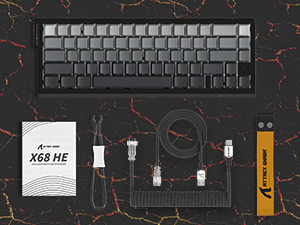
Сүрөт 2.1: Продукциянын таңгагына кирген бардык буюмдар.
3. Орнотуу нускамалары
- Баскычтопту туташтыруу: Insert the USB Type-C end of the provided cable into the port on the back of the keyboard. Connect the USB Type-A end to an available USB port on your computer (PC or Mac).
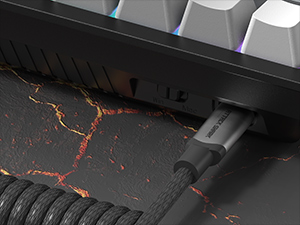
Image 3.1: Connecting the USB-C cable to the keyboard.
- Select Operating System Mode: Locate the switch on the back or side of the keyboard to select between PC (Win) and Mac modes. Ensure it is set to the correct operating system for your computer.
- Драйверди орнотуу: The keyboard is generally plug-and-play. For advanced customization, download the official web-based driver software from the ATTACK SHARK website. Refer to the 'Customization and Web Driver' section for more details.
- Жайгашкан жери: Position the keyboard comfortably on your desk. The ergonomic design and optional wrist rest (not included) can enhance comfort during extended use.
4. Иштөө нускамалары
4.1 Негизги өзгөчөлүктөрү жана аткаруу
The X68 HE keyboard utilizes magnetic pole switches with Hall Effect triggering, providing a high level of responsiveness.
- 8000Гц добуш берүү ылдамдыгы: Achieves a 0.125ms response time for rapid input detection.
- 0.01 мм RT тактыгы: Ensures precise keystroke registration with zero dead zones.
- Жөнгө салуу пункттары: Customize trigger points from 0.1mm to 3.4mm for personalized tactile feedback.
- Толук ачкыч Анти-Гостинг: Allows for simultaneous key presses without conflicts, crucial for complex commands.

Image 4.1: Visual representation of the 8000Hz polling rate and rapid response.

Image 4.2: Illustration of the adjustable actuation point feature.

Сүрөт 4.3: Мисamples of precision in gaming with 0.01mm RT accuracy.
4.2 Customization and Web Айдоочу
The ATTACK SHARK X68 HE keyboard features professional web-based software for comprehensive customization. This software allows users to:
- Customize Dynamic Keystrokes (DKS)
- Set key combinations and macros
- Ачкычтарды кайра иштетүү
- Adjust RGB lighting settings
The web driver is compatible with both Windows and Mac operating systems. Access the official ATTACK SHARK website to download and utilize the customization software.

Image 4.4: The customization software interface for the X68 HE keyboard.
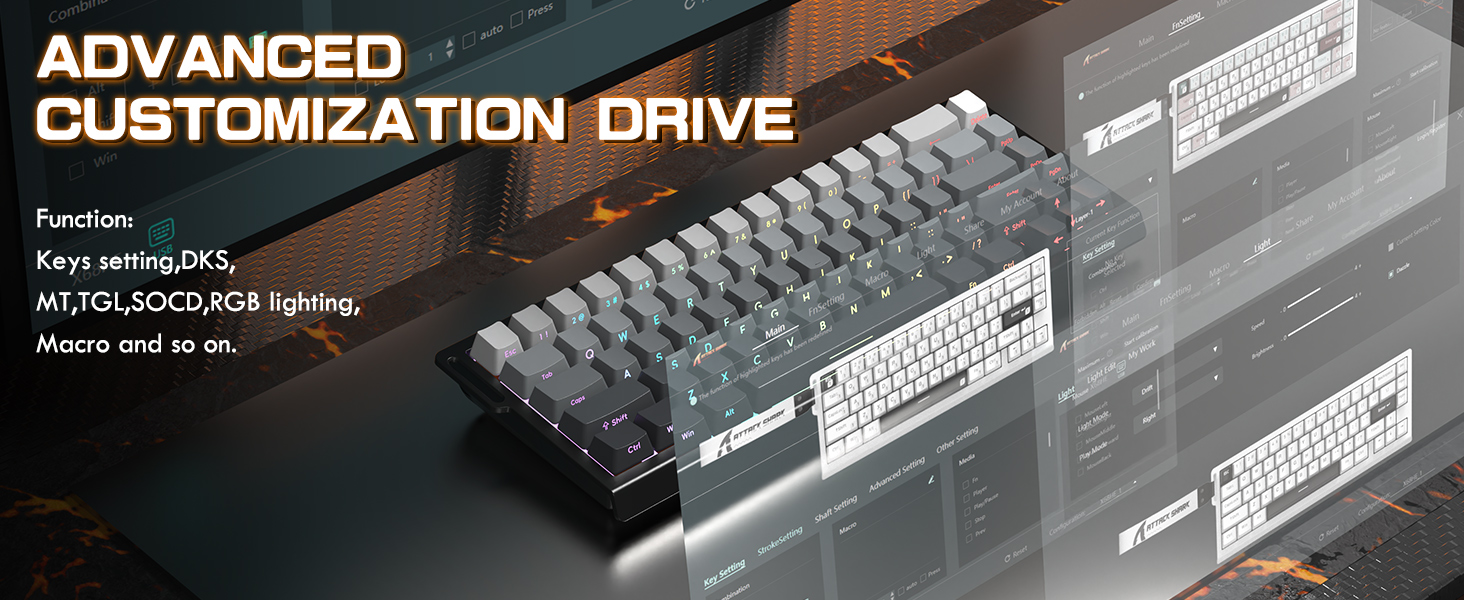
Image 4.5: Advanced customization features available through the web айдоочу.
4.3 RGB арткы жарыктандыруу
The keyboard features 16 million-color RGB lighting with various dynamic modes to enhance your experience. You can adjust lighting effects directly on the keyboard using function key combinations:
- Fn + ↑ / ↓: Арткы жарыктын жарыктыгын тууралоо
- Fn + ← / →: Арткы жарык ылдамдыгын тууралоо
- Fn + [\|]: Жарык режимин которуштуруу
- Fn + Enter: Жарыктын түсүн которуштуруу
- Fn + Backspace: Жарыкты күйгүзүү/өчүрүү

Image 4.6: RGB lighting effects and control shortcuts.
5. Техникалык тейлөө
To ensure the longevity and optimal performance of your ATTACK SHARK X68 HE keyboard, follow these maintenance guidelines:
- Тазалоо: Клавиатураны жумшак, кургак чүпүрөк менен үзгүлтүксүз тазалап туруңуз. Тереңирээк тазалоо үчүн, баскычтоп капкактарынын ортосундагы чаңды жана таштандыларды кетирүү үчүн кысылган аба баллонун колдонуңуз.
- Клавиатураны алып салуу: Use the provided keycap puller to carefully remove keycaps for cleaning or replacement. Avoid excessive force to prevent damage to the switches.
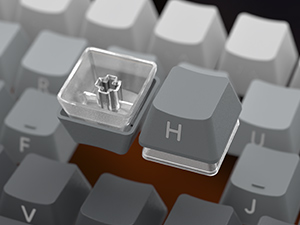
Image 5.1: Proper method for removing keycaps.
- Switch Care: The magnetic switches are designed for durability. Avoid spilling liquids on the keyboard. If a spill occurs, disconnect the keyboard immediately and allow it to dry completely before reconnecting.
- Кабелдик башкаруу: Use the coiled cable and ensure it is not kinked or strained to prevent damage.
6. Кыйынчылыктарды
If you encounter issues with your ATTACK SHARK X68 HE keyboard, please refer to the following common solutions:
- Баскычтоп жооп бербейт:
- USB кабели клавиатурага жана компьютерге бекем туташып турганын текшериңиз.
- Баскычтопту компьютериңиздин башка USB портуна туташтырууга аракет кылыңыз.
- Verify that the operating system switch (Win/Mac) on the keyboard is set correctly.
- Компьютериңизди өчүрүп күйгүзүңүз.
- RGB жарыктары иштебейт:
- Check if the lighting is turned off using the Fn + Backspace shortcut.
- Adjust brightness using Fn + ↑ / ↓.
- Баскычтоп туура туташып жана кубат алып жатканын текшериңиз.
- Customization Software Issues:
- Ensure you are using the correct and latest version of the web-based driver software from the official ATTACK SHARK webсайт.
- Clear your browser cache or try a different browser if experiencing issues with the web айдоочу.
- Refer to the software's internal help or online resources for specific customization queries.
- Inconsistent Polling Rate/Response:
- Ensure your computer's USB ports are functioning optimally and are not overloaded.
- Close any background applications that might be consuming significant system resources.
- Verify that the keyboard's firmware is up to date via the customization software.
If these steps do not resolve your issue, please contact ATTACK SHARK customer support for further assistance.
7. Техникалык шарттар
| Өзгөчөлүк | Деталь |
|---|---|
| Продукциянын өлчөмдөрү | 14.25 x 6.18 x 1.93 дюйм (14"L x 5"W x 1.93"H) |
| Элемент Салмагы | 1.98 фунт |
| Өндүрүүчү | ATTARK SHARK |
| Модель номери | X68 HE |
| Шайкеш түзмөктөр | Ноутбук, компьютер, планшет |
| Байланыш технологиясы | USB-C (Зымдуу) |
| Keyboard Description | Mechanical, 60% Layout |
| Сунушталган Колдонуулар | Business, Education, Everyday Use, Gaming, Multimedia, Personal, Programming, Student |
| Өзгөчөлүктөр | 0.01mm Rapid Trigger Accuracy, 128KHz Scan Rates, Backlit, Ergonomic, Snap Tap & Dynamic Keystroke |
| Түс | Black (as per current product variant) |
| Арткы жарыктандыруу түсүн колдоо | RGB (16 миллион түс) |
| Стиль | Заманбап |
8. Расмий продукт Video
Видео 8.1: Продукциянын расмий көргөзмөсүasing the ATTACK SHARK X68 HE Rapid Trigger Mechanical Gaming Keyboard's features and performance. This video highlights the magnetic switches, rapid trigger functionality, and customizable RGB lighting.
9. Кепилдик жана колдоо
For warranty information, please refer to the documentation included with your product or visit the official ATTACK SHARK webсайт. Колдоо үчүн байланыш чоо-жайын, адатта, өндүрүүчүнүн сайтынан тапса болот webсайт же сатып алуу пункту аркылуу.
Онлайн ресурстар:
- Расмий чабуулчу акула Webсайт: Visit the ATTACK SHARK Store


