1. Киришүү
Thank you for choosing the Ohniyou 72 Inch Industrial Ceiling Fan. This manual provides essential information for the safe installation, operation, and maintenance of your new ceiling fan. Please read it thoroughly before installation and keep it for future reference.
This 72-inch ceiling fan features 8 premium metal fan blades, a quiet DC motor, integrated LED lighting with 3 color temperatures, and convenient control via both a remote and a smartphone app. It is designed for large spaces such as living rooms, shops, garages, offices, warehouses, gyms, and covered outdoor patios.

Image 1.1: The Ohniyou 72 Inch Industrial Ceiling Fan installed in a contemporary living room, showcasing its large size and included remote control and app interface.
2. Маанилүү коопсуздук нускамалары
To reduce the risk of fire, electric shock, or personal injury, please follow these safety guidelines:
- Жаңы желдеткичти орнотуудан мурун бардык көрсөтмөлөрдү жана коопсуздук маалыматын окуңуз.
- Бардык зымдар улуттук жана жергиликтүү электр эрежелерине ылайык болушу керек. Эгерде сиз зымдарды жакшы билбесеңиз, квалификациялуу электрикке кайрылыңыз.
- Before installation, disconnect power by turning off the circuit breakers at the main fuse box.
- Ensure the installation site allows the fan blades to rotate without obstruction and provides a minimum clearance of 7 feet (2.1 meters) from the floor to the blade trailing edge.
- The outlet box and support structure must be securely mounted and capable of reliably supporting a minimum of 35 lbs (15.9 kg).
- Вентиляторду бычактары бузулган же кандайдыр бир көрүнүктүү кемчиликтери бар учурда иштетпеңиз.
- Желдетүүчү лопаткалардын жолуна объекттерди коюудан алыс болуңуз.
- This fan is suitable for indoor and covered outdoor use (damp rated). Do not expose to direct water spray.
3. Пакеттин мазмуну
Төмөндө саналып өткөн бардык компоненттер пакетиңизге камтылганын текшериңиз:
- Интеграцияланган LED жарыгы менен шыптын желдеткичи
- Алыстан башкаруу
- Down-rods (8-inch and 20-inch)
- Кронштейн орнотуу
- Аппараттык камсыздоо топтому (бурамалар, зым гайкалар ж.б.)
- User Manual
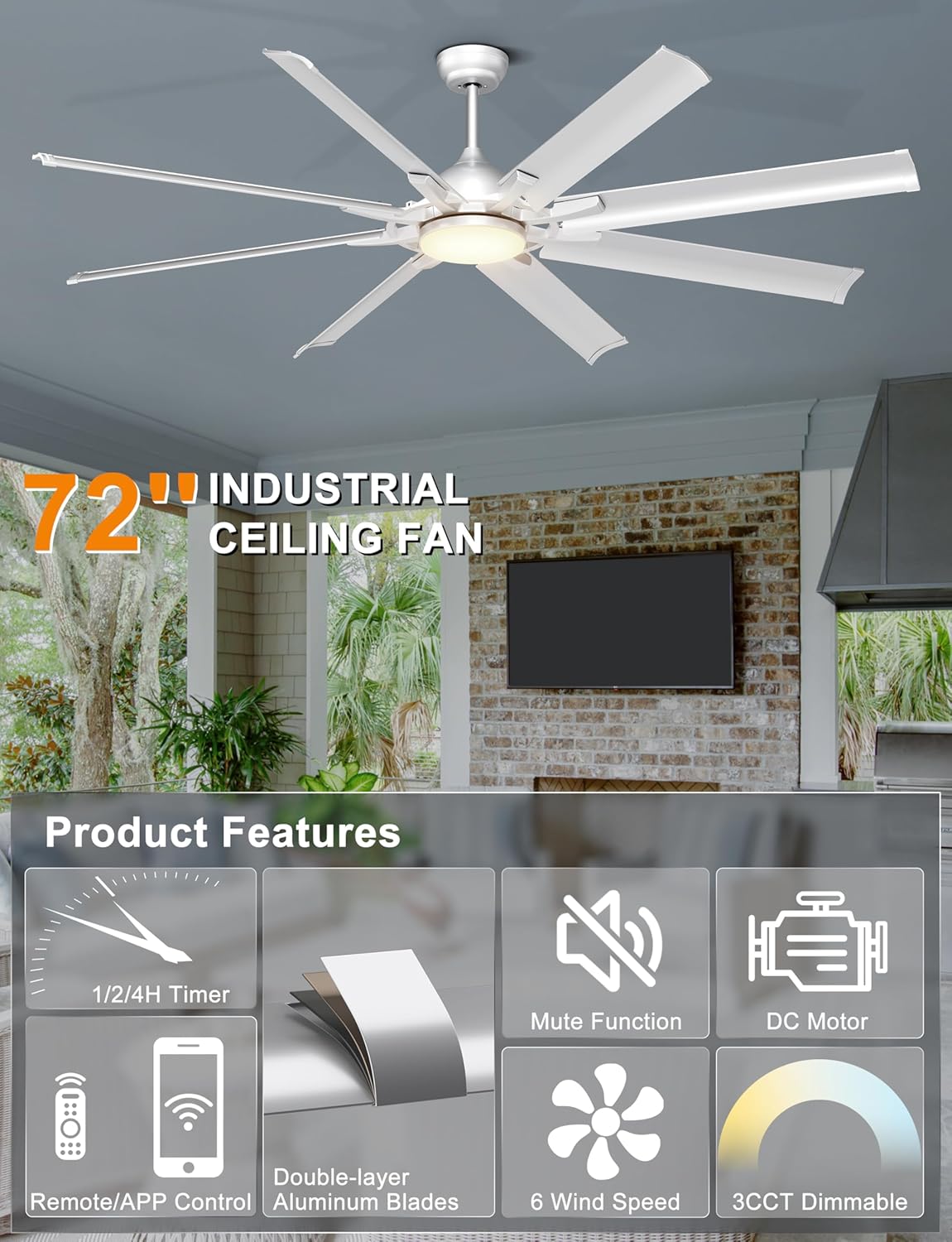
Сүрөт 3.1: Бүттүview of the Ohniyou 72 Inch Industrial Ceiling Fan's main features and components.
4. Орнотуу жана орнотуу
The installation process is designed to be straightforward. For detailed visual guidance, refer to the installation video available on the product page (if applicable) or consult a qualified electrician.
4.1 Монтаждоо параметрлери
This fan comes with two down-rods (8-inch and 20-inch) to accommodate various ceiling heights and types. It is suitable for:
- Flat ceilings
- High ceilings
- Slanted ceilings with an angle of up to 15 degrees

Image 4.1: Fan dimensions and compatibility with different ceiling types (flat and sloped up to 15 degrees). Recommended room size: 18ft x 18ft to 25ft x 25ft. Damp rated for covered outdoor use.

Сүрөт 4.2: Мисamples of downrod mounting for different ceiling configurations.
4.2 Жалпы орнотуу кадамдары (Кыскача мазмуну)
- Орнотууга даярданыңыз: Turn off power at the circuit breaker. Ensure the mounting location is secure and can support the fan's weight.
- Монтаждык кронштейнди орнотуу: Монтаждык кронштейнди шыптын чыгуучу кутуга бекитиңиз.
- Assemble Down-rod and Fan: Attach the chosen down-rod to the fan motor assembly. Feed electrical wires through the down-rod.
- Желдеткичти илиңиз: Carefully lift the fan and hang it on the mounting bracket.
- Зым байланыштары: Connect the fan's electrical wires to the household wiring according to the wiring diagram provided in the full installation guide.
- Коопсуз чатыр: Slide the canopy up and secure it to cover the wiring and mounting bracket.
- Бычактарды бекитүү: Securely attach the 8 aluminum blades to the motor housing.
- Light Kit орнотуу: Connect and secure the LED light kit to the fan.
- Күчтү калыбына келтирүү: Turn on power at the circuit breaker and test the fan.
5. Иштөө нускамалары
Your Ohniyou ceiling fan can be controlled using the included remote control or a smartphone application.
5.1 Алыстан башкаруу функциялары
The remote control provides comprehensive command over your fan's settings.
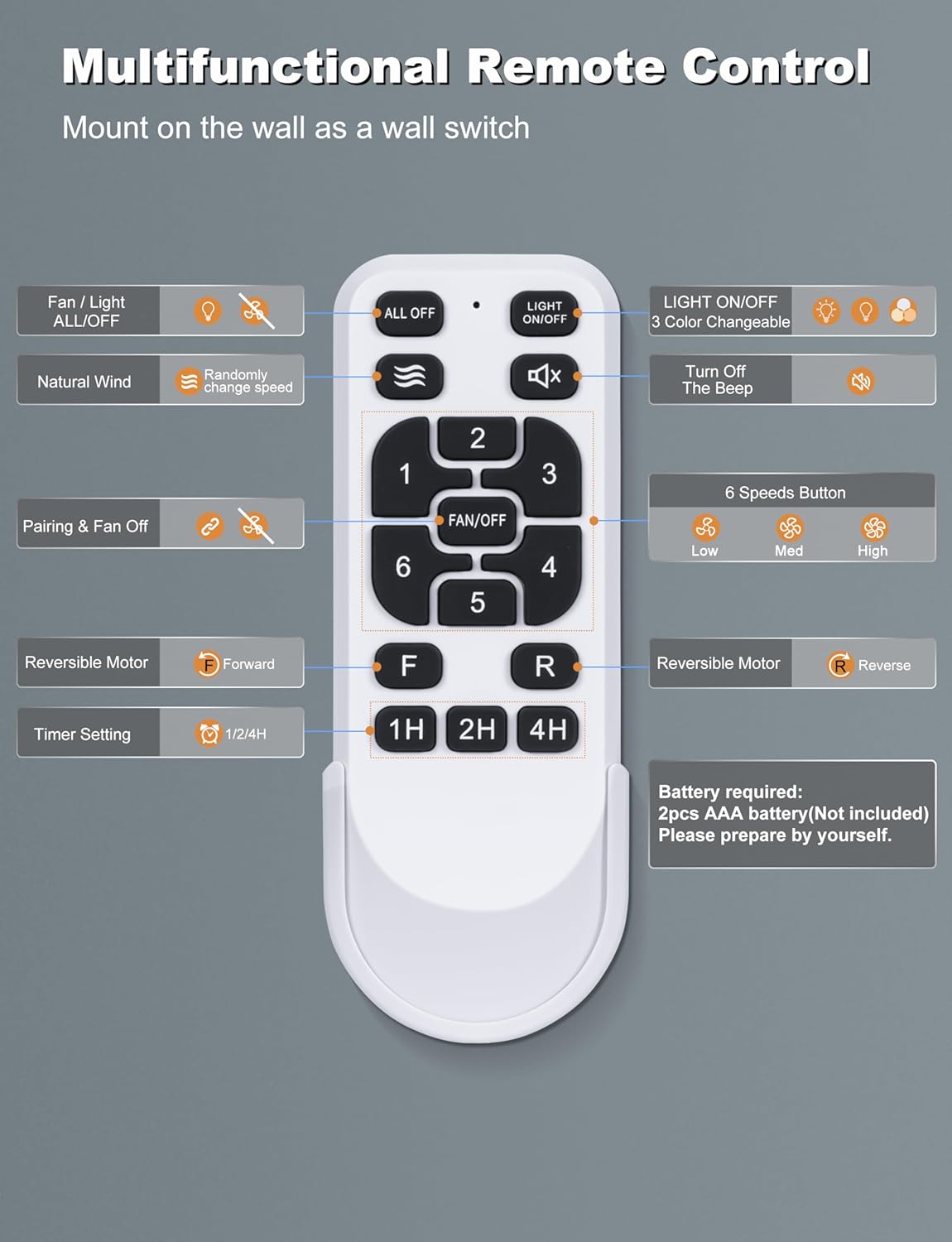
Image 5.1: Multifunctional Remote Control layout and button descriptions.
- Fan / Light ALL/OFF: Turns both fan and light on/off.
- Табигый шамал: Activates a mode where fan speed changes randomly to simulate natural breeze.
- Pairing & Fan Off: Used for pairing the remote and turning the fan off.
- Reversible Motor (F/R): Switches between forward (summer) and reverse (winter) modes.
- Timer Setting (1H/2H/4H): Желдеткичти 1, 2 же 4 сааттан кийин автоматтык түрдө өчүрөт.
- Жарык КҮЙГҮЗҮҮ/ӨЧҮРҮҮ: LED жарыгын өз алдынча күйгүзөт же өчүрөт.
- 3 Color Changeable: Cycles through the three color temperature options (3000K, 4500K, 6000K).
- Turn Off The Beep: Mutes the audible feedback from the fan.
- 6 Speeds Button (1-6): Желдеткичтин ылдамдыгын 1ден (эң төмөнкү) 6га (эң жогорку) чейин жөнгө салат.
5.2 Smart APP башкаруу
Control your fan conveniently from your smartphone. The app allows you to adjust fan speeds, light color temperatures, and set timers hands-free.

Image 5.2: Scan the QR code to download the app and view its interface for fan and light control.
To learn how to use the APP, scan the QR code in Image 5.2 or visit https://www.jasonghost.com/tinysmart/.
How to match the APP:
- Телефонуңуздун Bluetooth'ун күйгүзүңүз.
- Return to the APP interface.
- Turn off the wall switch. After 5 seconds, turn it on again.
- Hit the Pair button in the app to connect.
5.3 Fan Speed and Reversible Motor
The fan offers 6 distinct speeds for optimal airflow. The reversible DC motor allows for year-round use:
- Summer Mode (Forward): Төмөн карай аба агымы муздатуу эффектин жаратат.
- Кышкы режим (Тескери): Upward airflow circulates warm air trapped near the ceiling, improving heat distribution.

Image 5.3: Explanation of the 6-speed reversible motor for summer cooling and winter air circulation.

Image 5.4: Airflow capacity and speed levels (Soft, Natural, Cool Wind).
5.4 Customizable Lighting
The integrated LED light offers three color temperature options to suit different moods and scenarios:
- 3000K: Жылуу ак
- 4500K: Табигый ак
- 6000K: Cool White
The LED light provides 28W of bright, soft, and non-dazzling illumination.

Image 5.5: Visual representation of the 3 color temperature options (3000K, 4500K, 6000K).

Сүрөт 5.6: Детальдуу view of the LED light and its color temperature range.
Light Memory Function
The fan's light has a memory function that recalls the last used color temperature setting.

Image 5.7: Steps to activate and use the light memory function.
6. Техникалык тейлөө
Үзгүлтүксүз тейлөө сиздин шыптын желдеткичиңиздин оптималдуу иштешин жана узак иштөөсүн камсыз кылат.
- Тазалоо: Мезгил-мезгили менен вентилятордун жана мотор корпусун жумшак, гamp cloth. Do not use abrasive cleaners or solvents. Ensure the fan is turned off and power is disconnected before cleaning.
- Бычак текшерүү: Check fan blades for any cracks or damage. Replace damaged blades immediately.
- бекиткичтерди бекемдөө: Periodically check all screws and fasteners on the fan and mounting hardware to ensure they are tight.
- Майлоонун кереги жок: Туруктуу токтун кыймылдаткычы туруктуу майланган жана кошумча майлоону талап кылбайт.
7. Кыйынчылыктарды
Эгер күйөрманыңызда көйгөйлөргө туш болсоңуз, төмөнкү жалпы көйгөйлөрдү жана чечимдерди караңыз:
| Көйгөй | Мүмкүн себеп | Чечим |
|---|---|---|
| Күйөрман иштебейт | желдеткичке кубат жок Бошоң зым байланыштары Алыстан башкаруу пультунун батареясы аз/түгөн | Ажыраткычты жана дубалды өчүргүчтү текшериңиз Бардык зымдардын туташууларынын бекем экенин текшериңиз (алдын ала электр кубаты өчүрүлгөнүн текшериңиз) Алыстан башкаруунун батареяларын алмаштырыңыз |
| Күйөрман солкулдайт | Бошогон бычактын бурамалары Теңдешсиз бычактар Бошоң монтаждык кронштейн | Бардык бычак бурамаларын бекемдеңиз Ensure blades are installed correctly and use a balancing kit if necessary Tighten mounting bracket screws |
| Жарык иштебейт | Loose wire connection to light kit LED айдоочу маселеси | Check light kit wiring (ensure power is off first) Contact customer support if LED driver is suspected to be faulty |
| Пульт иштебей жатат | Batteries low/dead Пульт желдеткич менен жупташтырылган эмес Алыстан жана ресивердин ортосундагы тоскоолдук | Батареяларды алмаштырыңыз Follow pairing instructions in Section 5.2 Ensure clear line of sight to fan's receiver |
| Желдетүүчү ашыкча ызы-чуу чыгарат | Бошогон бурамалар Motor housing rubbing Туура эмес орнотуу | Бардык бурамаларды текшерип, бекемдеп коюңуз Ensure no parts are rubbing against each other Review installation steps or consult a professional |
If the problem persists after attempting these solutions, please contact Ohniyou customer support.
8. Техникалык шарттар
| Өзгөчөлүк | Спецификация |
|---|---|
| Бренд | Ohniyou |
| Модель аты | GLX107 |
| Түс | Sliver with Lights |
| Электр желдеткич дизайн | Шып күйөрманы |
| Power Source | AC/DC |
| Стиль | өнөр жай |
| Продукциянын өлчөмдөрү | 30.5"D x 11.8"W x 9.45"H |
| Бөлмө түрү | Garage, Living Room, Outdoor Patio, Shop |
| Өзгөчөлүктөр | App Operable, LED Light, Quiet DC Motor, Remote Controlled, Timer |
| Сунушталган Колдонуулар | Аба циркуляциясы, муздатуу |
| Ызы-чуу деңгээли | 35 dB (rated), less than 30 dB (actual operation) |
| Ватtage | 65 ватт |
| Blades саны | 8 |
| Аба агымынын кубаттуулугу | Мүнөтүнө 6616 куб фут |
| Blade Length | 28.7 дюйм |
| Ылдамдык (макс) | 84 RPM |
| Тtage | 120 вольт (ток) |
| Элемент Салмагы | 15 фунт |
| Камтылган компоненттер | Ceiling Fan with Light, Remote |
| Ички/тышкы колдонуу | Indoor, Outdoor (Covered) |
| Башкаруу ыкмасы | Колдонмо, алыстан |
| Натыйжалуулук | High (DC Motor saves 80% energy compared to traditional AC motor) |
| Кубат деңгээли саны | 6 |
| Өндүрүш жылы | 2025 |
| Өлчөмү | 72 INCH |

Image 8.1: Illustration of the quiet operation and energy efficiency of the DC motor.
9. Кепилдик жана колдоо
Ohniyou stands behind the quality of its products. While specific warranty details are not provided in this manual, please retain your proof of purchase for any warranty claims.
For technical assistance, troubleshooting beyond this guide, or warranty inquiries, please contact Ohniyou customer support through the retailer where the product was purchased or visit the official Ohniyou store page.
Ohniyou Store: https://www.amazon.com/stores/Ohniyou/page/D0CEBDFD-197D-47C8-B1CF-91B773CED66C


